A backup kept on the same server as your site shares its fate. If your hosting account is compromised, your provider experiences an outage, or someone accidentally deletes important files, you could lose both your website and its backup.
That is why website backups should also live somewhere separate from your hosting account.
An offsite copy gives you another way to recover your files and database if something goes wrong, including ransomware attacks, accidental deletion, or your hosting provider going out of business.
There are several options to store website backups offsite, from free WordPress plugins to cloud storage and managed backup services. The right choice depends on your website, how frequently it changes, and how much control you want over the recovery process.
Below, we compare eight offsite backup options, their costs, and the features that make each one useful.
You will also find out how to test a backup and estimate the monthly cost for a small business website.
Offsite Backup Options Compared
| Option | Type | Price | Free tier and minimums |
|---|---|---|---|
| Backblaze B2 | Cloud storage | $6.95/TB/month | No minimum storage duration fees; free egress up to 3x stored data |
| Cloudflare R2 | Cloud storage | $0.015/GB/month | 10 GB free |
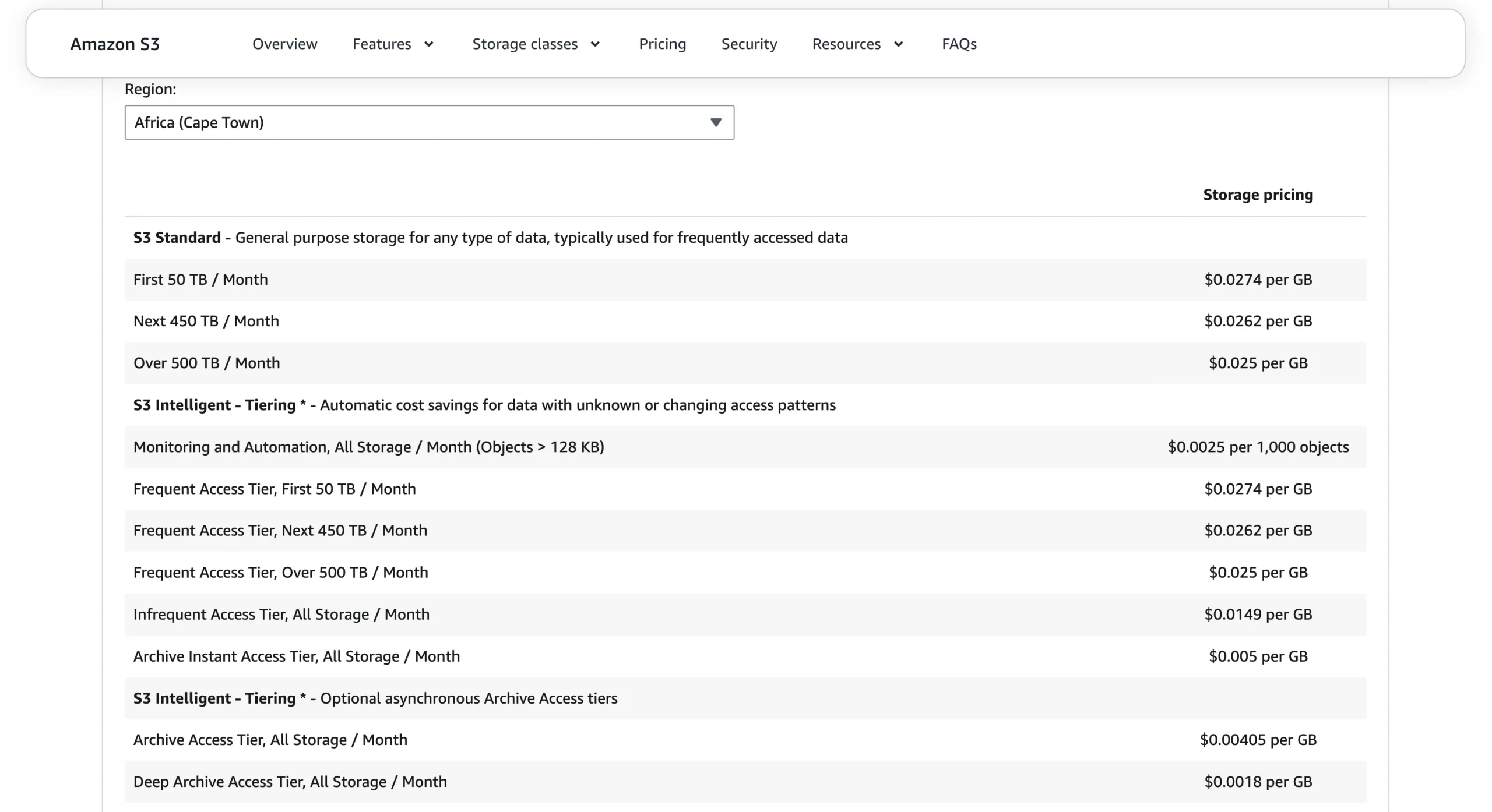
| Amazon S3 | Cloud storage | $0.0274/GB/month for the first 50 TB (Africa – Cape Town) | No minimum charge; new accounts may receive up to $200 in credits (6-month validity) |
| Wasabi | Cloud storage | $7.99/TB/month | No free tier; minimum monthly charge equivalent to 1 TB; 90-day minimum storage duration |
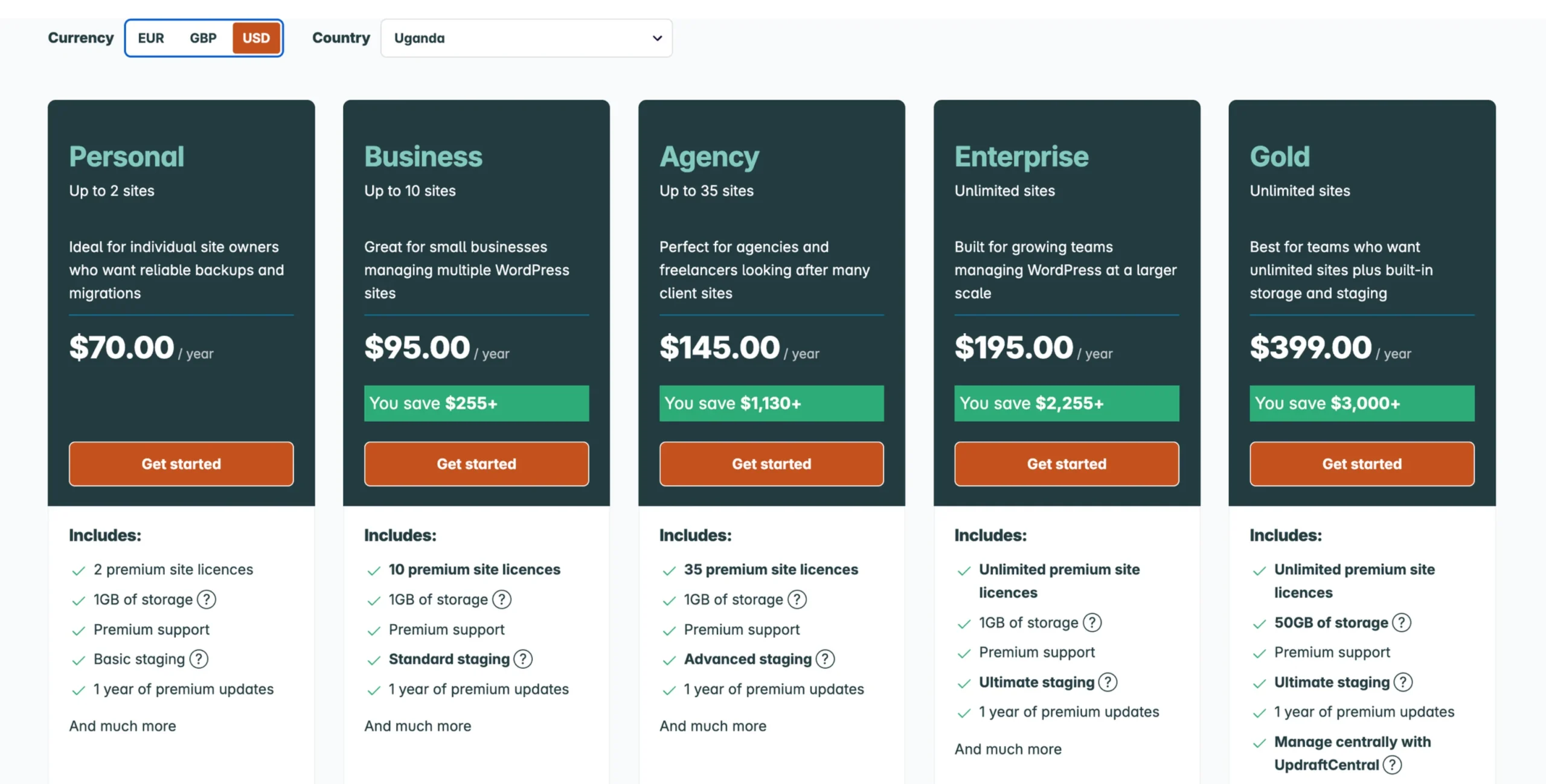
| UpdraftPlus | WordPress plugin | Free; Premium from $70/year | Free version included; no native storage, uses your own cloud destination |
| Jetpack Backup | Managed WordPress backup | $9.95/month in the first year, depending on the offer | No free tier; paid plans start with 10 GB base storage |
| FastComet offsite backup | Hosting provider service | $9.95/month for shared hosting with free offsite backups | Website backup free for FastComet hosting customers |
| Acronis Cyber Protect | Whole-server backup | No public price | Storage pooled per server |
Cloud storage charges can include additional fees for operations, downloads, and retention, depending on the provider. Promotional prices and subscription terms can also change.
Confirm the current offer before signing up, particularly if you are paying from Uganda.
1) Backblaze B2
Backblaze B2 is cloud storage where you pay for the space your backups occupy. You connect it to a compatible WordPress plugin, backup application, or script, which sends your website files and database to the storage service.
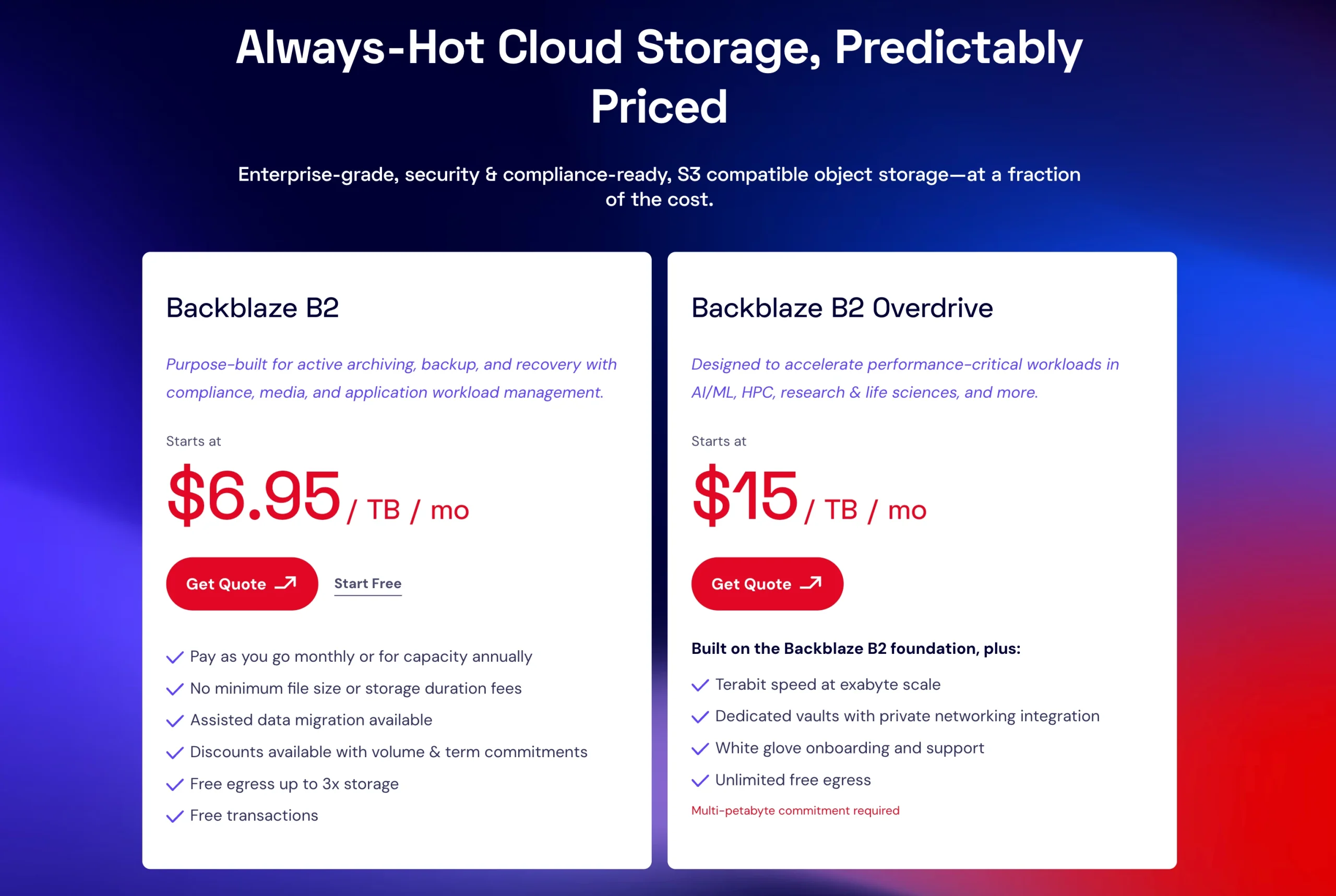
Storage costs $6.95 per TB per month, with no minimum storage duration fees. Downloads are free up to three times the amount stored each month. Beyond that allowance, you pay $0.01 per GB.
You can select a storage region and restrict access keys to specific buckets or folders. Keys can have read-only or write-only permissions, and you can set them to expire on a schedule.
These controls help limit the damage a compromised website could cause to your stored backups.
Backblaze also offers Object Lock, with governance and compliance modes for protecting stored objects against deletion or alteration under the applicable rules.
For a small website, the low storage cost makes Backblaze B2 an attractive option. You will need to configure a compatible plugin or script, though, so it takes more setup than a fully managed backup service.
2) Cloudflare R2
Cloudflare R2, another cloud storage option, charges $0.015 per GB monthly for standard storage, with no egress charges. That means you can download your backups for restoration without paying extra for data transfer.
Its free tier includes 10 GB of storage, one million Class A write operations, and ten million Class B read operations per month. The allowance renews monthly rather than ending after a trial period.
A small website making one full backup daily may fit within these allowances, although the actual usage depends on backup size and how your software handles files.
There is one detail to watch: the free tier applies to standard storage only. Infrequent Access storage is charged from the first gigabyte and has a 30-day minimum storage duration.
You can specify a location hint or EU jurisdiction when creating a bucket, but you cannot change the selected jurisdiction later. Bucket locks and scoped tokens can also help protect your backups from accidental or deliberate deletion.
Cloudflare R2 is a good choice for small websites that need affordable storage and free restores. Just make sure your access settings protect your backup copies.
3) Amazon S3
Amazon Simple Storage Service (S3) works with a wide range of backup tools and offers strong protection against backup deletion through Object Lock.
In compliance mode, protected object versions cannot be overwritten or deleted, even by the account’s root user. You must enable versioning for this protection to work, but once configured, it helps keep your backups safe from deletion or changes.
In the Africa region, S3 Standard storage costs $0.0274 per GB per month for the first 50 TB, with no minimum storage charge.
Requests and data transfer are billed separately, so storage is only part of your total cost. Include request charges and data transfer fees when estimating your bill.
Archive storage options cost less but have minimum storage durations:
- 30 days for Standard-IA
- 90 days for Glacier Instant Retrieval and
- 90 days for Glacier Flexible Retrieval
- 180 days for Glacier Deep Archive
New AWS accounts may receive up to $200 in free-tier credits, valid for six months from account creation (as of July 15, 2025).
Amazon S3 is a good option if your business needs strong protection against backup deletion. Setup takes more work than B2 or R2, and you need a payment card to get started.
4) Wasabi
Wasabi charges $7.99 per TB monthly and does not charge egress or API request fees. However, its minimum charges can make it expensive for a small website.
There is no free tier, and the Pay as You Go plan has a minimum monthly charge equivalent to 1 TB of active storage. That means a website using just 5 GB still incurs the full terabyte charge.
Objects also have a 90-day minimum storage duration. If you delete them sooner, you still pay for the minimum period.
Wasabi supports Object Lock in governance and compliance modes, but you must enable it when creating the bucket. You cannot add it later.
It also supports UpdraftPlus, so WordPress owners can connect the plugin to the storage service. Its trial offers 100 GB for 30 days to users with company email accounts and 10 GB for 14 days to users with free email accounts such as Gmail, Yahoo, and Outlook.
Wasabi is better suited to larger backup archives where the 1 TB minimum makes sense.
Confirm regional availability and payment options before subscribing from Uganda.
5) UpdraftPlus
UpdraftPlus is a WordPress plugin that automates website backups and sends them to a remote storage destination. Supported options include Google Drive, Dropbox, Amazon S3, OneDrive, and Rackspace Cloud Files.
Before relying on it, check where your backups are going.
By default, UpdraftPlus stores them in a folder inside your hosting account’s wp-content directory. That is not offsite storage, so you need to configure a remote destination separately.
The free version supports scheduled backups to destinations such as Google Drive, Dropbox, and Amazon S3.
Your storage limit depends on the destination you choose because UpdraftPlus does not provide native storage with its free version.
In Uganda, Premium starts at $70 per year for the Personal plan, which includes two site licenses.
It adds pre-update backups, incremental backups, one-click migration, multiple simultaneous storage destinations, database encryption, administrator-only settings, and personal-data anonymization. The plan also includes 1 GB of UpdraftVault cloud storage.
UpdraftPlus is a practical option if you run a WordPress website and want control over your backup schedule and storage destination. Remember to check the storage provider’s charges separately.
6) Jetpack Backup
Jetpack VaultPress Backup provides real-time backups for WordPress websites. That is useful for a shop processing orders throughout the day because changes are captured as they happen rather than waiting for the next scheduled backup.
Jetpack’s free plan does not include backups, so you need a paid subscription for automated cloud backups.
The current listed price is $9.95 per month for the first year, billed yearly, followed by $19.95 per month on renewal. The first-year rate is promotional, so budget for the regular renewal price. The plan starts with 10 GB of backup storage.
Storage needs a little planning. Jetpack estimates usage by multiplying the size of your latest daily backup by the number of days retained.
For example, a 1 GB backup kept for 30 days uses approximately 30 GB.
You cannot manually delete individual backups. When you reach the storage limit, Jetpack removes older copies while trying to maintain your selected minimum retention period.
If that retention period no longer fits within the available storage, new backups stop recording.
You can add storage to your plan:
| Additional storage | Monthly price |
|---|---|
| 10 GB | $2.95 |
| 100 GB | $5.95 |
| 1 TB | $9.95 |
These add-ons are in addition to the base plan price.
If your website has large media files that do not need to be backed up, placing them in a donotbackup folder can stop Jetpack from counting them. Also, download your backups before cancelling your subscription because access ends when the subscription does.
Jetpack is a good fit for busy WordPress and WooCommerce websites. Just account for the storage you’ll need to keep your preferred backup history.
7) FastComet Offsite Backup
FastComet includes free offsite website backups with every shared hosting plan. The service offers up to 30 daily backups stored in a geographically separate data center, full account snapshots, and unlimited restores through a web panel.
The backups cover website files, databases, emails and cron jobs. You can restore individual files, databases, scheduled tasks or emails without restoring the entire account. That is useful when you only need to recover one part of your website.
FastComet also offers a separate, fully managed server backup service starting at $19.95 per month if you need server-level protection rather than website backups.
If your website is hosted elsewhere, contact FastComet’s support team to discuss the available options.
This is a convenient choice if you already host your website with FastComet and want managed offsite backups included in your package.
8) Acronis Cyber Protect
Acronis Cyber Protect Cloud provides backup and recovery for entire servers, virtual machines and other workloads. Unlike the website-focused options above, it is designed to protect broader IT environments.
There is no public price list. Pricing is available through service providers, using a minimum monthly commitment model with volume-based discounts at higher tiers.
Under solution-based licensing, storage is pooled at the customer level. Servers include 3 TB, virtual machines 2 TB, and workstations 300 GB. If usage exceeds the included allowance, additional charges apply.
Acronis is worth considering if your business needs to protect entire servers or several systems. For a typical small website, it is likely more than you need.
How to Test Your Website Backup
A backup is only useful if you can restore it successfully. It is better to test the process now than discover a problem when your website is down.
Follow these steps:
- Download your latest backup from the offsite location.
- Create a test subdomain in cPanel.
- Restore the website files and database.
- Check recent posts, product images, login access and contact forms.
- Record how long restoration takes.
- Test if the website’s own credentials can delete protected backups. Ideally, they should not be able to.
- Repeat the test every few months and after major website changes.
What Does Offsite Backup Cost for a Small Website?
Let’s use a 5 GB website as an example. If you create one full backup each day and keep 30 days of copies, you could need approximately 150 GB of storage, assuming no deduplication or compression reduces the total.
Here is what that could cost per month:
| Option | Approximate monthly cost | Approx. monthly cost (UGX) | Important consideration |
|---|---|---|---|
| Backblaze B2 | $0.97 | UGX 3,977 | Storage only; restores incur no egress charge within the 3× monthly stored-data allowance. |
| Cloudflare R2 | $2.10 | UGX 8,610 | Assumes operations remain within the free monthly allowance; downloads are free. |
| Amazon S3 – Africa | $4.11 | UGX 16,851 | Before credits and other applicable charges |
| Wasabi | $7.99 | UGX 32,759 | The 1 TB minimum applies |
These figures are estimates, not guaranteed bills. Actual charges depend on the storage consumed, the number of requests, downloads, retention settings, subscription terms and any applicable taxes.
The Jetpack estimates use the listed $9.95 monthly base price. Your cost may differ if you qualify for a promotional offer or select another plan.
UpdraftPlus adds the cost of whichever storage destination you connect. FastComet website backups are free with its hosting, while Acronis does not publish a comparable website-sized price.
For a small website, Backblaze B2 or Cloudflare R2 can keep storage costs low. The main consideration is how much setup and ongoing management you are comfortable handling yourself.
Which Offsite Backup Option Should You Choose?
The right choice depends on your website and how much control you want over the backup process.
- Small WordPress website on a budget: Use the free version of UpdraftPlus with Backblaze B2 or Cloudflare R2.
- Frequently updated WooCommerce store: Consider Jetpack VaultPress Backup, including the cost of additional storage.
- Strong protection against backup deletion: Use Amazon S3 with versioning and Object Lock in compliance mode.
- Developer-managed backups on cPanel: Send backups directly to Backblaze B2 or Cloudflare R2 using a compatible script or application.
- Whole-server protection: Consider Acronis Cyber Protect through a service provider. You can also request a quote from FastComet if you prefer a hosting provider to manage the backup service.
- Larger backup archives: Wasabi may be worth considering if your storage needs justify the 1 TB minimum. For a typical small website, that minimum makes it less cost-effective than pay-for-what-you-use alternatives.
Whichever service you select, keep the offsite copy separate from your hosting account, restrict access to it and test your restoration process.
Start with Reliable Website Hosting from Truehost
A dependable backup strategy starts with reliable hosting and a copy of your website that you can restore when something goes wrong.
Truehost hosting plans include free daily backups, while cPanel gives you tools to manage your website and its files.
These features provide a useful starting point, but keeping an additional copy outside your hosting account gives you another recovery option if your hosting environment becomes unavailable.
If you are launching a website or moving an existing one, take a look at our Truehost web hosting plans to find an option that suits your business.
Keep your website hosted reliably, retain your daily backups and add an offsite copy for another layer of protection.
