Email marketing is the practice of sending targeted messages to people who have agreed to hear from you. The goal is to build relationships as well as make sales.
It works because you are speaking to people who already showed interest in your business. They may have bought from you, visited your shop, or joined your mailing list.
Email suits small businesses because it is low cost compared with print, radio, or paid ads. You can start with a small list and grow it gradually.
You also own the list. Social media platforms can change their rules or reduce your reach, but your email list remains yours.
It is easy to track and improve. You can see who opened your message, clicked a link, or made a purchase.
This guide will show you:
- The main types of email campaigns
- How to write emails people actually open
- How to use AI without losing your brand voice
- How to design emails for mobile readers
- How to reach the inbox instead of spam
- Which numbers to track
- How to start with a professional business email address
Types of Email Campaigns
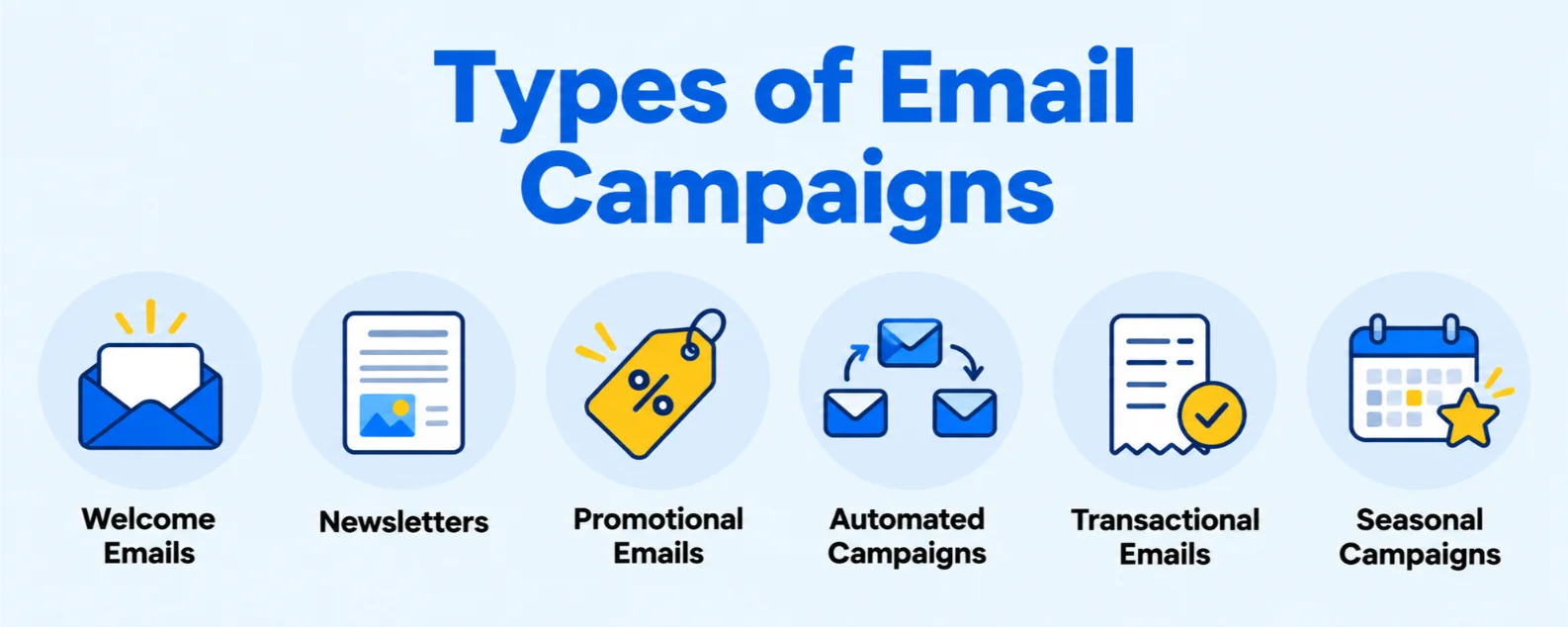
Different emails serve different goals. You do not need to use every type at once. Start with one or two that match your business.
1) Welcome Emails
Welcome emails are important because they create the first impression. They also often receive high engagement because the subscriber has just joined your list.
Your welcome email should thank the person, explain what to expect, and offer something useful. You can include a small discount, your best content, or your most popular products.
A simple structure is:
- Thank them for joining
- Tell them what emails they will receive
- Share a useful tip, product, or offer
- Give one clear next step
For example, a salon in Kampala could say: “Thank you for joining. Here is 10% off your first booking. We send styling tips and offers twice a month.”
2) Newsletters
Newsletters are regular updates that keep your brand top of mind. They help customers remember you even when they are not ready to buy.
Good newsletter content includes:
- Company news
- Tips and how-tos
- Featured products
- Customer stories
- Upcoming events
Choose a frequency you can maintain: weekly, fortnightly, or monthly. A monthly newsletter is better than a weekly one you cannot sustain.
A hardware shop could send a monthly newsletter with safety tips, new stock arrivals, and a customer project story.
3) Promotional Emails
Promotional emails promote limited-time discounts, product launches, seasonal sales, or subscriber-only deals.
They can also remind customers when an offer is about to expire. A short reminder such as “Your discount ends tonight” can bring people back to complete a purchase.
Balance promotions with useful content. If every email is a sale, subscribers may stop opening your messages.
A good rhythm is to send value first, then make an offer. For example, share three tips for choosing school supplies, then promote your back-to-school bundle.
4) Automated (Drip) Campaigns
Automated campaigns are emails that send automatically after someone takes an action. They save time and keep your business responsive.
For new subscribers or customers, a simple sequence can include:
- Welcome email
- First-purchase offer
- Personalised follow-up
- Thank-you message
Online stores can use abandoned cart reminders. These remind a shopper to complete a purchase after leaving items in the cart.
For existing customers, send new arrivals, helpful tips, and loyalty offers.
You can also create a re-engagement sequence for inactive subscribers. Ask whether they still want to receive your emails and remove people who do not respond.
5) Transactional and Occasion-Based Emails
Transactional emails confirm important actions. They include order confirmations, booking confirmations, receipts, and delivery updates.
These emails build trust because customers expect them. They also give you a natural chance to share a helpful tip or related product.
Occasion-based emails celebrate the customer. Send birthday offers, anniversary messages, or loyalty rewards.
A restaurant could send a birthday voucher. A clothing boutique could reward a customer after their fifth purchase.
6) A Ugandan Campaign Calendar
A local calendar helps you plan ahead instead of sending emails at the last minute.
Plan campaigns around:
- Back-to-school and term openings
- Independence Day and other public holidays
- Easter, Christmas, and New Year
- Valentine’s Day and Mother’s Day
- Harvest and festive seasons
- End-of-month and payday promotions
Independence Day falls on October 9, while Christmas Day falls on December 25 in Uganda.
A bookshop can plan a back-to-school campaign before terms open. A restaurant can promote a family meal offer around Christmas or Independence Day.
Content and Personalisation
Good email marketing is not about sending more emails. It is about sending relevant emails.
Know Your Audience
Start by building simple customer personas. A persona is a short profile of your ideal customer.
Include:
- Age
- Location
- Interests
- Buying habits
Learn from surveys, replies, and purchase history. Ask customers what they want to receive from you.
For example, a Kampala boutique may serve young professionals who want affordable office wear and university students looking for casual fashion. These groups need different messages.
A simple website also gives customers a place to learn about your business and join your email list. Truehost Uganda offers affordable web hosting for small businesses, blogs, and online shops.
Segmentation Basics
Segmentation means dividing your list into smaller groups. It helps you send the right message to the right person.
You can segment by:
- Purchase history
- Location
- Interests
- Engagement level
- New versus returning customers
For example, a cafe can send a loyalty offer to regular customers and a first-visit discount to occasional visitors.
Relevant emails usually outperform mass emails because they feel personal and useful. Mailchimp’s published benchmarks show an average click rate of 2.62% across all users, but results vary widely by industry and audience relevance.
Subject Lines
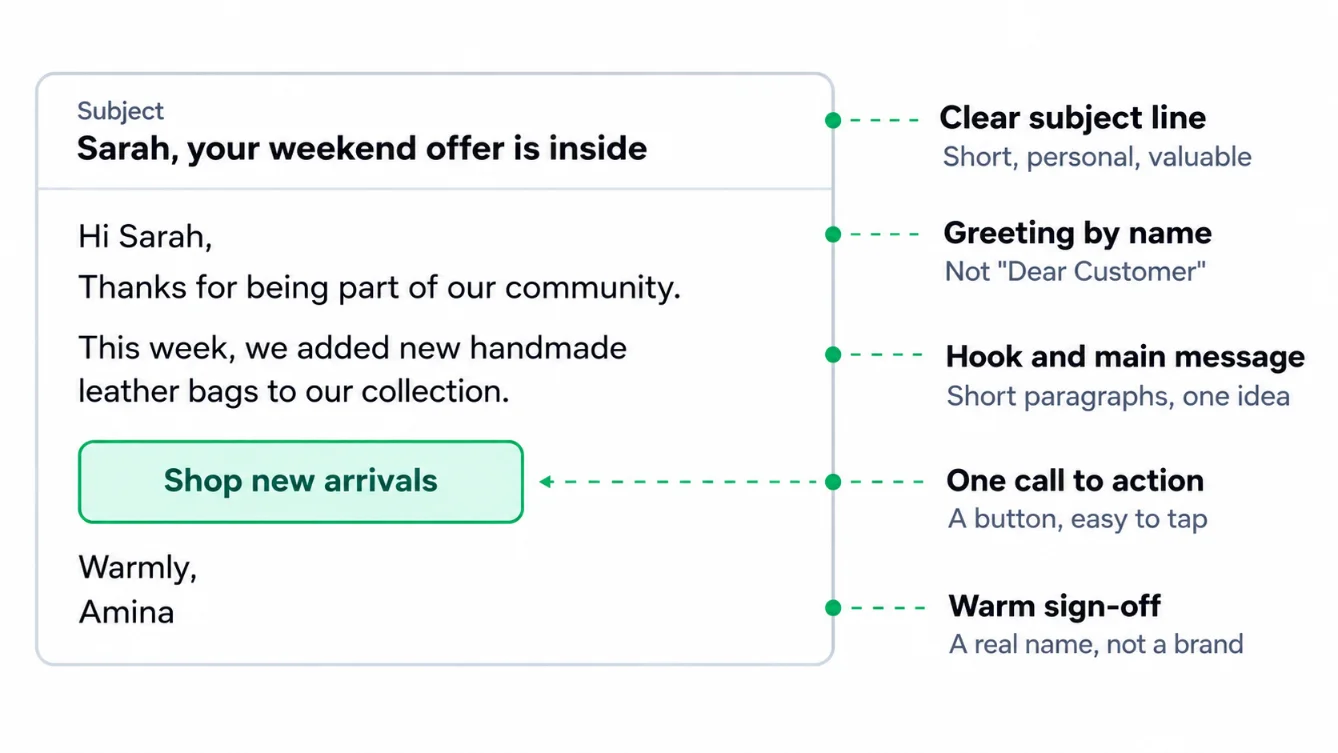
Your subject line decides whether someone opens your email. Keep it short, clear, and valuable.
Use names or tailored details when you have them. “Sarah, your weekend offer is inside” feels more personal than “Special offer.”
Avoid clickbait, ALL CAPS, and confusing wordplay. People should know what to expect when they open the email.
Good examples:
- “Your 10% welcome offer is ready”
- “New arrivals: office dresses from UGX 80,000”
- “3 ways to protect your phone this rainy season”
Poor examples:
- “OPEN NOW!!!”
- “You won’t believe this”
- “Last chance” with no clear offer
Email Body Structure
Use a simple structure in every email.
Start with a greeting by name. Avoid “Dear Customer” because it feels distant.
Then add a hook, your main message, one call to action, and a warm sign-off.
Keep paragraphs short. Use plain language. One idea per paragraph is enough.
Example:
Hi Sarah,
Thank you for being part of our community.
This week, we added new handmade leather bags to our collection.
[Shop new arrivals]
Warmly,
Amina
Tone and Language
Use a friendly, professional, and conversational tone. Write as if you are speaking to one customer, not a crowd.
Choose English, Luganda, or a mix based on your audience. Some customers respond better to English, while others connect more with Luganda.
If you use a mix, keep it natural. Do not force local phrases where they do not fit.
Use local examples. Mention Kampala, Entebbe, Gulu, Mbarara, or other places your customers know.
Calls to Action
Give readers one main action per email. Too many links create confusion.
Use clear actions such as:
- Shop now
- Book today
- Reply to this email
- Claim your discount
A button is easier to tap on a phone. A text link can work well for a simple action, such as replying to an email.
Make the next step obvious. If you want bookings, say “Book your appointment today” and link directly to the booking page.
Using AI to Save Time and Improve Results
AI can help small teams work faster. It cannot replace your judgment, but it can remove repetitive work.
Why AI Suits Small Teams
Many Ugandan business owners handle sales, marketing, customer service, and operations alone. AI can handle drafts, ideas, and repetitive tasks.
That gives you more time for customers, products, and business decisions.
Generative AI for Content
Generative AI can draft subject lines, email copy, and product descriptions.
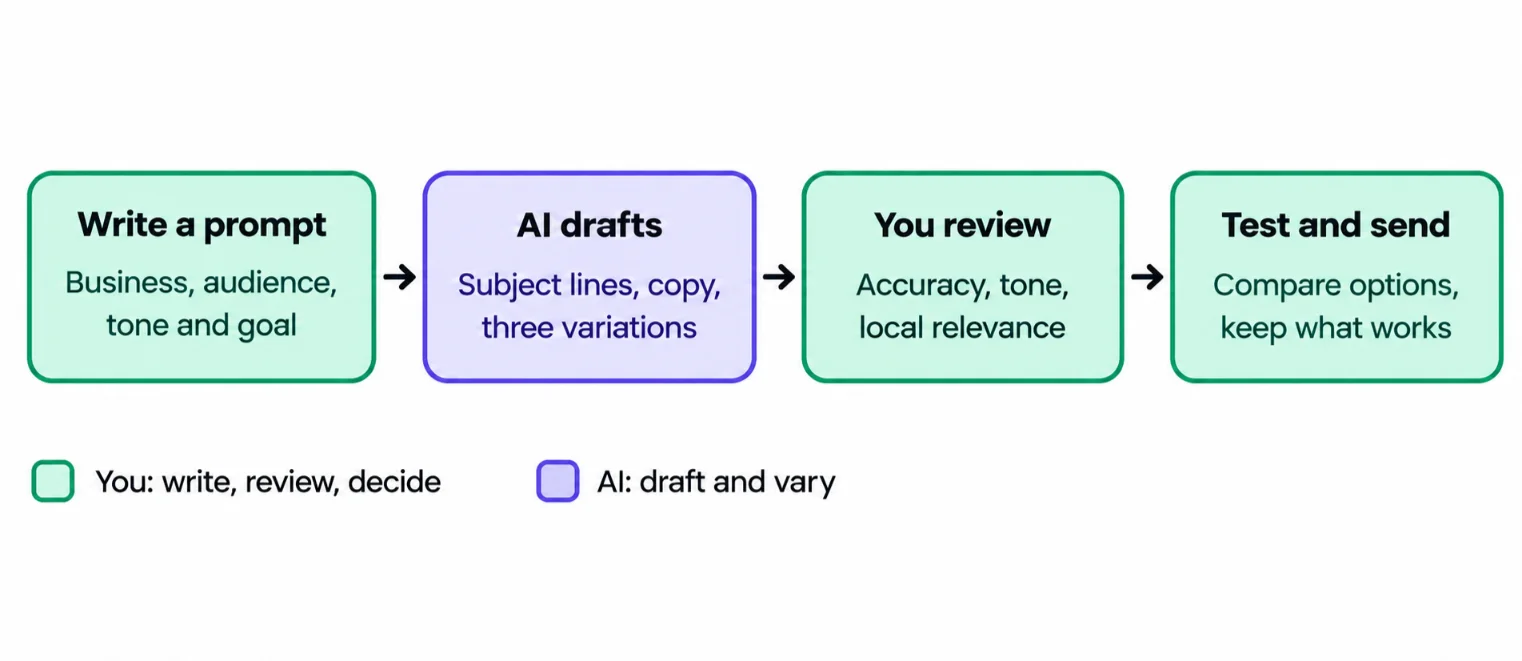
It can also create variations for A/B testing. For example, ask it to write three subject lines for the same promotion, then test which one performs better.
AI can support personalised recommendations based on preferences or past purchases. A boutique can suggest items that match a customer’s previous style. A salon can suggest services based on past bookings.
It can also help translate or adapt messages between English and Luganda. Always use a human check for tone and accuracy.
Predictive AI for Sending and Targeting
Predictive AI studies behaviour to make smarter decisions.
Send-time optimisation sends emails when each subscriber is most likely to open them. This can improve engagement without extra work.
AI can also spot inactive subscribers or likely buyers. That helps you create better segments and avoid sending irrelevant offers.
Writing Good Prompts
A good prompt gives the AI context.
Tell it about:
- Your business
- Your audience
- Your tone
- Your goal
For example: “Write a friendly email for a Kampala bakery announcing weekend cinnamon rolls. Audience: young professionals. Tone: warm and simple. Goal: encourage pre-orders.”
Then edit the result. Add local details, correct product names, and make sure it sounds like you.
Keeping a Human in the Loop
Always review AI content for accuracy, brand voice, and local relevance.
Never share customers’ personal data with tools that are not secure. Remove names, phone numbers, purchase details, and other private information before using an AI tool.
Getting Started
Many email platforms have AI features built in. You may not need a separate tool.
Start with one task, such as subject lines. Compare AI-generated options with your usual approach and keep what works.
Design and Mobile Optimisation
Most Ugandan readers open email on their phones. Your email must look good on a small screen.
Uganda had about 19 million smartphones in use by the third quarter of 2025, while active mobile internet subscriptions reached 17 million.
Mobile-first layout
Use a single-column, clean layout with large tap-friendly buttons.
Avoid cramming too much into one email. White space makes your message easier to read.
Fonts and contrast
Use readable fonts and strong colour contrast. Small grey text on a white background can be hard to read outdoors or on older phones.
Images and data
Use light, compressed images. This helps subscribers on limited or costly mobile data.
Add alt text to images. Alt text describes the image if it does not load.
Also include a plain-text fallback. This ensures your message still makes sense without images.
Test before sending
Test your email on different devices and screen sizes before sending.
Check that:
- Buttons are easy to tap
- Text is readable
- Links work
- Images load quickly
- The email looks good in both light and dark mode
Keep branding consistent. Use the same logo, colours, and tone across emails.
Deliverability: Getting Your Emails to the Inbox
Deliverability determines whether your email reaches the inbox or lands in spam.
Why It Is Important
Great emails are useless if they land in spam. Your customer may never see them.
Good deliverability protects your sender reputation and improves your results.
Setting Up Properly
Use a professional, domain-based address such as [email protected] instead of a free email account.
A custom address makes your business look credible. It also gives you more control over your sending reputation.
You can set up your custom mailboxes through Truehost Workplace Email, then connect the domain you registered through Truehost domains.
Email authentication proves that your messages really come from your domain.
- SPF lists the servers allowed to send email for your domain.
- DKIM adds a digital signature that shows the message was not altered.
- DMARC tells receiving servers what to do if SPF or DKIM fails.
Set these up before sending at scale. Since February 2024, Google and Yahoo require bulk senders to authenticate email with SPF and DKIM and to have a DMARC policy in place.
Choose a dependable sending setup. Business hosting email works well for everyday communication and smaller campaigns. Dedicated sending tools may suit businesses sending high volumes.
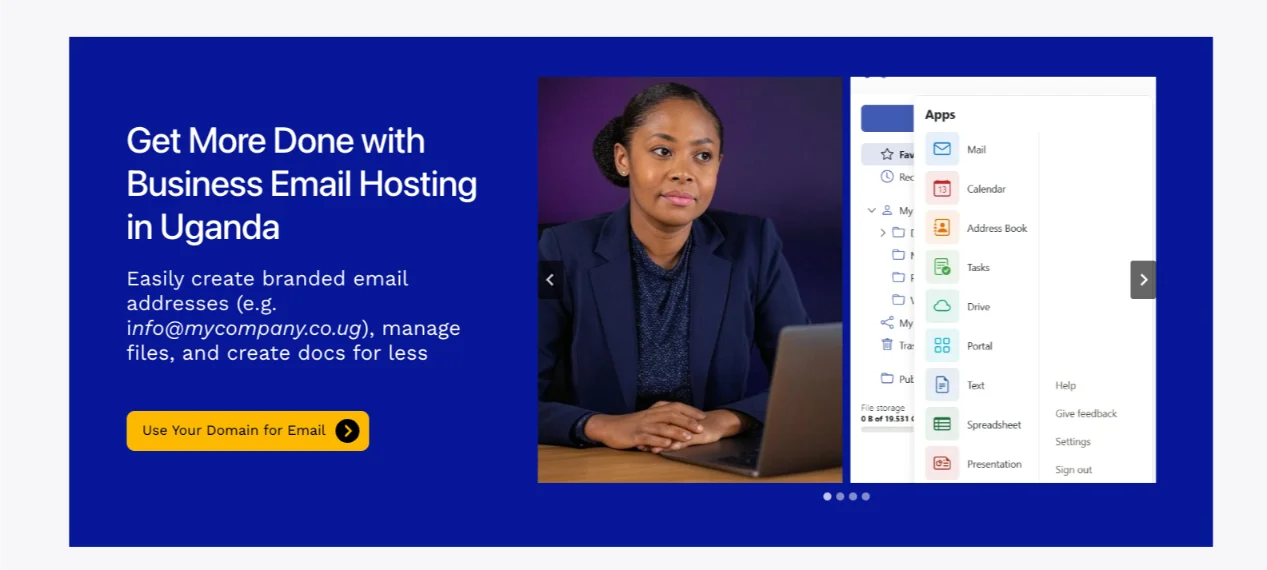
At Truehost, we offer Workplace email with custom mailboxes on your own domain, along with calendar, documents, and cloud storage in one plan. You can set it up here: Truehost Workplace Email.
Avoiding Spam Triggers
Avoid tactics that make email providers suspicious.
Do not use:
- Misleading subject lines
- Excessive punctuation
- Spammy phrases
- Image-only emails
- Broken links
Write honestly. If your subject says “50% off,” the email must clearly explain the offer.
Building Sender Reputation
Your sender reputation grows through consistent sending, a clean list, and low complaint rates.
Remove invalid addresses. Make unsubscribing easy. Do not buy email lists.
If you have a new domain or email address, warm it up. Start with small volumes and increase gradually as engagement stays healthy.
Troubleshooting Checklist
If your emails land in spam, work through these steps:
- Check that SPF, DKIM, and DMARC are set up correctly.
- Confirm you are sending from a custom domain address.
- Remove inactive, invalid, or unengaged contacts.
- Review your subject line for misleading words or excessive punctuation.
- Reduce image-only content and add real text.
- Test every link before sending.
- Send to people who explicitly agreed to hear from you.
- Ask a few customers to check their spam folder and mark your email as “not spam.”
Measuring Success: Email Marketing Metrics
Measurement tells you what is working. Without it, you are guessing.
Why Measurement is Important
You cannot improve what you do not track. Metrics show which subject lines, offers, and audiences respond best.
Key Metrics
Track a few numbers consistently. Do not try to monitor everything at once.
| Metric | What it means | Healthy direction | Ugandan example |
|---|---|---|---|
| Open rate | Percentage of delivered emails opened | Compare with your own past campaigns | A salon sees 38% opens on a haircut offer |
| Click-through rate | Percentage who clicked a link | Higher means your message and offer are relevant | A boutique sees clicks on a new-arrival link |
| Conversion rate | Percentage who completed an action | Purchases, bookings, or enquiries | A restaurant receives bookings from an email |
| Subscriber growth | New subscribers minus lost subscribers | Steady growth is healthy | A shop gains contacts from an in-store sign-up sheet |
| Unsubscribe rate | People who leave your list | Keep it low, but do not panic over small changes | A high rate after a sales-heavy campaign signals fatigue |
| Bounce rate | Emails that could not be delivered | Keep it low | Old addresses may need removal |
| Spam complaint rate | People marking your email as spam | Keep it very low | A sudden rise may mean irrelevant or unwanted emails |
Open rates have limits. Privacy features can inflate them because an email may be counted as opened even when the person did not genuinely read it.
Mailchimp’s published all-user benchmark shows an average open rate of 35.63%, an average click rate of 2.62%, and an average unsubscribe rate of 0.22%. Use these as broad reference points, not targets.
Engagement over time matters too. Watch replies, forwards, repeat purchases, and customers who return after receiving your emails.
Tracking Conversions
Use unique links and promo codes to see which email created a sale.
For businesses that receive enquiries through WhatsApp or phone calls, ask customers how they found you. Add a simple question: “Did you receive our email offer?”
For businesses without online sales, use in-store redemption codes. A customer can show the email or mention a code to claim an offer.
A/B Testing Basics
Test one thing at a time. Otherwise, you will not know what caused the change.
Test:
- Subject line
- Send time
- Button text
- Offer wording
- Image placement
For example, send Version A with “Weekend offer inside” and Version B with “Sarah, your weekend offer is inside.” Keep everything else the same.
Reading Your Results
Segment results by audience group, device, and campaign type.
Look for patterns. Maybe mobile readers click more, but desktop readers buy more. Maybe welcome emails outperform newsletters.
Set simple goals and review monthly. For example, aim to grow your list by 50 contacts and improve your click rate over the next month.
Metrics are a compass, not the destination. Use them to guide decisions, not to chase numbers.
Email Marketing for Small Businesses FAQs
How much does it cost to start email marketing?
You can start cheaply. Your main costs are an email platform, a custom domain, and business email hosting.
Some platforms offer free plans for small lists. Paid plans usually increase with the number of contacts and features you need.
The bigger investment is time: building a permission-based list and sending useful emails.
What tools or services do I need?
You need:
- A professional email address on your own domain
- An email marketing platform
- A way to collect consent
- A simple way to track results
For a growing business, reliable hosting and automation tools also help. Truehost offers VPS, dedicated servers, OpenClaw hosting, AI Workers, and N8n hosting for businesses that need more control, automation, or scalability.
Do I need a website to start email marketing?
No. You can start with a professional email address, a sign-up method, and an email platform.
However, a simple website helps. It gives customers a place to learn about your business, view products, and sign up for updates.
You can start with social media and WhatsApp, then add a website as you grow. Truehost Uganda web hosting includes plans for small businesses, while a custom .ug or .co.ug domain gives your brand a professional online address.
Is email marketing legal in Uganda, and what consent do I need from subscribers?
Yes, but you must respect customer consent. Uganda’s Data Protection and Privacy Act, 2019 says personal data should not be collected or processed without prior consent.
The law defines consent as a freely given, specific, informed, and unambiguous indication of a person’s wishes.
It also gives people the right to ask a business to stop processing their personal data for direct marketing.
In practice:
Remove people who ask to stop receiving marketing emails
Only email people who agreed to hear from you
Explain what they are signing up for
Provide an unsubscribe option
How long does it take to see results?
Some results can appear quickly. A welcome offer or promotion can bring sales within days.
Relationship-based results take longer. Loyalty, repeat purchases, and strong open rates usually build over months.
Focus on consistent, relevant emails. Results follow trust.
Get Started with Business Email Hosting from Truehost
A professional email address is the first step to better deliverability and more trust.
When customers see [email protected], they know the message comes from your business. That simple detail can improve credibility and inbox placement.
Truehost Workplace email gives you custom mailboxes on your own domain, with a calendar, documents, and cloud storage in one plan. It is a practical foundation for email marketing Uganda businesses can rely on as they grow.
If you also need a website, Truehost provides web hosting, VPS hosting for growing businesses, and domain registration so you can manage your domain, website, and business email from one provider.
Start simple. Build a permission-based list. Send useful emails. Track what works.
Set up your business email with Truehost Workplace Email today, register your Uganda domain if you need one, and send your first campaign this week.
