You don’t need one mailbox per address. The addresses you pay for decide your bill.
Most small businesses in Uganda want a few professional addresses. Staff names, an info@ line, maybe a bookings@ line. Then the price list shows “per mailbox” and the budget gets tight.
Here is the good news. There are three types of business email addresses, and only some of them cost money:
- Named staff mailboxes: one person, one login, one private inbox.
- Role mailboxes: tied to a job, like
orders@oraccounts@. - Aliases: extra addresses that forward to a mailbox you already have.
The difference between an alias and a mailbox is simple. A mailbox stores mail and has a login. An alias only points to a mailbox.
Below you’ll find 25 business email address examples, plus a worked mailbox-count decision you can reuse.
The three businesses in the examples are Pearl Trails (safaris), Lakeview Dental (a clinic) and Nile Ridge Coffee (an exporter). The addresses are patterns you can copy.
Is the address really important? Yes. In a 2025 Exclaimer survey, 44% of people named a professional address on a company domain as a top trust signal for a business email. Only 11% said they don’t find business emails trustworthy at all.
So trust is there to be earned. Your address is the first thing you earn it with.
Let’s start with the people.
a) Named staff mailboxes (8 examples)
A named mailbox belongs to one real person. They have their own login and a private inbox.
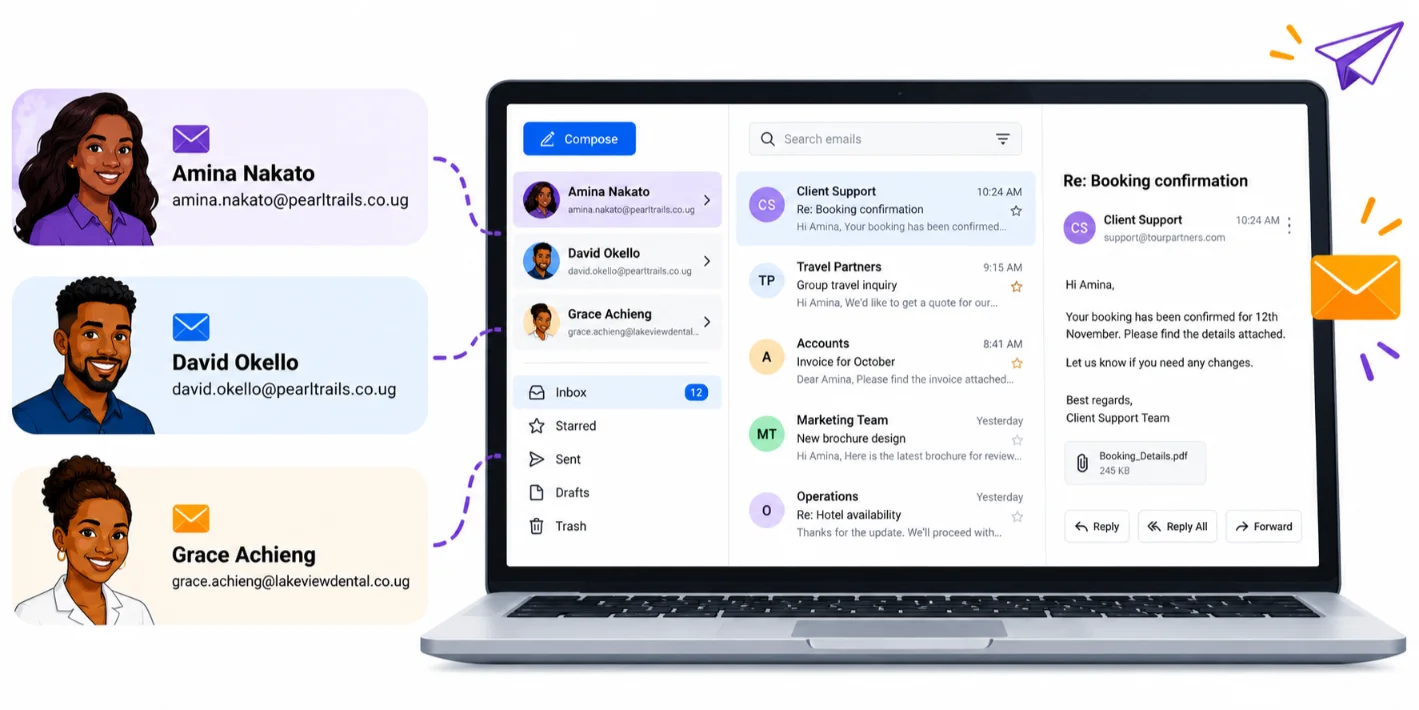
Choose these when someone must send, reply and be identifiable.
[email protected]: the owner. This is the first.last format.[email protected]: the operations lead at the same business. Same format, so the pattern stays consistent.[email protected]: the practice manager. Suppliers and staff know exactly who they are writing to.[email protected]: the export manager. Foreign buyers get a clear, named contact.[email protected]: initial plus surname. It works for long or multi-part names.[email protected]: first name only. It suits a very small team, but it gets crowded fast.[email protected]: surname first. Use it when two staff share a first name.[email protected]: the clinic doctor.
Notice that Ruth’s address has no “Dr.” in it. Put professional titles in the email signature instead. Addresses stay short, and a title change never forces a new mailbox.
Signatures is important too. The same Exclaimer research found that 23% of people look for a professional, branded signature when judging whether an email is trustworthy.
Naming conventions for Ugandan names: Decide one rule for people with two given names or long surnames. Write it down before you create the second mailbox. A rule made after ten mailboxes exist is painful to enforce.
Named mailboxes are the ones you pay for. Next, the addresses that belong to jobs.
b) Role mailboxes (8 examples)
A role mailbox is tied to a job, not a person. It survives staff changes.
That is important. When your bookings agent leaves, bookings@ stays. Customers never need a new address, and old emails don’t vanish with one person’s inbox.
A role address can work in two ways, depending on your provider:
- A shared mailbox: several people read and reply from one address.
- A single paid mailbox: one login, which the team shares.
Microsoft, for example, says its shared mailboxes need no license of their own. Nobody signs in to them directly. People get access through their own accounts.
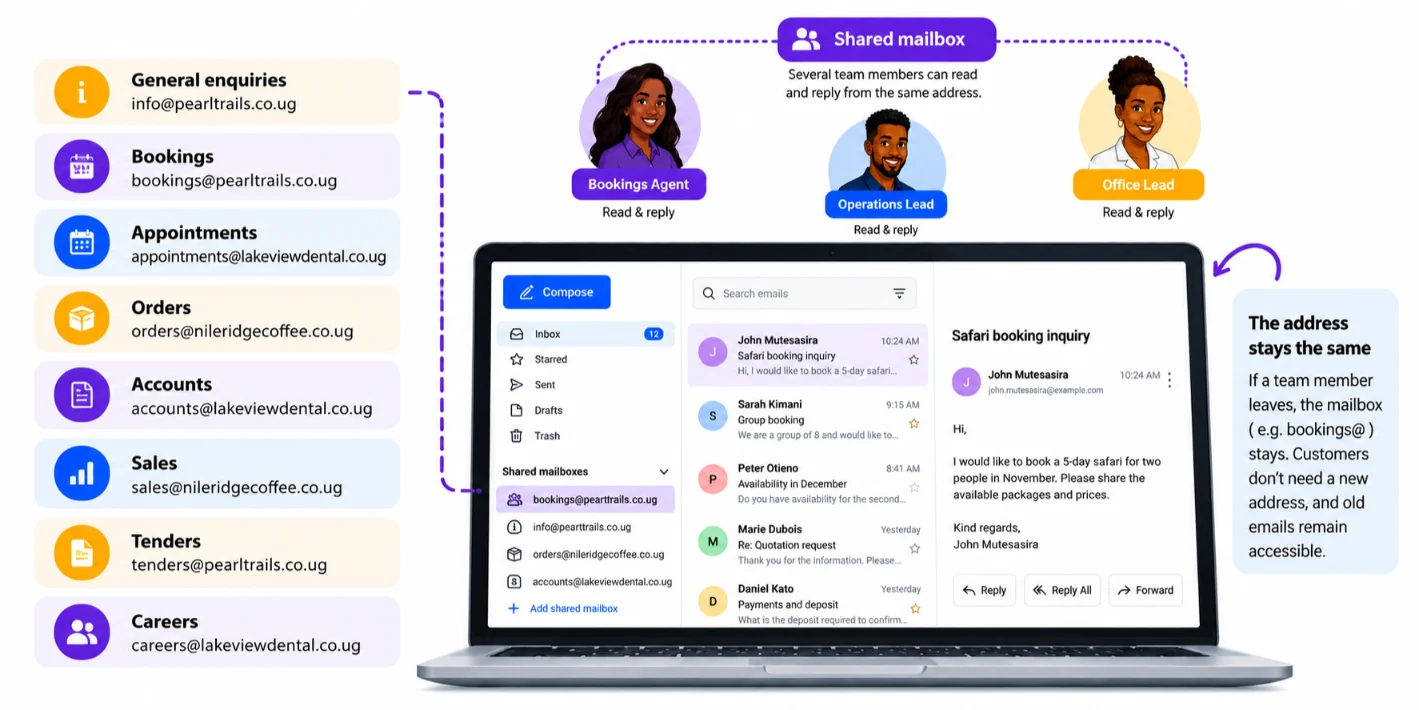
Other providers charge for a role address as a normal mailbox. Always check before you buy.
[email protected]: the general front door. The owner or office lead should watch it daily, because it gets every first enquiry.[email protected]: safari reservations. A booking agent should monitor it, because late replies lose trips.[email protected]: patient scheduling. The front desk should own it, since they hold the diary.[email protected]: buyer orders. The export manager or an order clerk should read it, so no order sits unseen.[email protected]: invoices and payments. Finance should own it, so money issues stay in one place.[email protected]: export inquiries. The sales lead should watch it, because new buyers expect a quick answer.[email protected]: procurement and corporate bids. Deadlines are strict, so a manager should check it.[email protected]: recruitment. The practice manager or HR should handle it, so applicants get a reply.
Each role address gives customers one place to write. It also keeps work from sitting in one person’s private inbox.
There is a risk, though. When several people share one inbox, each may assume someone else replied. Agree who answers what before you launch it.
A simple habit helps. Assign one owner per role address, and name a backup for leave days.
You can run named and role mailboxes on one plan. We at Truehost sell Workplace email as bundles. At the time of writing, Workplace Starter costs USh 8,905.00 per month billed annually for one 3 GB mailbox, and Workplace Pro costs USh 3,740.10 per month billed annually and covers three mailboxes. Prices change, so confirm them on the plan page.
Now for the cheapest type of address.
c) Aliases (9 examples)
An alias is an extra address that forwards to a mailbox you already have. On most setups it needs no extra login and no extra cost.
Use aliases to keep addresses tidy without buying seats.
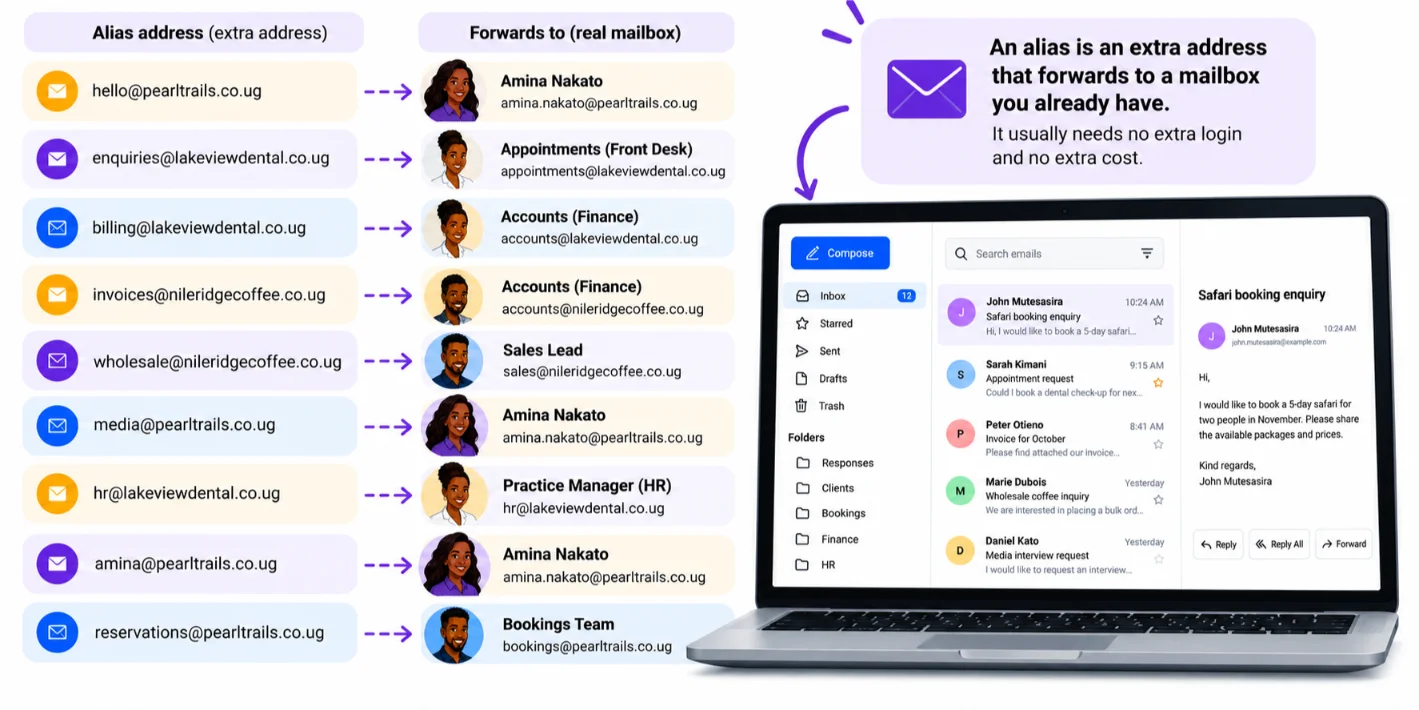
[email protected]→ forwards to Amina. A friendly front door for first-time visitors.[email protected]→ forwards toappointments@. Patients who use this spelling still reach the front desk.[email protected]→ forwards toaccounts@. Anyone who writes “billing” still lands with finance.[email protected]→ forwards toaccounts@. Suppliers can send invoices to an obvious address.[email protected]→ forwards tosales@. Bulk buyers find the right door.[email protected]→ forwards to the owner. Journalists get a clear contact without a new mailbox.[email protected]→ forwards to the practice manager. Staff questions stay private.[email protected]→ a short form ofamina.nakato@. Easy to say on the phone.[email protected]→ a variant ofbookings@, catching customers who type the wrong word.
How many aliases can you add? It depends on the provider. One third-party guide says Google Workspace admins can attach up to 30 aliases per user, and Microsoft 365 up to 400 per mailbox. Check your own provider’s limit before you plan.
Some hosts also include forwarding at no extra charge. Our Truehost hosting plans come with unlimited email accounts for your domain, and free email forwarding is available when you register a domain with us.
There is a trade-off. A forwarding setup is built for receiving mail. It is not a full inbox, so it has less storage and fewer features than a paid mailbox.
Heads up: Replies from an alias normally still send from the main address, unless “send as” is set up. A customer who writes to billing@ may get a reply from accounts@. That is fine for most teams. Set up “send as” if it isn’t.
You’ve now seen all 25 addresses. The next question is which ones you should pay for.
The Mailbox-Count Decision
This section changes what you buy. It ends with a clear rule.
Ask three questions about every address:
- Does a person need to send and reply as this address?
- Does it need its own login, storage or private inbox?
- Will several people read it together?
Then apply this rule:
- Yes to questions 1 and 2: paid named mailbox.
- Receive only: alias.
- Yes to question 3: role or shared mailbox. Check how your chosen provider charges for these.
Take Pearl Trails. It uses nine of the addresses above. Here is how they sort out:
- Amina and David need to send and reply as themselves. That is two paid named mailboxes.
- info@, bookings@ and tenders@ are read by several people. These are role mailboxes. If your provider charges for them like normal mailboxes, count them. If it offers shared mailboxes, they may cost nothing.
- hello@, media@, amina@ and reservations@ only receive mail. These are aliases.
So Pearl Trails needs between 2 and 5 paid mailboxes. Not nine.
On Truehost’s published annual prices, that is the gap between Workplace Pro at USh 3,740.10 per month billed annually for three mailboxes and Workplace Business at USh 6,589.70 per month billed annually for five. Prices may change, so confirm them before you buy. The point stands: counting first can save you a tier.
One more risk to watch. Microsoft’s shared mailboxes need a license if they grow past 50 GB. A busy role address with big attachments can reach that over time.
The rule in one line: pay for logins, forward the rest.
Once you know your number, you need a format.
How to Choose your format in three steps
Keep it simple. Three decisions, in this order.
- Pick one format for named staff and stick to it. If you choose first.last, use it for everyone. Use the rule from the Ugandan names callout for long names.
- Create role addresses by function, not by person. Write bookings@, not “bookings-sarah@”. The role stays when people leave.
- Add aliases last, once you’ve seen what inboxes are overloaded. If one inbox is drowning, split it with an alias. Don’t guess early.
Now a short note on your domain. A .co.ug name is the second-level domain used for commercial entities in Uganda. A .com is familiar to foreign buyers and easy to type.
Rules and prices change by registrar and over time. Check with the registry or your provider before you commit.
Whichever you pick, use the same domain for every address. Your customers will notice if it changes.
Get your business email with Truehost
Named mailboxes are for people, role mailboxes are for jobs, and aliases are for convenience. Count who needs a login before you pay.
Now that you know how many mailboxes you need, set them up on your own domain.
We at Truehost let you register your .co.ug or .com domain and set up professional mailboxes in one place. Our Workplace plans also include office tools like documents, spreadsheets and calendars.
Start small. Buy the mailboxes your team needs today, then add aliases and upgrade a tier when you grow.
Here is a simple way to begin this week:
- List every address you want, using the business email address examples above as a guide.
- Run each one through the three questions.
- Count your paid mailboxes and pick the plan that covers them.
- Create the named mailboxes first, then the role addresses, then the aliases.
You can also compare plans on our Workplace email page before you decide. Setup is quick, and your domain, DNS and mailboxes stay in one account.
If you already run a website with us, check your hosting plan first. Unlimited email accounts may already be included, which could cover some of your role addresses at no extra cost.
