Choosing between WordPress.com and WordPress.org depends on whether you prefer convenience and managed hosting or greater control and flexibility. WordPress.com is a hosted platform that handles much of the technical work for you, while WordPress.org provides free, open-source software that you install on your own hosting account.
Both use WordPress, but they differ in cost, customization, maintenance, and control.
The right choice depends on your budget, technical skills, and long-term website goals.
Feature Comparison
| Feature | WordPress.com | WordPress.org |
| Price | Free and paid plans available. | Free software; pay for hosting and a domain. |
| Ease of use | Beginner-friendly, with less maintenance. | Requires more setup and management. |
| Hosting | Hosting is included. | You choose and pay for hosting. |
| Performance | Hosting performance is managed for you. | Depends on your hosting provider and plan. |
| Security | Many security tasks and updates are managed. | Depends on your host and maintenance. |
| Features | Features depend on your plan. | More flexibility with themes, plugins, and tools. |
| Plugins | Available on all paid plans | Install compatible plugins of your choice. |
| Themes | Choose from available themes; options vary by plan. | Install free or paid themes and create custom designs. |
| Support | Support options depend on your plan. | Community forums and hosting-provider support. |
| Site ownership | You own your content and can move it. | You own your content and control your hosting. |
1) Price
WordPress.org is free to use, but you still pay for hosting and a domain. WordPress.com includes hosting in its plans, which range from free to $45 per month, billed annually.
WordPress.com.
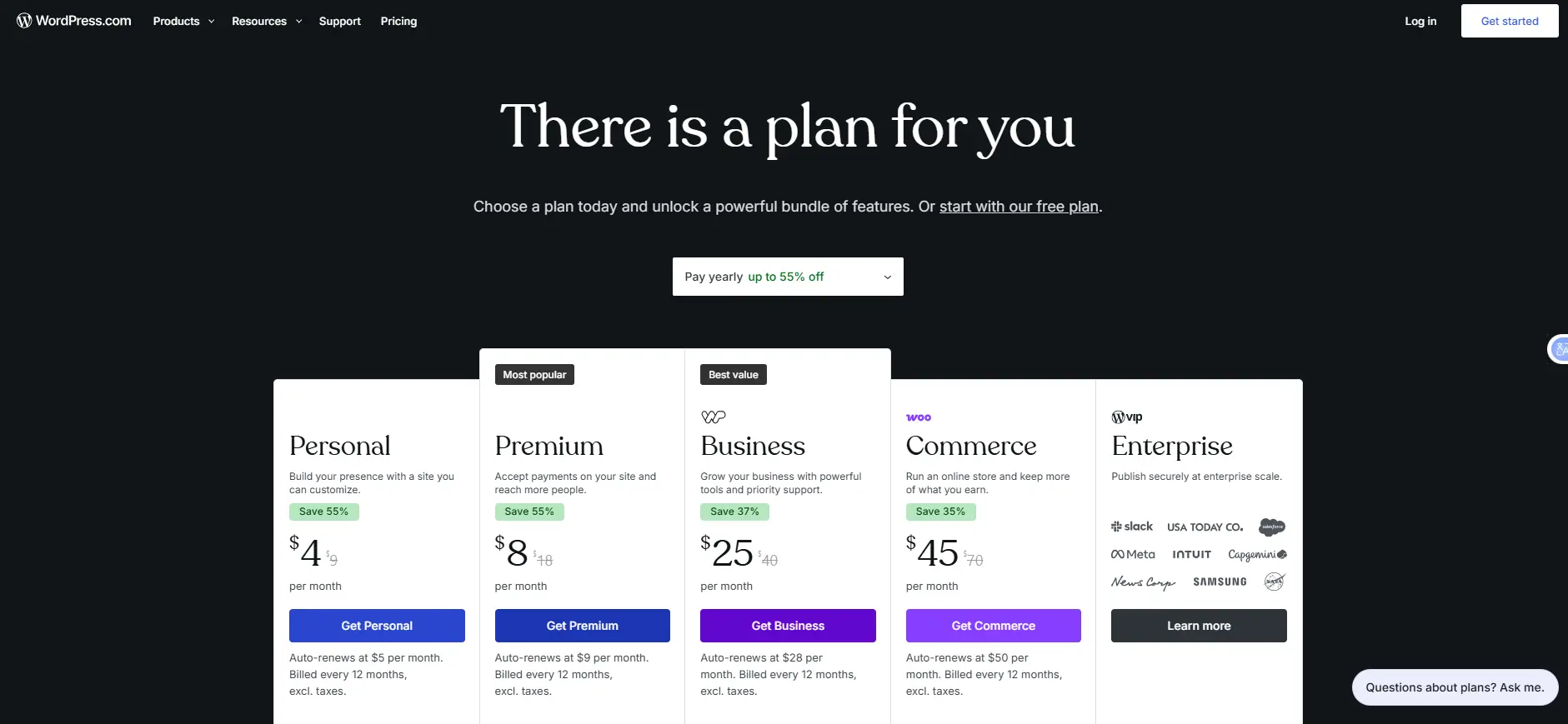
It offers Free, Personal, Premium, Business, and Commerce plans. Enterprise hosting is available through WordPress VIP at custom prices.
| Plan | Monthly billing | Yearly billing | Storage | Main features |
| Free | $0 | $0 | 1 GB | Free subdomain, ads, no plugins |
| Personal | $9/mo | $4/mo | 6 GB | Custom domain, no ads, plugins |
| Premium | $18/mo | $8/mo | 13 GB | Premium themes, site stats, payment buttons |
| Business | $40/mo | $25/mo | 50 GB | Staging, backups, SFTP/SSH, priority support |
| Commerce | $70/mo | $45/mo | 50 GB | Business features and online store tools |
Two- and three-year plans can further lower the monthly cost. For example, Personal costs $2.75 per month on a three-year plan. Annual and multi-year plans also include a free custom domain for the first year.
WordPress.org. The software is free, but you need to pay for hosting and a domain. A basic self-hosted website can cost around $50 to $100 per year.
- Domain: A .com domain usually costs $10 to $15 per year, depending on the provider and extension.
- Hosting: Basic shared hosting starts at around $3 per month. Premium managed hosting can cost $100 or more per month.
- Premium themes and plugins: These are optional. Some are free, while others cost hundreds of dollars per year.
Which is cheaper?
WordPress.com Personal costs $48 per year with annual billing, which is close to the cost of a basic self-hosted website. However, WordPress.com includes hosting, updates, and security management. With WordPress.org, you handle more of these tasks yourself.
You should also consider the time needed to maintain your site. One estimate puts self-hosted WordPress maintenance at 1 to 2 hours per month.
2) Ease of use
WordPress.com is easier to set up, while WordPress.org requires more technical work.
WordPress.com: Sign up, choose a plan and build your site. Hosting, SSL, a global content delivery network (CDN) and core updates are included, even on the free plan. Paid plans add features such as an AI website builder.
WordPress.org: You need to:
- Buy a domain and hosting.
- Install WordPress through your hosting provider.
- Check that your host meets WordPress’s requirements.
- Set up backups, security, caching, and updates.
You do not need coding skills, but you must manage updates, backups, and common errors yourself.
3) Hosting
WordPress.com includes hosting in every plan. With WordPress.org, you choose your host and pay for it separately.
WordPress.com: Your site runs on WordPress.com’s servers, so you do not need to configure hosting or manage server migrations. However, you cannot move to another host while keeping the site on WordPress.com. Developer tools such as SFTP/SSH, WP-CLI, Git, and staging are available on Business and Commerce plans. Large organizations can use WordPress VIP.
WordPress.org: You can choose from several hosting options:
- Shared hosting: The cheapest option, starting at around USh 8,905.00 per month from Truehost, with server resources shared among websites.
- Managed WordPress hosting: The host handles updates, backups, caching and security scans. Some providers restrict certain plugins.
- VPS or dedicated hosting: Offers more control and resources but costs more and requires technical management.
4) Speed and performance
WordPress.com provides managed hosting with a global content delivery network (CDN) on every plan. WordPress.org performance depends on your host and how you manage your site.
WordPress.com: Built-in caching and optimization reduce the need for extra tools. However, some caching, security, and backup plugins may be restricted.
WordPress.org: Your site’s speed depends on:
- Hosting quality: Server performance, storage, and available resources.
- Software versions: WordPress recommends PHP 8.3 or newer.
- Caching and CDN: These help pages load faster.
- Themes and plugins: Heavy designs and too many plugins can slow your site.
A well-optimized WordPress.org site can outperform WordPress.com, but poor hosting and maintenance can hurt performance.
WordPress.com is the simpler option if you want good speed without managing technical settings.
5) Security
WordPress.com handles most security tasks, while WordPress.org requires you and your host to manage them.
WordPress.com: All plans include DDoS and brute-force protection, malware detection and removal, a web application firewall, and core updates. Business and Commerce also include real-time backups and one-click restores.
WordPress.org: Most security risks come from plugins and themes rather than WordPress core. Patchstack reported 11,334 new vulnerabilities in 2025, a 42% increase from the previous year, with only six affecting core.
To protect your site:
- Choose hosting with firewalls and malware scanning.
- Update WordPress, themes, and plugins regularly.
- Keep backups off-server and test restores.
- Use strong passwords and two-factor authentication.
- Monitor vulnerabilities with tools such as Wordfence or Patchstack.
6) Features
WordPress.com limits some features by plan, while WordPress.org gives you more freedom to customize your site.
WordPress.com:
- Free: 1 GB storage, a WordPress.com subdomain and ads.
- Personal: Custom domain, no ads, plugins and basic design tools.
- Premium: Premium themes, advanced stats and payment buttons.
- Business: Staging, backups, developer tools and priority support.
- Commerce: Business features plus integrated WooCommerce tools.
WordPress.com payment fees range from 10% on Free to 0% on Commerce. Card processing fees still apply.
WordPress.org: You can add memberships, courses, custom payment gateways, multisite networks, and other features using plugins or custom code. However, you may need extra tools to match WordPress.com’s built-in features.
Choose WordPress.org for custom features and integrations, or WordPress.com if its built-in tools meet your needs.
7) Plugins
Since April 2, 2026, all paid WordPress.com plans support plugins, including Personal. The Free plan does not.
WordPress.com: Paid plans allow access to more than 50,000 plugins from the WordPress.org directory, including custom plugin uploads. However, some plugins are restricted because WordPress.com already handles tasks such as caching, security, and backups (WordPress.com).
WordPress.org: You can install free, paid, or custom plugins without platform restrictions. However, you must manage compatibility, updates and conflicts.
Before installing a plugin, check its update history, ratings, compatibility and developer support. Avoid plugins that duplicate existing features, as plugins are a major source of WordPress security vulnerabilities.
8) Themes
WordPress.com limits theme options by plan, while WordPress.org lets you install any compatible theme.
WordPress.com:
- Free: Free themes only.
- Personal: Premium theme options, custom CSS and font uploads.
- Premium: Access to all premium themes.
- Business and Commerce: Upload third-party or custom themes.
WordPress.org: You can install free or paid themes, customize them or build your own. The Site Editor also lets you adjust layouts visually without coding.
Choose WordPress.com if its theme library meets your needs. If you want a specific third-party theme or a fully custom design, WordPress.org offers more freedom.
9) Support
WordPress.com provides official support, while WordPress.org users rely on their hosting provider, community forums or paid help.
WordPress.com: Paid plans include support from its team, with 24/7 priority support on Business and Commerce. Free users rely mainly on community forums. Help with third-party plugins and themes may be limited.
WordPress.org: Support comes from:
- Community forums: Free advice and documentation.
- Hosting providers: Chat or ticket support, depending on the plan.
- Theme and plugin developers: Support for their products.
- Freelancers or agencies: Help with complex technical issues.
Check your host’s support quality before buying, since it may be your main source of technical assistance.
10) Site ownership
You own your content on both platforms, but moving a website may require extra work.
WordPress.com: You can export posts, pages and comments, then import them into WordPress.org. Images may need to be copied over, while themes, plugin settings, forms, and redirects may require separate setup. Tools such as Jetpack can help transfer subscribers and stats.
WordPress.org: You control your website’s files and database and decide where they are hosted. This gives you more control over backups, migrations, and customization.
You can also move a self-hosted site to WordPress.com, which offers assisted migration.
The main difference is control: WordPress.org gives you more freedom over your site and hosting. WordPress.com operates within its plans and platform rules.
On the Free plan, revenue from ads WordPress.com displays on your site goes to Automattic, not you.
Which One Should You Choose?
Choose WordPress.com if you want managed hosting, support and predictable costs. Choose WordPress.org if you need more control over hosting, custom features, plugins, themes and monetization. The main difference is how much control and maintenance you want.
WordPress.com works well for blogs, portfolios and simple business websites. WordPress.org is better for custom online stores, membership sites, course platforms and projects that need more flexibility.
Both let you export your content if you decide to move later.
Ready to self-host? Truehost Uganda offers WordPress hosting with a one-click installer, free SSL, daily backups, free migrations and 24/7 live chat support.
WordPress.com vs WordPress.org FAQs
Is WordPress.com or WordPress.org better?
WordPress.com is best for people who want managed hosting and less maintenance. WordPress.org suits those who want more control, custom features and freedom to monetize.
Are WordPress.com and WordPress.org owned by the same company?
No. WordPress.com is run by Automattic, a for-profit company. WordPress.org provides free, open-source WordPress software, while the WordPress Foundation owns the WordPress trademark.
Is WordPress.com just the free version of WordPress?
No. WordPress.com offers free and paid plans. The Free plan includes 1 GB of storage, a WordPress.com subdomain, ads, and no plugin installation. Paid plans offer more features and managed hosting.
Is WordPress.org really free?
Yes, the software is free. However, you must pay for hosting and a domain. Premium themes and plugins may also cost extra. A basic website can cost around 50–100 per year.
Which is cheaper long-term?
Basic setups cost roughly the same: WordPress.com Personal is $48 per year, while basic WordPress.org hosting can cost 50–100 per year. Self-hosting may cost less if you handle maintenance yourself. WordPress.com may offer better value if you want managed security, backups and less work.
Can I install plugins on WordPress.com?
Yes. All paid plans have supported plugin installation, but the Free plan does not. Some plugins are restricted because WordPress.com already handles their functions.
Do I need coding skills for WordPress.org?
No. You can build a website without coding, but you must manage updates, backups and other routine tasks. Coding is mainly needed for custom features or theme changes.
Can I switch between WordPress.com and WordPress.org?
Yes. You can export your content from one platform and import it into the other. However, themes, plugin settings and some site features may need to be set up again. You may also need to transfer images, subscribers and stats or configure redirects.
