Email forwarding and email hosting both let you use a custom domain address such as [email protected]. They serve different needs.
Email forwarding sends messages from your domain address to an inbox you already use, such as Gmail or Outlook. It works well for simple aliases like sales@, info@, or billing@.
It fits when you do not need separate mailboxes.
Email hosting creates real mailboxes on your domain. You can send, receive, store, and access email through webmail, IMAP, POP3, or an email app.
That makes it suitable for daily business communication.
The email forwarding vs email hosting decision comes down to one question. How much does your business depend on email?
Short opening answer: Choose email forwarding if you only need to receive messages at branded addresses and read them in an existing inbox. Choose email hosting if you need professional mailboxes, storage, outgoing sending from your domain, better control, and room for a team to grow.
Next, you will see both options side by side. Then we look at cost, trust, deliverability, storage, and security.
Email Forwarding vs Email Hosting: Comparison Table
Start with the big picture. This table shows where the two options differ.
| Feature | Email Forwarding | Email Hosting |
|---|---|---|
| Main purpose | Routes incoming email to another inbox | Hosts full business mailboxes |
| Custom domain address | Yes | Yes |
| Receive email | Yes | Yes |
| Send from the custom domain | Limited; depends on the setup | Yes, directly from the hosted mailbox |
| Separate mailbox per user | No | Yes |
| Webmail access | No | Yes |
| IMAP / POP3 access | No | Yes |
| Email storage | No dedicated mailbox storage | Yes, storage is included per mailbox |
| Team mailboxes | Not ideal | Suitable for named staff and departments |
| Spam and security controls | Basic or dependent on destination inbox | Anti-spam, anti-virus, admin controls, and mailbox management |
| Best for | Aliases, simple routing, solo users | Businesses that email customers daily |
The rest of this guide explains each row in plain terms.
How Email Forwarding Works
Forwarding is a simple relay. Your domain passes mail along and keeps nothing.
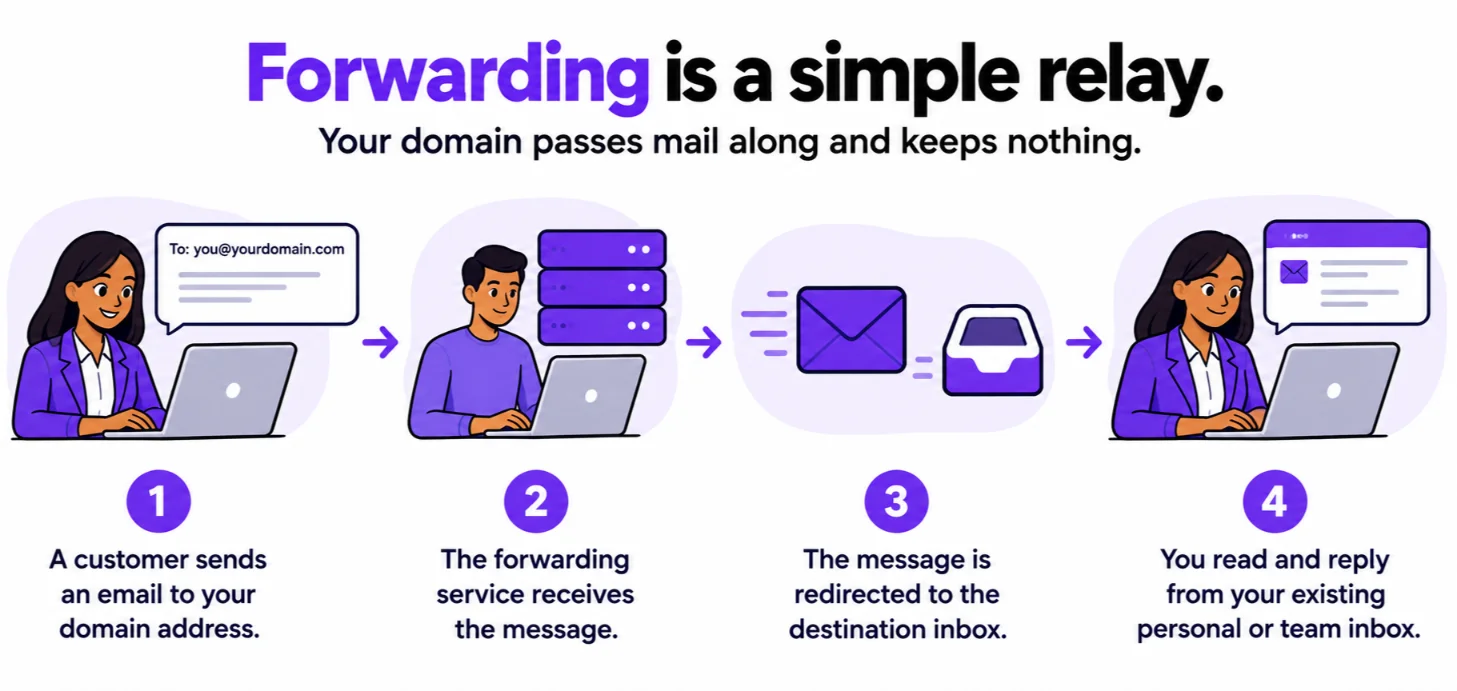
- A customer sends an email to your domain address.
- The forwarding service receives the message.
- The message is redirected to the destination inbox.
- You read and reply from your existing personal or team inbox.
That last step is important. It is where most of the trade-offs begin.
What Email Forwarding Is Good For
Forwarding does a few jobs well.
info@,sales@,support@, andbilling@aliases- A one-person business that wants a professional-looking address without managing another inbox
- Routing inquiries to a Gmail, Outlook, or other existing mailbox
- Temporary or low-volume communication needs
If this list matches your needs today, forwarding may be all you need.
Limitations of Email Forwarding
The limits show up once you start replying and growing.
- No dedicated hosted mailbox
- Replying from the custom domain may require extra configuration
- Forwarded mail can fail SPF, DKIM, or DMARC checks because an intermediary server handles delivery
- No separate storage, webmail interface, or per-user mailbox management
The authentication point deserves a closer look.
SPF checks the server that delivers a message. A forwarding server is a different server, so SPF often fails after a forward.
DKIM holds up better. Its signature travels with the message and breaks only if something edits the message on the way.
DMARC passes when either SPF or DKIM passes and aligns with your From domain. So a forwarded message can still pass, but the result is less predictable.
Fixes such as SRS and ARC exist. They depend on your forwarding provider, not on you.
How Email Hosting Works
Hosting changes the path. Mail goes straight to a mailbox on your domain.
- The domain’s MX records point to the email hosting provider.
- Incoming mail is delivered directly to the hosted mailbox.
- You send and receive email from the same professional address.
- Mail is stored on the provider’s servers and can be accessed through webmail, IMAP, or POP3.
There is no middle hop. Your address, inbox, and sent mail all live in one place.
What Email Hosting Includes
A hosted plan bundles several tools. Here is what you typically get.
- Individual mailboxes such as
[email protected] - Webmail access
- IMAP and POP3 support for Outlook, Apple Mail, Gmail, and other clients
- SMTP for sending email
- Mailbox storage
- Admin controls for users, aliases, forwarders, autoresponders, and signatures
- Anti-spam and security features
SMTP also helps beyond daily email. If you run a website, store, or N8n workflow on a Truehost VPS, those tools can send through your hosted mailbox settings.
What Email Hosting Is Good For
Email is not going away.
Hosting suits the businesses that add to that number.
- Businesses that communicate with customers daily
- Teams that need separate mailboxes for staff or departments
- Companies sending quotations, invoices, proposals, and customer support replies
- Organizations that need email storage, access controls, and a professional sending setup
1) Cost
Price is usually the first question. The honest answer has two sides.
Cost of Email Forwarding
Forwarding is the budget route. You pay for routing, not for mailboxes.
- Often cheaper because it only routes incoming messages
- May be included with a domain or hosting package
- Suitable for a new business testing demand or managing a few aliases
- Lower cost comes with limited mailbox features and sending control
Cost of Email Hosting
Hosting costs more because you get more.
- Costs more because it provides mailboxes, storage, sending infrastructure, security, and administration tools
- Our email plans include mailboxes, aliases, forwarding rules, anti-spam, anti-virus, drive storage, and collaboration tools
- Plans start from about $1.05 ( ~UGX 4364.07)per month when billed triennially
Prices change from time to time. Check the current plan page before you buy.
Which Is More Cost-Effective?
It depends on what a missed or ignored email costs you.
- Forwarding is cost-effective for receiving occasional inquiries only.
- Hosting is more cost-effective when missed inquiries, poor deliverability, or unprofessional sending would cost more than the monthly email fee.
Do the math with your own numbers. If one lost customer is worth more than a year of email fees, hosting pays for itself.
Want to see real prices? Compare our Truehost Workplace email plans and pick the tier that fits your team.
2) Professionalism and Brand Trust
Customers judge you by the address they see. They also judge the address that replies.
Email Forwarding and Brand Consistency
- You can receive mail at
[email protected] - Replies may come from a personal Gmail address unless an alias is configured
- This creates a mismatch between the address customers see and the address sending the reply
Some setups let you reply as your domain address. They need extra configuration, and results vary.
Email Hosting and Brand Consistency
- Staff send directly from
[email protected] - The brand remains consistent across inquiries, invoices, proposals, and support replies
- Better suited to businesses that want customers to recognize and trust their email address
One address in, the same address out. That consistency builds trust over time.
3) Deliverability, SPF, DKIM, and DMARC
Deliverability decides whether your message lands in the inbox or the spam folder. Authentication is a big part of that.
Google’s email sender guidelines set the baseline. All senders to Gmail need SPF or DKIM. Bulk senders of 5,000 or more messages a day need SPF, DKIM, and DMARC.
Google also recommends that every sender set up all three. Most small businesses will not hit the bulk threshold, but the same signals shape how Gmail treats your mail.
Why Forwarding Can Affect Deliverability
- Forwarding adds an intermediary server to the delivery path
- This can affect SPF alignment, break DKIM signatures, and complicate DMARC evaluation
- Forwarded messages may be marked as spam or fail authentication checks
To be fair, this is a risk, not a certainty. A clean forward with an intact DKIM signature can still pass.
Why Hosted Email Supports Better Deliverability
- Incoming and outgoing mail remain within a controlled hosting environment
- You can publish SPF, DKIM, and DMARC records for your domain
- Direct sending from hosted mailboxes supports better inbox placement and sender reputation
Hosting does not guarantee inbox placement. You still need correct DNS records and good sending habits.
4) Storage, Access, and Team Collaboration
This is where the gap is widest. Forwarding stores nothing. Hosting is built around storage and access.
| Need | Email Forwarding | Email Hosting |
|---|---|---|
| Store old emails in a dedicated mailbox | No | Yes |
| Access mail through webmail | No | Yes |
| Use Outlook, Apple Mail, or mobile apps through IMAP/POP3 | No | Yes |
| Give each employee a mailbox | No | Yes |
| Manage aliases and forwarders from an admin panel | Limited | Yes |
| Use drive storage and productivity tools | No | Available with Truehost Workplace email plans |
If you plan to add staff, this table is the strongest argument for hosting.
See what each mailbox includes on our Truehost Workplace email page.
5) Security and Control
Email carries invoices, orders, and customer records. Security is crucial more than most people expect.
The FBI’s 2024 Internet Crime Report logged 21,442 business email compromise complaints and $2.77 billion in losses.
Those figures describe fraud in general. They show why control over your mailboxes counts.
Security With Email Forwarding
- Messages pass through an additional service before reaching the final inbox
- Limited visibility into what happens during the handoff
- Harder to troubleshoot missing or delayed messages
Security With Email Hosting
- More direct control over mailboxes, passwords, spam filtering, forwarding rules, aliases, autoresponders, and user access
- Our professional email includes an administration panel for creating emails, autoresponders, signatures, forwarders, aliases, and moderation policies
- Better suited to businesses handling customer records, invoices, orders, and confidential communication
Control also means responsibility. Use strong passwords and turn on two-factor authentication where it is offered.
When to Choose Email Forwarding
Forwarding is the right call in a few clear cases.
- You are a solo entrepreneur and only need to receive inquiries
- You want branded aliases such as
hello@orsupport@without creating new mailboxes - You already use Gmail, Outlook, or another inbox and do not want to change your workflow
- Email volume is low and the address is mainly for receiving messages
- You want the lowest-cost starting point
There is no shame in starting small. Just know the limits before you grow.
When to Choose Email Hosting
Hosting makes sense once email becomes part of how you earn.
- You need to send and receive email from your business domain
- You want separate mailboxes for staff, departments, or branches
- You handle customer inquiries, quotations, invoices, support requests, or supplier communication
- You need reliable storage, webmail, IMAP/POP3 access, and administrative control
- You want better control over deliverability and email security
- Your business is growing and needs a professional communication system
If you ticked two or more of these, hosting is worth a serious look.
Final Verdict: Email Forwarding vs Email Hosting
Email forwarding is the simpler and cheaper option for receiving mail at branded domain addresses. It works best for aliases, solo businesses, and low-volume communication.
Email hosting is the better long-term choice for most Ugandan businesses that use email to win and serve customers. It provides real mailboxes, storage, direct sending from the business domain, webmail and app access, security controls, and room to add team members.
Here is the short version by situation.
| Business situation | Better option |
|---|---|
| New solo business testing demand | Email forwarding |
| Freelancer receiving inquiries only | Email forwarding |
| Business replying to customers from its domain | Email hosting |
| Team with multiple staff mailboxes | Email hosting |
| Business sending invoices, quotations, or proposals | Email hosting |
| Business concerned about deliverability and brand trust | Email hosting |
You do not have to decide for life. You can start with forwarding and move to hosting when replies, invoices, or staff arrive.
Get Professional Email for Your Business
We at Truehost provide business email, domains, web hosting, and support for businesses at different growth stages.
Our professional email supports @yourdomain.com addresses, anti-spam protection, storage, and integrations with Gmail and Outlook.
Open a domain with us, choose a plan, and set up your first mailbox today. Start with our Truehost Workplace email plans.
Email Forwarding vs Email Hosting FAQs
Can I use email forwarding and email hosting together?
Yes. Many businesses host named mailboxes for staff and forward shared aliases like sales@ into them. Our plans include aliases and forwarding rules, so you can set this up in one place.
Does email forwarding give me a professional email address?
Partly. Customers can write to your domain address. Your replies may still come from a personal inbox unless you configure an alias.
Can I forward business email to Gmail?
Yes. This is the most common forwarding setup. Keep in mind that forwarding can affect SPF checks, and your reply setup needs extra configuration.
Is email hosting worth it for a small business in Uganda?
It is if you reply to customers or send invoices and quotations. Plans start from about $1.05 per month when billed triennially.
If you only receive occasional inquiries, forwarding may be enough for now.
Can I move from email forwarding to email hosting later?
Yes. Create your hosted mailboxes first. Then point your domain’s MX records to the hosting provider.
DNS changes take time to spread, so plan the switch for a quiet period. Old messages stay in the inbox where you read them.
