Most landing pages don’t fail because they look bad. They fail because visitors can’t quickly tell what you offer, whether it’s for them, or what to do next.
This guide shows you how to create a landing page that produces relevant enquiries. Not just traffic. Not just clicks.
An enquiry is any action where a visitor asks to talk to you:
- A form submission
- A quote request
- A callback request
- A booking
- A WhatsApp message
- A consultation request
This guide is for service businesses, local companies, consultants, agencies, and product-based businesses that want more qualified leads.
Here is the approach. You will choose the enquiry action, build the page section by section, write clear copy, add proof, match the traffic source, and test the full enquiry journey.
By the end, you will have a practical blueprint to create or improve an enquiry-focused landing page.
How to Create a Landing Page That Gets Enquiries
Let’s start with what ‘getting enquiries’ means.
1) What Makes a Landing Page Get Enquiries
Traffic, clicks, and enquiries are three different things.
- Traffic is people arriving on your page.
- Clicks are people tapping a button or link.
- Enquiries are people asking to speak with you.
Only the last one pays your bills.
A qualified enquiry comes from someone who is relevant, reachable, and potentially able to buy. A wrong-fit contact is not a win. It costs you time.
The core rule is simple: one visitor type, one offer, one primary enquiry action.
Why? Because a landing page works best when it asks for a single decision. Every extra service, menu link, or company story gives visitors another reason to leave.
Here is a quick comparison. This is an illustration, not a case study.
- Focused page: “Emergency plumbing in Kampala. Request a callback in 2 minutes.” One service, one audience, one button.
- Distracting page: A homepage with plumbing, solar, tiling, a blog, a careers link, and three different contact buttons.
The first page asks one question. The second asks ten.
For context, Unbounce’s 2024 benchmark report, based on over 57 million conversions, 41,000 landing pages, and 464 million pageviews, puts the median landing page conversion rate at 6.6% across all industries. Treat that as a reference point, not a promise. Your industry, offer, and traffic source will change the number.
Next, decide what that one action is.
2) Decide the Enquiry You Want Before Designing
Choose the exact action before you open a design tool.
Common options include:
- Request a quote
- Book a consultation
- Get a callback
- Send a WhatsApp message
- Make a booking
Pick based on four things:
- The service. Custom work needs a quote. Standard work can be booked directly.
- The price point. Higher prices usually need a conversation first.
- The urgency. Urgent needs suit a call or a WhatsApp message.
- The buyer’s decision process. Some buyers compare. Others decide fast.
The action should match the visitor’s level of readiness. Someone who is only researching won’t book a meeting. Someone with a burst pipe won’t fill in a long form.
Write a one-sentence page brief before you design anything:
This page helps [audience] get [specific outcome] through [offer] so they can [enquiry action].
If you can’t fill in that sentence, the page isn’t ready to build.
Avoid vague buttons. “Submit,” “Learn more,” and “Contact us” tell visitors nothing. Use a clearer action wherever you can, such as “Request My Free Quote.”
Now you know the goal. Let’s build the page.
3) The Enquiry Landing Page Blueprint
This section is the practical core of the article.
Each section of your page has one job: move the visitor closer to making an enquiry.
Here is the recommended order:
| Page section | Job it does | What to include |
|---|---|---|
| Hero | Confirm relevance immediately | Specific headline, supporting line, primary enquiry button, trust cue |
| Problem/outcome | Show understanding of the visitor | The visitor’s problem and the result they want |
| Offer details | Explain what they receive | Scope, inclusions, process, timeline, availability, pricing approach |
| Proof | Reduce risk | Reviews, results, photos, credentials, client names, service area |
| Objection handling | Remove hesitation | FAQs, guarantees, response time, privacy, what happens next |
| Enquiry block | Make contacting easy | Short form, alternative contact method, response expectation |
| Final CTA | Capture ready visitors | Repeat the offer and action clearly |
You don’t need every section. If a section repeats what another already says, cut it.
Keep only the sections that answer your visitor’s main questions.
Let’s go through them, starting at the top.
4) Write a Hero Section That Earns the Enquiry
The first screen has two jobs. It must answer “Is this for me?” and “What do I do next?”
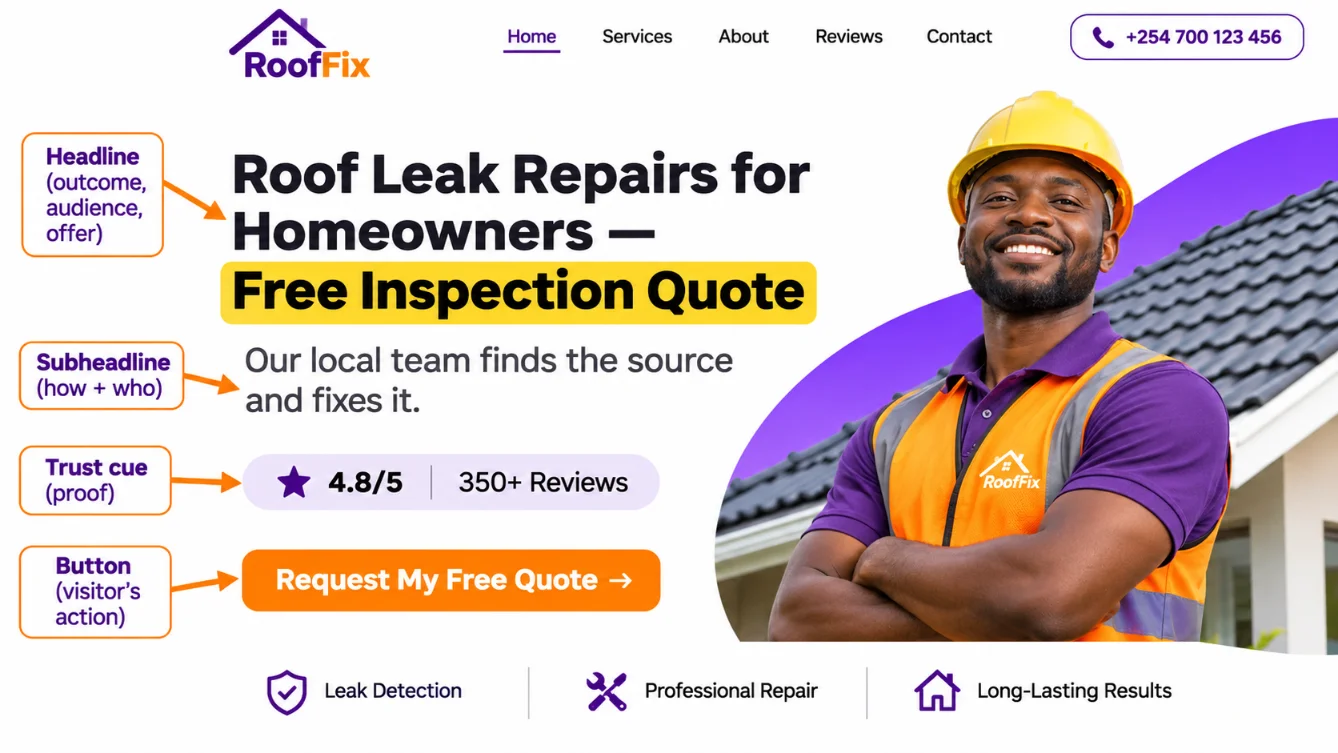
Use this headline formula:
[Specific outcome] for [audience] — [differentiator or offer]
Use this for the subheadline: explain how you deliver the outcome and who it is for.
Write the button around the visitor’s action:
- “Request My Free Quote”
- “Book a Consultation”
- “Get a Callback”
Then add one trust cue above the fold. Pick the strongest one you can prove:
- Review score
- Years in business
- Response time
- A recognizable client
- A certification
- A measurable result
Here are three illustrative hero examples. Swap in your own facts.
Local service (roof repair)
- Headline: Roof Leak Repairs for Homeowners — Free Inspection Quote
- Subheadline: Our local team finds the source and fixes it.
- Button: Request My Free Quote
- Trust cue: [Your review score and number of reviews]
Consultant (accounting)
- Headline: Tax Filing Support for Small Businesses — Fixed-Fee Packages
- Subheadline: Get your returns filed correctly, with a named accountant.
- Button: Book a Consultation
- Trust cue: [Your years in practice or credential]
Product business (office furniture)
- Headline: Ergonomic Office Chairs for Growing Teams — Bulk Pricing Available
- Subheadline: Tell us your team size and we’ll send a tailored quote.
- Button: Get a Bulk Quote
- Trust cue: [Your delivery time or client name]
Once the hero works, explain your offer clearly.
5) Explain the Offer Clearly
Describe your service in the visitor’s words. Not your industry’s jargon.
Say “we fix leaking roofs,” not “comprehensive building envelope remediation.”
Then be clear about three things:
- What is included
- What is excluded
- What happens after the enquiry
Clarity builds trust. Hidden limits destroy it.
Pricing is a judgment call. Here is how to choose:
- Exact price: Works for standard, repeatable offers.
- Price range: Works when scope varies but you can set expectations.
- “From” pricing: Works when there is a clear starting package.
- No pricing: Works for custom work, but explain how pricing is decided.
Also show availability, service area, delivery time, or booking process. Keep it short. A single line is often enough.
Use this simple structure for each service:
- What it is. One plain sentence.
- Who it is for. Name the audience.
- What the visitor receives. List the deliverables.
- What happens next. State the next step.
Now you need to prove you can deliver.
6) Add Proof That Answers “Why You?”
Proof should be specific to the offer. Generic company claims don’t persuade anyone.
Useful types of proof include:
- Customer reviews
- Before-and-after examples
- Case results
- Photos of your work
- Credentials and awards
- Client names
- Local presence
Write each proof example in three parts:
- The customer’s situation
- What you did
- The outcome
Use only real, permitted examples from your own clients.
Place proof near the enquiry form and the final CTA. That is where hesitation is highest.
Be careful with big claims. Words like “best,” “guaranteed results,” and “number one” need evidence. If you can’t substantiate them, leave them out.
Even with strong proof, some visitors still hesitate. Let’s deal with that.
7) Handle the Objections That Stop Enquiries
Visitors often want to enquire but hold back. Common reasons are:
- Cost
- Trust
- Timing
- Complexity
- Fear of being pressured
Find your real objections by reviewing:
- Sales calls
- Customer questions
- Reviews
- Previous enquiries
Then answer them directly in your copy or FAQ section.
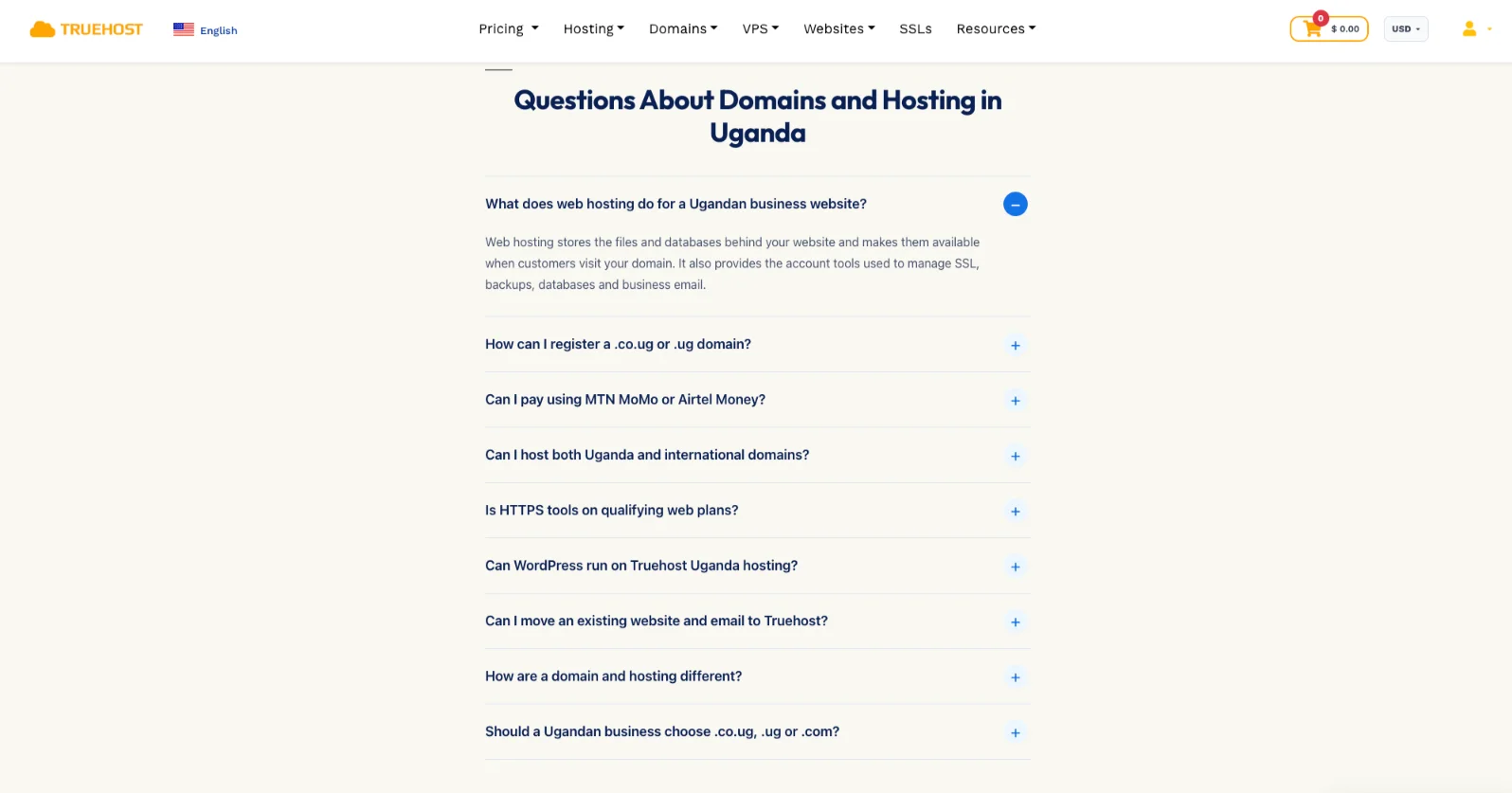
Good objection-based FAQs include:
- How much does it cost?
- How long does it take?
- Do you serve my area?
- What happens after I enquire?
Also reassure visitors about privacy, response time, and the next step. But don’t overpromise.
“We reply within one business day” is honest if you can keep it. “Instant replies, always” is risky.
That brings us to the enquiry form itself.
8) Build an Enquiry Form People Complete
Form length should match the value and complexity of your offer. A quick callback needs fewer fields than a custom project quote.
Keep only the fields you need to respond or qualify:
- Name
- Phone or email
- One contextual question
Replace vague labels with useful questions. Instead of “Message,” ask “What do you need help with?”
Place reassurance beside the submit button:
- Response time
- No obligation
- Privacy
- “We’ll reply within one business day”
Set up a confirmation message or thank-you page. The visitor should know the enquiry was received and what happens next.
Avoid extra fields that add friction without improving lead quality. Every unneeded field is a reason to quit.
Some visitors would rather not use a form at all. Give them another route.
9) Offer the Right Contact Options
Make your primary enquiry method obvious. Secondary options can support different preferences.
Here is when each option works best:
- Form: Best when you need details before replying.
- Phone call: Best for urgent or complex needs.
- WhatsApp: Best for quick, informal conversations.
- Booking link: Best for prospects who can pick a time themselves.
- Email: Best for detailed or document-based requests.
Don’t give visitors too many equal choices. Too many options can delay action.
Place a phone number, WhatsApp button, or booking link where it supports the main CTA without competing with it. A smaller secondary link near the form often works well.
Click-to-call and WhatsApp are especially useful for local or urgent services. People searching on a phone often want an answer now.
Contact options only work if the visitor arrives with the right expectation. That depends on where they came from.
10) Match the Landing Page to Its Traffic Source
A visitor arrives with an expectation. Your page must continue the message from the ad, email, social post, or search result that brought them.
Align four things with the source campaign:
- Headline
- Offer
- Audience
- CTA
Sending campaign traffic to a generic homepage weakens results. Visitors must hunt for what they clicked on.
Create separate pages when the message differs by:
- Service
- Audience
- Location
- Offer
Here is an illustrative match:
- Google Ads headline: “Same-Day AC Repair in Kampala”
- Landing page headline: “Same-Day AC Repair in Kampala — Get a Callback in Minutes”
- CTA: “Get a Callback”
Same words. Same promise. No confusion.
Traffic source also affects results. One analysis of Unbounce’s 2024 data reports paid search at 10.9 percent, paid social at 12.0 percent, and email at 19.3 percent. Warmer audiences convert better, so compare yourself against the right channel.
Next, make sure the page works well on a phone.
11) Make the Page Fast and Mobile-First
Most visitors will first see your page on a phone. One roundup of Unbounce data notes that 83% of landing page visits are on mobile, though desktop converts 8% better.
So mobile can’t be an afterthought.
Place the enquiry button where it’s visible without scrolling.
Cover these mobile essentials:
- Readable text
- Sufficient contrast
- Tap-friendly buttons
- Simple navigation
- A short form
Some things quietly kill enquiries:
- Slow, oversized images
- Heavy scripts
- Pop-ups
- Unnecessary animations
Test on a normal mobile connection. Not only on fast office Wi-Fi.
Hosting matters here too. Slow servers slow every page. We at Truehost offer VPS plans for pages that need more speed and control, and dedicated servers for high-traffic campaigns. You can open a domain and hosting with us.
Speed is only one part of a pre-launch check. Let’s cover the rest.
12) Test the Full Enquiry Journey Before Launch
Don’t launch until you’ve tested the whole journey. Use this checklist:
- Open the page from the actual campaign link, on a phone.
- Submit a test enquiry.
- Confirm it reaches the correct inbox, CRM, WhatsApp number, or internal team.
- Check who responds, how quickly, and what the follow-up message says.
- Check every button and form field.
- Check every error state and the confirmation screen.
- Check the mobile layout.
Finally, track completed enquiries and lead quality. These matter far more than visits or clicks alone.
Once the page is live, keep improving it. You don’t need a full redesign.
13) Improve Enquiries Without Redesigning Everything
Diagnose the most likely problem based on your results.
Traffic is high but enquiries are low. Try one of these:
- Clarify the headline
- Simplify the form
- Strengthen proof
- Make the CTA more specific
Enquiries are high but quality is poor. Try one of these:
- Clarify who the offer is for
- Add qualification questions
- State exclusions
Mobile visitors leave quickly. Check these:
- Speed
- Layout
- Clarity
- Whether the enquiry action is visible early
Then test one meaningful change at a time. Good candidates are:
- Headline
- CTA wording
- Form length
- Proof placement
- Offer clarity
Review results over a meaningful period. Don’t judge a page after a few visits. Small samples give misleading answers.
Now let’s put everything together in a template you can use.
Copy-and-Paste Enquiry Page Template
Use this ready-made structure as your starting point.
text
Headline:
[Specific outcome] for [audience] — [key benefit or offer]

Supporting line:
Explain how you deliver the outcome and who it is for.

Primary CTA:
[Request a Quote / Book a Consultation / Get a Callback]

Three benefit bullets:
- Benefit 1
- Benefit 2
- Benefit 3

Proof block:
Add a review, result, photo, credential, or short customer example.

How it works:
1. Step one
2. Step two
3. Step three

Objection-handling FAQ:
- Question 1
- Question 2
- Question 3

Enquiry form:
- Name
- Phone or email
- What do you need help with?

Final CTA:
Repeat the offer and tell the visitor exactly what to do next.
Don’t copy it word for word. Adjust it to your audience, offer, and enquiry action.
You now know how to create a landing page that earns real enquiries. Start with one audience, one offer, and one action. Then build, test, and improve.
Ready to put it live? Get your domain and hosting set up with us.
How to Create a Landing Page FAQs
How long should an enquiry landing page be?
Use only the length needed to help a relevant visitor make an informed enquiry. Simple or urgent offers may need a shorter page. Higher-value or considered services may need more proof, process, and objection handling.
Stop adding content when each section answers a distinct hesitation.
Should I use my homepage as a landing page?
Usually no. A homepage serves several visitor types and goals. An enquiry landing page should focus on one audience, one offer, and one enquiry action.
Use a dedicated page for campaigns, specific services, or measurable lead generation.
Should I offer a phone call, form, WhatsApp, or booking link?
Offer the option that matches how your best customers prefer to enquire. But make one the primary action.
A form works when you need details first. Calls suit urgent or complex needs. WhatsApp suits quick conversations. Booking links suit prospects who can choose a time themselves.
How do I know whether my landing page is working?
Measure completed enquiries and compare them with relevant visitors.
Also assess enquiry quality. Check whether leads match your service area, budget, timeline, and ideal customer profile.
How quickly should I respond to an enquiry?
Respond as quickly as you can reliably sustain.
If immediate replies are not possible, state an honest response time on the page. Then assign someone to own follow-up.
What if I get enquiries but no sales?
Review whether the page attracts the right audience. Check whether the form captures enough context. Check whether follow-up explains the next step.
If the leads are unsuitable, make the offer, pricing range, service area, or ideal customer more specific.
Can I use the same landing page for different services?
Only if the services share the same audience, problem, offer, and enquiry action.
If visitors would need to choose between very different services, prices, or outcomes, create separate pages.
