To calculate your website’s bandwidth, you need three figures:
- Your average page size
- Your average monthly pageviews
- The size and frequency of any downloadable files you offer
Multiply them. Add a buffer. The result is the monthly transfer your hosting plan must support.
That is the simplest way to size your website bandwidth needs without guessing.
Gather these before you start:
- Average page size (page weight): the total data transferred when one page loads
- Average monthly pageviews
- Average pages per visitor (only needed if you know visitors but not pageviews)
- Daily downloads and average file size (PDFs, catalogs, ZIPs, audio, video)
- Expected growth or campaign traffic (promotions, product launches, seasonal peaks)
New website? Use estimates from similar sites or your marketing plan. After launch, replace them with real data from Google Analytics, cPanel or server logs.
By the end, you will know how to measure page size, apply the formula, add a buffer, and compare the result with a hosting plan.
How to Measure Your Average Page Size
Page size is the base of every bandwidth calculation. A wrong figure here throws off every number after it.
For context, the HTTP Archive’s 2024 Web Almanac puts the median page at about 2.6 MB on desktop and 2.3 MB on mobile. Your own pages may be lighter or heavier.
Here are three ways to find your figure.
Method 1: Browser developer tools
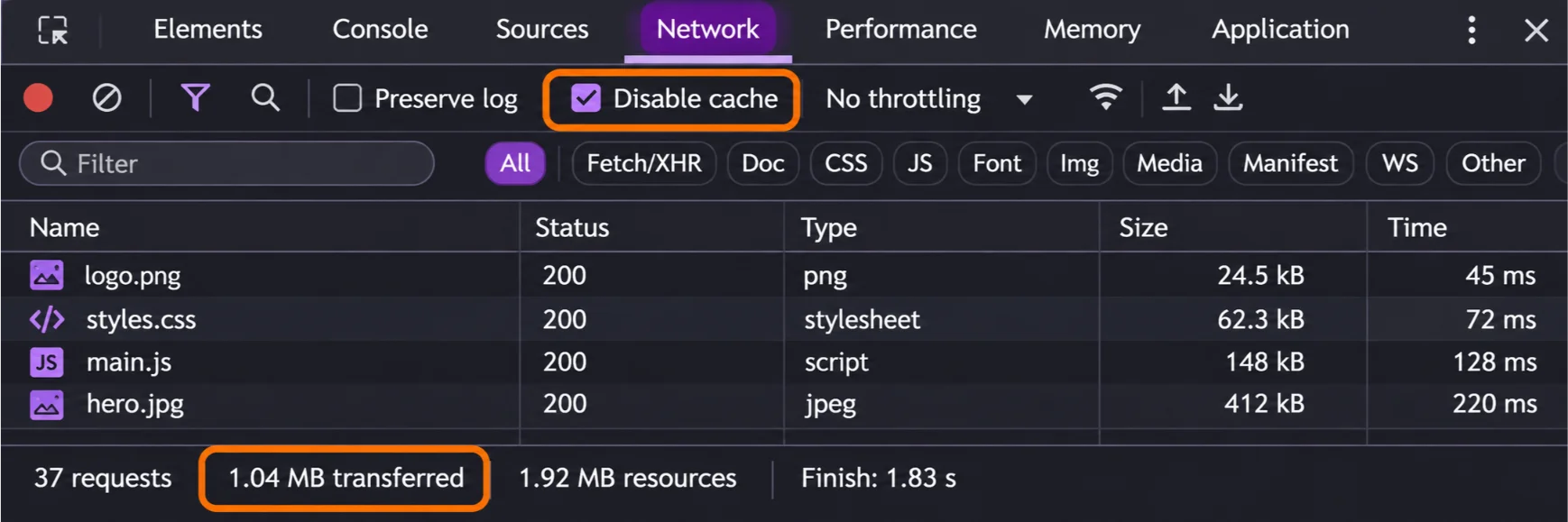
- Open the page in Chrome.
- Press Ctrl + Shift + I (Windows/Linux) or Option + Cmd + I (Mac).
- Open the Network tab and tick Disable cache.
- Reload the page.
- Read the Transferred figure at the bottom.
- Repeat for your key pages: homepage, service page, blog post, product page.
- Use a weighted average. If product pages get most of your traffic, they should count for more.
Important caveat: the Transferred figure counts every asset the browser downloads for that page load. That includes third-party scripts, analytics, chat widgets, ads, fonts and embedded media.
Some of that content comes from third-party servers or a CDN, not your hosting account. So the figure can overstate what your host must serve.
Treat it as a conservative planning figure. Then check your hosting dashboard or server logs for the amount served from your account.
Method 2: Online testing tools
Free tools give you a second opinion. Try Pingdom, GTmetrix, PageSpeed Insights or WebPageTest.
Record these four things:
- Total page size
- Number of requests
- Largest assets
- Third-party scripts
Method 3: Existing hosting or analytics reports
For established sites, cPanel or dashboard bandwidth reports are the most accurate starting point. They reflect real visitors, caching and bots.
On our hosting plans at Truehost, cPanel shows your visitor stats and resource usage in one place.
Once you have a page size, you can run the numbers.
The Basic Bandwidth Formula
Monthly bandwidth = Average page size × Total monthly pageviews
- The result is in MB. Divide by 1,024 for GB.
- Use pageviews, not unique visitors. One visitor can load many pages.
If you only know visitors, add one more factor:
Monthly bandwidth = Page size × Monthly visitors × Pages per visitor
Worked example (local business site)
- Page size: 1.5 MB
- Visitors: 2,000 a month
- Pages per visitor: 3
- Calculation: 1.5 × 2,000 × 3 = 9,000 MB ≈ 8.79 GB
That covers pages. Files are the next piece.
Add Downloads to the Calculation
Use this version when your site offers files. Think catalogs, price lists, forms, reports, software or media.
Monthly bandwidth = [(Daily pageviews × Page size) + (Daily downloads × File size)] × 30
The × 30 turns your daily total into a monthly one.
Worked example (B2B site)
- Daily pageviews: 500
- Page size: 2 MB
- Daily downloads: 50
- File size: 3 MB
- Calculation: [(500 × 2) + (50 × 3)] × 30 = 34,500 MB ≈ 33.69 GB
Notice the downloads add 4,500 MB a month on their own. Files are easy to forget, and they add up fast.
Add a Safety Buffer
The raw figure is not enough. Real traffic is messier than a formula.
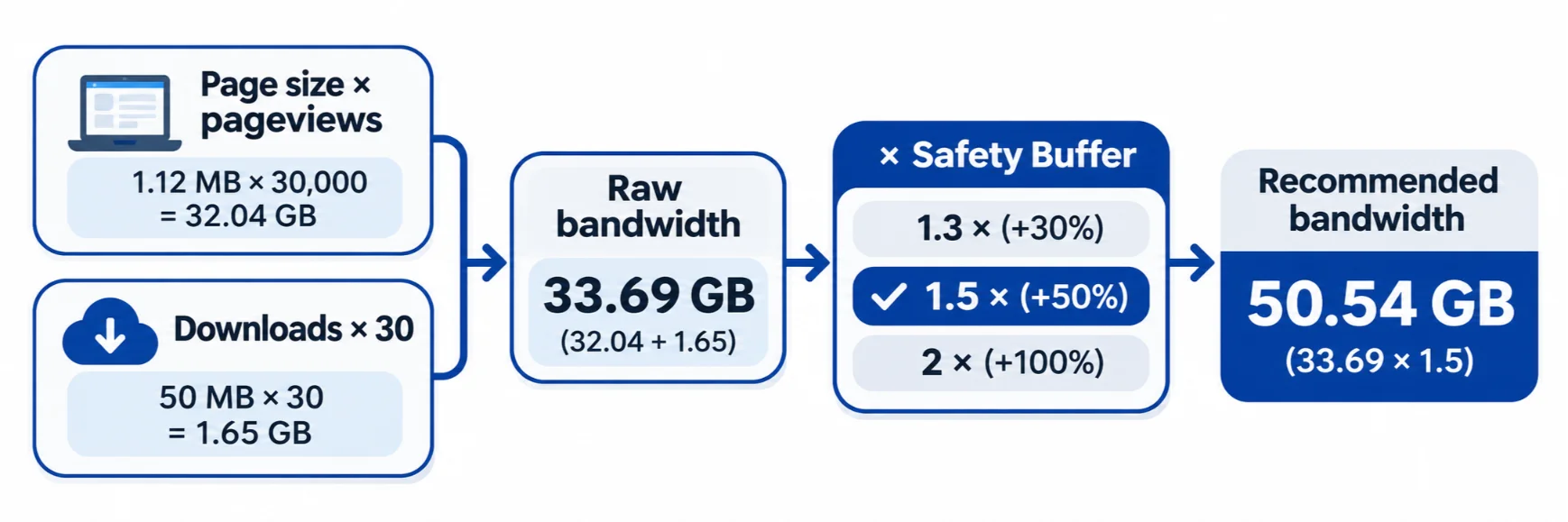
Here is what pushes usage above the estimate:
- Repeat visits
- Bots
- Caching differences
- Campaigns
- Seasonal peaks
- Viral posts
Recommended bandwidth = Raw bandwidth × buffer
Pick a buffer that matches your traffic:
- 1.3x: stable, predictable traffic
- 1.5x: the default for most business sites
- 2x: online stores, media sites, campaign-heavy or fast-growing sites
Completed example: 33.69 GB × 1.5 = 50.54 GB per month. So look for a plan with at least ~51 GB of transfer.
The buffer covers uncertainty and variability. That means traffic spikes, bots, campaign traffic, seasonal peaks and measurement error. It is not there to “make up” the gap between a cache-disabled test and real repeat visits.
Browser caching can reduce repeat-visit transfer. A CDN can reduce the share of traffic your origin host serves. Treat both as possible reductions, not reasons to drop the buffer.
One honest tradeoff: an oversized buffer means you pay for capacity you never use. A buffer that is too small risks slowdowns or a suspended site. Match it to how predictable your website bandwidth needs really are.
Bandwidth Examples by Website Type
Illustrative estimates only (1,024 MB = 1 GB).
| Website type | Monthly visits | Pages/visit | Page size | Raw transfer | With buffer |
|---|---|---|---|---|---|
| Local brochure site | 2,000 | 3 | 1.5 MB | 8.79 GB | 13.18 GB (1.5x) |
| Image-heavy blog | 20,000 | 2 | 1.5 MB | 58.59 GB | 87.89 GB (1.5x) |
| Online store | 50,000 | 5 | 2 MB | 488.28 GB | 976.56 GB (2x) |
| B2B site with downloads | ~15,000 pageviews | n/a | 2 MB + 50 daily 3 MB downloads | 33.69 GB | 50.54 GB (1.5x) |
Look at the online store. More pages per visit, heavier pages and a 2x buffer push it close to 1 TB a month.
Your own numbers will differ. Use these rows as a sense check, not a target. When you are ready to compare, you can see our hosting plans.
Why Your Real Usage May Be Higher Than the Estimate
These factors push real usage past the formula. Each one is shown here for its effect on the calculation.

- Heavy images and video raise page size.
- Dynamic content (filters, search, product grids) adds requests per visit.
- Third-party scripts (analytics, chat, ads, embeds) add hidden weight.
- Downloads multiply usage by file size.
- Traffic spikes from promotions or viral posts add sudden load.
- Bots and uptime monitors add visits you never see in your sales numbers.
Bots deserve a closer look. Imperva’s 2025 Bad Bot Report found automated traffic made up 51% of all web traffic in 2024. Bad bots accounted for 37%.
Imperva sells bot protection, so read that as one vendor’s view. Your site’s share will differ. But it shows why an estimate based only on human visitors tends to run low.
Common Calculation Mistakes
Most errors come from the same few habits:
- Using unique visitors instead of total pageviews
- Measuring only the homepage
- Forgetting downloadable files
- Ignoring fonts, scripts and embeds
- Skipping the buffer, or adding an oversized one
- Not recalculating after a redesign or campaign
The last one is easy to miss. A redesign can change page size overnight.
Turning Your Number Into a Hosting Decision
Now compare your buffered figure with a plan’s monthly transfer allowance. Leave room for growth.
Some plans say “unlimited bandwidth.” Check the fair-use policy, CPU and RAM limits, inode limits and any throttling. Unlimited rarely means no limits at all.
We at Truehost list unlimited bandwidth on our web hosting plans. Our Starter and Pro plans are sized for roughly 50,000 visits a month. Our Unlimited plan suits busier shops and agencies. You can compare our hosting plans against your own figure.
If your number outgrows shared hosting, there are two next steps:
- A VPS gives you a dedicated share of a server, with more resources and root access.
- A dedicated server gives you one physical machine for your site alone.
Running more than a website? Tools such as n8n Hosting, OpenClaw hosting and AI Workers have their own resource needs. They call APIs and move data in ways a page-based formula does not capture. Plan for them separately.
These signs mean it is time to recalculate or upgrade:
- Usage near the limit
- Slowdowns at peak times
- New video or downloads
- Steady traffic growth
How to Calculate Your Website’s Bandwidth Needs FAQs
Where do I find my monthly pageviews?
Google Analytics shows total pageviews for any date range. If you don’t use it, your hosting dashboard or cPanel visitor stats (such as AWStats or Webalizer) report monthly hits and pages. Your server access logs hold the raw data.
A new site has no history yet. Estimate from similar websites in your niche or from your planned marketing traffic.
Should I measure page size with the cache on or off?
Off. A first-time visitor downloads every file on the page. A returning visitor loads much less, because their browser has already stored things like your logo, fonts and stylesheets.
Measuring with the cache disabled gives you the heaviest realistic page size. Your real usage may come out slightly lower, and the safety buffer covers the difference.
What happens if my website exceeds its bandwidth limit?
It depends on the host. The most common outcomes are:
- Slower loading speeds
- A temporary suspension until the next billing cycle
- Extra charges for the additional data
- A request to upgrade your plan
Check your usage monthly. You can then catch a rising trend before you hit the limit.
Does a CDN change how much bandwidth I need?
Yes. A CDN such as Cloudflare stores copies of your images, scripts and stylesheets on servers around the world. It delivers them from there, so less data is served from your hosting account.
Calculate your normal figure first. Then expect your hosting bandwidth to come in lower once a CDN handles your static files.
Do emails, FTP uploads and backups count toward my bandwidth?
The formula above covers visitor traffic to your website. Email, FTP transfers and backups may or may not count toward your quota. It depends on the hosting provider. Some include them in total data transfer. Others track them separately.
Your hosting plan’s terms will say which applies.
Get a Hosting Plan That Fits Your Bandwidth Numbers
Quick recap checklist:
- Measure average page size.
- Find monthly pageviews.
- Add downloads if you offer any.
- Multiply by 30 if using daily figures.
- Apply the appropriate buffer: 1.5x for most business sites, 2x for online stores, media sites and campaign-heavy sites.
- Compare with the plan’s transfer allowance and fair-use terms.
You now have your bandwidth number. Choose a Truehost hosting plan that covers today’s traffic and leaves room to grow.
Not sure how to match your figure to a plan? Contact our support team. We will help you work it out.
