Choosing hosting for Moodle involves more than finding an affordable plan. Your learning platform needs to load lessons quickly, handle simultaneous quiz attempts, and keep course materials available when many students log in at once.
The wrong hosting plan can lead to slow pages, failed activities, and frustrated students.
Moodle runs on PHP and uses a database to store course and learner information. It also needs storage for uploaded files, caching to improve performance, scheduled tasks to process activities such as forum emails, and security features to protect user information.
Your hosting plan must support these requirements while leaving room for growth.
So, how do you choose the right plan? Start by estimating how many learners will use Moodle simultaneously, checking software compatibility and deciding who will handle updates and maintenance.
Let’s look at what to check before choosing a Moodle hosting plan and how Truehost’s options can support your learning platform.
What to Consider When Choosing Hosting for Moodle
1) Budget
Start with an annual budget you can sustain. Include the hosting subscription, domain registration, renewal charges, backups, and any management or technical support fees.
A plan with a low introductory price may cost more in the long run if essential services are charged separately.
Your expected class size should also guide your spending. A small training program with a few dozen learners may run comfortably on a modest plan, while a growing school could need more processing power, memory, and storage.
MoodleCloud offers managed hosting with annual billing in Australian dollars, so exchange rate changes affect the cost in your local currency. Self-hosted shared hosting and VPS plans offer more control, but check who will handle maintenance.
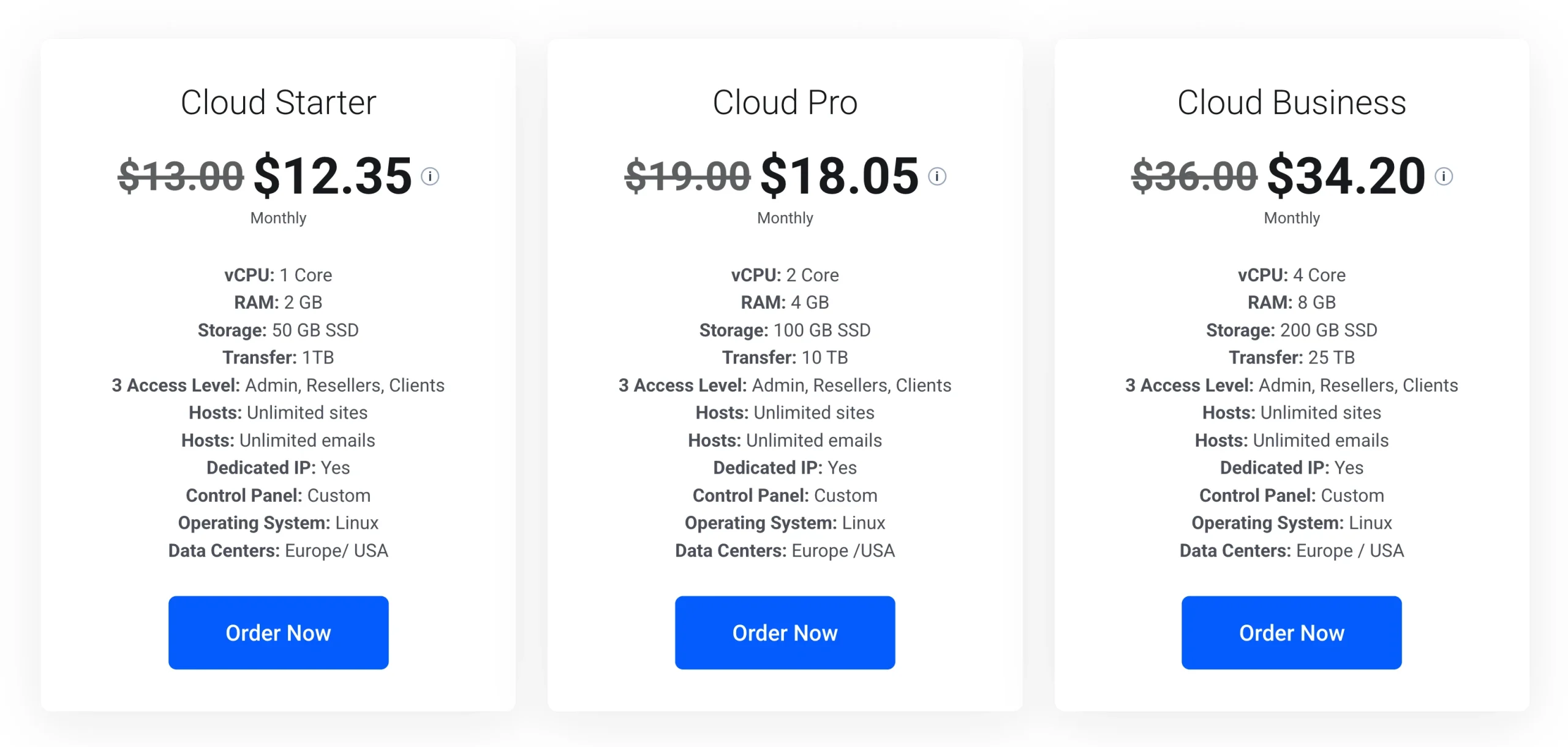
These are the Truehost hosting options for Moodle:
| Plan | Resources | Suitable use | Price |
|---|---|---|---|
| Shared Starter | 30 GB SSD, 10 websites | Small Moodle installations and pilot classrooms | USh 14,248.00/month |
| Shared Pro | 50 GB SSD, 30 websites | Small installations needing additional storage | USh 10,650.38/month |
| Cloud Starter (managed VPS) | 1 vCPU, 2 GB RAM, 50 GB SSD | Pilot projects and testing | USh 46,306.00/month |
| Cloud Pro (managed VPS) | 2 vCPU, 4 GB RAM, 100 GB SSD | Growing classes and training programs | USh 67,678.00/month |
| Cloud Business (managed VPS) | 4 vCPU, 8 GB RAM, 200 GB SSD | Larger classes, heavy course materials, and custom plugins | USh 128,232.00/month |
Our shared hosting plans include cPanel, free SSL, and daily backups. Confirm PHP and database compatibility, cron access, and resource limits before installing Moodle.
Our Managed VPS plans include Linux, a dedicated IP, backups, monitoring, and security patching. Cloud Starter has one vCPU, below Moodle’s recommended dual-core baseline, while Cloud Pro and Cloud Business have two or more vCPUs.
Choose a plan that fits your current needs while leaving room for growth.
2) Hosting Type
Moodle can run on MoodleCloud, managed hosting, unmanaged hosting, or your organization’s own servers. Your choice depends on your budget, technical skills, and need for plugins or root access.
MoodleCloud offers plans for 50–750 users, with 1–50 GB of storage, but plugin customization is limited. Shared hosting can suit a small installation, while a VPS offers more control over server resources and settings.
Before signing up, ask who handles updates and security, if your required plugins are supported, and if the plan gives you the server access Moodle needs.
If you do not have someone to manage server maintenance, consider a managed hosting option.
3) Server Requirements
Moodle has specific PHP and database requirements, and these change with each release. Before paying for hosting, check that the server supports the version you intend to install.
The requirements for selected Moodle releases:
| Moodle release | Minimum PHP version | Supported database versions |
|---|---|---|
| Moodle 4.5 LTS | PHP 8.1+ | MySQL 8.0, MariaDB 10.6.7, or PostgreSQL 13 |
| Moodle 5.1 | PHP 8.2+ | MySQL 8.4, MariaDB 10.11, or PostgreSQL 15 |
| Moodle 5.2 | PHP 8.3+ | MySQL 8.4, MariaDB 10.11, or PostgreSQL 16 |
| Moodle 5.3 LTS | PHP 8.3+ | MySQL 8.4, MariaDB 11.4, or PostgreSQL 17 |
These are minimum version requirements, so verify the complete compatibility requirements for your selected release before installation. Moodle also requires 64-bit PHP, the sodium extension, and a max_input_vars setting of at least 5000.
For a new site, Moodle 5.3 LTS is a sensible starting point, with security support listed until October 2029. Ask your host for the exact PHP and database versions it runs, since a plan page that says “latest PHP” does not tell you which version that really is.
Also check PHP memory and upload limits, timezone settings, database configuration, and server compatibility before committing to a plan.
4) RAM, CPU, and Storage
Your server needs enough processing power and memory to handle learners opening courses, submitting assignments, taking quizzes, and accessing resources.
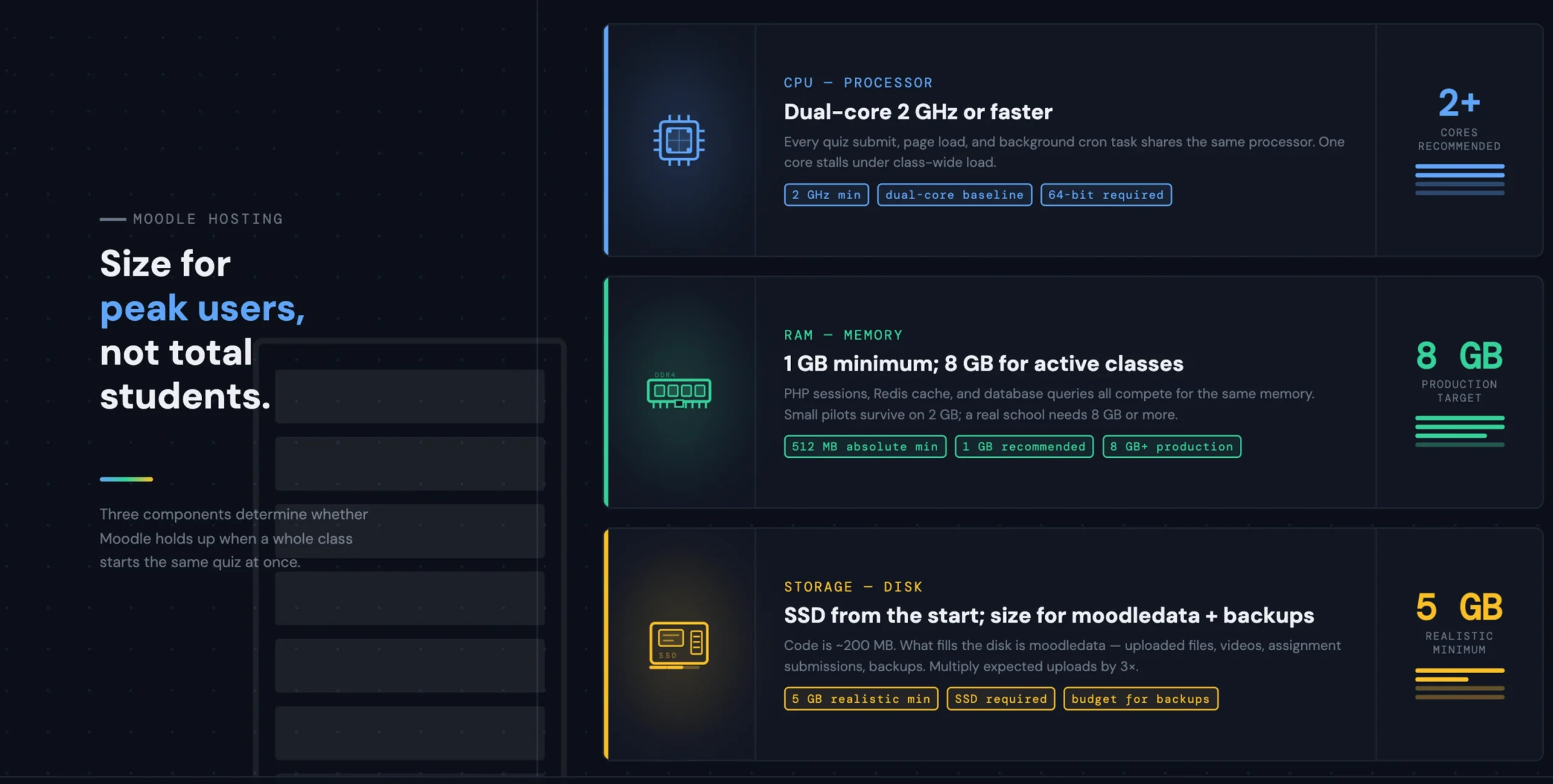
Moodle recommends a dual-core CPU at 2 GHz or better and at least 1 GB of RAM as a baseline. Approximately 5 GB of disk space is a realistic minimum, although production sites may need 8 GB of RAM or more.
Your actual requirements depend on simultaneous users, course activities, and the size of your learning materials.
A class of 100 students taking the same timed quiz may put more pressure on the server than a group of 200 students logging in at different times.
Storage needs also increase as you upload lecture notes, assignments, videos, and other learning materials. Remember to account for Moodle’s moodledata directory and backup copies, not just the software installation.
5) Performance
A Moodle site should remain responsive during busy periods, especially when students are completing assessments. The server’s storage, caching, PHP configuration, and scheduled tasks all contribute to performance.
Start by checking for SSD storage and PHP OPcache support. OPcache reduces the need for PHP to recompile scripts repeatedly, while caching helps Moodle serve frequently used information more efficiently.
Larger installations may benefit from Redis or another supported memory-based caching solution.
Cron is another important part of the setup. Moodle uses scheduled tasks to process background activities, including forum notifications and automated course operations.
Configure cron to run from the command line at least once per minute, as recommended by Moodle, rather than relying on web-triggered execution.
Before launching your platform, test it with realistic workloads. Pay particular attention to timed quizzes, assignment submissions, and periods when several classes are active.
These tests can reveal performance problems that may not appear when only one person is using the site.
6) Scalability
Your hosting requirements may change as you add learners, courses, teachers, and learning materials. So, choose a provider that allows you to increase resources without making an unnecessary move to a different server.
For a small installation, adding RAM or CPU capacity may be enough. Larger platforms may eventually need separate web and database servers, several web servers, or additional storage infrastructure.
Scheduled tasks also need attention as activity increases. Moodle allows administrators to adjust how many scheduled and ad hoc tasks can run concurrently, but increasing these limits without sufficient server resources can create additional pressure on the database.
Ask your provider how upgrades work, if they require downtime, and what happens if your site outgrows its current plan. A hosting arrangement that supports gradual upgrades makes it easier to respond to growing demand.
7) Security and Backups
Moodle stores learner details, course materials, assessment records, and other information that your organization needs to protect. So, security should be part of your hosting decision from the beginning.
Check that moodledata is stored outside the public web directory so its contents cannot be accessed directly through a browser.
The config.php file should also be protected against unauthorized changes, and public PHP error messages should be disabled to prevent sensitive server information from being exposed.
SSL should be enabled so connections between users and your site are encrypted. Configure secure cookies and keep Moodle, its plugins, and the server software updated.
Backups are just as important. Confirm that your backup arrangement covers the Moodle database, moodledata, custom plugins, theme changes, and other site modifications.
Ask how frequently backups run, how long they are retained, and if restoring a backup attracts an additional fee.
Do not stop at confirming that backups exist. Test a restoration on a separate site or test environment to check that your courses and data can be recovered successfully.
8) Support and Reliability
Choose a provider with accessible support channels, clear service commitments, and experience with Moodle or similar learning platforms.
Before signing up, ask how quickly the provider responds to urgent issues and which problems its team will resolve. Server and network faults may fall under hosting support, while Moodle configuration, third-party plugins, and course administration may be your responsibility.
Ask for response targets and uptime commitments in writing. Find out if technical support is available outside normal working hours, particularly if your learners take evening classes or complete assessments at weekends.
Clear responsibilities make it easier to get help when a problem occurs. They also prevent delays caused by uncertainty over if an issue belongs to the hosting provider or your Moodle administrator.
9) Server Location
The location of your hosting server can affect how quickly learners access your Moodle site. A data centre closer to most of your users may reduce network latency, although server performance, routing, and internet connection quality also influence the experience.
Start by identifying where most of your learners are based.
If your students are mainly in Uganda, for example, test the platform using ordinary local mobile and broadband connections before committing to a long-term plan.
Truehost’s Managed VPS options offer data centres in Europe and the USA. MoodleCloud also provides hosting in Australia, Europe, and the USA. Compare the available locations and test response times from your learners’ usual locations where possible.
Do not rely on distance alone to make the decision. A well-configured server in a slightly more distant location may perform better than a poorly configured server nearby.
10) Reporting and Administration
Once Moodle is running, you need a practical way to monitor activity, identify errors, and manage the platform.
Moodle includes site-wide reports for logs, live logs, configuration changes, performance, security, events, and custom reporting. These tools help administrators investigate unusual activity, review system changes, and identify potential problems.
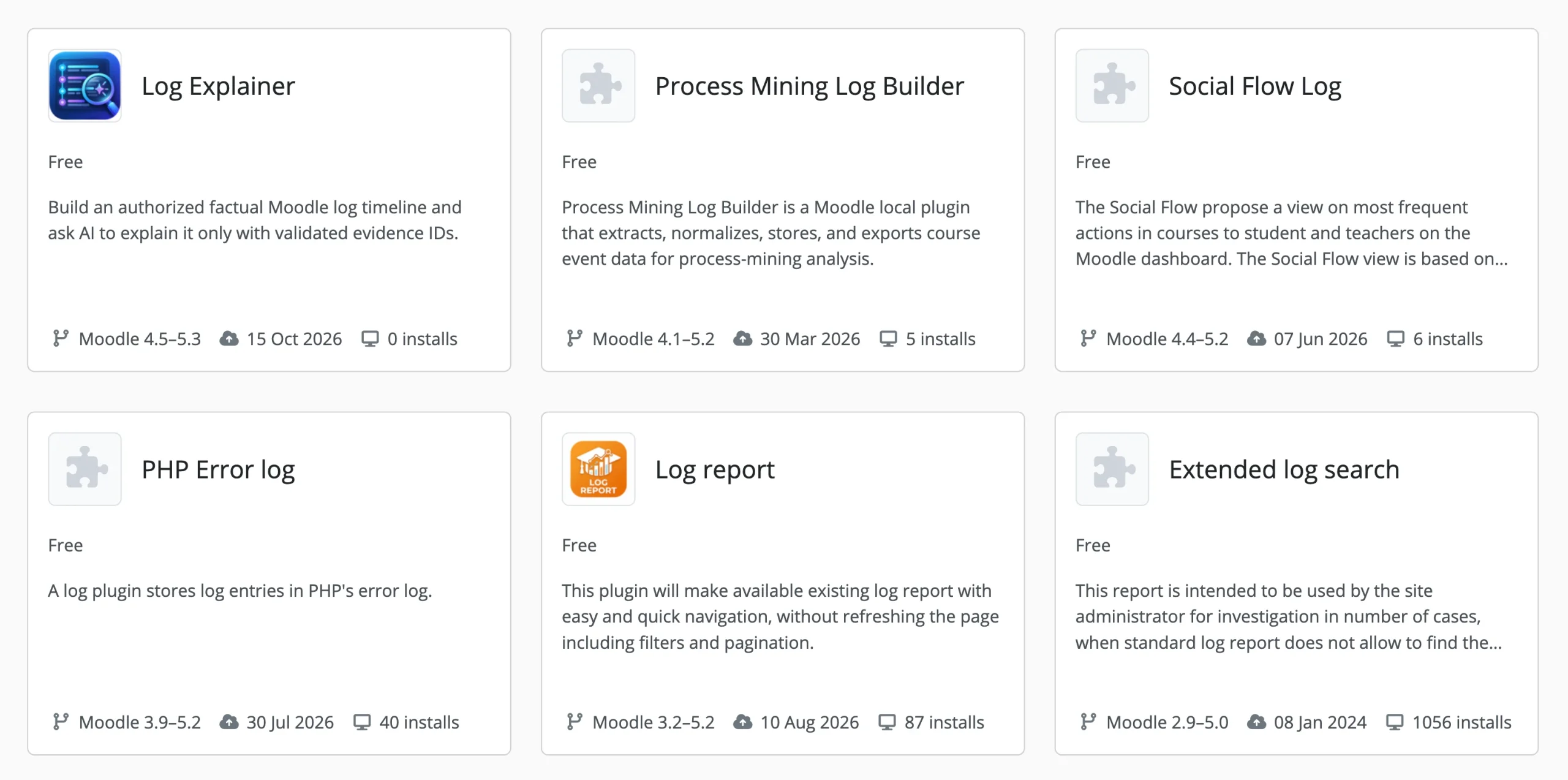
You should also check what the hosting provider offers. A control panel can make routine tasks easier, while server logs help you investigate errors. Resource monitoring can show if your site is running short of memory, CPU capacity, or storage.
Confirm that you can access the information you need without submitting a support ticket every time something goes wrong.
For a school or training centre, timely access to logs and resource information can make it easier to identify problems before they affect an entire class.
11) Additional Considerations
Before committing to a hosting plan, check a few other details that can affect how well your Moodle site works.
- Plugins and integrations: Support for the plugins and LTI tools your courses need.
- Outgoing email: Reliable configuration for course notifications and forum messages, since Moodle sends a lot of it.
- Upload limits: Compatible limits in both Moodle and the server, or large file uploads will fail.
- Software lifecycle: Security support duration for your chosen Moodle release.
- Domain name: A suitable domain for your audience, for example, a .ug address for a Ugandan institution.
- Year-two cost: Ask what the plan costs at renewal and if backups are included or billed separately.
Sorting out these details before installation can prevent avoidable problems once students and teachers begin using the platform.
Moodle Hosting Pre-Launch Checklist
Before inviting your learners onto Moodle, run through the following checks:
- Write down the maximum number of learners doing the same thing at once. That is your peak concurrency number.
- Ask the host for the exact PHP and database versions, and compare them against your chosen Moodle release’s requirements.
- Confirm cron can run every minute from the command line.
- Calculate storage requirements for the Moodle installation,
moodledata, course uploads, and backups. - Install Moodle on a pilot site first and check that the essential features work.
- Run a test quiz with a realistic number of concurrent learners you expect.
- Create a backup and test restoring it in a separate environment.
- Assign responsibility for software updates, security, backups, and technical support.
Tip: Start with a pilot, monitor how the platform performs, and upgrade when testing shows that you need additional resources. This gives you a practical basis for choosing your next plan instead of paying for server capacity you may not use.
Choose the Right Moodle Hosting with Truehost
The right Moodle hosting plan depends on your class size, expected traffic, storage needs, and technical skills.
For a small classroom or pilot, our shared hosting plans offer SSD storage, cPanel, free SSL, and daily backups.
For larger classes, heavy course materials, or more control over server settings, our Managed VPS plans provide dedicated resources, monitoring, and maintenance options.
You can install Moodle through Softaculous on supported shared hosting plans, or manually on a VPS. Our Managed VPS plans can be configured with cPanel, CyberPanel, or Plesk.
Before choosing a plan, confirm that it supports your Moodle version, required PHP and database versions, cron jobs, and plugins. Also check which updates, backups, and maintenance tasks are included.
Ready to host your Moodle learning platform? Take a look at our shared hosting plans or Managed VPS options, and contact our team for help choosing a plan that fits your learners and budget.
