Your website can be perfectly healthy and still look dead if the DNS behind it stops answering.
Where that DNS is hosted decides how likely that is. The cloudflare dns vs registrar dns choice affects your uptime, your security and how easily you can change things later.
This guide keeps it simple and backs every number with a source.
“Cloudflare DNS” covers three different products:
- The 1.1.1.1 resolver. It only changes how you look things up. It does nothing for your domain.
- Authoritative DNS. It holds your domain’s records for the whole world. This is what we compare here.
- Cloudflare Registrar. It sells domains. Domains bought there must stay on Cloudflare nameservers.
Authoritative DNS is free. Cloudflare offers it on all plans and never caps DNS queries.
On Free, Pro and Business, it doesn’t charge for them either.
Registrar DNS is the default set of nameservers your registrar assigns. It makes a new domain work right away.
Quality ranges widely. Some registrars run solid multi-region networks. Others run a few servers with a basic form.
For a blog or a parked domain, that is often fine.
Here is a quick way to judge any registrar’s DNS:
- Server locations
- Supported record types
- Minimum TTL (how short you can set record caching)
- Outage history
Our verdict: pick on uptime and control first, speed second.
Next, you get a comparison table, a criterion-by-criterion breakdown, a decision guide and a safe switching checklist.
Cloudflare Dns Vs Registrar Dns Comparison Table
| Criterion | Registrar DNS | Cloudflare DNS |
|---|---|---|
| Primary purpose | Storing records so a new domain works | Fast, resilient DNS built for traffic and security |
| Cost | Usually bundled with the domain | Free on every plan, no query caps |
| Security | Varies, some charge for DNSSEC | Free DNSSEC, DNS-level DDoS protection |
| Global network and speed | A few servers, often regional | Global anycast network, steady lookups |
| Reliability | Depends on the registrar | Traffic reroutes between locations |
| Features and record types | Mostly the basics | Wide range, apex CNAME flattening, API |
| DNS-only vs proxied (orange cloud) | Not available | Optional, a separate feature |
| Setup and management | Default, one panel | Change nameservers, recreate records, separate account |
1) Cost
What to aim for: no hidden fees, no renewal surprises, and a free option that still has the features you need.
Cloudflare
- Free on every plan with no query cap.
- Record limits: free zones created before 1 September 2024 get 1,000 records. Newer free zones get 200. Pro, Business and Enterprise get 3,500.
- What costs money: custom nameservers need Business or above. Foundation DNS is an Enterprise-only offering.
- Cloudflare Registrar sells at cost, but with the nameserver requirement.
Registrar
- Normally included with the domain.
- Watch for paid extras, such as premium DNS add-ons and DNSSEC.
- Check renewal pricing too.
Verdict: both are free in practice for typical sites, so cost rarely decides it.

Starting from scratch? Search for a .co.ug or .ug domain with us and pair it with Truehost web hosting in one account.
2) Security
What to aim for: DNSSEC availability, DDoS resilience, and account protection (2FA and domain lock).
Cloudflare
- Free DNSSEC, plus DNS-level DDoS protection.
- A DS record is a fingerprint of your DNSSEC key. It sits at your registry, and it lets resolvers trust your signed answers.
- Registrars that support RFC 8078 scan for Cloudflare’s CDS and CDNSKEY records and update the DS record automatically. Otherwise, you add it by hand.
Registrar
- Varies a lot.
- Some include DNSSEC. Some charge for it. Some don’t offer it.
Verdict: Cloudflare, unless your registrar offers DNSSEC and strong account controls.
DNS security is one layer. Your visitors also need HTTPS, so add an SSL certificate to your site.
3) Global network and speed
What to aim for: nameservers near your visitors.
Caching means most visitors never reach your nameserver. Speed only shows up on cache misses.
So treat speed as a bonus. Reliability is the main reason to care.
Cloudflare
- Uses anycast. The same addresses are announced from many cities, and each query goes to a nearby one.
Registrar
- Often runs fewer, regional servers.
- That’s fine if your visitors are in the same region.
Verdict: Cloudflare for audiences spread across countries. Either one for a local, single-region site.
4) Reliability
What to aim for: redundancy and a clean track record.
Cloudflare
- The anycast design means traffic reroutes if one location has trouble.
- Be honest about the record. On 18 November 2025, a faulty configuration file knocked thousands of sites fully or partially offline for about six hours. That failure hit the proxy layer.
- In April 2026, IsDown logged dashboard and API incidents lasting from one hour to 2.8 hours. Cloudflare said such API issues do not affect cached files served at its edge.
- A dashboard outage stops you editing records. It doesn’t necessarily stop visitors reaching you.
Registrar
- An outage can hit every domain the registrar hosts.
- The track record is harder to check.
A note on DNSSEC risk. On 5 May 2026, .de domains were hard to reach for about three hours. The cause was faulty DNSSEC signatures during a routine key rollover at the .de registry.
This was a registry failure, not a Cloudflare-versus-registrar issue. It would affect domains on either type of DNS provider.
Verdict: usually Cloudflare, but neither is immune. For critical sites, a secondary DNS provider is often the best-value backup.
Good DNS can’t save a lapsed domain. Read what happens when your domain expires and how to renew a domain in Uganda.
5) Features and record types
What to aim for: the records you need now and later, short TTLs, apex CNAME support, and automation.
Cloudflare
- A wide range of record types, including CAA, SRV, HTTPS, SVCB and TLSA.
- CNAME flattening lets you put a CNAME at the root of your domain.
- Batch record changes and an API are available on all plans.
- Free analytics with 7 days of history.
Registrar
- Usually a simple form with the basics: A, AAAA, CNAME, MX and TXT.
- Sometimes a fixed or high minimum TTL.
Verdict: Cloudflare for flexibility and automation. Either one for a basic site.
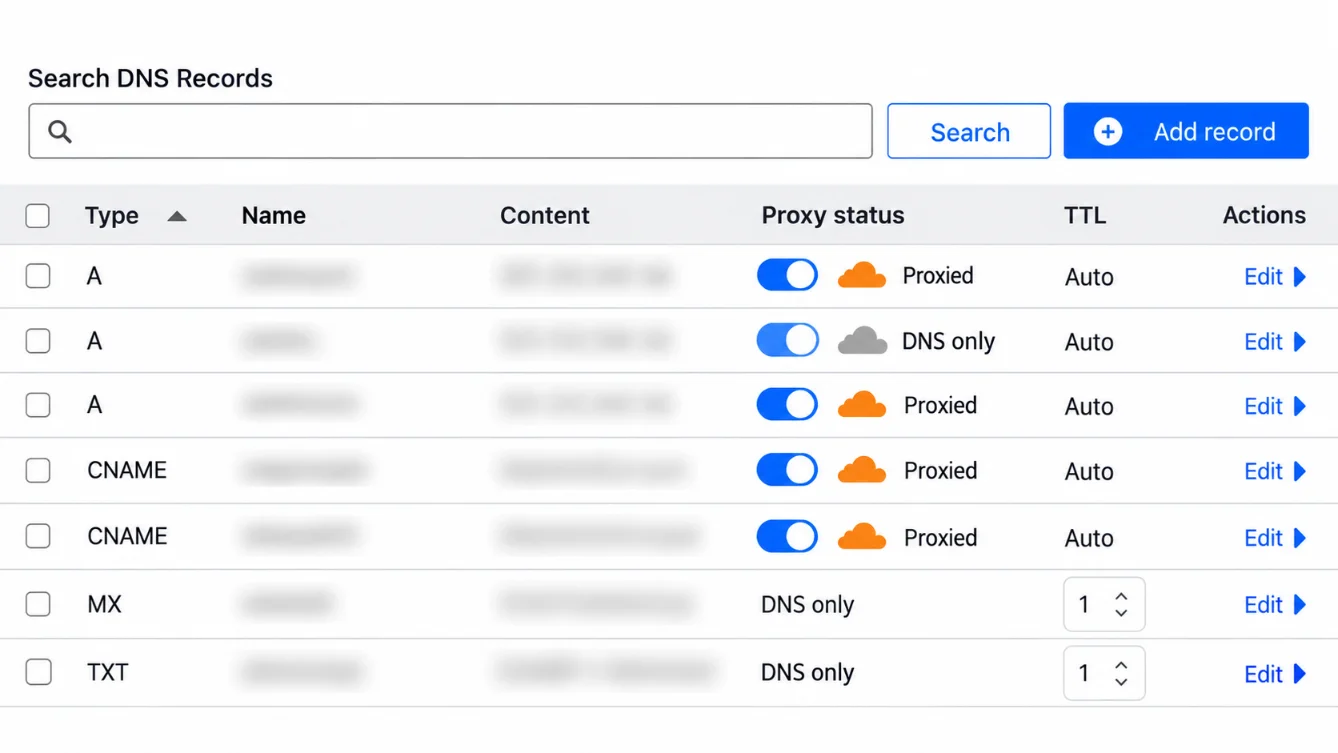
6) Proxy and CDN: DNS-only vs proxied
What to aim for: understand the difference between DNS-only and proxied records. Then decide whether you want Cloudflare’s caching, firewall and security layer in front of your site.
Cloudflare
- The proxy is an optional reverse-proxy feature, separate from DNS hosting.
- With DNS-only records, visitors reach the IP you publish, just as with any provider.
- When proxied, Cloudflare’s IPs are returned instead of your server’s.
- SSL applies here, because it works with the proxy. Install a valid certificate on your server too. Our hosting plans at Truehost include free SSL.
There is a new switch in 2026. On 28 April, Cloudflare added an account-level setting called enforce_dns_only. It turns the proxy off across all zones and returns your origin IPs.
It is meant for incident response. While it is on, you lose DDoS, WAF and caching protection. It is API-only.
This affects your server. Without the proxy, your origin takes all the traffic. Cloudflare tells you to verify origin capacity first. A VPS or dedicated server with reserved resources helps you plan for that.
Registrar
- Not available.
Verdict: Cloudflare if you want a CDN or WAF. Otherwise, it doesn’t matter.
7) Ease of setup and management
What to aim for: minimal effort now, and an easy way to change later.
Cloudflare
- Change your nameservers, then copy your records into a separate Cloudflare account.
- If you register the domain at Cloudflare, you can’t move DNS elsewhere without transferring the domain.
Registrar
- Nothing to do.
- One panel and one bill for everything.
Verdict: registrar for pure simplicity. Cloudflare when the site or email is important enough to spend 15-30 minutes.
Which One Should You Use?
| Scenario | Recommendation | Reason |
|---|---|---|
| Personal blog or portfolio | Registrar DNS | You have only a handful of records and little at stake, so one panel and zero setup is the simplest route. Switch later if the site grows. This holds only if your registrar is reliable and lets you set short TTLs. |
| Business where email must never fail | Cloudflare DNS, plus a secondary DNS provider if possible | Email relies on MX, SPF, DKIM and DMARC records, so a DNS outage makes your email look down too. A resilient network and short TTLs make provider changes safer. |
| Online store | Cloudflare DNS | Every minute of downtime is lost sales. You get free DNSSEC, DNS-level DDoS protection and fast record changes. Turn on the proxy only if you also want caching and a firewall. |
| Visitors across Africa or other continents | Cloudflare DNS, after checking coverage | A wide anycast network answers from locations near visitors, while a small registrar cluster can be slow for distant users. Check each provider’s coverage near Kampala and test with dig from those regions if you can. |
| Agency managing many domains | Cloudflare DNS | The API and batch record changes save time across many zones. Keep an eye on record limits: 200 on newer free zones, 3,500 on paid plans. |
| Someone who wants the CDN and WAF | Cloudflare DNS with the proxy on | The orange cloud is available only at Cloudflare. Note that proxied records return Cloudflare’s IPs instead of your server’s. |
| A domain already at Cloudflare Registrar | Cloudflare DNS (no choice) | Domains registered there must use Cloudflare’s nameservers. Moving DNS elsewhere means transferring the domain. |
For most of these, the practical setup is to keep the domain wherever it is and point the nameservers to Cloudflare.
Running a store? Our online shop builder accepts mobile money checkout. Need email that never fails? Set up business email on your own domain.
How to switch without downtime
Follow these four steps in order:
- Before. Find where your DNS lives with
dig NS yourdomain.com.- List every record, including SPF, DKIM, DMARC and subdomains.
- Don’t trust auto-import alone.
- Lower your TTLs a day ahead.
- The DNSSEC trap. You can’t keep your old DS record when moving to Cloudflare.
- Either disable DNSSEC before migrating, or
- use the multi-signer approach.
- Cutover. Change the nameservers at your registrar.
- Test with
dig @newns yourdomain.com. - Allow up to 24-48 hours for delegation to refresh.
- Test with
- After. Send a test email and check your records.
- Re-enable DNSSEC.
- Keep the old zone live for a few days as a rollback.
Moving a whole website, not just DNS? We offer free website migration. Talk to our team and we’ll plan the cutover with you.
Moving the domain itself? Follow our guide on how to transfer a domain in Uganda, or start a domain transfer directly.
Using Cloudflare DNS While Keeping Your Registrar
Your registrar and your DNS provider don’t have to be the same company.
It is the most common setup. It also keeps you free to change later.
For critical domains, add a secondary DNS provider. That way, one provider’s bad day doesn’t become yours.
It also avoids lock-in. Your domain stays where you can move it, and your DNS can move with a nameserver change.
If you run automations, the Cloudflare API fits well. You can call it from workflows on our n8n hosting, or from OpenClaw and AI Workers setups.
DNS With Truehost
We at Truehost let you manage domain records, nameservers and redirects from one dashboard. Renewals sit in the same place.
Our DNS hosting comes with your domain. DNSSEC is offered on compatible extensions.
This suits you if you want one panel, one bill and local support. It fits blogs, portfolios and small business sites well.
The honest limit: our DNS is DNS hosting. It doesn’t include a Cloudflare-style proxy with a CDN and firewall.
If you want that, keep your domain with us and point the nameservers to Cloudflare.
Open a domain with us and pick the DNS setup that fits.
Cloudflare DNS vs Registrar DNS FAQs
Is Cloudflare DNS really free, and what’s the catch?
Yes. Cloudflare doesn’t cap or charge for DNS queries on Free, Pro or Business.
The catches are small:
Your records live in a separate account.
Newer free zones are limited to 200 records.
Custom nameservers need Business or above.
Does changing DNS provider affect SEO?
Not by itself. The key is keeping your site reachable and your records identical.
Copy every record, lower your TTLs first and test before the cutover.
Can I use Cloudflare DNS and keep my registrar?
Yes. Change the nameservers at your registrar to the ones Cloudflare gives you.
The exception is a domain registered at Cloudflare. It must stay on Cloudflare’s nameservers.
Will switching break my email?
It can, if you miss a record. MX, SPF, DKIM and DMARC records must all be copied across.
Send a test email right after the cutover. Keep the old zone live for a few days.
Want mailboxes on your own domain? See our business email plans.
What happens if Cloudflare goes down?
It depends on what failed. A dashboard or API outage stops edits, but cached answers keep working.
A wider network outage, like the one on 18 November 2025, can take sites offline. A secondary DNS provider is the cheapest backup for critical sites.
