Got an app ready but no idea where it should live? You’re not alone.
So, what is application hosting? It means placing your software, backend code and databases on a remote, internet-connected server. Users reach it 24/7 through a browser, mobile app or API.
WordPress shows the idea well. Self-installing WordPress means you download it, install it and configure it yourself. A hosted version, like WordPress.com, is ready to use as soon as you register.
Here is how it works:
- Your app and its data sit on the provider’s servers, and users connect over the internet.
- The provider handles hardware, networking, server maintenance, security and updates.
- You handle your code, content and app settings.
Is that the same as web hosting? Not quite. Web hosting serves websites. Application hosting serves software that needs a backend, databases or APIs.
The market is growing fast. Grand View Research valued it at USD 78.30 billion in 2024. It projects USD 156.26 billion by 2030.
You don’t need a big budget to start. Hosting an app can start from USh 14,248.00 a month with Truehost shared hosting.
This guide will teach you:
- The main types of application hosting
- The benefits and trade-offs
- What it costs
- How to choose a provider
Main Components of Application Hosting
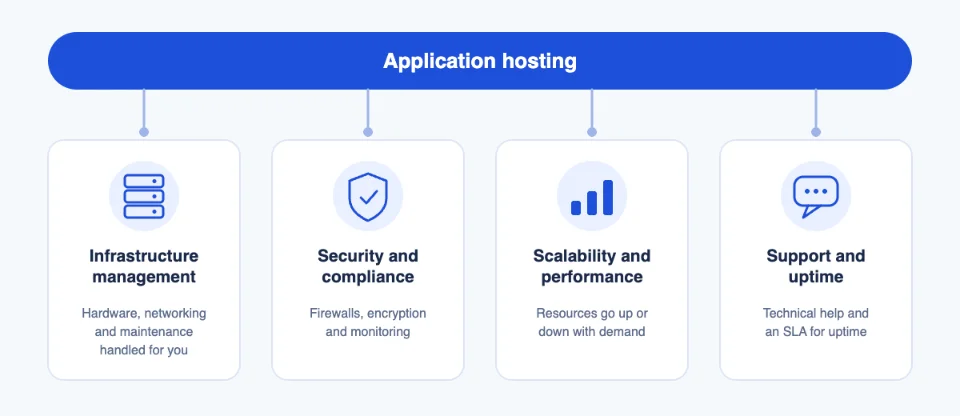
So what is application hosting made of? It’s more than renting server space. Four parts do the heavy lifting.
a) Infrastructure management. The provider handles hardware, networking and maintenance. A startup never has to buy or replace a server.
b) Security and compliance. Expect firewalls, encryption and monitoring. If you need a specific compliance standard, ask the provider to confirm it in writing. Our plans include free SSL, and you can also get SSL certificates for other projects.
c) Scalability and performance. Resources go up or down with demand. A campaign launch can cause a sudden traffic spike, and your host should absorb it.
d) Support and uptime. You get technical support and a service level agreement (SLA). An SLA is a written promise about uptime and support, often with credits if the provider misses it.
Next, let’s match your app to the right setup.
Which Application Hosting Fits Your App?
Choosing hosting is a two-step decision. First, work out what you are running. Then match it to the server type that can handle it.
| App | Who it suits | What the app needs from the host | Server type that fits | Truehost plan |
|---|---|---|---|---|
| WordPress | Bloggers, business websites and small online stores | A current PHP version, MySQL or MariaDB, enough memory for plugins, SSL and automatic backups; one-click install and caching | Shared | Starter, Pro or Unlimited. |
| Joomla and Drupal | Designers and development teams building complex or highly customised sites | Higher memory limits, PHP and database compatibility, and often SSH access | Higher-tier shared, or VPS depending on traffic | Pro or Unlimited, or Cloud VPS Elite. |
| WooCommerce (small store) | Anyone selling products online, from a small shop to a growing catalogue | SSL, strong security, plenty of memory and processing power, and room to handle sales-day traffic spikes | Shared | Pro or Unlimited. |
| Magento | Growing or larger online stores | Root or SSH access, OpenSearch, and at least 4 GB RAM | VPS or cloud (not shared) | Cloud VPS Elite or Managed Cloud Starter. |
| Forums and wikis (phpBB and MediaWiki) | Communities, support sites, documentation and internal knowledge bases | A reliable database, steady storage growth, spam protection and regular backups | Shared to start, then VPS as the community grows | Starter or Pro, then Cloud VPS Elite. |
| Custom apps (Node.js, Python and Laravel) | Startups, SaaS builders and agencies hosting client apps | Root or SSH access, the right runtime versions, a database, and the freedom to install your own software | VPS, cloud or dedicated | Cloud VPS Elite, Managed Cloud Starter or H2 Dedicated Server. |
Don’t guess the specs. Check each app’s official requirements:
- WordPress recommends PHP 8.3 or newer, MySQL 8.0 or newer (or a current MariaDB) and HTTPS.
- WooCommerce asks for PHP 8.3 or newer and a WordPress memory limit of at least 256 MB.
- Joomla 5 needs PHP 8.1 at minimum, recommends 8.3, and suggests a 256 MB memory limit.
- Magento needs a dedicated search engine. Adobe lists OpenSearch as its supported option for current releases.
Selling online? Our online shop option gets you a store without the setup work. Need a simple site first? Try our website builder.
Now let’s look at the four server types.
Shared Hosting
- Your app shares server resources with other users.
- Best for small apps, test projects and low traffic.
- Pros: Cheapest, easy to start.
- Cons: Limited resources, and other sites can affect performance.
At Truehost, our Starter plan hosts up to 10 websites on 30 GB of SSD storage. It also supports Python and Node.js. Everything runs from an easy cPanel hosting dashboard.
VPS Hosting
- A dedicated slice of a server with guaranteed resources.
- Best for growing apps that need more control and stable performance.
You also get root access, which custom apps often need. Our VPS hosting fits that stage. Prefer hands-off? Choose our managed VPS.
Cloud Hosting
- Your app runs across a network of connected servers, so you can scale instantly and pay for what you use.
- Best for apps with changing or unpredictable traffic.
Our Managed Cloud Starter plan suits this case. It also keeps server management hands-off.
Dedicated Hosting
- A whole physical server for one customer, with full control and maximum resources.
- Best for high-traffic or resource-heavy apps.
Our dedicated servers are built for that workload.
Advantages of Application Hosting
Hosting your app with a provider brings six clear benefits. Each one also has a trade-off worth knowing.
a) Cost Efficiency
You skip hardware purchases. Maintenance costs drop, and some plans offer pay-as-you-go pricing.
For example, our Starter plan costs USh 14,248.00 a month. There’s no server to buy.
b) Enhanced Security and Compliance
Good hosts provide firewalls, intrusion detection and centralised access control. For small teams, this often beats an in-house setup.
It has limits, though. Patchstack counted 11,334 new WordPress vulnerabilities in 2025, and 91% were in plugins. A secure server can’t fix a weak plugin, so keep yours updated.
c) Simplified Management
The provider handles updates, upgrades and backups. That reduces your IT workload.
For example, our plans include free daily backups.
d) Accessibility and Collaboration
Teams access the app from anywhere. They collaborate in real time and always work on the same, consistent version.
For example, you manage your site from a cPanel dashboard in any browser. You can also use Git, SSH and SFTP.
e) Scalability and Flexibility
You scale without buying new hardware. You deploy quickly and add features as you grow.
For example, many apps start on shared hosting. They move to a VPS when they need more speed or root access.
f) Technical Support
Expert help means your team focuses on the business instead of the infrastructure.
We at Truehost offer 24/7 support. It helps most when something breaks at night.
How Much Does Application Hosting Cost?
Costs depend on app size, complexity and traffic. Below, we’re showing Truehost pricing.
| Hosting type | Plan | Best for | Price |
|---|---|---|---|
| Shared | Starter | Small apps, low traffic | USh 14,248.00 |
| Shared | Pro | Growing apps | USh 10,650.38 |
| Shared | Unlimited | Multiple apps or sites | USh 100,412.78 |
| VPS | Cloud VPS Elite | Apps needing guaranteed resources | USh 16,990.74 |
| Managed cloud | Cloud Starter | Variable traffic, hands-off management | USh 46,306.00 |
| Dedicated | H2 Dedicated Server | High-traffic or resource-heavy apps | USh 388,258.00 |
What affects the price:
- Storage
- Bandwidth
- Number of active users
- Type of content
Pricing models:
- Fixed-resource: You pay a set price for set limits. Budgeting is easy.
- Pay-as-you-go: You pay for what you use. It’s flexible, but bills can surprise you. Flexera’s 2025 report found 84% of respondents call managing cloud spend their top cloud challenge.
- Free tiers or trials: Check what the limits are before you build on them.
Hidden costs to watch for:
- Overage charges for exceeding limits
- Premium support
- Software licenses
- Extra security, backup and monitoring tools

Tip: Start with a basic plan and upgrade as the app grows. You can compare our hosting plans here.
Don’t forget the address. You’ll need a name for your app, so search for a .ug domain before you launch.
How to Choose an Application Hosting Provider
Price is important, but it shouldn’t decide alone. Check these six areas first.
Application compatibility. Your app’s requirements (language, database, framework) decide what the host must support. Match them before you pay.
Onboarding process. Look for one-click setup, management tools, documentation and getting-started resources. Our plans include a one-click installer with hundreds of apps, and free migration.
Security features. Ask how the provider protects its infrastructure against physical and online attacks. Vague answers are a warning sign.
Reliability and uptime. Ask for the uptime guarantee in writing. A 99% guarantee allows about 3.65 days of downtime a year. That’s why most providers advertise 99.9%, which is about 8.8 hours.
- 99%: about 3.65 days a year
- 99.9%: about 8.8 hours a year
- 99.999%: about 5 minutes a year
Our Unlimited plan lists 99.999% uptime.
Downtime costs real money. ITIC’s 2024 survey found that over 90% of mid-size and large firms put one hour of downtime above USD 300,000. Your losses may be smaller, but the lesson holds.
Support and service. Look for 24/7 support through live chat, email or phone. Test it with a pre-sales question. You can reach our team through our support page or contact us.
Data export. Make sure you can move your data if you switch providers or the provider shuts down. Ask how to download full backups. If you’re moving to us, we handle the migration for free. Your domain can come too, through our domain transfer service.
Who Needs Application Hosting?
- Startups launching a first product without buying hardware.
- SaaS businesses that need uptime and scalability.
- E-commerce stores with traffic spikes during sales.
- Agencies and freelancers hosting client apps.
- Small businesses running internal tools or booking systems. Add professional email hosting to match.
If your app fits one of these, start small and grow when traffic demands it. You can go live in under 30 minutes. Pick your Truehost hosting plan, then register your .ug domain so customers can find you.
Application Hosting FAQs
What is the difference between application hosting and web hosting?
Web hosting serves websites. Application hosting serves software that needs a backend, databases or APIs. Many plans cover both, and WordPress sits in between.
Asked another way: what is application hosting? It’s the home for software that does more than display pages.
How much does application hosting cost?
It depends on your app’s size, complexity and traffic. Shared hosting starts from USh 14,248.00 a month with us. VPS, cloud and dedicated plans cost more, as the pricing table above shows.
Which type of hosting is best for a small app?
Start with shared hosting. It’s the cheapest and easiest option. If your app needs root access or more guaranteed resources, move up to a VPS.
Is application hosting secure?
It can be, but security is shared. The provider protects the infrastructure. You keep your code, plugins and passwords safe. Ask any provider what protections it includes.
Can I move my app to another provider later?
Yes, if you keep your code and database exports. Before you sign up, confirm you can download full backups. That way you’re never locked in.
