The best OS for VPS hosting depends on the applications you want to run, your preferred control panel, and your server administration skills.
Ubuntu is a good starting point for general Linux hosting, while AlmaLinux suits cPanel environments, and Windows Server is suitable for applications built for Microsoft’s ecosystem.
At Truehost, we offer several Linux distributions, including Ubuntu, Debian, AlmaLinux, Rocky Linux, and Oracle Linux.
Windows Server is also available on request through our VPS hosting service.
Let’s compare the available options, their compatibility, and their management requirements to help you choose the right VPS operating system.
Best VPS Operating Systems Compared
| Operating system | Application compatibility | Control panel support | Administration |
|---|---|---|---|
| Ubuntu | General Linux applications | cPanel, Hestia | Beginner to advanced |
| Debian | Linux applications and server workloads | Hestia | Intermediate |
| AlmaLinux | RHEL-compatible applications | cPanel | Intermediate |
| Rocky Linux | RHEL-compatible applications | No current cPanel support | Intermediate to advanced |
| Oracle Linux | Oracle and enterprise applications | No native cPanel or Hestia support | Intermediate to advanced |
| CentOS Stream | RHEL-related development environments | Limited panel support | Intermediate to advanced |
| Windows Server | ASP.NET and Windows applications | Windows-compatible tools | Intermediate |
Control panel compatibility depends on the OS release and panel version.
1) Ubuntu: For general-purpose VPS hosting
Ubuntu is a popular choice for VPS hosting because it offers flexibility, extensive software support, and a large user community.
Its software repositories make it easier to install packages for different projects, while its documentation helps administrators troubleshoot common server issues.
You can use Ubuntu to host PHP websites, Python applications, Node.js projects, databases, and other Linux-compatible software.
It also supports popular control panels:
- cPanel: Supports Ubuntu 24.04 LTS.
- Hestia: Supports Ubuntu 22.04, 24.04, and 26.04 LTS.
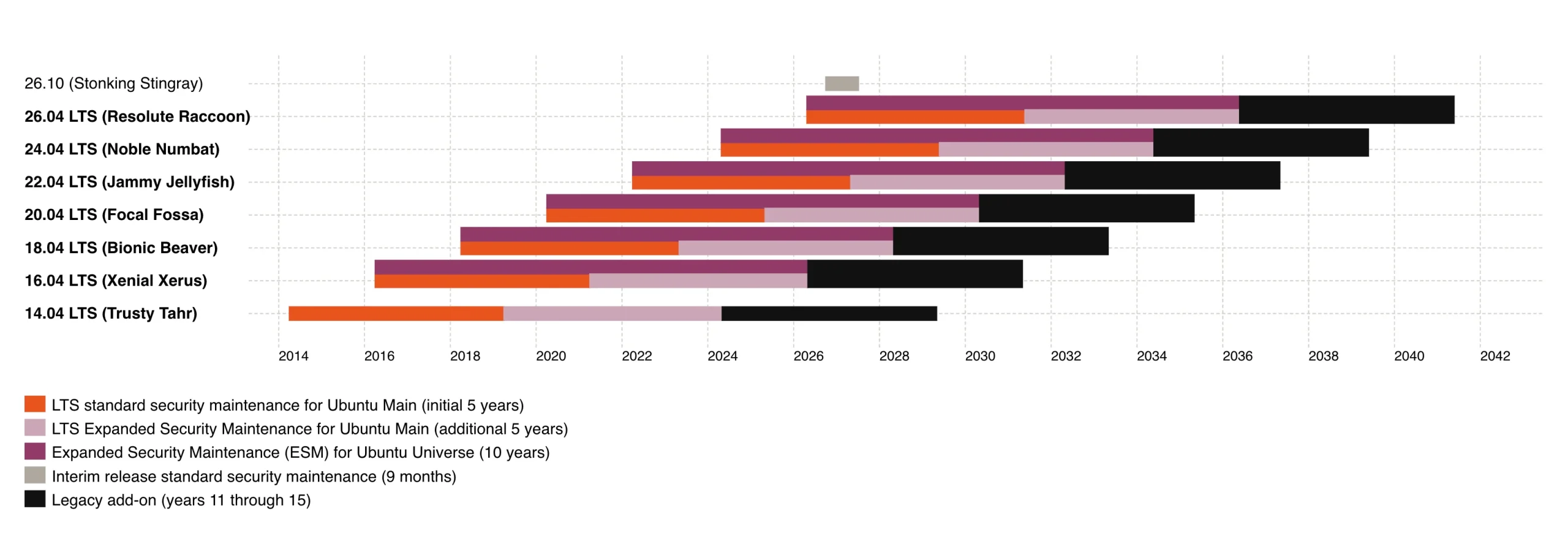
Ubuntu releases a new Long Term Support (LTS) version every two years. These releases receive several years of security maintenance, making them suitable for servers that need a predictable update schedule.
For example, Ubuntu 24.04 LTS receives standard security maintenance until May 2029, while Ubuntu 26.04 LTS receives it until May 2031.
Ubuntu is also relatively easy to learn, thanks to its extensive documentation and active community. However, you’ll still need basic Linux administration skills to manage software installations, updates, permissions, and server security.
2) Debian: For stability and predictable performance
Debian is well suited to VPS hosting because of its conservative approach to software updates.
Its stable releases prioritize thoroughly tested packages, reducing the risk of unexpected changes affecting running applications.
You can use Debian for websites, databases, APIs, and other Linux-based server workloads. Its relatively lightweight installation also leaves more VPS resources available for your applications.
Debian supports Hestia Control Panel but does not support cPanel. Debian 12 and 13 are currently listed in Hestia’s official installation requirements.
Debian’s stable releases receive three years of full support, followed by two years of Long Term Support (LTS). For example, Debian 13 receives full support until August 9, 2028, and LTS until June 30, 2030.
Although Debian is relatively easy to maintain, you’ll need familiarity with SSH, terminal commands, and package management to administer it without a control panel.
3) AlmaLinux: For enterprise server environments
AlmaLinux is an enterprise-focused Linux distribution designed to maintain compatibility with Red Hat Enterprise Linux (RHEL). It provides a familiar environment for businesses running applications developed for RHEL-based systems.
One of its main advantages is cPanel compatibility. cPanel supports AlmaLinux 8, 9, and 10, making it suitable for hosting multiple websites through WHM and cPanel.
AlmaLinux is free to download and use. However, cPanel is a separate commercial product, so you’ll need to account for its license when planning your hosting costs.
Its long support lifecycle also makes it suitable for production servers. AlmaLinux 9 receives security updates until May 2032, while AlmaLinux 10 receives them until May 2035.
Managing AlmaLinux requires familiarity with Linux commands, package management, and server configuration. A control panel such as cPanel can simplify routine website management, although server maintenance may still require administrative knowledge.
4) Rocky Linux: For enterprise workloads and long-term stability
Rocky Linux is an enterprise-focused distribution with several useful features:
- RHEL compatibility: Supports applications developed for Red Hat Enterprise Linux environments.
- Long-term support: Provides extended maintenance periods for supported releases.
- Open-source licensing: Free to download, use, and distribute.
- Community-driven development: Maintained by the Rocky Enterprise Software Foundation and its community.
However, there is an important control panel limitation. cPanel discontinued Rocky Linux support starting with version 134. New installations and upgrades on Rocky Linux are blocked, and cPanel recommends early planning for platform transitions.
Rocky Linux has its own long-term support schedule. Version 9 receives security updates until May 31, 2032, while version 10 receives them until May 31, 2035.
You’ll need some Linux administration experience to configure and maintain a Rocky Linux server, particularly if you intend to manage it directly through SSH.
5) Oracle Linux: For Oracle ecosystem workloads
Oracle Linux is an enterprise Linux distribution developed by Oracle. It is designed to support business applications and workloads that require compatibility with Oracle’s software ecosystem.
You can use it to run Oracle databases, enterprise applications, and other software developed for compatible Linux environments.
One of its features is the Unbreakable Enterprise Kernel (UEK), which is designed to support performance and scalability in demanding enterprise environments.
Oracle Linux is free to download and distribute, although paid Oracle support services are available for organizations that need additional assistance.
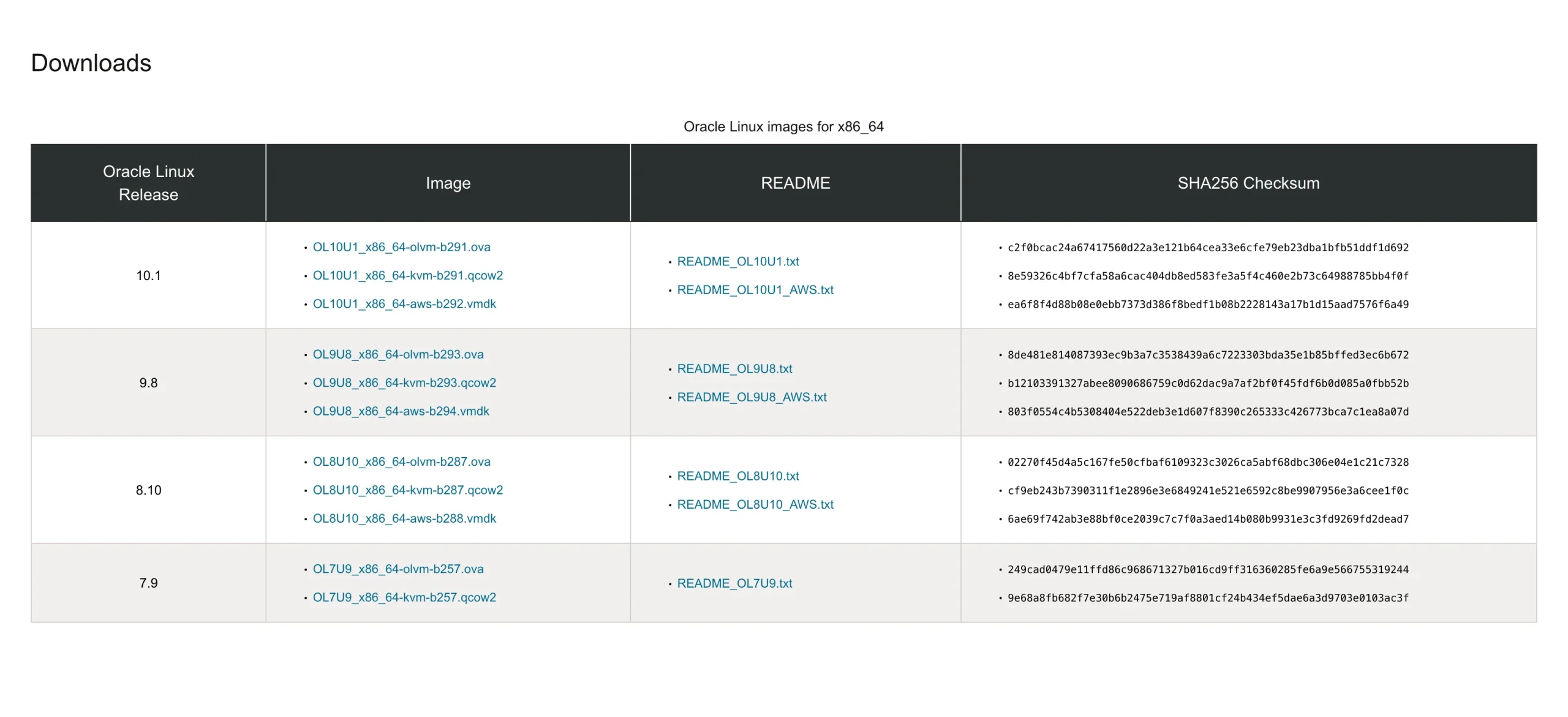
Its support lifecycle depends on the installed release. For example, Oracle Linux 9 has Premier Support until June 2032, followed by Extended Support until June 2035.
Oracle Linux is not listed among the currently supported operating systems for cPanel or Hestia. You’ll therefore need to check your application’s installation requirements before choosing it.
6) CentOS Stream: For development and testing
CentOS has traditionally been used for enterprise Linux servers and applications that require compatibility with RHEL. However, the CentOS Project has changed its development model, shifting its focus from CentOS Linux to CentOS Stream.
CentOS Stream serves as an upstream development branch for RHEL. It provides a preview of changes expected in future RHEL releases, making it useful for developers and administrators who want to test software compatibility before those changes reach RHEL.
This is different from the older CentOS Linux releases, which have reached end of life:
- CentOS Linux 7 reached end of life on June 30, 2024.
- CentOS Linux 8 reached end of life on December 31, 2021.
- CentOS Stream 9 is scheduled to reach end of life on May 31, 2027.
- CentOS Stream 10 is expected to receive maintenance until 2030.
CentOS Stream receives updates more continuously than traditional stable server distributions. This makes it useful for testing applications against upcoming enterprises.
Linux changes, but less suitable for production environments that require a slower, more predictable update cycle.
Also, cPanel does not list current CentOS Stream releases among its supported operating systems, and Hestia does not list CentOS among its supported distributions.
7) Windows Server: For Microsoft-based server environments
Windows Server is Microsoft’s operating system for hosting websites, business applications, and other services designed for the Windows environment.
It is particularly useful if your application depends on Microsoft technologies such as ASP.NET, .NET Framework, IIS, or other Windows-specific software.
Unlike Linux distributions, Windows Server provides a graphical interface for managing many server settings. You can also administer it remotely using Remote Desktop Protocol (RDP).
Windows Server integrates with Microsoft’s ecosystem and includes tools for user management, networking, security, and remote administration.
However, it has different licensing requirements from Linux distributions, so confirm the applicable costs and management options before ordering.
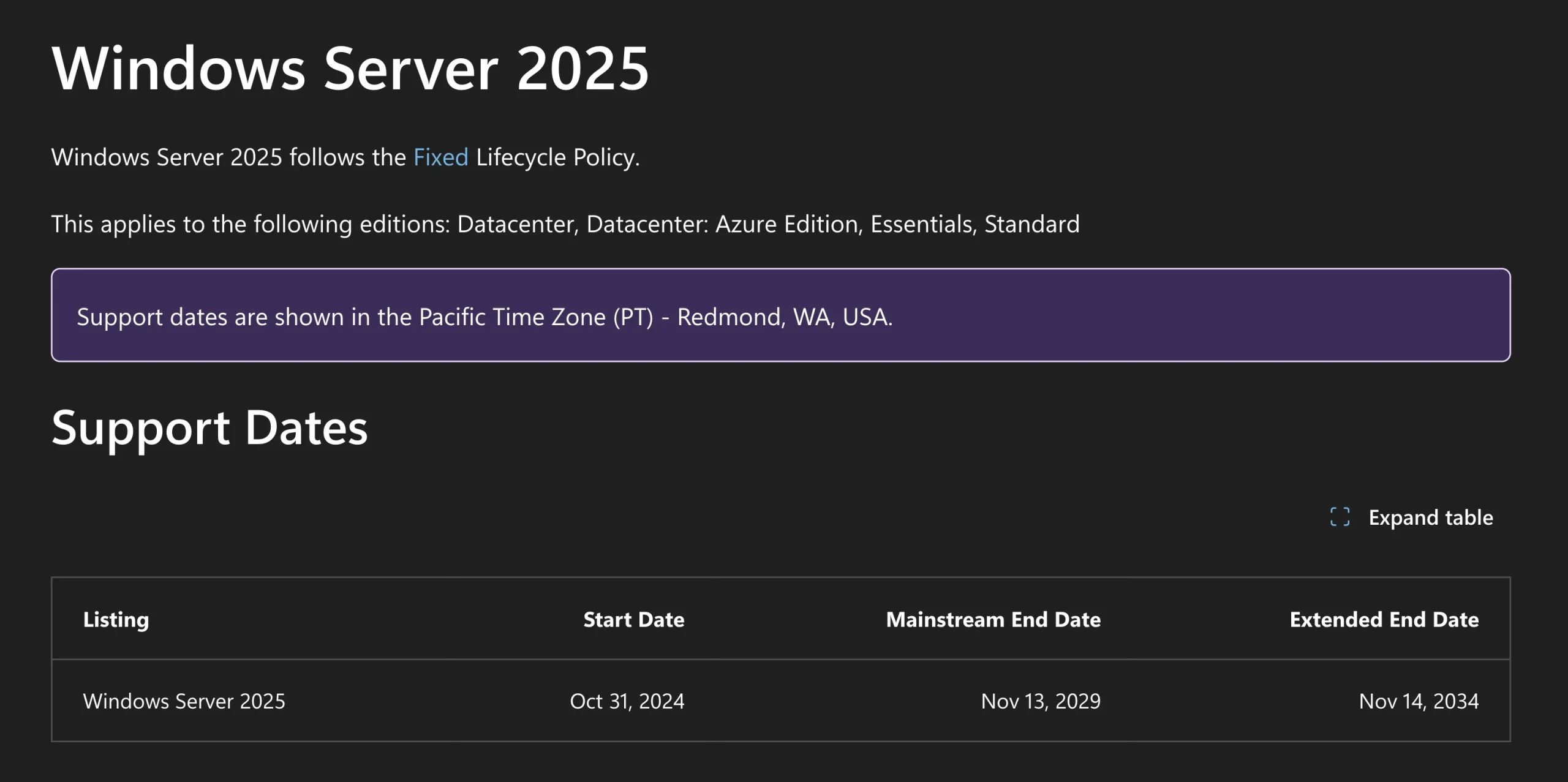
For example, Windows Server 2025 receives mainstream support until November 14, 2029, and extended support until November 15, 2034, according to Microsoft’s product lifecycle documentation.
At Truehost, Windows Server is available on request through our VPS hosting service. If you only need to host an ASP.NET or .NET website, you can also consider our Windows hosting plans.
Which VPS Operating System Should You Choose?
Your application’s technical requirements and preferred management tools should guide your decision.
- For cPanel hosting: Choose AlmaLinux or a supported Ubuntu release. Remember that cPanel requires a separate license.
- For free control panel hosting: Consider Ubuntu or Debian with Hestia. Both support Hestia, subject to its version requirements.
- For Windows applications: Select Windows Server if your application requires ASP.NET, IIS, or other Windows-specific components.
- For RHEL-compatible applications: Pick AlmaLinux or Rocky Linux, depending on your software and control panel requirements.
- For Oracle applications: Choose Oracle Linux if your software specifically requires it.
- For command-line administration: Ubuntu and Debian are practical options for developers and administrators who prefer managing servers through SSH.
Before ordering, check your application’s installation documentation and confirm that your preferred OS version is available from your hosting provider. Also, verify control panel compatibility since requirements can differ between releases.
Best OS For VPS FAQs
Can you run Windows on a VPS?
Yes. You can install Windows Server on a VPS, provided your hosting provider supports it. Windows VPS hosting is suitable for applications that require ASP.NET, IIS, .NET Framework, or other Microsoft technologies. At Truehost, Windows Server is available on request through our VPS hosting service.
Which Linux OS is best for VPS?
Ubuntu, Debian, and AlmaLinux are popular choices for VPS hosting. Ubuntu suits general-purpose applications, Debian is known for stability, while AlmaLinux is a strong option for enterprise workloads and cPanel hosting. Your choice should depend on your application’s requirements and preferred control panel.
Which OS is most used for servers?
Linux is one of the most widely used operating system families for servers, particularly for web hosting, cloud infrastructure, and application deployment. Its popularity comes from its flexibility, open-source licensing, and extensive software support. Ubuntu and Debian are among the commonly deployed Linux distributions.
Which Linux OS is better than Ubuntu?
No Linux distribution is universally better than Ubuntu. However, some alternatives may be more suitable for specific workloads:
- Debian: For stability and conservative software updates.
- AlmaLinux: For enterprise hosting and cPanel environments.
- Rocky Linux: For RHEL-compatible applications.
- Oracle Linux: For Oracle-based applications.
The best option depends on your software requirements, support preferences, and server management needs.
Which Ubuntu version should I use for VPS?
Ubuntu 26.04 LTS is the latest LTS release as of November 2026. It is a good choice for new VPS deployments because it receives standard security maintenance until April 2031. However, check your application’s and control panel’s compatibility before installing it. For example, if you plan to use cPanel, Ubuntu 24.04 LTS is the compatible option listed in this guide.
Get Started with Truehost VPS Hosting
Choosing the right VPS operating system helps ensure your applications run in a compatible and maintainable environment.
Ubuntu and Debian suit general Linux hosting, AlmaLinux supports cPanel environments, while Windows Server accommodates Microsoft-based applications.
At Truehost, we offer several Linux distributions through our VPS hosting plans, with Windows Server available on request. You can select a server configuration based on your application’s CPU, RAM and storage requirements.
If you’re ready to deploy your applications, browse through our Truehost VPS hosting plans and choose a server that fits your project.
If you prefer assistance with server setup, updates, security, and monitoring, our Managed VPS hosting plans offer you that.
