WordPress hosting is web hosting built specifically for WordPress sites, meaning the server is configured for how WordPress works.
General web hosting tries to accommodate everything. That flexibility comes at a cost: the settings are a compromise, and nobody has tuned anything for WordPress in particular.
With WordPress hosting, the server is optimized for the platform, the support team knows it, and the security rules target the threats that actually hit WordPress sites.
Most people running a WordPress site benefit. A personal blog can survive on general hosting, but if you want better speed and security, WordPress hosting is the better fit.
Businesses, online stores, publishers, and agencies also need it. The main exception is if you’re running several different platforms under one account.
How Does WordPress Hosting Work?
The server comes configured with PHP and MySQL. WordPress is written in PHP and stores its content in a MySQL database.
On a general plan, you might have to create the database yourself and check that the PHP version is compatible.
On a WordPress host, that environment is already built, and the server limits are set to values WordPress can work with.
WordPress comes pre-installed. You don’t upload files or run through the five-minute install. You get your admin credentials, log in, and start building.
Some hosts pre-install a few essentials too, which you can remove if you don’t want them.
Caching and performance settings are pre-tuned. WordPress builds every page on the fly, which is flexible but slow. Caching stores a finished copy so the server can hand it over without rebuilding it.
On a WordPress host, server-level caching is already configured, a CDN is usually wired in, and the database is tuned for WordPress queries. You don’t install a caching plugin and guess at the settings.
The host handles updates, backups, and security. Core updates are often automated, sometimes tested on a staging copy first.
In addition, backups run on a schedule without you having to think about it. Firewalls block attacks that target WordPress specifically, like brute-force logins and plugin exploits.
You still get full WordPress dashboard access. Managed hosting doesn’t lock you out of your own site.
You log into wp-admin as usual, install plugins, change themes, publish posts, and manage users. The host runs the infrastructure; you run the site.
Key Features of WordPress Hosting
| Feature | General Web Hosting | WordPress Hosting |
| Server Optimization | Generic setup for any CMS/platform | Specifically tuned for WordPress performance |
| Supported Platforms | Multiple CMSs and custom sites | Optimized exclusively for WordPress |
| Security | General firewalls and malware scanning | WordPress-specific vulnerability scans and CMS-targeted firewalls |
| Updates | Manual updates | Automatic WordPress core/plugin updates |
| Support | General technical support | Specialized WordPress support teams |
| Staging | Rarely included | Frequently included in managed plans |
| Cost | More affordable- plans start from USh 8,905.00 | Can be more expensive due to specialized infrastructure- Managed WordPress plans start from UGX 14,000/month |
a) Performance
WordPress hosting plans come with pre-configured caching that understands how WordPress builds pages and queries its database, so visitors get a finished page instead of waiting for the server to assemble one.
CDN integration pushes your images, stylesheets, and scripts to servers closer to your visitors, which cuts load times for people who aren’t near your main server.
SSD storage also reads data far faster than traditional spinning drives, speeding up everything from page loads to database queries.
Put together, a site on tuned hosting feels responsive, while the same site on generic hosting often feels like it’s dragging.
b) Security
Security on a WordPress host targets WordPress. A WordPress-specific firewall blocks the request patterns that attackers use against WordPress sites, like repeated login attempts and known plugin exploits.
Malware scanning looks for the specific signatures found in infected WordPress installations, so it catches problems rather than letting them sit there.
Automatic updates close known holes in core, themes, and plugins before someone can use them.
And, free SSL puts your site on HTTPS, which visitors expect and search engines reward. None of this makes a site invincible, but it covers the threats that reach WordPress sites.
c) Management
Management features give you back time. Automatic backups mean a bad update or a hacked file doesn’t become a disaster, because you can restore a recent copy without having to remember to run a backup yourself.
Staging environments let you test a plugin update or a design change on a duplicate of your site before it touches the live version, so you find out what breaks before your visitors do.
And one-click install and migration tools mean a new site goes up in minutes, and an existing one moves over without rebuilding it by hand.
These are small conveniences individually; together they remove most of the routine maintenance that eats into your week.
d) Support
WordPress-trained staff can look at your issue and recognize quickly whether it’s a plugin conflict, a PHP memory limit, or a database problem, because they see these cases constantly.
General support can usually get there too, but they start from a broader base and often have to escalate.
When your site is down, the difference between a fast, accurate answer and a slow, uncertain one is worth a lot.
It’s also worth testing support before you buy: ask a specific WordPress question and see how they answer.
e) Scalability
Good WordPress hosting includes scalability.
As traffic grows, the host can give your site more resources, and you can move from shared hosting to VPS or dedicated infrastructure without rebuilding anything or learning a new dashboard.
A plan that fits today may not fit after a successful launch or a busy season. Choosing a host that offers a clear path upward means growth doesn’t force you to change providers at the worst possible moment.
f) Ease of Use
Ease of use comes from everything already being set up. The dashboard is the WordPress dashboard you know.
The settings that affect WordPress performance are where they need to be. One-click installers, built-in staging, and pre-configured caching mean you spend your time on the site itself instead of on server configuration.
For non-technical users, this removes a lot of friction.
Types of WordPress Hosting and Costs
I) Shared WordPress Hosting
Shared WordPress Hosting puts your site on a server with other WordPress sites, sharing the CPU, RAM, and storage.
It’s the affordable entry point, and for a new blog, a portfolio, or a small business site that isn’t expecting heavy traffic, it works well.
The host manages the server, and you get the WordPress-optimized environment. The trade-off is that a traffic spike on a neighbouring site can affect yours.
You don’t need a huge budget to get shared WordPress hosting. At Truehost, plans start from USh 8,905.00/month.
II) VPS WordPress Hosting
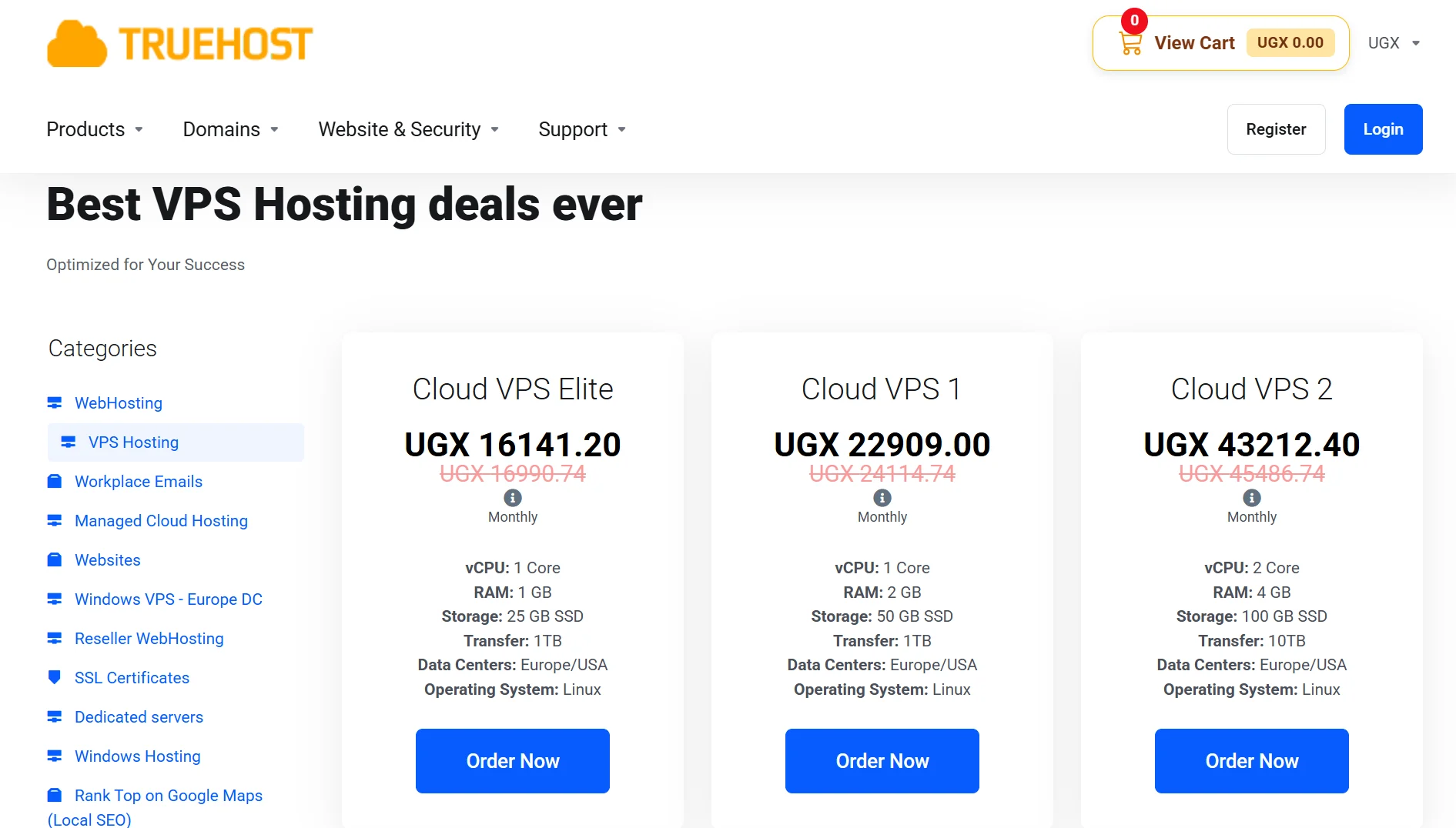
VPS WordPress Hosting gives you a virtual server with dedicated resources.
You’re still on a shared physical machine, but your slice of CPU and RAM is yours, so performance stays consistent regardless of what other sites do.
This is the step up for sites that have outgrown shared hosting but don’t need an entire physical server, and it comes with more control over the server environment.
At Truehost, VPS hosting starts from USh 16,257.56/month.
III) Managed WordPress Hosting
Managed WordPress Hosting is the hands-off option. The host handles the server, updates, security, backups, and caching while you focus on content and your business.
It’s the right choice if you don’t have a technical team and don’t want to become one. Managed plans usually include staging, tested plugin updates, and support that genuinely knows WordPress.

Managed WordPress hosting starts from USh 64,116.00/month at Truehost.
IV) Dedicated WordPress Hosting
Dedicated WordPress Hosting means an entire physical server is yours. It suits heavy-traffic sites, complex ecommerce operations, and anyone with strict security requirements.
You get full root access and performance limited only by the hardware.
It’s the most expensive option, starting from USh 349,432.20, and it’s more than most sites need, but for the ones that need it, nothing else compares.
How to Choose the Best WordPress Hosting
- Identify your needs: a personal blog vs. business site vs. ecommerce. A blog posting a few times a week needs less than an online store handling orders hourly, so be honest about what you’re running.
- Check performance: speed, uptime guarantees, caching, CDN. Look for specific numbers like 99.9% uptime and details on caching and CDN rather than vague “fast” claims.
- Evaluate security: SSL, firewalls, malware scanning, backups. Free SSL is the baseline, and you should confirm backups run regularly and can be restored easily.
- Look at support: 24/7 availability, WordPress expertise, response times. Round-the-clock help matters, but so does whether the team can actually diagnose a WordPress problem.
- Scalability: can it grow with your traffic? Your site might be small now, but check whether you can upgrade without switching hosts.
- Compare pricing: watch for renewal rates and hidden fees. The introductory price isn’t the renewal price, so check what you’ll pay after the first term.
- Check ease of use: dashboard, one-click install, staging. You want a dashboard that makes sense and setup that doesn’t require a manual.
- Read reviews: real user feedback and uptime history. A few negative reviews are normal, but a pattern of complaints about downtime or support is a warning.
- Test support: ask pre-sales questions before committing. The response you get tells you a lot about what support will be like after you’ve paid.
Get Reliable WordPress Hosting
If you’re ready to stop worrying about whether your hosting can keep up, we can help.
At Truehost, we’ve built our hosting around what WordPress needs: fast servers, SSD storage, free SSL, daily backups, and a cPanel dashboard that keeps site management simple.
We help businesses and individuals in Uganda get online quickly and stay online. Our plans start from USh 8,905.00/month for Starter, which covers a fresh website, a portfolio, or a blog finding its audience.
The Pro plan at USh 3,740.10/month handles multiple sites and more traffic, and Unlimited at USh 52,296.10 gives agencies and busy shops the resources to grow.
If you’re moving an existing site, our team handles the migration so you don’t lose files or emails.
We also offer VPS, managed cloud, and dedicated servers as your needs grow, so you don’t have to switch hosts to scale.
Setup is quick; you can go live in under 30 minutes, and our renewal rates are among the lowest in Uganda.
Pick the plan that fits where you are now and move up when you need to. The important thing is getting your WordPress site onto hosting that doesn’t hold it back.
