It is time to redesign your website when your brand has outgrown it.
That is the clearest signal, according to Tess Demir, founder of Tess Demir Design.
Your business has moved on. You have new services, a more established client base and a sharper point of view. But your site still shows who you were two or three years ago.
That gap quietly erodes trust with the exact clients you now want to attract.
This website redesign checklist walks you through ten steps. It puts strategy first, then build, then measurement and improvement.
Here is what you will get:
- A readiness check to run before you set any dates
- Ten practical steps, from goals to post-launch
- Real data to back up the big decisions
Let’s start with the gate.
Pre-Project Gate: Readiness Assessment
Before you set any dates, score your project honestly on five areas:
- Clarity of business goals
- Access to the right knowledge holders
- Content readiness
- Technical certainty
- Decision-making speed
Give every weak area an owner and a concrete plan. A realistic schedule reflects the actual work, not an optimistic target.
Tip: score each area from 1 to 5. Anything below 3 needs a fix before kickoff.
It feels slow to pause here. But a delayed launch costs far more than an honest score.
Once the gate is clear, you can start with the “why”.
1) Start With the Reason Behind the Redesign
Write down why this project exists now. Answer these questions in plain words:
- What is the current site hindering?
- Which business goals should the new experience enable? Think leads, sales enablement, brand perception, recruiting, content publishing, support, expansion or investor confidence.
- What triggering event created urgency?
- What will success look like after launch?
- Which measurements give you a useful baseline today?
Avoid vague goals like “modernize.” Turn each goal into something you can measure.
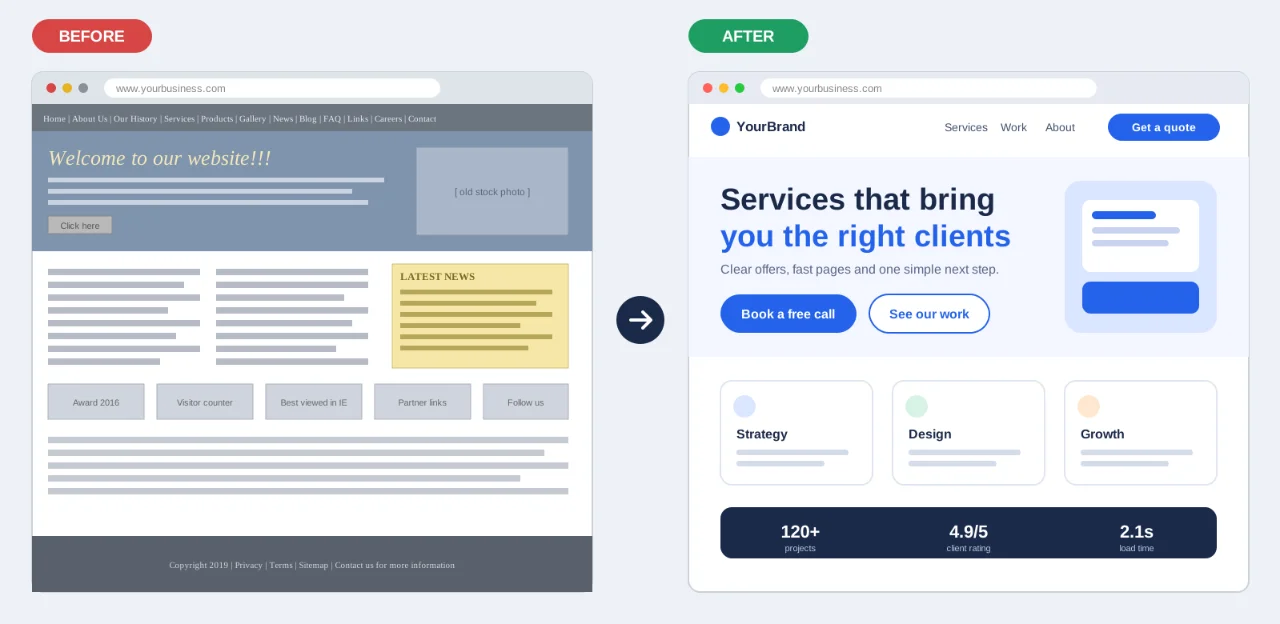
For example: write “Increase qualified form submissions from service pages” instead of “Improve lead generation.”
Next, capture your baselines. Record traffic, conversions, rankings and user behavior before you change anything.
Without a baseline, you cannot prove the new site works.
With your reason set, look at who you are building for.
2) Trace How Buyers Move From Problem to Purchase
Map the full path your buyers take:
- Problem recognition
- Solution exploration
- Evaluation
- Decision
- Internal validation
Then work through each stage:
- Identify your primary and secondary audiences.
- Document the questions buyers ask at each stage.
- List the alternatives they consider, including “do nothing.”
- Note the proof they need to reduce uncertainty.
- Note which actions the site should make easier, and which content gets used after sales conversations.
Do not forget the buying team itself. Gartner found that 74% of B2B buyer teams show unhealthy conflict during the decision process.
The same survey found that buyers who feel content is relevant to the whole buying group are three times more likely to report a high-quality deal.
Why it is important: your site is often read by several people who want different things.
Your site has a different job at each stage. First, earn the small “yes.” Then make deeper information easy to find.
Ground this map in real evidence. Use analytics, surveys, competitor reviews and card-sorting.
Now check what you already have.
3) Review What Your Current Site Already Does Well
Review what works before you replace it. Look at:
- Traffic, high-value landing pages, search rankings and backlink value
- Conversion paths, form performance, user behavior and common exit points
- Sales and support questions, plus content quality and duplication
- Mobile, accessibility and performance issues
- CMS limitations and publishing pain
- Brand and messaging consistency
Then sort every element into one of five groups:
- Keep: it works, so leave it alone
- Improve: the idea is right, the execution is weak
- Consolidate: merge it with similar content
- Remove: it no longer serves anyone
- Rebuild: it needs a fresh start
Protect anything that brings in traffic, leads or rankings.
The risk is real. Seer, an SEO agency, documented a client that redesigned and moved to a new CMS. Traffic fell 26% year over year the month after launch.
Seer’s audit traced the drop to poorly redirected URLs and excess 404 errors.
Finish this step with a full content inventory. Note the gaps you find.
Those gaps lead you to the people who can fill them.
4) Pull Together Insight From Across Your Team
In complex organizations, essential knowledge is spread out. Start by finding who holds what:
- Business knowledge
- Customer knowledge
- Product knowledge
- Technical knowledge
Then map representatives from sales, marketing, product, IT, legal, talent and leadership.
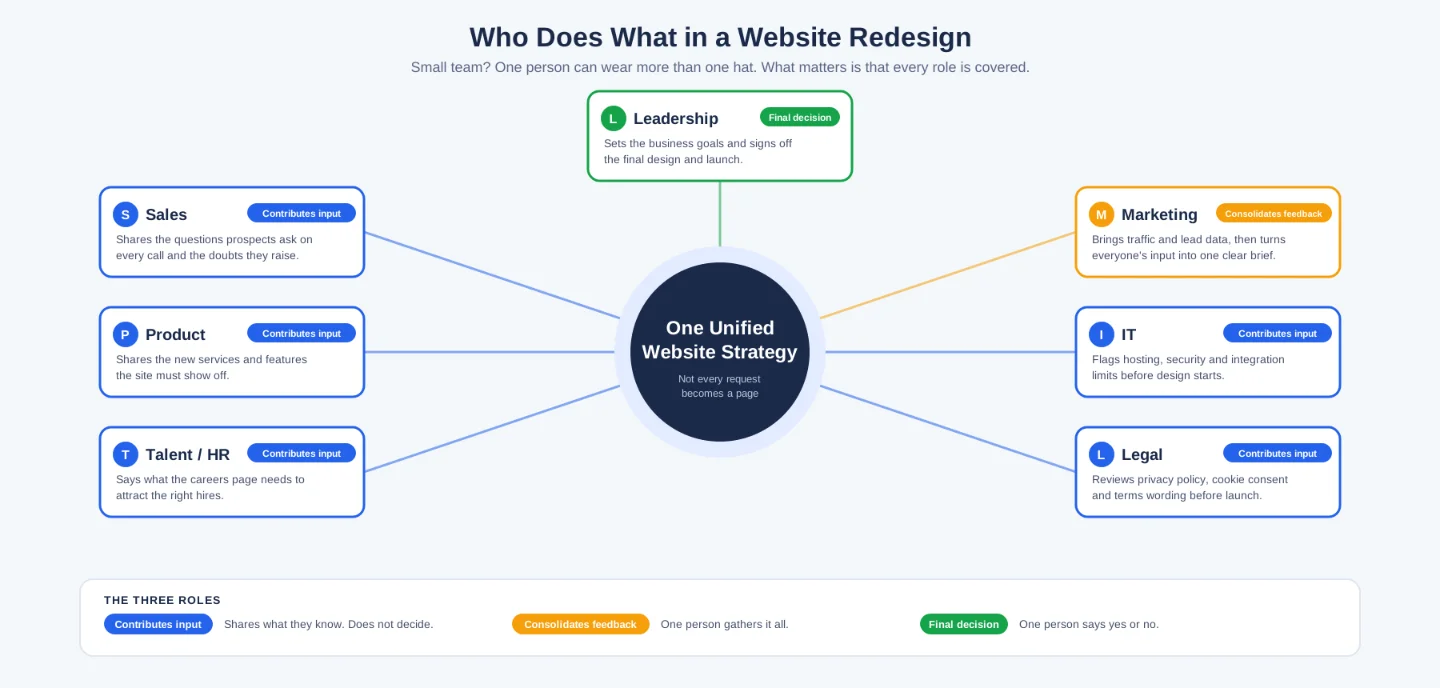
Make three roles clear:
- Who contributes input
- Who consolidates feedback
- Who makes the final decision
Use structured interviews and workshops. Then turn what you hear into one unified strategy.
Do not turn every request into a page.
Define roles, communication channels and escalation paths early. This avoids bottlenecks later.
With the team aligned, you can agree on what you are saying.
5) Settle Your Brand Story and Key Messages
Agree on the core story before you write any page. Answer these five questions:
- Who is the company for?
- What value does it create, and why is that important now?
- How is it distinct from alternatives?
- Why should the audience believe the claim?
- What messages serve each audience and journey stage?
If these answers are unclear, design will keep reopening strategic questions. That burns time and budget.
Align your messaging with the broader brand story. Plan for consistency across every page.
Once the story is settled, you can shape the structure around it.
6) Map Out the Site Architecture and Page Content
Build your information architecture before any visual design. Work through this list:
- Complete the content inventory. Decide which pages stay, merge, move or disappear.
- Map the future sitemap and navigation.
- Define each page’s purpose and conversion action.
- Set primary, secondary and tertiary CTAs site-wide.
- Separate unique pages from repeatable templates.
- Set content ownership, deadlines, internal links, tagging, search and AI-readiness requirements.
Page count alone does not define complexity. Template variety, content readiness and decision-making are more important.
Build a page-level content plan. Plan visuals and downloadable assets at the same stage.
Then choose the platform that will carry all of it.
7) Pick a Platform That Fits Your Long-Term Needs
Your platform must fit how your organization will operate after launch. Document these points:
- Who publishes and approves content
- Which roles and permissions you need
- Your CRM, search, product, recruiting and data integrations
- Localization and translation workflows
- Security, privacy, accessibility and compliance needs
- Hosting, performance, backup and support expectations
- Your current scale and your likely future scale
Do not choose a CMS only because an agency prefers it.
Instead, split your needs into three lists: must-have, should-have and future.
Treat performance as a requirement from day one. Google’s Core Web Vitals give you clear targets. A page is “good” when it hits these at the 75th percentile of real users:
- Largest Contentful Paint (LCP): 2.5 seconds or less
- Interaction to Next Paint (INP): 200 milliseconds or less
- Cumulative Layout Shift (CLS): 0.1 or less
INP replaced First Input Delay as a Core Web Vital in March 2024.
Speed also affects revenue. Google’s web.dev case studies report that Vodafone improved LCP by 31% and saw 8% more sales. Rakuten 24 raised its conversion rate by 33.13% after investing in Core Web Vitals.
Results differ by site. Still, the direction is clear.
Hosting is part of this choice. At Truehost, we offer VPS and dedicated servers for sites that need more power, control and room to grow. If you want a team to handle the full build, you can open a website project with us.
Now you can give the strategy a face.
8) Shape the Look, Feel, and Usability
Design should express your strategy, not discover it. Follow these practices:
- Use real or representative content in key layouts.
- Test more than one creative direction when differentiation is important.
- Test hierarchy at mobile and desktop sizes.
- Make actions and navigation unmistakable.
- Design reusable components and states.
- Validate accessibility, readability, contrast, keyboard navigation and alt text.
- Show how motion and interaction support the story.
Limit component variants to avoid design drift. For example: standard, condensed and featured.
Accessibility deserves extra attention. The WebAIM Million 2025 report found that 94.8% of the top one million home pages had detected WCAG 2 failures. The average was 51 errors per page.
Most sites get this wrong. You can stand out by getting it right.
Mobile is crucial too. DataReportal’s Digital 2025: Uganda report counted 14.2 million internet users in January 2025, about 28.0% of the population. It also counted 38.6 million cellular connections, or 76.2% of the population.
In short: design for the phone first.
Next, build a living design system. Include colors, typography, spacing and components.
Build one full, high-impact page early, often the homepage. It validates the system before you scale it.
Keep client feedback tied to agreed goals, not personal taste.
When the design holds up, it is time to build and move.
9) Develop, Move Content Over, and Prepare for Launch
Before launch, confirm each of these:
- Content is final, approved and loaded.
- 301 redirects preserve important URLs. Map old to new, and avoid mass homepage redirects.
- Metadata, schema, canonicals and sitemaps are correct.
- Analytics and conversion events work.
- Forms route to the right systems and people.
- Accessibility and cross-device QA are complete.
- Performance and security checks have passed.
- Editors are trained, and backup and rollback plans exist.
- Ownership is clear for every launch task.
Treat SEO, analytics and content migration as core work. Do not leave them for the last week.
Remember the Seer case from step 3. A 26% traffic drop followed a redesign with weak redirects.
Test every form, CTA and integration. A broken form is a lost lead.
Automation can help with routing. At Truehost, we offer N8n hosting, so you can connect forms to your CRM and alert the right person without manual steps.
Add trust signals before you go live. Include testimonials, case studies and clear contact details.
Need a team to carry this checklist through launch? You can start your website project with us.
Launch is not the finish line.
10) Keep Improving Once the Site Is Live
Launch is the beginning of evidence, not the end of strategy. Monitor these areas:
- Search visibility
- Form submissions and conversions
- User behavior
- Sales feedback
- Content performance
- Technical health
Compare every result against the baseline you set in step 1.
Treat the site as a living asset. Make small improvements based on real data.
Routine reporting takes time. At Truehost, we offer AI Workers and N8n hosting for teams that want to automate reports and alerts.
The strongest agency relationships keep asking one question. Is the website helping the business reach its evolving goals?
Turn This Blueprint Into A Live, High-Performing Website
You now have a complete website redesign checklist. Start with the readiness gate, then work through the ten steps in order.
Strategy comes first. Execution follows. Measurement never stops.
We at Truehost specialize in professional website redesigns that go beyond looks. We build sites made to convert visitors, rank higher on Google and support real business growth.
You get custom design and SEO structure. You get fast local hosting and ongoing support. We handle the full journey so you don’t have to.
Ready for a site that matches who you are today?
