cPanel and DirectAdmin both handle the same essential tasks. They also differ in usability, performance, pricing and integrations.
This guide puts cPanel vs DirectAdmin side by side, feature by feature. Each point ends with a clear verdict.
cPanel is a control panel for Linux web servers. You use it to add domains, create email accounts, install WordPress and manage backups. Most hosts and freelancers know it well.
DirectAdmin does the same core jobs with a lighter, simpler design. Hosts that want low costs and low server load often pick it.
Your panel affects three things:
- How easy your daily tasks are
- How much you pay, directly or through your host
- How much of your server’s power is left for your websites
Choose cPanel if you want the most familiar interface and the biggest library of tutorials. Choose DirectAdmin if you want a lighter, faster, more affordable panel that still covers everything most websites need.
Want the details? Start with the table below.
cPanel vs DirectAdmin Quick Comparison Table
| Comparison Point | How cPanel Is | How DirectAdmin Is | Final Verdict |
| Ease of Use | Polished, icon-based layout with a search bar. Very familiar to most users. | Cleaner and more compact. Most-used tools are on the main dashboard. | Tie. cPanel for familiarity, DirectAdmin for a fast, uncluttered dashboard. |
| Pricing and Cost | More expensive. Licence costs rise quickly for resellers and agencies. | Considerably cheaper, so hosts can offer lower prices or more resources. | DirectAdmin |
| Performance and Resource Usage | Heavier. Uses more RAM and CPU. | Lightweight. Leaves more server resources for your websites. | DirectAdmin |
| Popularity and Support | Industry standard with a huge library of tutorials, videos and documentation. | Smaller but active community, with good documentation. | cPanel |
| Features and Compatibility | Widest range of third-party integrations and plugins. | Covers everything most websites need. Fewer niche add-ons. | cPanel for integrations. DirectAdmin is enough for most sites. |
| System Requirements | Needs more RAM and disk space. Supports fewer operating systems. | Runs on modest hardware. Supports more Linux distributions. | DirectAdmin |
| Security and Updates | Regular updates, SSL, firewall and two-factor support. | Regular updates, SSL, firewall and two-factor support. | Tie. Security depends mostly on the host. |
Now let’s go through each point.
1) Ease of Use
Both panels are easy to learn. The difference is in style.
How cPanel is:
- Icon-based layout grouped into sections: Files, Databases, Domains, Email, Security.
- A search bar at the top. Type “email” or “backup” and jump straight there.
- Very familiar. People moving from another host rarely need to relearn anything.
How DirectAdmin is:
- Cleaner and more compact, with fewer visual elements.
- The most-used tools sit on the main dashboard.
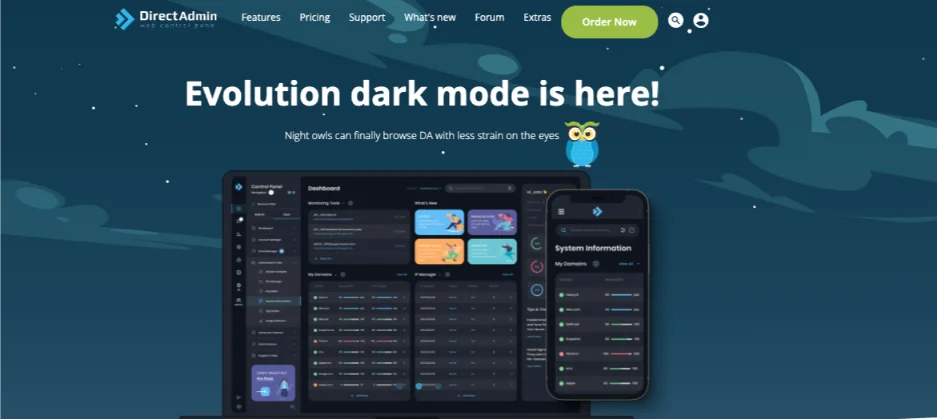
- Newer versions have a modern layout with a search feature and a dark mode option.
- Pages load quickly because the panel itself is light.
Final Verdict:
cPanel wins on familiarity and learning resources. DirectAdmin wins for people who want a quick, uncluttered dashboard.
For a beginner, both are easy.
Ease of use is a matter of taste. Price is not, so let’s look at that next.
2) Pricing and Cost
This is where the two panels differ the most.
How cPanel is:
- Licensing is charged per account on shared hosting and per server tier on VPS and dedicated. Those licence costs get passed to the customer.
- Costs rise quickly for resellers and agencies with many accounts.
- Hosts often charge more for cPanel plans than for comparable plans on other panels.
The numbers show why. cPanel’s tiers cover 1 account (Solo), up to 5 (Admin), up to 30 (Pro) and up to 100 (Premier). Beyond 100 accounts, you pay per extra account.
cPanel raised its prices again from 1 January 2026. The Solo licence, for a single account, moved from about $26.99 to $29.99 a month. The per-account charge above 100 accounts went from $0.45 to $0.49.
How DirectAdmin is:
- Licensing is considerably cheaper, so hosts can offer more resources for the same price.
- Savings usually show up as lower plan prices or more included features.
DirectAdmin’s retail licences are:
- Personal Plus: $5 a month for 2 accounts and 20 domains
- Lite: $15 a month for 10 accounts and 50 domains
- Standard: $29 a month for unlimited accounts and domains
Compare that to cPanel Solo. About $30 buys one cPanel account. The same money buys unlimited DirectAdmin accounts.
Final Verdict:
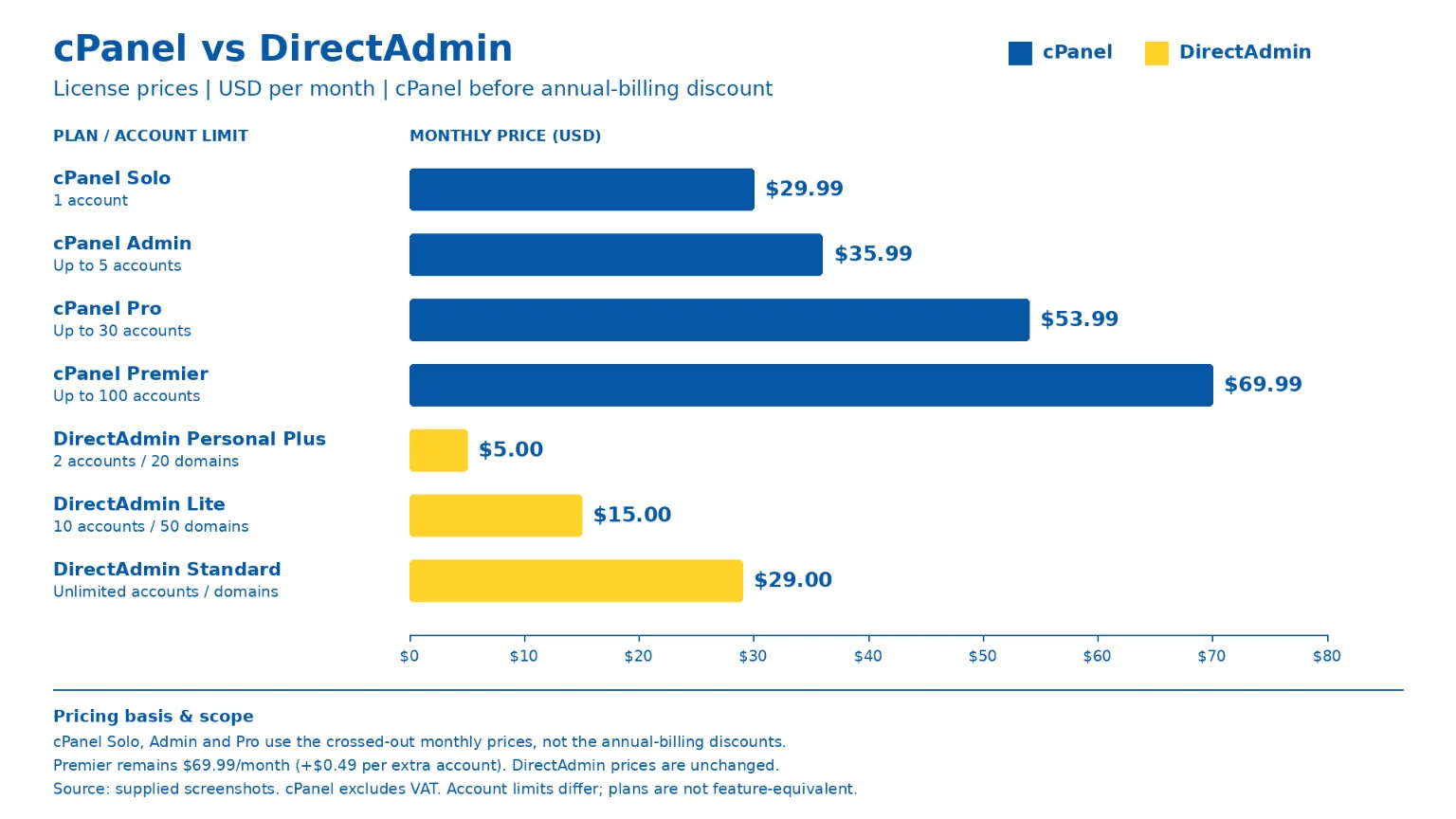
DirectAdmin is the clear winner on price. This is especially true for startups, freelancers, small businesses and resellers.
One tradeoff: if you buy shared hosting, you rarely pay the licence directly. Your host does. So compare final plan prices, not just licence prices.
Lower cost often comes with a lighter panel. Let’s see how that plays out.
3) Performance and Resource Usage
A control panel runs on your server. It takes some of its power.
How cPanel is:
- It runs more background services, so it uses more RAM and CPU.
- On a well-resourced server, this is barely needed.
- On a small VPS, it can eat into what is left for your websites.
How DirectAdmin is:
- Designed to be lightweight, so more of the server goes to your sites.
- Often runs well on a small VPS where cPanel would struggle.
Important clarification:
The panel does not directly make your website faster.
What counts is server hardware, caching, PHP version and optimization. A lighter panel just leaves more headroom.
Final Verdict:
DirectAdmin wins on efficiency. cPanel is perfectly fine on a properly sized server.
If your site outgrows a small plan, you do not have to switch panels. At Truehost, we offer VPS and dedicated servers where you get full control of your resources. We also host n8n, if you plan to run automation workflows alongside your websites.
Performance is about the server. Support is about people. That is our next point.
4) Popularity, Documentation and Support
When something breaks, you want an answer fast.
How cPanel is:
- Has been the industry standard for many years.
- Huge amount of official documentation, YouTube tutorials, forum answers and third-party guides.
- Most freelancers and web developers already know it.
How DirectAdmin is:
- Smaller community but active, with official documentation and a support forum.
- Popular with hosts that care about price, including in Africa and Europe.
- Because it is simpler, there is also less to troubleshoot.
Why the host is more important than the panel:
The speed and quality of support from your hosting company will affect you more than the size of the panel’s community.
A huge tutorial library does not help at 11 pm if your site is down. A fast support team does.
Final Verdict:
cPanel wins on the volume of learning resources. DirectAdmin is more than adequate when the host provides good support.
Next, let’s see what each panel can do.
5) Features and Compatibility
Both panels cover the daily needs of most site owners. Here is what you get in each:
- Email management: accounts, forwarders, autoresponders, spam filtering.
- Databases: MySQL/MariaDB and phpMyAdmin in both.
- Security: SSL install, IP blocking, two-factor authentication, password protection for directories.
- Backups: on-demand and scheduled backups, restore options.
- App installation: one-click installers for WordPress and other CMS platforms.
- Developer tools: multiple PHP versions, Git, SSH access, cron jobs.
- Third-party integrations: billing (WHMCS), backup tools, malware scanners and CDN plugins.
A note on developer tools. Tools like Node.js and Python depend on how the host configures the server. Do not assume either panel gives you them by default. Ask your host first.
How cPanel is:
The widest range of integrations and plugins. Almost every tool in the hosting ecosystem supports it first.
How DirectAdmin is:
Covers what most websites, shops and blogs need. Fewer niche or enterprise-level add-ons.
Final Verdict:
cPanel has the edge on integrations. DirectAdmin has everything the average site owner will use.
Features count for less if the panel does not fit your server. That brings us to requirements.
6) System Requirements and Flexibility
This section is mainly for people who manage their own VPS. Shared hosting customers won’t need it.
How cPanel is:
- Needs more RAM and disk space. Its documentation lists 2 GB of RAM and 20 GB of disk as the minimum.
- Supports a narrower list of operating systems (for example AlmaLinux, Rocky Linux, CloudLinux and Ubuntu).
- Needs a fresh server with nothing else installed to set up.
How DirectAdmin is:
- Runs on modest hardware. Hosting guides list 1 GB of RAM as the minimum, with 2 GB or more recommended.
- Supports a wider range of Linux distributions, including AlmaLinux, Rocky Linux, Debian and Ubuntu.
- Easier to set up on a lower-spec VPS.
Both panels need a licence before you can install them. DirectAdmin’s licence is tied to your server’s IP address.
Final Verdict:
DirectAdmin is more flexible. cPanel is fine if you are on supported hardware and an approved operating system.
Running your own server? A Truehost VPS gives you the root access and resources to run either panel. For heavy workloads, our dedicated servers are the next step.
Last, let’s look at security.
7) Security and Updates
Security is where people expect a big gap. There isn’t one.
- Both panels get regular security updates and support SSL, firewalls and two-factor authentication.
- Security depends heavily on the host: server hardening, firewall setup, malware scanning and timely updates.
- Because both are widely used, both are targets. That is why choosing a host that actively maintains its servers is important.
Final Verdict:
It is a tie. Neither panel is automatically more secure than the other.
Your habits count too. Use strong passwords, turn on two-factor authentication and keep your CMS plugins updated.
You now have all seven points. Let’s turn them into a decision.
When to Choose cPanel
- You or your team already know cPanel well.
- You want the largest library of tutorials and third-party guides.
- You rely on specific plugins or integrations built mainly for cPanel.
- Budget is not your main concern.
- You manage clients who specifically ask for cPanel.
When to Choose DirectAdmin
- You want to keep hosting costs down.
- You run a blog, business site, online shop or portfolio.
- You use a small or mid-sized VPS where resources are crucial.
- You prefer a clean, fast, no-clutter dashboard.
- You are a reseller who wants lower licence overhead.
- Your host already bundles strong features with it.
Why Truehost Uses cPanel
Our shared hosting plans run on cPanel. Customers get the interface most web owners already know.
Why it suits Ugandan site owners:
- Familiar for anyone moving from another host.
- A huge library of tutorials, so most problems can be solved without waiting for support.
- Works smoothly with one-click installers for WordPress and other CMS platforms.
What the Starter plan includes:
- Hosts 10 websites
- 30 GB SSD storage
- Free SSL and daily backups
- Free website migrations
- Unlimited cPanel email accounts
- 24/7 support
- Billing cycles: monthly, annually, triennially
- 30-day money-back guarantee
An honest note:
DirectAdmin is a strong panel too. We chose cPanel for familiarity and support, not because DirectAdmin is weak.
If you want a simple start, open a hosting account with us at [Truehost Uganda hosting page]. You can try it risk-free for 30 days.
Planning to run your own server later? We also offer VPS and dedicated servers. And if you want AI tools or automation, we offer OpenClaw hosting, AI Workers and n8n hosting.
Bottom line: pick cPanel for familiarity and ecosystem. Pick DirectAdmin for lower cost and a lighter footprint. Either way, your host’s support counts most.
cPanel vs DirectAdmin FAQs
Is cPanel easier for beginners?
Both are easy to learn. cPanel feels more familiar because most hosts and tutorials use it.
DirectAdmin has a cleaner layout with fewer options. Some beginners find that simpler.
Does the control panel affect website speed?
Not directly. Your site speed depends on server hardware, caching, PHP version and optimization.
A lighter panel like DirectAdmin leaves more server resources free. That helps most on small VPS plans.
Can I migrate from cPanel to DirectAdmin?
Yes. You move your files, databases, email accounts and DNS settings.
Back up everything first. Ask your host if they offer migration help. We at Truehost offer free website migrations on our Starter plan.
Which control panel is best for a Ugandan business?
For most small businesses, cPanel on a good shared hosting plan is the easiest start. It is familiar and well documented.
DirectAdmin makes sense if you run your own VPS and want to keep costs down. Pair either one with a .ug domain and a host that offers local payment options.
Can I use cPanel on a Truehost plan?
Yes. Our shared hosting plans run on cPanel.
On a VPS, cPanel is available as a separate licence you add to your server.
Is DirectAdmin free?
No. DirectAdmin is a paid licence. Retail prices are $5 a month for Personal Plus, $15 for Lite and $29 for Standard.
Many hosts bundle the licence into their plans, so you may not pay for it separately.
