Want to register a .co.ug domain for your business in Uganda?
A .co.ug domain gives your business a recognisable Ugandan online identity, helps customers identify your local market, and provides a professional address for your website and business email.
Whether you run a shop, consultancy, startup, real estate agency, online store, or established company, choosing the right domain name is an important step towards building your online presence.
The good news is that you can register a .co.ug domain through a domain registrar that supports Uganda’s country-code domain extensions. You do not need to be a web developer to get started.
In this guide, you’ll learn how to register a .co.ug domain, compare domain registration providers, understand renewal costs, and connect your new domain to your website.
Where Can You Register a .co.ug Domain in Uganda?
You can register a .co.ug domain through providers such as Truehost, Hostnali, HostPinnacle, and HostAfrica, subject to their current availability and registration policies.
Before choosing a provider, compare the initial registration fee, annual renewal price, transfer charges, payment options, customer support, and domain management features. A low introductory price may not always be the cheapest option over several years.
The table below highlights the providers to compare before registering your domain. Prices and availability should be confirmed on each provider’s official website before payment.
| Registrar | Registration | Renewal | Transfer |
| Truehost | UGX 431002/year | UGX 106860/year | UGX509366/year |
| Afriregister | UGX 129500 | UGX 129500 | 0 |
| Host256 | UGX 130,000/year | UGX 130,000/year | Confirm current quote |
| Webhosting.ug | UGX 136,000 | UGX 136,000 | UGX 136,000 |
Truehost’s published domain page lists .co.ug at UGX 431002 per year. Prices may change, so confirm the total before purchasing. Competitor prices are not presented as verified because comparable current official prices were not confirmed for every provider.
When comparing providers, pay particular attention to renewal fees. Your domain is an ongoing business asset, so understanding the cost of keeping it active matters just as much as the first-year price.
Steps to Register a .co.ug Domain
Registering a .co.ug domain is straightforward. Follow these six steps to secure your business name and prepare it for your website.
i) Choose a Domain Name

Start by choosing a short, memorable domain name that reflects your business, brand, or services.
For example, if your company is called Kampala Fresh Foods, you could check names such as:
- kampalafreshfoods.co.ug
- kampalafresh.co.ug
- kampalafreshmarket.co.ug
These are examples only; you must check whether the names are available.
A good business domain should be easy to spell, simple to pronounce, and recognisable to your target customers. Avoid unnecessary hyphens, confusing abbreviations, and names that are too similar to existing brands.
Before registering, check that your chosen name does not infringe another business’s trademark.
ii) Check .co.ug Domain Availability
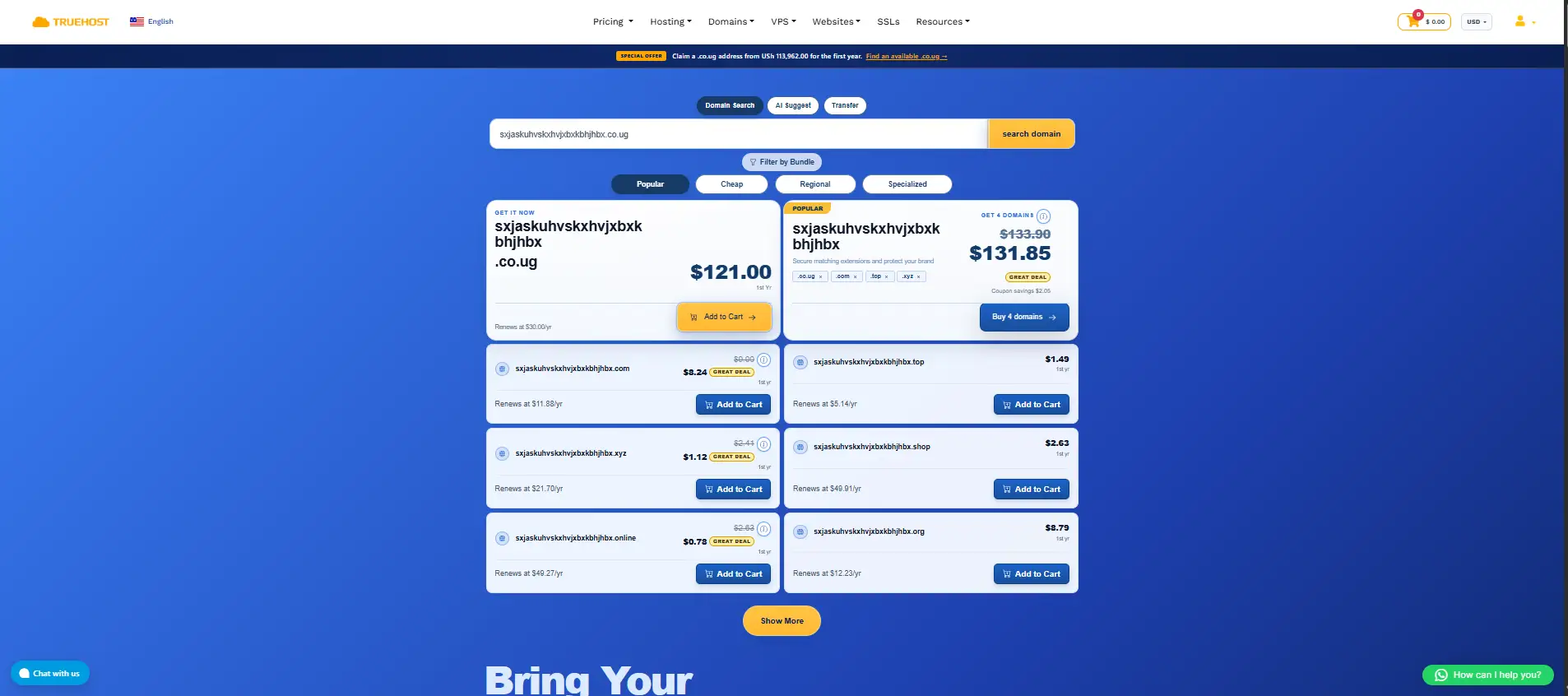
Once you have a name in mind, visit your preferred domain registrar and use its domain search tool.
Enter the name you want, followed by the .co.ug extension. The search tool will indicate whether the domain is available for registration.
If your first choice is already registered, try a shorter variation, your main product or service name, or a distinctive brand name.
Tip: Check the availability of matching social media usernames and other relevant domain extensions if you plan to expand your business in the future.
iii) Create an Account With Your Registrar
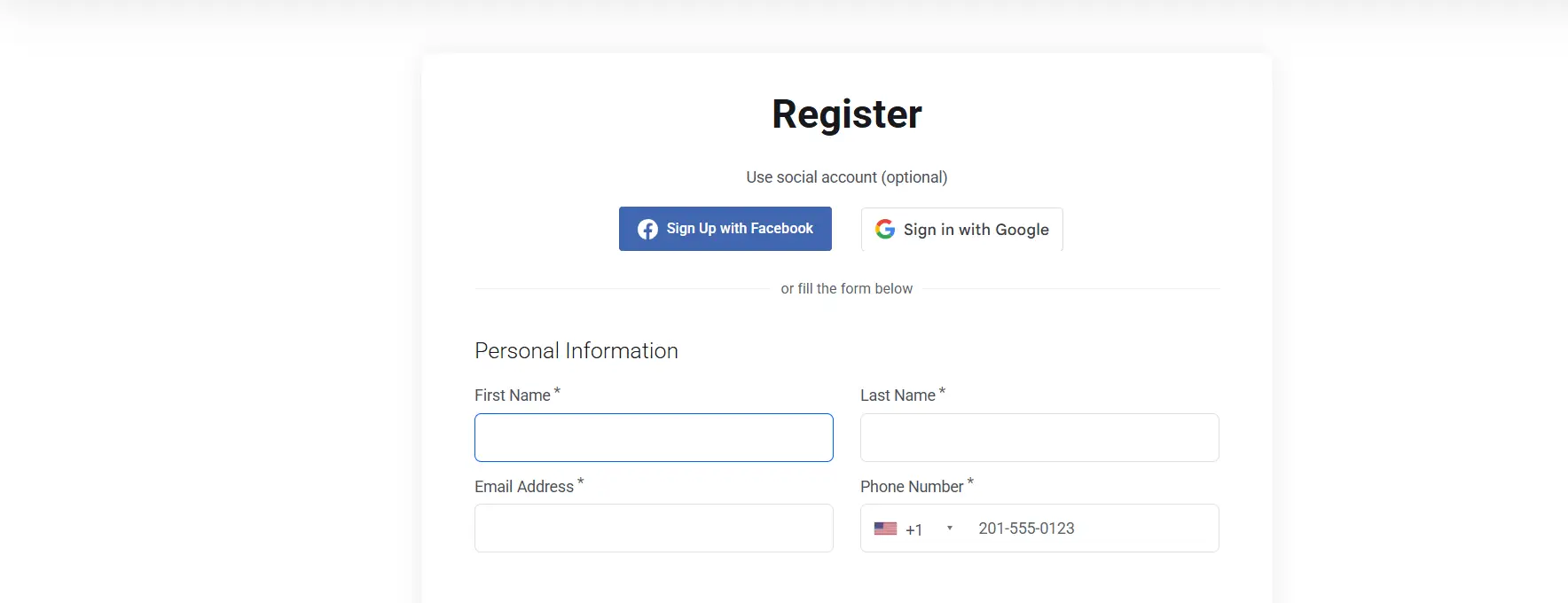
After finding an available domain, create an account with your chosen registrar.
You will generally need to provide your name, email address, telephone number, and other requested contact details. Follow the provider’s instructions and ensure that your registration information is accurate.
Keep control of the account and use an email address you can access reliably. This is important for receiving renewal notifications, managing DNS settings, and recovering your account if necessary.
iv) Complete Payment for Your .co.ug Domain
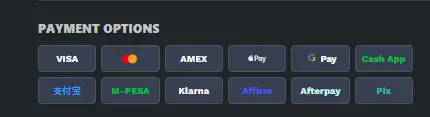
Review the registration price and select the available registration period.
Before paying, confirm:
- The total registration cost and applicable taxes.
- The renewal fee for subsequent years.
- Whether any optional services have been added.
- The payment methods accepted by the registrar.
- The registration period and expiry date.
Complete the payment using one of the payment methods offered at checkout. Depending on the provider, available options may include cards, bank transfers, or supported mobile payment services.
Save your payment confirmation and registration receipt for your records.
v) Connect Your Domain to Web Hosting and DNS
Registering a domain gives you the domain name, but it does not automatically mean you have a complete website.
To publish your website, you will generally need a hosting service or another platform where your website is deployed.
If your hosting provider supplies nameservers, update your domain’s nameserver settings as instructed. Alternatively, configure the required DNS records if you are connecting the domain to a website builder, email service, or external hosting platform.
For example, you may need to configure:
- A or AAAA records to direct your domain to a server’s IP address.
- CNAME records to connect a subdomain to another hostname.
- MX records to direct incoming email to your email provider.
- TXT records for email authentication or domain verification.
DNS changes can take time to propagate. Follow your hosting provider’s instructions and verify that your website and email work correctly after the changes.
If you are not ready to build a website, you can register your domain first and connect it to a website or email service later.
vi) Verify Your Contact Email and Domain Details
After registration, check your inbox for any verification message or confirmation request from your registrar.
Complete the requested verification promptly. If you do not receive an email, check your spam folder and confirm that the email address entered during registration is correct.
Log in to your domain account and check the registered name, contact details, nameservers, and expiry date.
Keep your contact information up to date so that you can receive important notices about your domain.
Remember to Renew Your .co.ug Domain Annually
Your domain needs to be renewed before it expires to maintain control of your online identity.
Set a calendar reminder at least 30 days before the expiry date. If your registrar offers automatic renewal, consider enabling it and checking that your payment details remain valid.
Do not assume that an expired domain will remain available indefinitely. Depending on the applicable registry and registrar policies, you may face additional recovery charges or risk losing the name.
Important: Check your registrar’s specific renewal, expiry, grace-period, and redemption rules. The exact recovery process and charges depend on the applicable domain policies.
Register a .co.ug Domain With Truehost Today
Ready to take your business online?
A .co.ug domain can give your business a clear Ugandan identity and provide a professional foundation for your website and branded email.
With Truehost Uganda, you can check domain availability and explore domain registration and hosting services from one provider.
Get started today:
- Visit the Truehost domain registration page.
- Search for your preferred .co.ug domain name.
- Confirm the current registration and renewal prices.
- Complete your order and follow the setup instructions.
Choose a domain that represents your business well, secure it before someone else registers it, and take the next step towards building your online presence.
Frequently Asked Questions About .co.ug Domains
Can I register a domain name by myself?
Yes. You can register a domain name yourself without hiring a web developer.
Choose an available name, create an account with a registrar, provide the required information, complete payment, and follow the registration instructions. You can then connect the domain to your hosting provider or website platform.
If you need help with DNS configuration, your hosting provider may offer setup guidance.
How much does it cost to register a domain name in Uganda?
The cost depends on the domain extension, registrar, registration period, and any applicable taxes or optional services.
For example, Truehost Uganda’s published domain page lists .co.ug at UGX 113,962 per year. Other providers may charge different registration, renewal, and transfer fees.
Always check the current price before completing your purchase, and compare the renewal fee as well as the introductory price.
How do I choose the best .co.ug domain registrar?
ose a registrar based on more than the first-year registration price.
Compare the following factors:
- Registration, renewal, and transfer charges.
- Supported payment methods.
- Domain management and DNS controls.
- Customer support and technical assistance.
- Renewal reminders and account security.
- Compatibility with your website hosting and email services.
A provider that offers transparent pricing and reliable support can make managing your business domain easier over time.
What is the best site to register a domain name?
The best site depends on your budget, preferred domain extension, payment options, and support requirements.
If you want to register a .co.ug domain and manage your domain alongside hosting services, you can start by checking Truehost Uganda.
Compare its current pricing and features with other providers before deciding which service best suits your business.
What is the difference between .ug and .co.ug?
Both extensions are associated with Uganda, but they serve slightly different branding purposes.
A .ug domain is a shorter country-code domain, while .co.ug is commonly used by businesses and commercial websites seeking a recognisable Ugandan identity.
Choose the extension that best suits your brand, availability, budget, and intended audience.
Do I need a website before registering a .co.ug domain?
No. You can register your domain before building your website.
Securing the name early helps you establish control of the domain you want to use for your business. You can connect it to web hosting, a website builder, or a professional email service when you are ready.
Can I transfer my .co.ug domain to another registrar?
A transfer may be possible, but eligibility, procedures, and charges depend on the domain’s applicable registry and registrar policies.
Before starting a transfer, contact your current registrar and the receiving provider to confirm the requirements, any restrictions, and the total cost. Avoid changing providers without understanding how the transfer could affect your domain management and renewal arrangements.
