A CDN can protect your website against many DDoS attacks, but it does not guarantee complete protection. It works by distributing traffic across servers in different locations, delivering cached content without putting extra pressure on your main server, and blocking suspicious traffic before it reaches your website.
This protection can make a big difference. In Q3 2026, Cloudflare reported blocking 18.2 million network-layer DDoS attacks and 14.4 trillion malicious HTTP requests.
However, a CDN cannot stop every attack. Hackers may bypass it and target your main server directly, overwhelm dynamic pages that cannot be cached, or attack other services connected to your website.
This article looks at how CDN DDoS protection works, the types of attacks it can prevent, its limitations, and other security measures you can use to protect your website.
How a CDN Provides DDoS Protection
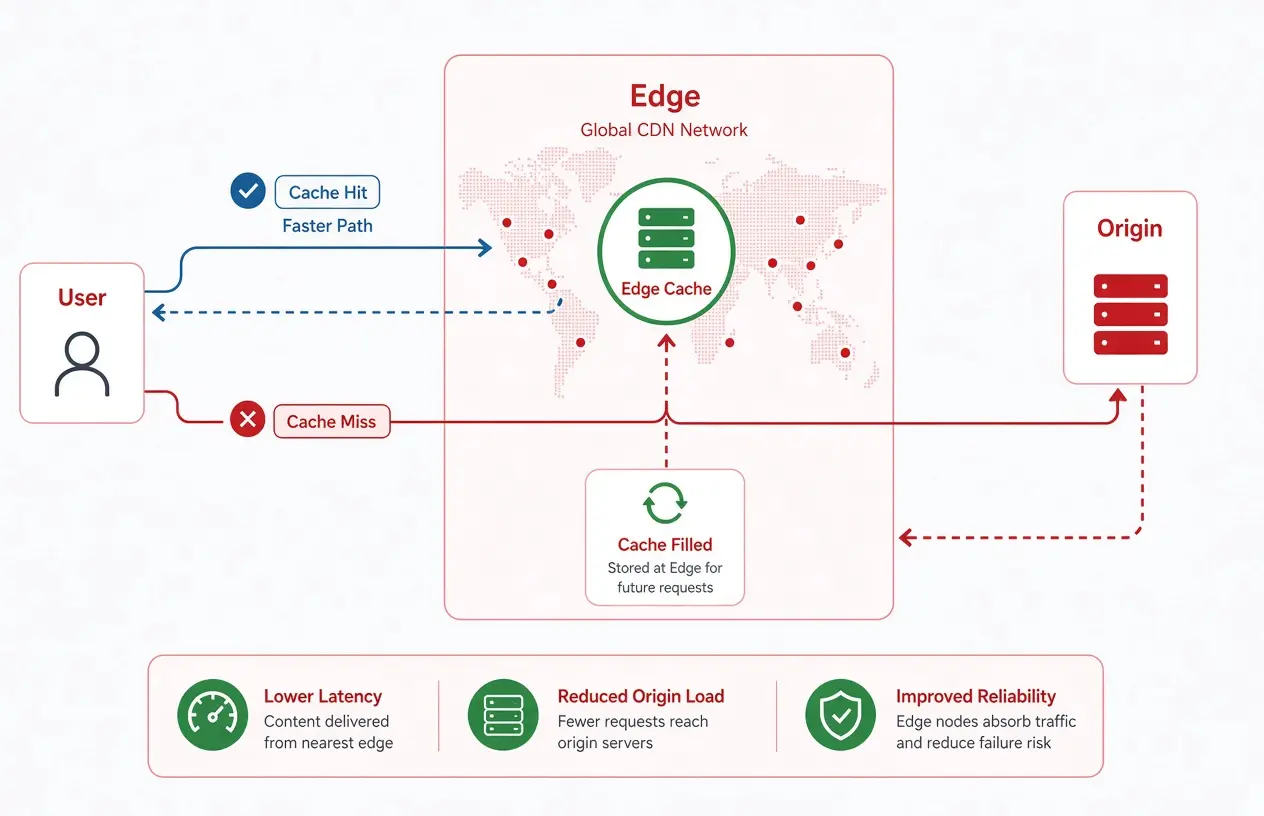
A CDN protects your website by sitting between visitors and your main server. It uses several methods to detect and block harmful traffic before it causes problems.
- Traffic distribution: A CDN spreads incoming traffic across servers in different locations. This prevents one server from handling too many requests at once.
- Edge caching: It stores files such as images, scripts, and stylesheets on its servers. Visitors can access these files without sending every request to your main server.
- Traffic filtering: The CDN checks incoming traffic and blocks suspicious requests before they reach your website.
- Rate limiting and bot detection: It limits how many requests a visitor can make within a certain time and identifies automated traffic that may be part of an attack.
- Web Application Firewall (WAF): A WAF checks website requests and blocks harmful ones, including attacks that try to overwhelm your website through normal-looking traffic.
- Origin server protection: A CDN can hide your main server’s IP address, making it harder for attackers to target it directly.
Basic vs. Security-Focused CDNs
Not all CDNs offer the same level of protection. A basic CDN mainly improves website speed by delivering content from nearby servers. A security-focused CDN offers extra features such as DDoS protection, traffic filtering, bot detection, and a Web Application Firewall (WAF).
Some providers combine all these security features into one service. Check what your CDN plan includes before relying on it to protect your website.
What Types of Attacks Can CDNs Handle Well or Poorly?
A CDN can stop many DDoS attacks, especially those that send large amounts of traffic to a website. However, some attacks are harder to detect and block, particularly those that look like normal visitor activity or bypass the CDN.
Attacks CDNs Handle Well
- Volumetric attacks: These attacks flood a website with traffic until its server or network cannot handle any more requests. A CDN spreads this traffic across many servers, reducing the pressure on your main server.
- Protocol attacks: These attacks target network connections and use up server resources. A CDN helps by handling these connections on its own servers before they reach your main server.
Attacks That Need Extra Protection
- Application-layer (Layer 7) attacks: These attacks send many requests to website pages such as login, search, and checkout. They often look like normal visitor activity, making them harder to detect. A WAF, bot detection, and rate limiting provide extra protection.
- Cache-busting attacks: Attackers change parts of a URL to make the CDN treat every request as new. This forces the CDN to fetch content from the main server repeatedly, putting extra pressure on it. Proper caching rules help reduce this risk.
Attacks CDNs May Not Prevent
- Direct-to-origin attacks: Attackers can find your main server’s IP address and send traffic directly to it, bypassing the CDN completely.
- Non-web attacks: Most CDNs protect HTTP and HTTPS traffic. Services such as email, FTP, databases, and DNS may need separate protection.
- Large and complex attacks: Some attacks can exceed a CDN provider’s capacity or take advantage of security weaknesses. Attackers may also combine different attack methods to make detection harder.
Critical Limitations of CDN DDoS Protection
A CDN can protect your website from many attacks, but it has limitations. Some attacks bypass it, while others target parts of your website that the CDN cannot fully protect.
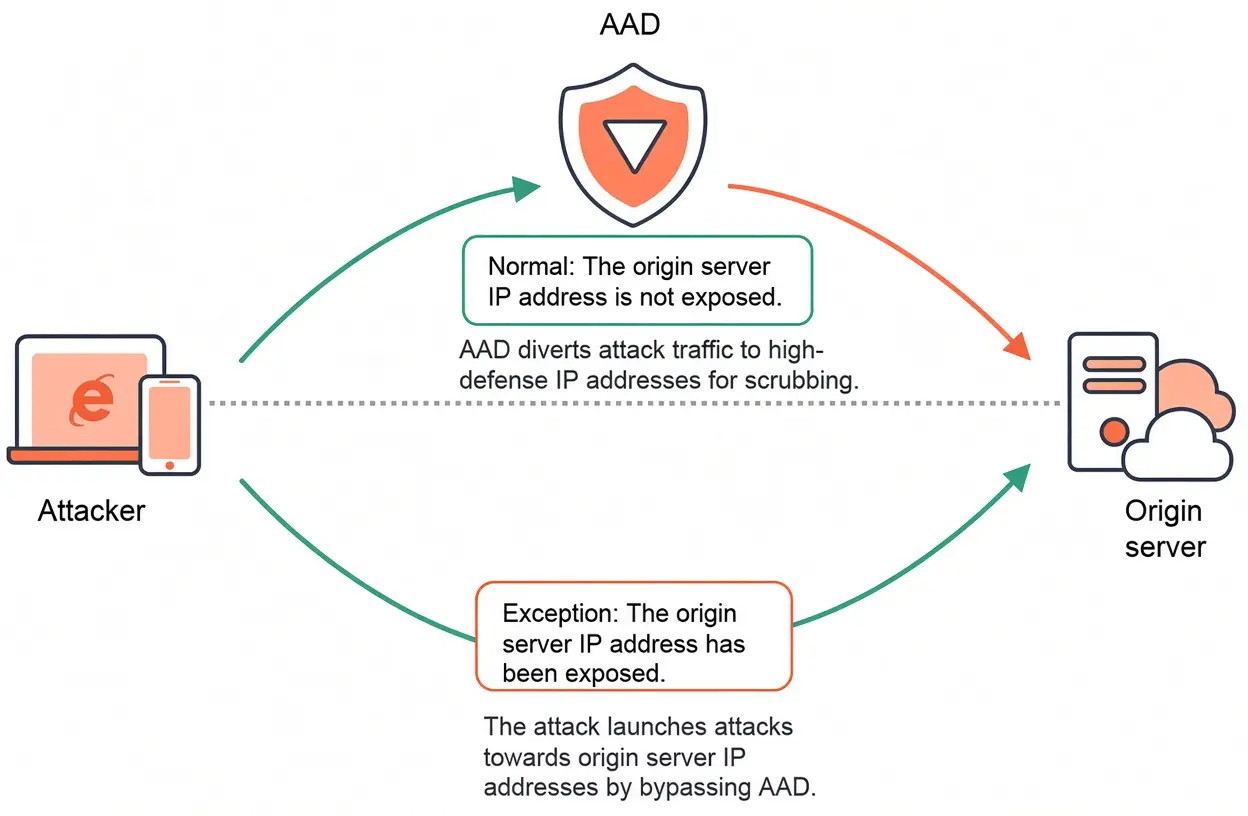
1) Exposed Origin IP Address
A CDN cannot protect your main server if attackers know its real IP address. They can bypass the CDN and send attacks directly to your server.
Your server’s IP address can leak through:
- Old DNS records from before you started using the CDN.
- Mail servers hosted on the same server or network.
- Subdomains such as staging, FTP, and VPN that are not protected by the CDN.
- Public SSL certificate records and internet scanning tools.
To reduce this risk, hide your origin IP, update old DNS records, and allow only trusted CDN traffic to reach your server.
2) Uncached and Dynamic Content
A CDN can cache files such as images and scripts, but it cannot cache every part of a website.
Pages and services such as logins, searches, APIs, and checkouts often need to communicate with your main server.
Attackers can target these pages with repeated requests, forcing your server to use more CPU, memory, and database resources. This can slow down your website even when cached pages continue working.
3) Poor Configuration
A CDN may fail to protect your website properly if its settings are incorrect.
Common mistakes include:
- Leaving some DNS records outside the CDN.
- Exposing the origin server’s IP address.
- Using weak firewall and WAF rules.
- Allowing direct access to the origin server.
Review your DNS, firewall, and CDN settings regularly. Make sure your server accepts traffic only through approved connections.
4) Sophisticated Attacks
Some attackers use more advanced methods that are harder to detect.
For example, they may send traffic in short bursts to overwhelm your server repeatedly. Others target cloud resources to increase your hosting costs without necessarily taking your website offline.
Strong filtering and monitoring can help detect these attacks, but blocking too much traffic can also affect genuine visitors.
5) Unprotected Services
Most CDNs mainly protect websites that use HTTP and HTTPS.
Other services, such as email, FTP, databases, VPNs, and admin panels, may remain exposed if they are not protected separately.
An attack on these services can also affect your website if they share the same server or network.
6) CDN Provider Limitations
Not all CDN providers offer the same level of DDoS protection. Some features are available only on higher-priced plans.
For example, a provider may include basic DDoS protection but charge extra for advanced firewall rules, network protection, or attack monitoring.
Before selecting a CDN, check which security features are included, what traffic limits apply, and whether extra protection costs more.
Best Practices for Maximizing CDN DDoS Protection
A CDN provides good protection against DDoS attacks, but you need to configure it properly and add other security measures. The following practices can help keep your website safe.
i) Protect your origin server.
Configure your server firewall to accept website traffic only from your CDN. Block direct connections from other sources. If your server’s IP address was previously public, change it to prevent attackers from using old records to bypass the CDN.
ii) Enable security features.
Turn on DDoS protection, a Web Application Firewall (WAF), bot detection, and rate limiting. Set stricter limits for sensitive pages such as login, search, and checkout to prevent attackers from sending too many requests.
iii) Set up DNS correctly.
Make sure all website records that need protection pass through the CDN. Remove unused subdomains and check for old DNS records that may reveal your server’s IP address. Keep your email services separate where possible.
iv) Use additional security measures.
Do not rely on a CDN alone. Add caching, load balancing, server monitoring, and firewall protection. You can also use backup servers to keep your website running if the main server becomes unavailable.
v) Choose a reliable CDN provider.
Compare providers based on their DDoS protection, security features, server locations, pricing, and customer support. Check whether protection is always active or only starts after an attack is detected.
vi) Test your security settings.
Check whether attackers can access your main server without going through the CDN. Review firewall and CDN logs for suspicious connections. Repeat these checks after changing your hosting, DNS, or CDN settings.
vii) Prepare for attacks.
Have a plan for handling DDoS attacks before they happen. Know how to contact your CDN provider, who will manage security settings, and what steps to take if your website goes offline. This helps you respond faster and reduce downtime.
Is a CDN Enough to Protect Your Website from DDoS Attacks?
No. A CDN provides strong protection against DDoS attacks, but it cannot protect your website from every threat. It helps handle large traffic floods, blocks suspicious requests, and reduces the load on your main server. However, attackers can still bypass it, target dynamic pages, or attack other services such as email and databases.
For better protection, combine a CDN with other security measures. Protect your origin server, enable a Web Application Firewall (WAF), set request limits, and use bot detection. Regularly check your security settings to make sure attackers cannot bypass the CDN.
Your hosting provider also plays an important role in website security. Truehost Uganda offers reliable web hosting to help you keep your website online and accessible. With features such as SSL certificates, backups, and website security tools, you can build a stronger foundation for your website.
Looking for reliable hosting for your website? Check Truehost Uganda’s web hosting plans and find a plan that suits your needs.
Can a CDN Protect Your Website from DDoS Attacks? FAQs
Does a free CDN plan stop DDoS attacks?
Some do, to a point. Cloudflare, for example, includes unmetered DDoS mitigation on every plan, free included. Advanced features usually require a paid plan: Cloudflare lists dedicated origin egress IPs, Magic Transit and Network Interconnect as Enterprise-only. Other providers set their own limits, so check which WAF, rate limiting, bot detection, alerting and support your plan includes.
Does a CDN protect against Layer 7 attacks?
Yes, when it is configured for them. A CDN with a WAF, bot detection and rate limiting can block many application-layer floods. The hardest cases are distributed attacks that send valid requests to expensive endpoints while staying under per-IP thresholds. Those need behavior-aware protection on top of basic CDN rules.
What happens if my origin IP leaks?
Attackers can send traffic directly to your server, bypassing the CDN entirely, and the result can be downtime even while CDN dashboards look normal. Fix it by allowing only CDN traffic at the origin firewall, adding authenticated origin connections, cleaning leaking DNS records, and rotating to a new IP that is never published.
Is a CDN the same as a WAF?
No. A CDN improves content delivery and, depending on the provider, adds DDoS protection. A WAF inspects web requests and blocks malicious ones, including application-layer floods. They address different parts of the problem and work best together.
How fast does DDoS mitigation start?
It depends on the provider and the model. Always-on protection filters traffic continuously, so there is no gap between detection and mitigation. Cloudflare says its systems detect and mitigate attacks without human intervention, and some vendors publish time-to-mitigation guarantees: Imperva advertises three seconds for always-on service. On-demand services rely on detection thresholds and then a traffic diversion, which adds delay.
What is the difference between a CDN and a DDoS protection service?
A CDN primarily distributes content to improve delivery speed. A dedicated DDoS protection service focuses on detecting and mitigating malicious traffic, often with more depth at the network layer and for non-web services. The line is blurring: many providers now bundle CDN, WAF, DDoS protection and bot management into one platform. If you buy them separately, confirm that they work together and that your origin is locked down.
