Choosing between shared and reseller hosting depends on whether you host sites for yourself or for other people: shared hosting is the cheaper, low-maintenance choice for one owner running a few sites, while reseller hosting adds a WHM panel, a separate cPanel login per client, and white-label branding so you can sell hosting under your own name.
Both put many sites on one server, which is why they look alike on a pricing page.
This guide compares them on cost, performance, security and control, including what each really costs once the introductory discount ends.
Head-to-head comparison
Shared hosting wins on price and simplicity. Reseller hosting wins on control, isolation and earning potential. The table below sets the two side by side; each row is explained in detail in the sections that follow.
| Feature | Shared Hosting | Reseller Hosting |
| Starting price | Truehost: USh 8,905.00 | Truehost: USh 961,740.00 |
| Purpose | Hosting personal and business websites. | Hosting multiple client websites or starting a hosting business. |
| Account structure | Websites are managed under one main hosting account. | Allows you to create separate cPanel accounts for clients. |
| Control and management | Manage websites through a control panel. The provider handles server settings. | WHM access lets you create accounts, set resource limits, and manage clients. |
| Branding | Uses the hosting provider’s brand. | Supports private nameservers and white-label hosting features. |
| Performance and resources | Websites share the resources allocated to the hosting account. | Resources are divided among separate client accounts with individual limits. |
| Security | Websites under one account may share files and permissions. | Separate accounts provide better isolation between websites. |
| Scalability | Upgrade to a higher hosting plan as your website grows. | Upgrade your plan or add more client accounts as your business grows. |
| Technical skills | Requires basic website management skills. | Requires some knowledge of account management and client support. |
| Revenue potential | Mainly an expense for hosting your own websites. | Allows you to earn recurring income by selling hosting packages. |
1) Cost differences
Shared hosting costs far less up front, but the sticker price is only part of the bill for either product. Reseller plans start higher because you are buying a pool of resources to divide among many accounts, plus the tools to manage them. Here is how some providers compare.
Reseller hosting prices
| Provider | Starting price | Storage |
| Truehost | USh 961,740.00 | 50GB–150GB |
| Momentum Hosting | UGX 71,500 | 50GB–150GB NVMe |
| JulyHost | From UGX 300,000/year | 50GB–200GB NVMe |
| Webstar | From UGX 1,500,000 (annual billing) | 25GB–Unlimited |
| Host256 | From $77.90 | SSD |
Shared hosting prices
| Provider | Starting price | Storage |
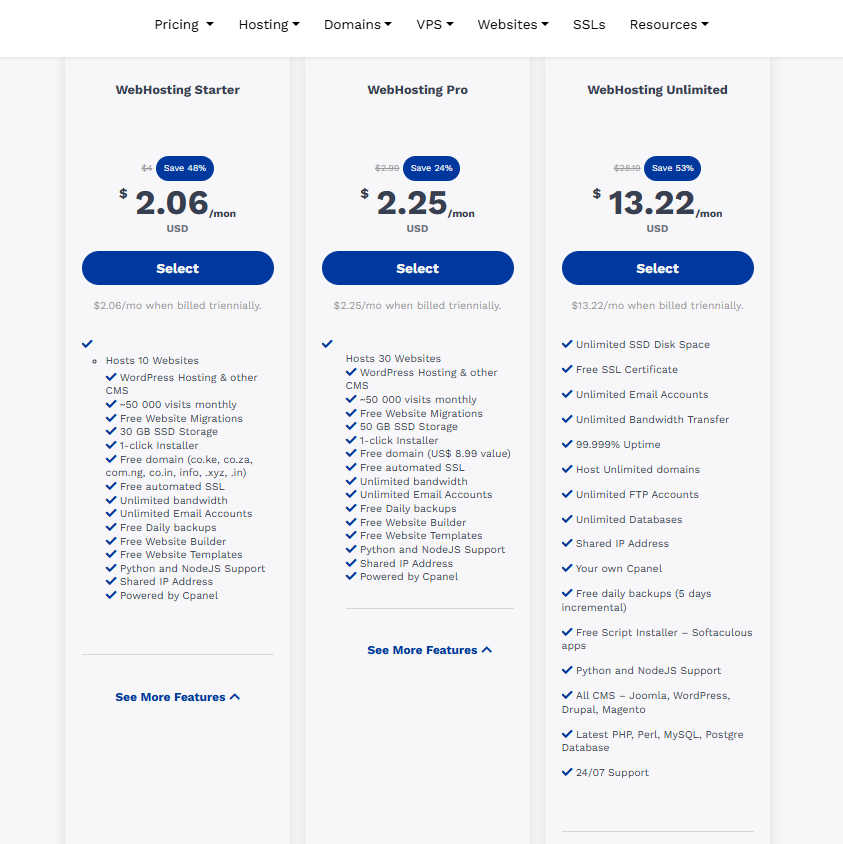
| Truehost | Starter: USh 8,905.00 | 30 GB SSD Storage |
| Momentum Hosting | UGX 10,550/ Month | 3 GB NVMe SSD Storage |
| JulyHost | 50,000 UGX / year | 5GB NVMe storage |
| Webstar | 50,000 ugx / year | 1GB SSD NVMe SSD Disk |
| Host256 | UGX 95,000 / Year | 2 GB SSD Storage |
Billing periods differ between providers (monthly, annual), so compare the cost per year rather than the headline number, and compare storage as well as price. A cheaper plan with 1 GB of space is not the same product as a dearer one with 30 GB.
2) Purpose and target audience
Shared hosting is built for people who run their own websites. Reseller hosting is built for people who run other people’s.
- Shared hosting: Designed for individuals and small businesses that want to host their own websites. Typical buyers are a business owner with a company site, a blogger, a church or school with one or two sites, or a freelancer with a portfolio.
- Reseller hosting: Designed for people who manage websites for multiple clients or want to start a hosting business. Typical buyers are web designers and developers, digital agencies, IT consultants and entrepreneurs who want a hosting brand without owning servers.

The dividing line is ownership of the websites. If every site on the account belongs to you, shared hosting is the natural fit. If the sites belong to your clients, and those clients should be able to log in, manage email, and pay their own bills, you need the account structure that reseller hosting provides.
3) Account Structure
The main difference is how websites and clients are separated. Shared hosting keeps websites under one account, while reseller hosting gives each client a separate account.
- Shared hosting: All your websites are managed through one hosting account. You can add multiple domains, but they share the same login and hosting resources. If you give a client access to the account, they may also access your other websites.
- Reseller hosting: You can create a separate cPanel account for each client. Each client gets their own login and can manage their website, emails, files, and databases. According to cPanel, a reseller buys hosting resources from a provider and shares them among the accounts they create for their customers.
Separate accounts make it easier to manage clients. You can give each client access to their website, suspend one account when a client fails to pay, or move a website without affecting the others.
With shared hosting, all websites remain under one account, making it harder to manage clients separately.
4) Control and Management
Shared hosting gives you the tools to manage your own websites. Reseller hosting adds WHM, which lets you create and manage separate hosting accounts for clients.
- Shared hosting: You use a control panel, usually cPanel, to manage website files, emails, databases and domains. The hosting provider handles server maintenance, security updates and other technical settings.
- Reseller hosting: You get access to WHM (Web Host Manager), which lets you create hosting accounts, set resource limits and manage your clients’ accounts. According to cPanel, reseller WHM access is limited, so you cannot manage the entire server.
What You Can Do With WHM
WHM gives you several tools to manage your hosting clients:
- Create hosting packages: Set limits for disk space, bandwidth and email accounts. You can apply these packages to new clients.
- Create and manage accounts: Create, suspend or delete individual client accounts.
- Control available features: Choose which cPanel tools each client can access.
- Customise the control panel: Change parts of the cPanel interface that your clients use.
What You Cannot Control
Reseller hosting does not give you full control of the server. Your hosting provider still manages the server’s operating system, firewall, security updates and PHP configuration.
You also cannot access accounts that belong to other resellers or change server-wide settings. The exact restrictions depend on your hosting provider and package.
If you need full server access to install software, change server settings or manage security yourself, consider VPS or dedicated hosting instead.
5) Branding
Shared hosting uses the provider’s brand, while reseller hosting lets you sell hosting under your own business name.
- Shared hosting: Your provider’s name appears on hosting services, invoices, nameservers and support.
- Reseller hosting: You can use your own business name, logo and contact details when selling hosting to clients.
How White-Label Hosting Works
White-label hosting lets you sell hosting without showing your provider’s brand. It includes:
- Private nameservers: Use names such as ns1.yourbrand.com instead of your provider’s nameservers.
- Branded control panel: Add your logo and customise the cPanel interface to match your business.
- Your own website and billing: Clients visit your website, pay through your billing system and contact your support team. You can use WHMCS to manage payments and hosting accounts.
Remember, your provider still manages the server. If their server goes down, your clients’ websites will also go offline. You are also responsible for providing good customer support and keeping your clients happy.
6) Performance and Resource Allocation
Both shared and reseller hosting use a server shared with other customers. The main difference is how hosting resources are divided among accounts.
- Shared hosting: Your websites share the resources allocated to your hosting account. Other customers also share the same server.
- Reseller hosting: Each client gets a separate account with its own resource limits. However, all client accounts still share the resources allocated to your reseller plan.
How Resource Limits Work
Many cPanel hosting providers use CloudLinux to control how much each account can use. These limits include:
- CPU: How much processing power an account can use.
- Memory (RAM): How much memory a website can use.
- Disk speed: How quickly an account can read and write data.
- Entry processes: How many website processes can run at the same time.
- Inodes: The number of files and folders an account can store.
These limits help prevent one busy website from using too many resources and slowing down others.
Reseller hosting has an additional limit. The resources allocated to your reseller plan are shared among all your clients. If one client uses too many resources, it can affect the performance of the other websites under your account.
What to Check Before Buying
Ask your hosting provider about:
- CPU and RAM limits for each account.
- Entry process and inode limits.
- Whether the server uses CloudLinux.
- How many accounts share one server.
- Whether storage uses SSD or NVMe drives.
Watch Out for Disk Space Limits
Some hosting providers allow resellers to sell more disk space than their plans actually have. This works because most clients do not use their full storage allowance.
However, problems can arise when several clients start using more space at the same time. Monitor storage usage in WHM and leave room for growth.
If you are hosting one website, choose a plan with enough resources for its needs. If you are a reseller, consider the combined resource needs of all your clients before choosing a plan.
7) Security
Reseller hosting offers better security separation because each client has a separate account. Shared hosting keeps multiple websites under one account, so if one gets hacked, the others may also be at risk.
- Shared hosting: Websites share one account, files and access.
- Reseller hosting: Each client has separate files, databases and login details, making it harder for one hacked website to affect the others.
How Account Separation Works
Some hosting providers use CloudLinux CageFS to prevent users from accessing other accounts’ files and folders.
However, this does not stop all attacks. Websites still need strong passwords, regular updates, malware scans and other security measures.
Who Handles Security?
On shared hosting, you protect your own website. With reseller hosting, you also help protect your clients’ websites.
Basic security practices include:
- Keep WordPress, themes and plugins updated.
- Back up websites regularly.
- Use strong, unique passwords.
- Give clients access only to what they need.
Choose a hosting provider with good security and reliable support, especially if your clients handle payments or customer information.
8) Scalability
Both shared and reseller hosting allow you to upgrade as your needs grow, but they have different limits.
- Shared hosting: You can move to a higher plan when your website needs more resources. You may need an upgrade if your website becomes slow during busy periods or regularly reaches its CPU, memory or process limits.
- Reseller hosting: You can upgrade your plan as you get more clients. However, all client accounts share the resources allocated to your reseller plan. If their combined usage becomes too high, their websites may slow down until you upgrade to a bigger plan.
When Should You Move to a VPS or Dedicated Server?
As your hosting business grows, you may need more control than a reseller plan offers. You can move to a VPS or dedicated server and manage your own WHM.
This gives you more control over server resources and settings, but it also comes with extra costs and responsibilities. You will need to manage server security, updates and backups. You also have to pay for your own cPanel licence.
As of November 2026, cPanel licence prices were:
| Licence | Account limit | Monthly price |
| Solo | 1 | $29.99 |
| Admin | 5 | $35.99 |
| Pro | 30 | $53.99 |
| Premier | 100 | $69.99 |
| Additional accounts above 100 | Per account | $0.49 |
9) Technical Skills Required
Shared hosting is suitable for beginners, while reseller hosting requires some extra skills to manage client accounts and provide support.
- Shared hosting: You only need basic website management skills, such as connecting a domain, creating email accounts, installing SSL certificates and setting up a website.
- Reseller hosting: You need to know how to create hosting accounts, manage resources, handle billing and help clients with basic hosting problems.
What You Need to Learn as a Reseller
- WHM basics: Learn how to create hosting packages, add clients, set limits and suspend accounts.
- DNS management: Learn how to set up nameservers, connect domains and fix email delivery problems.
- Resource monitoring: Check how much storage and other resources your clients use to avoid reaching your plan limits.
- Billing: Learn how to send invoices, receive payments and manage accounts. Tools such as WHMCS can automate billing and account creation.
- Customer support: Be ready to answer client questions and help when their websites have problems.
- Website migration and backups: Learn how to move websites from other hosts and create backups.
You do not need advanced server management skills to run a reseller hosting business. However, you need basic hosting knowledge, good customer support and a reliable hosting provider. Look for a provider that offers free migrations, helpful support and clear instructions.
10) Revenue Potential
Shared hosting is an expense, while reseller hosting gives you a chance to earn money by selling hosting services to clients.
- Shared hosting: You pay for hosting your own websites. It helps keep your websites online but does not directly earn you money.
- Reseller hosting: You buy hosting resources from a provider and sell them to clients at your own prices. Clients pay monthly or yearly, giving you regular income.
How You Make Money
Your earnings depend on how much clients pay you and how much you spend on hosting and other business costs.
For example, suppose a reseller plan costs UGX 300,000 per year and you charge each client UGX 50,000 per year.
| Clients | Yearly revenue | Hosting cost | Amount left |
| 6 | UGX 300,000 | UGX 300,000 | UGX 0 |
| 10 | UGX 500,000 | UGX 300,000 | UGX 200,000 |
| 20 | UGX 1,000,000 | UGX 300,000 | UGX 700,000 |
These are example figures, not guaranteed earnings. You need six clients just to cover the hosting plan. The remaining amount must also cover other costs, such as payment fees, billing software, marketing and customer support.
Other Services You Can Sell
You can earn more by offering additional services alongside hosting, such as:
- Website design and development.
- Website maintenance and updates.
- Malware removal and security services.
- Domain registration and renewals.
- SSL certificates and business email.
These services give clients more value and create additional income for your business.
Risks to Consider
Running a reseller hosting business also comes with challenges:
- Clients leaving: You lose income when clients move to another provider.
- Server downtime: If your hosting provider experiences problems, your clients’ websites may also go offline.
- Running costs: You must pay for your reseller plan, even when some clients have not paid you.
- Customer support: You need time to answer questions and fix hosting problems.
Reseller hosting can provide regular income, but success depends on finding clients and keeping them satisfied. It is not passive income; you need to manage the business and provide reliable support.
Which should you choose?
The choice between shared and reseller hosting depends on your needs. Shared hosting is best if you want affordable hosting for your own website. Reseller hosting is a better option if you manage client websites or want to start a hosting business.
If you need hosting for your website or business, check out Truehost Uganda’s hosting plans and choose a plan that fits your needs and budget.
