RAID and backups protect your data in different ways. RAID helps keep a server running when a drive fails, while backups help you recover files that have been deleted, corrupted, encrypted by ransomware, or lost with the entire machine.
For most businesses storing important data, you need both.
RAID stands for Redundant Array of Independent Disks. It combines multiple physical drives into one logical storage unit.
Depending on the configuration, it can improve performance, provide redundancy, or do both. Its main purpose is to keep a server available when a supported drive failure occurs.
A backup is a separate copy of your data, ideally stored somewhere other than the live server. It gives you a recovery point if the original files are lost or damaged.
For example, suppose someone accidentally deletes customer records from your online shop.
RAID will copy that change across the array, so the deleted records will not reappear simply because you have multiple drives. A backup containing an earlier copy of the records gives you a way to restore them.
This distinction is important for businesses running databases, billing systems, online shops, and other applications that depend on reliable access to their data. RAID helps reduce downtime, while backups provide another way to recover from data loss.
RAID vs Backups: The Main Differences
| Situation | RAID only | Backup only | RAID plus backup |
|---|---|---|---|
| A drive fails | Server stays online | Server is down until you restore | Server stays online |
| A file is deleted or overwritten | Not protected, the change is copied to every disk | Restore an earlier copy | Restore an earlier copy |
| Ransomware or file corruption | Not protected, the damage is copied too | Protected if the backup is offline or isolated | Protected if the backup is offline or isolated |
| Fire, theft or the whole server lost | Not protected, all drives sit in one machine | Protected if the copy is stored elsewhere | Protected if the copy is stored elsewhere |
| Downtime while you recover | None for a single drive failure | Hours or longer, depending on data size | None for a drive failure, a restore for data loss |
RAID protects availability, while backups provide recovery from data loss. Neither replaces the other.
1) Purpose and Function
RAID combines multiple physical drives into one logical storage unit. The way data is distributed across those drives determines how the array behaves when a drive fails.
Some RAID configurations focus on mirroring data across drives, while others use parity information to recover from supported drive failures. Certain configurations also improve read or write performance.
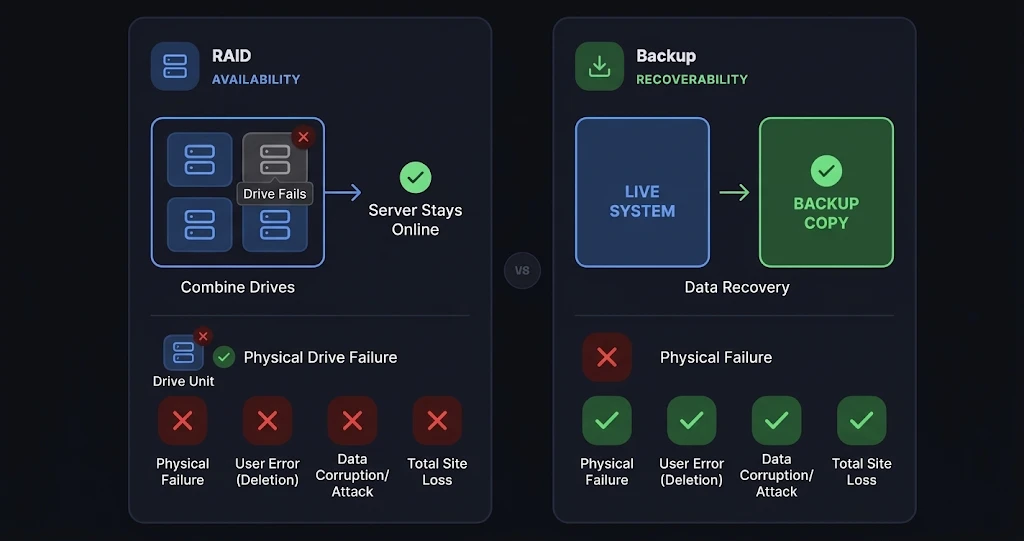
Backups serve a different purpose. They create separate copies of files, databases, applications, or other information so you can restore them after an incident.
For a business running an online shop, RAID may keep the website’s database available after a drive fails. A backup can help recover customer orders or product records after accidental deletion or corruption.
RAID primarily supports availability and hardware-failure recovery. Backups provide recovery points for lost or damaged data.
2) Data Redundancy and Protection
RAID levels differ in how they distribute data, how much storage they use, and how many drive failures they can tolerate.
- RAID 1: Mirrors data across two drives or more, depending on the implementation. With two equal-sized drives, usable capacity is roughly half the combined raw capacity.
- RAID 5: Uses parity information distributed across at least three drives. It can tolerate one failed drive.
- RAID 6: Uses dual parity across at least four drives. It can tolerate two failed drives.
- RAID 10: Combines striping with mirrored pairs. It can tolerate multiple drive failures if at least one drive in each mirrored pair remains operational. Losing both drives in the same pair can cause data loss.
These configurations provide redundancy, but redundancy is not the same as a backup. If someone deletes a file, overwrites a database, or introduces corrupted data, the changes can affect the redundant copies as well.
Backups preserve separate copies of data. Depending on the backup software, schedule, and retention settings, you may be able to restore an earlier version from before the unwanted change occurred.
3) Recovery from Hardware Failure
RAID can keep a server running when a drive fails, provided the configuration supports that failure and the remaining hardware is working correctly.
Without suitable RAID redundancy, a failed drive may take the server offline while you replace the hardware, restore the data, or rebuild the system.
Even with RAID, a failed drive needs attention. The array must be rebuilt after a replacement drive is installed, and the remaining drives may face additional workload during this process.
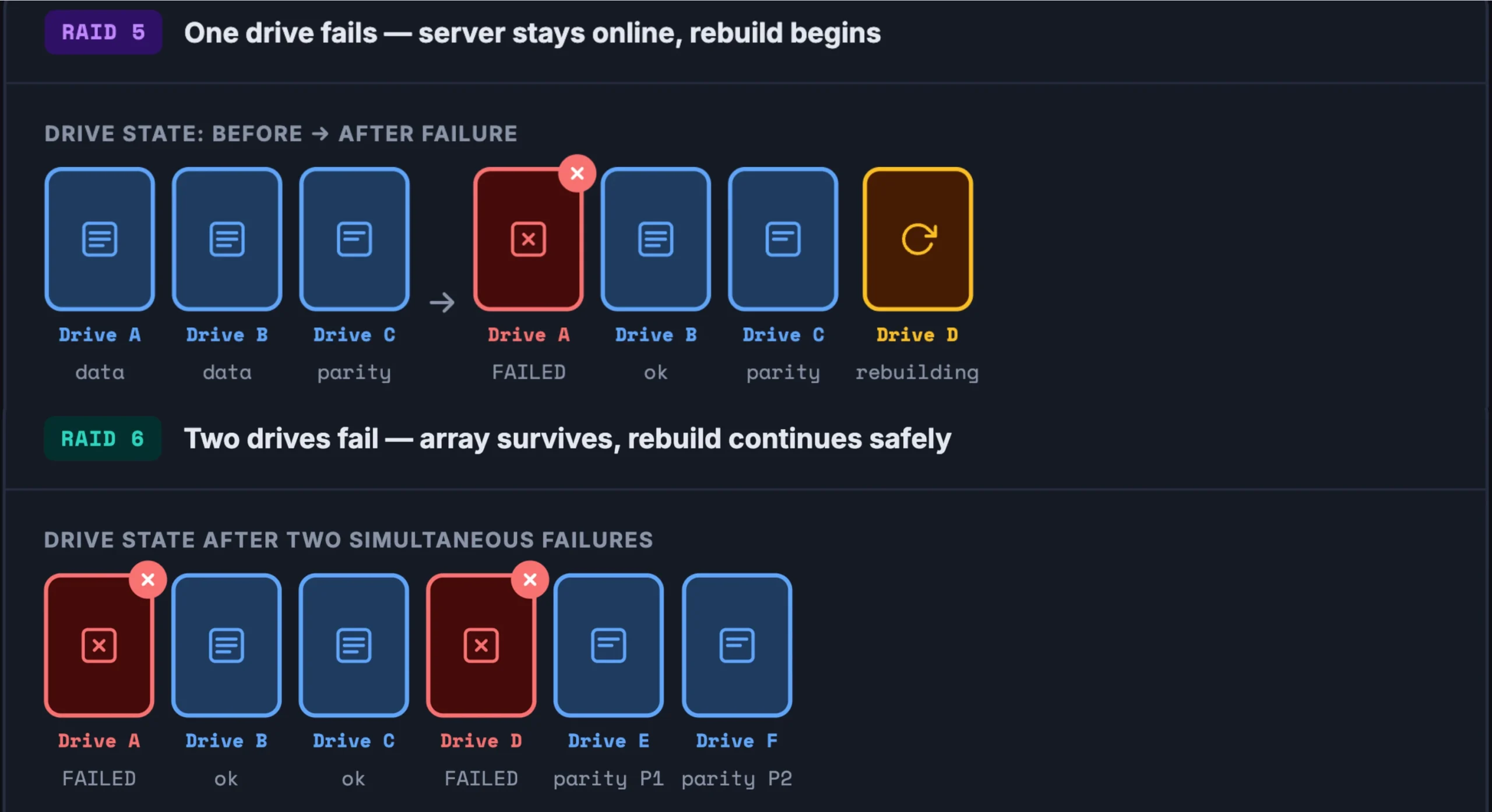
There are two important considerations:
- Rebuild time: Rebuilding a large array can take many hours or longer than a day, depending on drive capacity, performance, workload, and the RAID configuration.
- RAID 5 rebuild risk: RAID 5 can tolerate one failed drive, but it has no remaining single-drive fault tolerance while rebuilding. A second drive failure during that period can make the array’s data unavailable or unrecoverable. RAID 6 can tolerate two failed drives, although its protection also has limits if additional failures occur.
Backups provide another recovery option if an array fails during rebuilding or the entire server is lost.
The US Cybersecurity and Infrastructure Security Agency (CISA) recommends keeping offline, encrypted backups of critical data to support recovery from ransomware and other incidents.
Combining RAID with backups provides broader protection. RAID can reduce downtime from supported drive failures, while backups allow you to recover data after incidents that RAID cannot prevent.
RAID can also be useful in backup-storage systems, but those systems still need appropriate backup and recovery arrangements.
4) Protection Against Accidental Deletion
RAID does not protect against accidental deletion or overwriting. When a file is deleted or a record is overwritten, that change is reflected across the entire array within seconds.
The array did exactly what it was built to do. That is the problem.
Backups can help restore the folder from an earlier recovery point, provided a suitable copy exists.
The same applies when someone overwrites a document, changes a database record incorrectly, or removes information while carrying out routine maintenance.
To reduce the risk of permanent data loss, keep backups independently of your live data, and choose retention periods that match your recovery needs. A nightly backup gives you yesterday’s data. A backup taken every four hours gives you much less to lose.
5) Ransomware and Data Corruption Protection
RAID does not independently protect against ransomware or data corruption. If ransomware encrypts files on a live server, those changes may be reflected across the array.
A mirrored drive or parity-based configuration will not automatically restore the original files.
Backups can help restore clean data, provided the backup copies remain intact. CISA recommends maintaining offline, encrypted backups of critical data and regularly testing their availability and integrity.
Keep backup copies isolated from the live system where possible. A backup stored on a drive the server can reach may also be encrypted or deleted during a ransomware attack. At least one copy should be offline or otherwise unreachable from the live environment.
6) Recovery Speed and Downtime
RAID and backups affect recovery time in different ways.
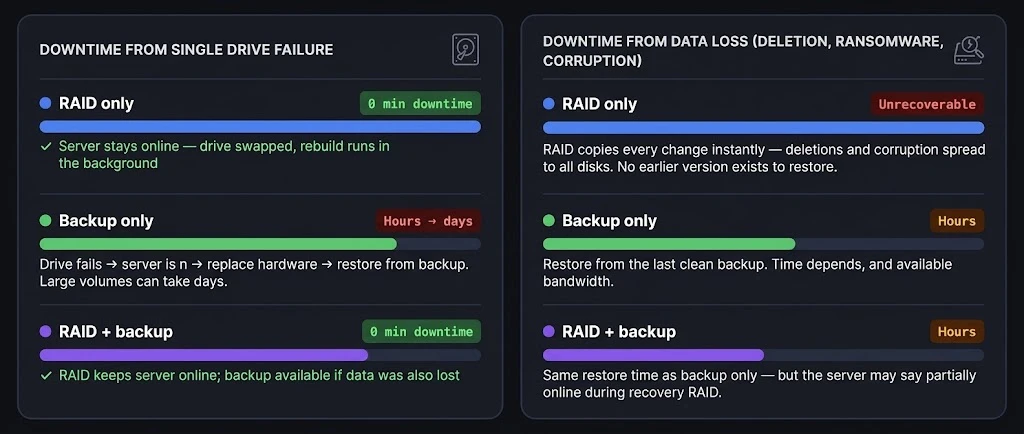
RAID can reduce downtime during a supported drive failure because the server may continue operating while the failed drive is replaced and the array rebuilds.
Backup restoration takes longer or shorter depending on several factors:
- The amount of data that needs to be restored.
- The speed of the backup storage and the server’s network connection.
- If the backup is local, remote, or cloud-based.
- The availability of replacement hardware and recovery infrastructure.
- The time required to verify the restored files and applications.
Your backup schedule also determines how much recent work you could lose. For example, if you back up a database every night, a failure in the afternoon could leave you without the changes made since the previous night’s backup.
Regular restoration tests help confirm that your backups work and give you a realistic estimate of recovery time. Test both individual files and larger recovery procedures where practical.
7) Storage Requirements and Cost
RAID requires multiple drives, and some of their combined capacity is reserved for mirroring or parity. The amount of usable storage depends on the RAID level, the number of drives, and their capacities.
For example, two equal-sized drives in RAID 1 generally provide the usable capacity of one drive. RAID 5 reserves the equivalent of one drive’s capacity for parity, while RAID 6 reserves the equivalent of two drives.
Backups require additional storage beyond the live array. Your costs will depend on the volume of data, backup frequency, retention period, storage location, and any associated management or recovery services.
A business retaining several months of daily backups will generally need more storage than one keeping only a single recent copy.
Compression, deduplication, and incremental backups may reduce storage requirements, depending on the system.
Using RAID and backups increases storage costs, but it protects against a wider range of incidents than relying on either one alone.
8) Off-Site and Disaster Recovery
RAID alone cannot protect against an incident that destroys or compromises the entire server.
If a fire, theft, electrical incident, or other disaster affects the machine and all its drives, the array may no longer be recoverable.
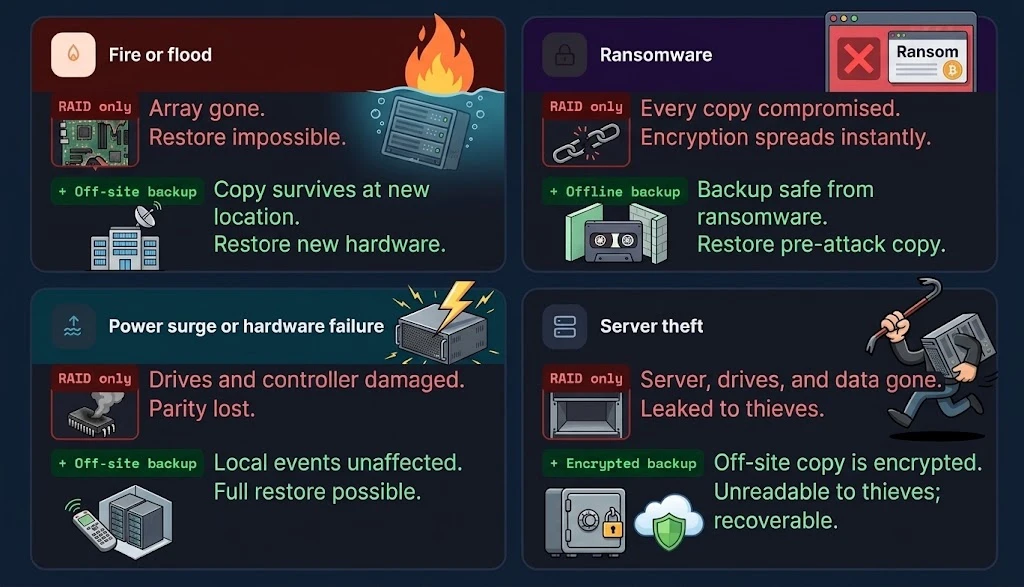
Backups stored independently of the affected server provide another recovery option. Off-site copies can help protect against local disasters, while offline or otherwise isolated copies reduce the risk of ransomware compromising both live data and backups.
For businesses that depend on their servers, it is worth documenting how the data will be restored after a serious incident.
This should include where the backup copies are stored, who can access them, how to obtain replacement infrastructure, and how to verify that restored applications are working.
Test the recovery procedure regularly. Confirm that you can access the backups, restore the required data, and resume essential operations within an acceptable period.
Which Setup Should You Choose?
The right setup depends on how easily you can recreate your data and how much downtime your business can tolerate.
RAID only: It may suit workloads whose data can be recreated from another reliable source, such as a processing server that reads its input from a separate central store.
It can help maintain availability during supported drive failures, but it does not provide independent recovery from accidental deletion, corruption, ransomware, or the loss of the entire machine.
Backup only: It may suit workloads that can tolerate downtime while you replace a failed drive or restore the system.
You have a separate copy of your data, but restoring a large volume can take hours or longer. Your recovery time depends on the available hardware, backup location, data size, and restoration process.
RAID plus backup: This is the recommended setup for databases, billing systems, online shops, and servers containing important customer records.
RAID helps maintain availability during supported drive failures, while backups provide recovery options for data loss, corruption, ransomware, and disasters affecting the original server.
The additional storage and maintenance costs are worth considering against the potential cost of losing business records or remaining offline for an extended period.
Before choosing, ask yourself:
- Can you recreate the data if it disappears?
- How much would an hour of downtime cost your business?
- Does the server store personal data subject to regulatory requirements?
If the data is difficult to replace, independent backups are essential. If downtime is expensive, RAID is also worth considering.
RAID vs Backups FAQs
Why is RAID not considered a backup?
RAID keeps redundant copies of data within an array, but those copies remain connected to the live system. Accidental deletion, overwriting, corruption, and ransomware can affect the redundant copies too. A backup provides a separate recovery point from which you can restore data.
Does RAID 1 count as a backup?
No. RAID 1 mirrors data across drives, so changes made to one copy are reflected in the other. A backup is a separate copy that can preserve an earlier version of the data.
Is RAID still useful?
Yes. RAID remains useful for maintaining availability when a supported drive failure occurs. It is best used alongside independent backups rather than as a replacement for them.
Why is RAID 5 criticized?
RAID 5 can tolerate one failed drive, but it cannot tolerate a second drive failure while the array is degraded. Rebuilding large drives can take a long time, leaving the array exposed during recovery. RAID 6 provides greater drive-failure tolerance because it can withstand two failed drives.
Is RAID faster than SSD?
RAID and SSD describe different things. RAID is a way of organizing multiple drives, while SSD refers to solid-state storage technology. A RAID array of SSDs can improve performance in some configurations, but the result depends on the RAID level, drive specifications, workload, and controller. A single SSD may outperform some RAID configurations.
Can Windows 11 do RAID 1?
Windows 11 supports storage-management features that can provide mirroring in supported configurations, including Storage Spaces. Hardware RAID support depends on the computer’s motherboard, controller, drivers, and firmware. Check the available storage options before configuring a mirrored setup.
Does a RAID 0 protect against data loss?
No. RAID 0 stripes data across multiple drives to improve performance and use their combined capacity, but it provides no redundancy. If a drive fails, the entire array’s data may become inaccessible. Keep independent backups of important files.
Is RAID 1 only for 2 drives?
No. RAID 1 is commonly implemented with two drives, but some implementations support three or more mirrored copies. The number of supported drives and the usable capacity depend on the controller or storage software.
Is RAID necessary with SSDs?
No. SSDs do not make RAID mandatory. A single SSD may be sufficient for some workloads, but RAID can still provide redundancy or performance benefits where supported. Independent backups remain important regardless of the storage technology.
Can you set up a RAID on an SSD?
Yes. RAID can be configured using compatible SSDs and a supported hardware controller or software-based storage system. The available RAID levels depend on the hardware, operating system, and storage software. Before setting it up, check compatibility, usable capacity, performance requirements, and your backup arrangements.
Choosing a Truehost Dedicated Server
If your business needs a dedicated server for a demanding workload, review the available options on our dedicated servers plans starting from USh 388,258.00 per month.
Before ordering, confirm these five details:
- RAID configuration: Check if RAID is included and if the configuration is RAID 1, 5, 6, or 10. Ask which RAID level is provided rather than relying on a general reference to RAID.
- Drive specifications: Confirm the number, type, and capacity of the drives. These details affect usable storage, performance, redundancy, and rebuild time.
- Backup options: Ask if backups are available, where they are stored, how long they are retained, and if they are isolated from the live server.
- Data-centre location: Check where the server and backup copies are hosted, particularly if your business handles personal data subject to cross-border data-transfer requirements.
- Pricing: Confirm the billing cycle and any additional costs for backup storage, management, or recovery services.
Review the specifications and ask our team to confirm any details that are not listed before ordering.
The appropriate plan and price should be added once the server’s RAID configuration, backup options, and billing details have been verified.
Compare the available Truehost dedicated server options and confirm these details before committing to a plan.
