Take an example of a small business with one website. Then it adds a shop, a blog, a customer portal and a staging site.
Each one needs its own SSL certificate. That means separate purchases, separate validations and separate renewal dates, all of which are easy to forget.
A wildcard SSL certificate fixes this. It gives you one certificate for your domain and all its subdomains.
Here is what you will learn:
- What a wildcard certificate is and how it works
- Its pros and limits
- Who needs one
- How to get one from Truehost
Wildcard SSL Certificate Definition
A wildcard SSL certificate is a single certificate. It secures one domain and all of its first-level subdomains.
The asterisk in *.yourdomain.com stands in for any subdomain name.
Example: *.example.com covers:
shop.example.comblog.example.comapp.example.com
It gives the same protection as a standard SSL certificate. The encryption is the same. Only the coverage is wider.
New to SSL? Here is the short version.
SSL (today, technically TLS) encrypts data between a visitor’s browser and your site. It enables HTTPS and the padlock in the address bar.
Without it, browsers label your site ‘Not Secure’. Visitors notice, and many leave.
Think of the certificate as your site’s ID card. A trusted certificate authority vouches that the site is really yours.
Next, let’s see how the wildcard version works.
How Does a Wildcard SSL Certificate Work?
The flow is simple:
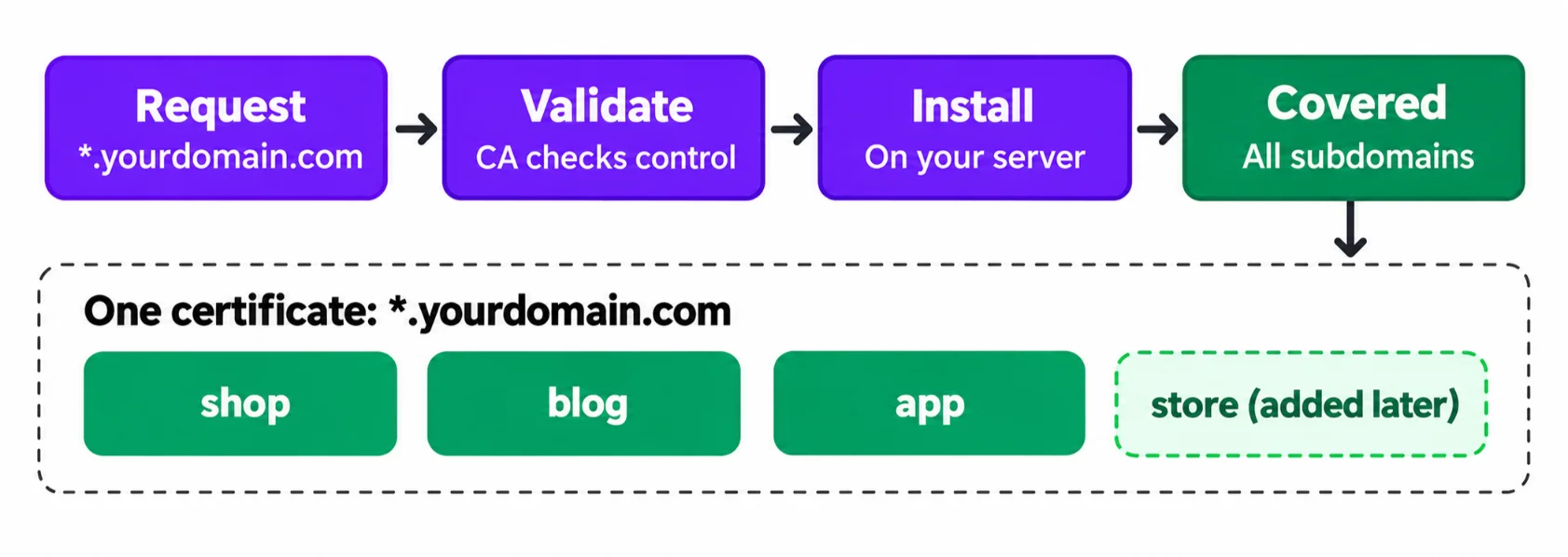
- You request a certificate for
*.yourdomain.com. - The certificate authority (CA) checks that you control the domain.
- The certificate is issued and installed on your server.
- Every subdomain under that domain is covered straight away.
That includes subdomains you add later. There is no extra purchase and no extra validation.
Most people finish validation in a few minutes.
The CA’s check is the only gate. You prove control once, and the certificate covers the whole domain.
One limit is worth knowing before you buy.
What a wildcard certificate does not cover
A wildcard covers one subdomain level only.
*.example.com secures blog.example.com. It does not secure news.blog.example.com. That deeper level needs its own certificate.
Here is a quick “covered vs not covered” view for *.example.com:
| Hostname | Covered? |
|---|---|
| shop.example.com | Yes |
| blog.example.com | Yes |
| app.example.com | Yes |
| news.blog.example.com | No (second level) |
| example.com (root domain) | Check your order. Many providers add it as an extra name. |
Benefits of a Wildcard SSL Certificate
A wildcard earns its place in five ways.
- Cost-effective: One certificate replaces several. The saving grows with every subdomain you add.
- Easier management: You install once and track fewer certificates, instead of several expiry dates.
- Automatic coverage of new subdomains: Launching store.yourdomain.com next month needs no new certificate.
- Consistent security: You get the same encryption across all subdomains. No gaps from one forgotten, expired certificate.
- Room to grow: It works the same whether you have three subdomains or thirty.
Renewals need a closer look. Since March 15, 2026, the maximum validity of a public SSL/TLS certificate is 200 days.
That limit drops to 100 days in March 2027 and to 47 days in 2029. DigiCert’s certificate validity FAQ explains the schedule.
So a wildcard now renews more often than the old yearly cycle. That is the tradeoff.
The upside is that you still renew one certificate for all your subdomains, not several. DNS validation also makes automated renewal possible.
Limitations and Risks to Know About
A wildcard is not perfect. Weigh these four points before you buy.
- One level only: It does not cover second-level subdomains. See the earlier section, “What a wildcard certificate does not cover”.
- Shared private key risk: All subdomains use the same private key. If it leaks, every subdomain is affected.
- Higher upfront cost: A wildcard costs more than a single-domain certificate. It pays off once you have several subdomains.
- No Extended Validation (EV): Wildcards come only as DV or OV. EV rules require every name in the certificate to be individually vetted, which doesn’t work with a wildcard.
The shared key is the biggest risk. That is why you must store it carefully.
Limit who can read the key file. Never send it by email. Keep an encrypted backup.
Who Should Use a Wildcard SSL Certificate?
You’re a good fit if you:
- run three or more subdomains
- expect to add subdomains as the business grows
- want fewer certificates to track and renew instead of several
Use cases with examples:
- E-commerce: separate subdomains for checkout, customer accounts and order tracking.
- Marketing sites: a blog, support centre and campaign landing pages on different subdomains.
- Internal tools: admin dashboards, staging and test environments.
Here is a simple local illustration. Picture a Ugandan online shop with shop.yourshop.ug, blog.yourshop.ug and support.yourshop.ug.
One wildcard covers all three. If the shop adds track.yourshop.ug later, that name is covered too.
Internal tools often run on servers you control. You can host them on our managed VPS plans and give each tool its own subdomain.
The same idea fits n8n hosting, OpenClaw hosting and AI Workers. Each can sit on a subdomain like n8n.yourdomain.com. It works on a dedicated server too.
One wildcard secures them all. Ready to cover your subdomains? Get a wildcard SSL certificate with us at Truehost.
When a wildcard is not the right choice
- A single website with no subdomains. A standard certificate is cheaper.
- A critical subdomain (such as payments) that needs its own certificate, so a key compromise elsewhere can’t affect it.
How to Validate Your Wildcard SSL Certificate (Methods and DV vs OV)
Before issuing your certificate, the CA must confirm you control the domain. You have two ways to do it.
Domain validation methods
- Email: a confirmation message sent to an address linked to the domain.
- DNS record: you add a record through your domain registrar. If your domain is with us, you can manage it through our domain services.
- File upload does not work for wildcards. Under CA/Browser Forum rules, HTTP-based (file upload) validation can’t be used for wildcard domains.
DNS is the better pick if you want automation. You add the record once and the CA checks it on its own.
Which validation level do you need? (DV vs OV)
Your choice depends on how much identity proof you want visitors to see.
a) Domain Validation (DV)
- Confirms domain ownership only.
- Fast to get and the most common choice for wildcards.
- Best for blogs, portfolios and small business sites.
b) Organization Validation (OV)
- Confirms domain ownership and the organisation behind it (name, address and phone, checked in a business directory).
- Takes longer to issue.
- Best for registered businesses and organisations that want visible identity checks.
Why there is no EV wildcard
EV needs the CA to vet every name in the certificate one by one. A wildcard covers names that do not exist yet, so that check cannot be done.
The CA/Browser Forum’s EV rules say wildcards are not allowed. See the section “Limitations and Risks to Know About” for the short version.
How to Get and Install a Wildcard SSL Certificate
Follow these six steps:
- Choose a CA or hosting provider that sells wildcard certificates.
- Generate a CSR. Use *.yourdomain.com as the Common Name. Many providers can generate it for you. Browsers rely on the Subject Alternative Name (SAN) rather than the Common Name, so make sure *.yourdomain.com is also listed in the SAN. CAs still ask for the CN, so keep it.
- Validate domain ownership by email or DNS record.
- Purchase and receive the certificate files.
- Install the certificate on your server and switch the site to HTTPS.
- Test it. Check the root domain and several subdomains with an online SSL checker.
Don’t skip step six. A missed subdomain is easier to catch now than after a customer reports it.
With shorter certificate lifetimes, set a renewal reminder on day one. Better still, use DNS validation and automate it.
Want someone else to handle the setup? Order your wildcard certificate from Truehost and we will help.
How to Get Your Wildcard SSL Certificate with Truehost
We at Truehost sell SSL certificates and help you install them. You get one place for your domain, hosting and security.
Why get your SSL certificate from Truehost
- Free installation help: we guide you through setup, or install it for you if you host with us.
- Fast issuance: domain-validated certificates are usually issued within minutes. OV certificates can take 1 to 5 business days.
- Choice of certificate types: DV, OV and EV, plus wildcard and multi-domain options.
- Trusted certificates: signed with SHA-2, with 99.9% browser compatibility.
- 24/7 support: plus the SSL Advisor tool if you aren’t sure which certificate to pick.
SSL certificates start from as low as USh 10,686.00 yearly cost.
Your next step is simple. List your subdomains, pick DV or OV, and validate by DNS.
Wildcard SSL Certificate FAQs
Does a wildcard certificate cover the root domain?
The wildcard name *.example.com alone covers subdomains, not example.com itself.
Many providers add the root domain as an extra name in the same certificate. Check the name list when you order, and test it after installation.
How many subdomains can it secure?
There is no set cap on first-level subdomains. If you add shop, blog, app and ten more, they are all covered.
The limit is depth, not number. Second-level names like news.blog.example.com need their own certificate.
Can I use a wildcard certificate on more than one server?
Usually, yes. You install the same certificate and private key on each server.
Licence terms differ by provider, so confirm yours first. Remember that every copy of the key adds risk, so guard each one.
How long does it take to get a wildcard certificate from Truehost?
DV certificates are usually issued within minutes, once domain validation is done. DNS and email checks are quick for most people.
OV certificates need extra checks and can take 1 to 5 business days. Need help choosing? Our support team is online 24/7.
