You type a domain name. You press enter. A website loads in under a second.
Between those two moments, something quiet happens. The Domain Name System (DNS) finds the right server for you, and you never see it.
If you have ever asked yourself what is DNS and why your website needs it, this guide is for you. We cover:
- What DNS is
- The servers involved
- The lookup steps
- Records and caching
- What it means for your website
The Domain Name System (DNS)
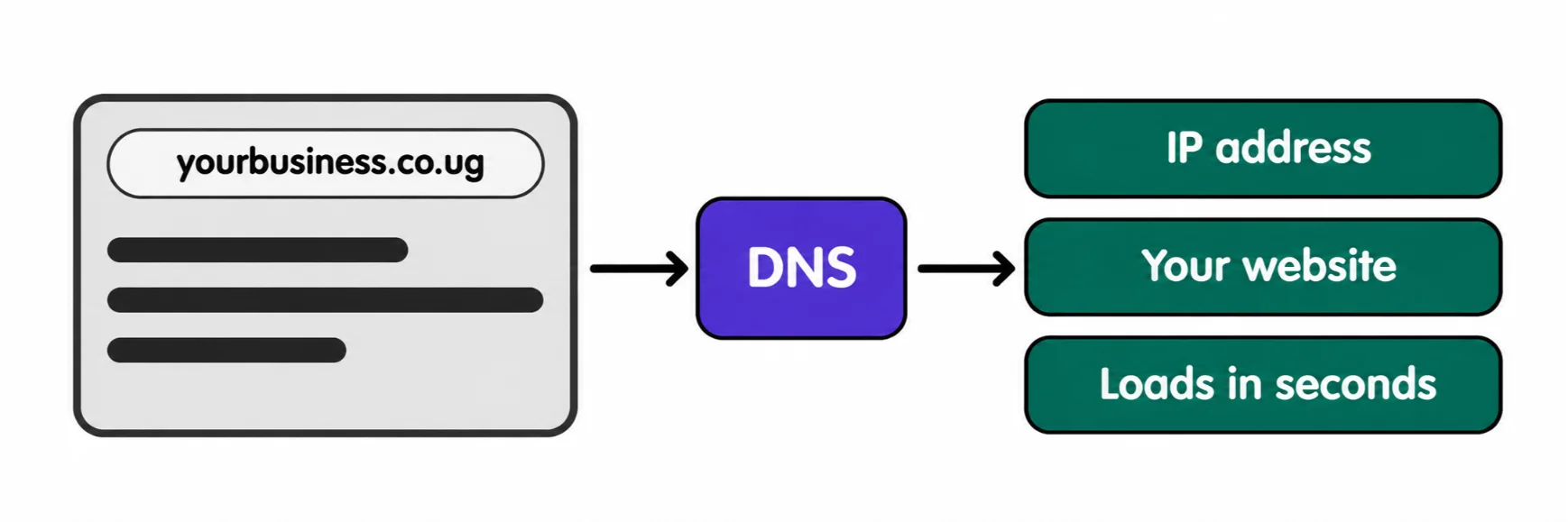
DNS is the system that translates domain names into IP addresses.
Think of the contacts list on your phone. You tap a name, and your phone dials a number you never memorised. DNS does the same for websites.
There are two sides to this:
- Humans use domain names, like example.com.
- Computers use IP addresses, like numbers on a phone.
Here are two real formats:
- IPv4: 192.168.1.1 (a private address many home routers use)
- IPv6: 2001:db8::1 (a reserved address used in documentation)
Every device on the internet has an IP address. That is how machines find each other.
So why does DNS exist? Because nobody could remember a string of numbers for every site they visit.
This affects your business. DataReportal counted 11.6 million internet users in Uganda in October 2026. Each one relies on DNS to reach your website.
How Does DNS Work?
When you type a domain, your browser asks a chain of DNS servers. It keeps asking until one returns the IP address.
All of this happens behind the scenes, in milliseconds.
First, let’s look at how domain names are built. Then we meet the four servers.
The DNS Hierarchy
A domain name has layers. Take blog.truehost.com. as our example:
- Root level: the dot at the very end. Most people never type it.
- Top-level domain (TLD): .com. Others are .org and country codes like .ug. In Uganda, .co.ug is a popular business extension. (Learn more in our guide to the UG Registry.)
- Second-level domain: truehost. This is the unique name you register.
- Subdomain: blog. You can create as many as you need.
DNS reads this hierarchy from right to left. It starts at the root, then the TLD, then the name, then the subdomain.
Key Components of DNS
Four DNS servers work together to load a webpage.
In short, one server asks the questions, and three others point it closer to the answer.
DNS Recursor (Recursive Resolver)
This server receives the query from your browser or device.
It is usually run by your internet provider or a public provider like Google (8.8.8.8) or Cloudflare (1.1.1.1).
The recursor does the legwork. It contacts the other servers for you.
It checks its cache first. It only goes searching if it has no answer.
Root Nameserver
This is the first stop when the recursor has no cached answer.
It does not know the IP address. It knows which TLD server to ask next.
There are 13 root server identities, labelled A to M. They are not 13 machines. A count cited in an ICANN discussion thread showed 1,865 instances across about 1,511 sites worldwide in September 2024. You can see the live picture at root-servers.org.
TLD Nameserver
This server handles the last part of the domain, such as .com, .org or .ug.
It points the recursor to the authoritative nameserver for that specific domain.
For example, the .com TLD server tells the recursor which nameservers hold the records for example.com.
Authoritative Nameserver
This is the final stop and the source of truth for the domain.
It holds the DNS records and returns the IP address to the recursor.
This is the server you control, through your registrar or DNS host.
What’s the Difference Between an Authoritative DNS Server and a Recursive DNS Resolver?
The recursive resolver sits at the start of the query. The authoritative server sits at the end.
Recursive DNS Resolver
- Asks the questions and finds the answer for the user.
- Owns no records, but caches answers for a set time.
- Is run by internet providers and public DNS providers.
Authoritative DNS Server
- Owns and answers for the DNS records of a domain.
- Does not need to ask anyone else.
- Is run by your registrar, hosting provider or DNS service (for example, Cloudflare or Route 53).
Quick Comparison
| Recursive resolver | Authoritative server | |
|---|---|---|
| Role | Finds the answer for the user | Gives the final answer for a domain |
| Who runs it | ISPs, public DNS providers | Registrars, hosts, DNS services |
| Holds records? | No | Yes |
| Caches? | Yes | No (it is the source) |
| Where it sits | Start of the lookup | End of the lookup |
One more point. A recursive query is the request. A recursive resolver is the server that handles it. People often mix the two up.
What Are the Steps in a DNS Lookup?
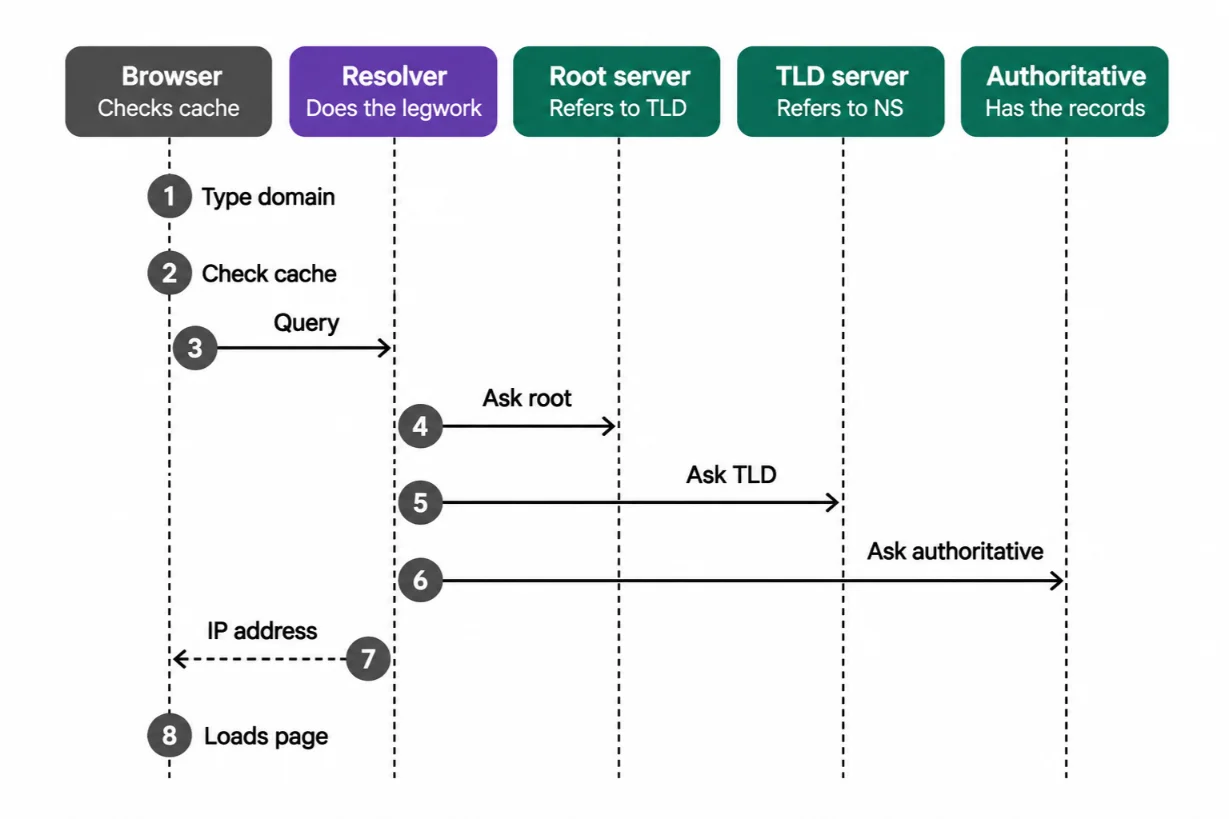
An uncached lookup has 8 steps. Caching lets the system skip some of them.
- The user types a domain into the browser.
- The browser and operating system check their local caches.
- The query goes to the recursive resolver.
- The resolver asks a root nameserver, which points to the TLD server.
- The resolver asks the TLD nameserver, which points to the authoritative server.
- The resolver asks the authoritative nameserver, which returns the IP address.
- The resolver caches the answer and sends it back to the browser.
- The browser connects to the IP address and loads the page.
Follow one domain through. Say a customer types truehost.ug. The browser has no record of it (steps 1-2). The resolver asks a root server, which points to the .ug TLD servers (steps 3-4). The TLD server points to the domain’s authoritative nameserver (step 5). That server returns the IP address (step 6). The resolver stores it and passes it on (step 7). The page loads (step 8).
How Does DNS Route Traffic to Your Web Application?
DNS decides which server a visitor reaches when they type your domain.
Your authoritative server holds records that point your domain to your hosting server’s IP address. Without them, visitors land nowhere.
Example: you host your site with us at Truehost. You add an A record that points yourbusiness.co.ug to your hosting server’s IP address. Visitors now reach your site.
What if you switch hosts or DNS providers? You update the records. Visitors then go to the new server.
DNS also handles other jobs:
- Subdomains: a CNAME can point a subdomain elsewhere. For example, blog.yourbusiness.co.ug can run on a separate platform.
- Email: MX records route your email to the right mail server.
- Traffic distribution: DNS can spread visitors across several servers. This is called load balancing.
Uganda’s customers pay and shop online. The UCC reported 36.7 million active mobile money users in Q1 2026, with 2.37 billion transactions in the quarter, as covered by Kampala Post. If your domain points to the wrong place, those customers cannot find you.
At Truehost, we give you a dashboard to manage records, nameservers and redirects in one place. Check our domain and hosting plans.
DNS Caching and TTL
Caching means storing lookup results closer to the user. Repeat visits then load faster.
Caching happens in three places:
- Your browser
- Your operating system (the stub resolver)
- Your ISP or public resolver
TTL (time to live) is how long a record stays cached before it is refreshed.
The trade-off is simple:
- Low TTL: changes show up faster, but there are more lookups.
- High TTL: fewer lookups, but updates are slower.
Practical tip: lower the TTL a day or two before you migrate a site. Raise it again afterwards.
Planning a move? Our hosting plans include free migration, so you are not doing this alone.
Types of DNS Queries
Three query types do the work:
- Recursive query: the resolver must return a final answer or an error.
- Iterative query: the server returns the best answer it has, often a referral to another server.
- Non-recursive query: the resolver already has the answer cached and replies straight away.
A typical uncached lookup uses a mix. Your device sends a recursive query. The resolver then sends iterative queries down the chain.
Common DNS Record Types
Records are the instructions stored on the authoritative server. Each one has a job.
| Record | What it does | Example use |
|---|---|---|
| A | Points a domain to an IPv4 address | Send yourbusiness.co.ug to your host |
| AAAA | Points a domain to an IPv6 address | Same, for IPv6 visitors |
| CNAME | Makes one name an alias of another | Point shop.yourbusiness.co.ug to a store platform |
| MX | Directs email to the right mail server | Deliver mail to your business inbox |
| NS | Shows which nameservers are responsible | Confirm your DNS host |
| TXT | Holds text data | Email authentication (SPF) and domain verification |
DNS Propagation
DNS propagation is the time it takes for DNS changes to spread across servers worldwide.
It happens because caches around the world still hold the old record. They keep it until the TTL expires.
Expect anywhere from a few minutes to 24-72 hours, depending on the TTL.
You will feel it most when you:
- Change nameservers
- Move to a new host
- Update A records
Tip: use a free online propagation checker, such as whatsmydns.net. It shows which locations already see your new record.
DNS Security Risks and How to Protect Your Domain
DNS was built for speed and scale, not security. That makes it easy to abuse.
The cost is real. EfficientIP’s 2025 report, as covered by TEISS, found companies faced about seven DNS attacks each, at roughly $942,000 per attack. Those figures come from large organisations, so treat them as a ceiling. The risk still applies to you.
Common Threats
- DNS spoofing (cache poisoning): fake records send users to malicious sites.
- DDoS attacks: floods of traffic knock DNS servers offline.
- Domain or DNS hijacking: an attacker takes control of your records.
- DNS tunneling: attackers hide data inside DNS traffic.
Protection Tips
- Enable DNSSEC. It verifies that responses are authentic. Adoption is still low. APNIC reported that only 7% of domains carried a secure delegation in 2025, per its February 2026 analysis.
- Turn on two-factor authentication on your registrar account.
- Use a reputable DNS provider with redundancy.
- Review your records regularly. Remove the ones you no longer use.
At Truehost, we offer DNSSEC on compatible domain extensions, and you manage it from your dashboard. See what your domain can include.
How to Check Your DNS Records
A DNS lookup asks the DNS system what records a domain has. You run one to confirm your site, email or nameservers are set up correctly.
Using nslookup on Windows:
- Open the Command Prompt.
- Type
nslookupand press Enter. - Set the record type, for example
set type=MX. - Type the domain, such as
truehost.ug, and press Enter.
Beginners can skip the command line. Free online lookup tools show the same data in a simple table.
In the results, look for:
- The IP address your domain points to
- The nameservers in charge
- The MX records for your email
What Is DNS FAQs
Is DNS the same as web hosting?
No. DNS points visitors to a server. Hosting is the server that stores your website.
Who controls my DNS?
You do, through your registrar or DNS host. Your internet provider controls the recursive resolver your device uses.
Can I change my DNS provider, and is it safe?
Yes. Copy all your records first, especially MX and TXT. Missing them can break your email.
How long does a DNS change take?
Anywhere from minutes to 24-72 hours. Your TTL is the main factor.
What is the best public DNS server?
There is no single winner. The common choices are Cloudflare (1.1.1.1), Google (8.8.8.8) and Quad9 (9.9.9.9). Test them on your own connection and pick the fastest. Privacy and filtering features also differ.
What does “DNS server not responding” mean?
Your device cannot get an answer from its DNS server. Restart your router, check your connection, or switch to a public DNS server. On Windows, ipconfig /flushdns clears the local cache.
Get Your Domain and DNS Set Up with Truehost
DNS translates domain names into IP addresses through a chain of four servers. It affects your site’s speed, email delivery and security.
A domain is only useful once its DNS points to the right place. That is why your choice of registrar and host counts.
We at Truehost offer domain registration, DNS management, and hosting that works with your domain. You can register .co.ug and .ug names, and pay with MTN MoMo or Airtel Money where available.
Two benefits tie back to this guide:
- Easy record management: edit A, MX and CNAME records from one dashboard.
- Reliable uptime: our hosting plans carry a 99.9% uptime guarantee.
Start with the name your customers will remember.
