Owning more than one domain is rarely accidental. Brands register extras for protection, regional reach, product launches, campaign microsites, typo defense, acquisitions, or investment. The real challenge begins after registration.
Without deliberate management, domains quietly expire, get hijacked, end up with inconsistent DNS, drain budgets, dilute SEO, and create operational chaos. The fix is simple but non-negotiable: treat every domain as a governed asset, with an inventory, a clear owner, security controls, and a renewal process, rather than a set-and-forget checkbox.
This guide walks through a practical system for managing multiple domain names, from first inventory to ongoing maintenance.
Step 1: List Your Domains and Give Each One a Purpose
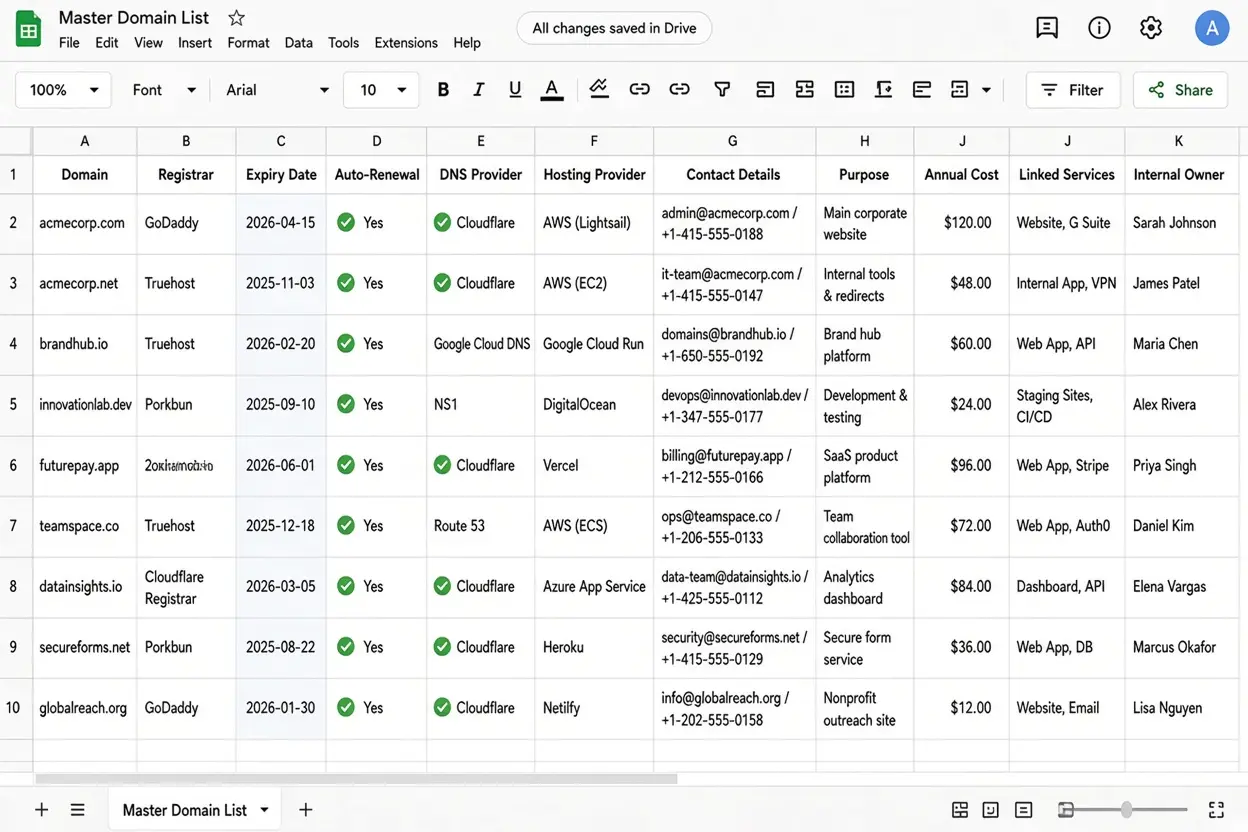
You can’t manage what you can’t see. Start with a complete inventory, then decide what each domain is for.
- Create a master list. A spreadsheet works well. For each domain, record the registrar, expiry date, auto-renewal status, DNS provider, hosting provider, contact details, purpose, annual cost, linked services, and internal owner.
- Group domains by purpose. Typical categories are primary brand, defensive (typos or other extensions), campaigns, regional websites, future use, and for sale. A purpose makes it easy to decide later whether a domain deserves its renewal fee.
- Review regularly. Check the list every three months and drop domains you no longer need.
- Align domains with your brand. Consider trademarks when registering new domains, and plan how you will handle third-party registrations that misuse your brand.
- Involve the right teams. Marketing, legal, IT, and finance each hold part of the picture, from campaign plans to trademark strategy to DNS access to budgets.
Step 2: Choose a Registrar and Consolidate Your Domains
Consolidate where possible. Keeping domains with one or two registrars simplifies payments, renewals, and security. Fewer logins mean fewer places for something to go wrong.
It helps to know who does what:
- The registrar manages domain registration.
- The DNS provider manages DNS records.
- The web host stores your website.
These can be the same company or three different ones, and confusing them is a common source of outages.
Compare security features. Look for two-factor authentication (2FA), transfer locks, DNSSEC support, login alerts, activity logs, reliable support, and bulk management tools.
Keep exceptions where needed. Some country-code domains can only be registered through specific registrars. A second registrar can also serve as a backup.

Transfer domains safely
- Unlock the domain and obtain its authorization code.
- Check the contact details and confirm you can access the admin email, since transfer confirmations are often sent there.
- Approve the transfer and check the DNS settings afterward.
Transfer restrictions to know about
- Change of registrant. Under the ICANN Transfer Policy currently in effect for generic top-level domains, a material change to registrant details can trigger a 60-day inter-registrar transfer lock. Some registrars let you opt out before making the change, but that option may not be available afterward. ICANN’s Board approved a set of Transfer Policy Review recommendations in June 2026, but implementation is still pending, so confirm the current rules with your registrar before changing ownership details.
- Other 60-day limits. A registrar may also deny a transfer within 60 days of initial registration or of a previous inter-registrar transfer. Country-code domains follow their own rules.
- Expired domains. Once a domain enters redemption, it may no longer be eligible for transfer. Check your registrar’s current policy.
Step 3: Automate Renewals and Track Expiry Dates
A missed renewal is the most avoidable domain disaster, and one of the most damaging.
- Enable auto-renewal on every domain and make sure each has a working payment method.
- Protect billing. Use a company card rather than a personal one, add a backup payment method, track card expiry dates, and send billing alerts to a shared mailbox.
- Renew important domains early. Consider multi-year renewals for critical domains.
- Add extra reminders. Set alerts 90, 60, and 30 days before expiry, independent of the registrar’s own emails.
What happens when a domain expires
- The website and email may stop working.
- The domain may enter a grace period during which renewal is still possible.
- It may then enter redemption, which usually involves an extra fee.
- If it remains unrenewed, it may be deleted and become available for anyone to register.
Exact timelines and fees vary by domain extension and registrar, and a grace period is not guaranteed, so don’t plan around it.
Step 4: Standardize and Clean Up DNS
Inconsistent DNS across dozens of domains is how outages and security gaps creep in.
- Use consistent settings. Create templates for common website, email, and verification records so new domains start from a known-good baseline.
- Set naming rules. Establish clear conventions for subdomains.
- Remove unused records. Delete records that point to services you no longer use. Dangling records can allow subdomain takeovers, where an attacker claims the abandoned service and serves content under your name.
- Document changes. Lower TTL values before migrations, record who changed what, and keep backups of your DNS settings.
Step 5: Secure Your Domain Portfolio
A hijacked domain can mean intercepted email, phishing under your brand, and a defaced or redirected website.
- Protect all accounts. Use 2FA, unique passwords, and a secure admin email account for both your registrar and DNS provider. Whoever controls that email address can often reset everything else.
- Limit access. Give staff individual accounts with appropriate permissions, and remove access when they leave.
- Enable locks and signing.
- Registrar lock helps prevent unauthorized transfers.
- Registry lock adds stronger protection for important domains and may require manual approval for changes.
- DNS lock helps protect DNS settings.
- DNSSEC helps prevent attackers from tampering with DNS responses.
- Keep contact details accurate. Incorrect details can cause problems with renewals, transfers, and proving ownership.
- Protect domains that don’t send email. Configure SPF and DMARC records to reduce spoofing, and add a null MX record when the domain doesn’t accept email at all.
- Monitor for abuse. Watch for lookalike domains that resemble your brand and for unexpected security certificates issued for your subdomains.
Step 6: Manage Secondary Domains and SEO
- Choose one primary domain as the main address for your website.
- Redirect secondary domains to it with a permanent 301 redirect.
- Keep separate sites only when necessary. For regional or other versions, use appropriate canonical tags to identify the preferred page.
- Check your redirects. Confirm they use the correct redirect type, avoid long chains, and have valid HTTPS certificates, so visitors on secondary domains don’t hit browser warnings.
- Don’t buy domains just for SEO. Register additional domains when they serve a clear business or brand purpose.
Step 7: Use Tools and Automation
- Start with a spreadsheet. For a small portfolio, it may be enough.
- Move to management software as you grow. Registrar dashboards and dedicated domain management tools simplify bulk updates and renewals.
- Automate routine tasks. Expiry alerts, DNS audits, bulk changes, and email security records are all good candidates.
- Get expert help when needed. Large portfolios, regulated businesses, and brands facing frequent abuse may benefit from specialist support.
Step 8: Set Rules and Create a Maintenance Schedule
- Assign ownership. Register domains in the company’s name, and appoint a primary owner and a backup.
- Set registration rules. Decide who can register domains, who approves requests, and where new registrations are recorded.
- Control costs. Track annual costs, compare renewal fees, and drop domains that no longer serve a purpose.
Then make the routine explicit:
| Frequency | Tasks |
| Monthly | Check upcoming expiries, payment methods, and security alerts. |
| Quarterly | Review unused domains, DNS records, and account access. |
| Annually | Verify contact details, review the budget, check security settings, and align domains with trademarks. |
Common Mistakes to Avoid
- Managing multiple domains requires proper organisation, security, and regular maintenance. Avoid these common mistakes to protect your domains and prevent unnecessary costs or downtime.
- Registering domains with too many registrars. Using several registrars can make renewals, billing, and account access harder to manage. Keep your domains with one trusted registrar where practical, or maintain a central record of all registrars, login details, and renewal dates.
- Using personal email addresses or payment cards. If a domain depends on one employee’s personal email or bank card, the business could lose access when that person leaves. Use company-controlled email addresses and approved payment methods, with backup access for authorised team members.
- Assuming the grace period is guaranteed. Some registrars offer a renewal grace period after a domain expires, but the terms vary by domain extension and registrar. Some domains may enter redemption or become available for registration again. Enable auto-renewal and monitor expiry dates rather than relying on extra time.
- Forgetting to update contact details. Domain records may contain outdated email addresses, phone numbers, or staff details after a team change. Keep registrant and administrative contacts current so you can receive renewal notices, security alerts, and transfer requests.
- Leaving old DNS records in place. When you stop using a website, email service, or server, remove DNS records that are no longer needed. Old records can cause service errors or create security risks if they point to abandoned services that someone else could claim.
- Ignoring email security on unused domains. A domain without an active website can still be used for email impersonation or spoofing. Configure appropriate SPF, DKIM, and DMARC records where applicable, and review other DNS settings to reduce the risk of unauthorised email use.
- Changing registrant details just before a transfer. Updating domain ownership or contact information shortly before transferring a domain can trigger verification requirements or transfer restrictions, depending on the registrar and domain extension. Check the applicable rules and complete any necessary changes well before the planned transfer.
- Pointing multiple domains to duplicate content without redirects or canonicals. If several domains display identical pages, search engines may struggle to determine which version to index. Redirect secondary domains to the preferred domain using permanent redirects where appropriate, or use canonical tags when duplicate pages need to remain accessible. This helps consolidate search signals and keeps your website structure clear.
Bring Your Domain Portfolio Under One Roof
Managing multiple domains comes down to a few steady habits: one complete inventory, a named owner for every domain, automated renewals, consistent DNS, locked-down accounts, and a regular review. None of it is difficult, but all of it is easier when your domains live in one place.
Start this week. Build the master list, confirm every domain has working auto-renewal and an owner, and put the monthly expiry check on someone’s calendar.
Ready to consolidate? Truehost lets you register, transfer, and manage your domains, DNS, and hosting from a single dashboard, with auto-renewal and WHOIS privacy available. Transfer your domains to Truehost today and replace scattered logins with one organized, secure portfolio.
