WooCommerce is lighter and usually runs well on managed WordPress hosting, while Magento needs more powerful, carefully configured infrastructure.
If you are trying to decide which platform your server can handle, or understand the difference between Magento and WooCommerce hosting, this guide gives you a practical comparison.
We cover server requirements, costs, speed, security, backups, and scaling. You’ll also get a short checklist to help you choose the right setup for your store.
WooCommerce can run on standard WordPress hosting with PHP, MySQL or MariaDB, and HTTPS support; Magento typically requires a VPS or dedicated server, more RAM, and additional services such as OpenSearch, Redis, and caching layers.
Let’s start with a side-by-side view of Magento vs WooCommerce hosting.
Magento vs WooCommerce Hosting
| Factor | WooCommerce hosting | Magento hosting |
|---|---|---|
| Typical starting setup | Managed WordPress/WooCommerce hosting | VPS, cloud server, or managed Magento hosting |
| Minimum practical resources | 1–2 vCPU, 2–4 GB RAM for a small store | 2–4 vCPU, 4–8 GB RAM for a small production store |
| Better fit | Small-to-medium stores, content-led stores | Large catalogs, high traffic, multi-store, B2B |
| Hosting complexity | Lower | Higher |
| Typical cost pattern | Lower entry cost; rises with traffic and plugins | Higher baseline; rises with traffic, catalog size, and developer needs |
| Key hosting features | PHP version control, caching, CDN, staging, backups | Dedicated resources, Redis, Elasticsearch/OpenSearch, CDN, staging, robust backups |
Treat the resource figures as starting points. Catalog size, plugins and traffic can push them up fast.
One note on editions. Magento Open Source is free to download. Adobe Commerce is the paid edition. Both need the same kind of hosting.
First, the lighter of the two.
What WooCommerce Hosting Needs
WooCommerce is a WordPress plugin, so its needs are modest. Still, a few details decide how smooth your store feels.
Core hosting requirements
WooCommerce runs on top of WordPress. Your host must meet both sets of rules.
WooCommerce’s server guide lists these needs for version 10.8 and later:
- WordPress 6.9 or newer
- PHP 8.3 or newer (tested up to PHP 8.4)
- MySQL 8.0 or newer, or MariaDB 10.6 or newer
- HTTPS support (SSL)
- A WordPress memory limit of 256 MB or more
Older PHP and MySQL versions may still run. But they miss security fixes, so avoid them on a live store.
After installing, open the WooCommerce System Status page. It shows your PHP version, database version and memory limit.
Minimums are only the start. A WooCommerce-friendly host should also give you:
- Staging: test updates on a copy, away from live orders.
- Daily backups: orders arrive all day, so old backups lose real sales.
- Malware scanning: it flags infected plugin or theme files early.
- One-click restores: when checkout breaks, minutes are important.
Hosting Features
Good features keep a store fast and safe. Here is what to look for:
- Server-level or plugin caching: it serves repeat visits quickly. Make sure cart, checkout and account pages are excluded from the page cache.
- CDN for product images and static assets: images load from a server near the shopper.
- Object caching where appropriate: it cuts repeat database queries on busy stores.
- Staging environment: test theme and plugin updates before they reach customers.
- Automatic backups stored separately from the live server: if the server fails, your backups survive.
- Email deliverability: if the store sends order notifications from the same hosting account, set up SPF and DKIM. Otherwise, receipts can land in spam.
Next, a look at when budget hosting is enough.
When Shared Hosting is Enough
Shared hosting works for some stores. It fits when you have:
- Low traffic
- A limited number of products (SKUs)
- A simple checkout
- Few plugins
Here is the risk. Many sites share one server’s CPU and RAM.
- Resource limits: your plan caps what your store can use.
- Noisy neighbors: another site’s spike can slow yours.
- Slow admin dashboard: editing products can feel sluggish.
- Checkout slowdowns: these often appear during promotions, when you can least afford them.
For reference, our Starter and Pro plans at Truehost are sized for about 50,000 visits a month. Both include free SSL and free daily backups.
Starting small? Open a hosting account with us and see our web hosting plans.
When WooCommerce Needs an Upgrade
Some stores outgrow shared hosting. Watch for these signs:
- High concurrent traffic
- Large catalogs
- Frequent flash sales
- Many plugins
- Complex product variations
- Heavy admin use
Checkout pages cannot be cached. Every buyer needs live server work.
At that point, move to managed WooCommerce hosting, a VPS, or cloud infrastructure. Our VPS hosting gives you dedicated resources and root access.
Now for the heavier platform.
What Magento Hosting Needs
Magento asks far more of a server. Plan for it from day one.
Core Hosting Requirements
Magento needs more RAM, CPU and database capacity than a typical WordPress store. Its software stack is also stricter.
You need:
- A supported PHP version
- MySQL or MariaDB
- Elasticsearch or OpenSearch for catalog search
- Redis for caching and sessions
- A Composer-based deployment workflow
Versions are important. Adobe’s 2.4.8 release notes add support for PHP 8.4 and MariaDB 11.4. They also say Adobe Commerce is now optimized for OpenSearch 2.19 and no longer works with Elasticsearch.
Adobe’s system requirements page lists the supported versions per release. Newer tables list Valkey, a Redis-compatible fork, so check the table for your version.
Why so demanding? Magento is built for complex catalogs, promotions, multi-store setups and high transaction volume. That power costs resources.
Adobe’s hardware guidance shows the scale:
- It recommends about 2 GB of PHP memory on a single-server store.
- Database memory should be at least half the size of your database.
Add search, cache and the operating system on top. You pass 4 GB quickly.
Recommended Server Setup
A solid Magento setup separates the heavy jobs:
- Separate or well-isolated resources for web, database and search, where appropriate.
- Redis for caching and sessions. Adobe’s performance guide credits Redis optimization for big gains in cart, checkout and concurrent users between versions 2.3 and 2.4.
- Elasticsearch/OpenSearch for catalog search. Adobe requires a search engine from version 2.4 onward.
- Varnish or full-page caching where compatible.
- CDN for media and static assets.
- Staging environment for extension, theme and core updates.
For a small live store, 8 GB of RAM is a safer start than 4 GB. Large catalogs need much more.
Managed Magento Hosting vs Self-Managed VPS
You have two main paths. Each has a clear trade-off.
Managed hosting
- Less technical work for you
- Higher cost
- The provider handles more of the stack
Self-managed VPS or cloud
- More control
- Potentially lower infrastructure cost
- You handle server administration, updates, monitoring and backups
The trade-off is time and expertise versus cost and control. Be honest about which one you have more of.
One warning. Magento may install from a one-click tool on shared hosting. But installing is not the same as running well under load.
1) Performance: Which Platform Needs Better Hosting?
Both platforms can be fast. The difference is how much hosting it takes to get there.
Why Magento Usually Needs More Resources
Magento starts with a bigger footprint. That shows up in several ways:
- A larger default footprint
- More complex indexing
- Advanced catalog and search functions
- Higher baseline infrastructure needs
Adobe notes that the database is sensitive to the memory available for data and indexes. Starve it, and everything slows.
Magento can perform very well. But only when caching, database configuration and server resources are set up properly.
Why Woocommerce Can Be Lighter
WooCommerce inherits WordPress’s relatively lightweight core. On good managed hosting, it can perform well.
But results depend heavily on:
- Hosting quality
- Theme weight
- Plugin count
- Image optimization
- Caching
- Database health
Light does not mean automatic. A heavy theme and 40 plugins can undo the advantage.
What Actually Determines Store Speed
Platform choice is only one factor. These are important just as much:
- Hosting resources and server location
- Caching and CDN
- Image optimization
- Number and quality of plugins/extensions
- Database queries and indexing
- Checkout and payment-page configuration
- Traffic spikes during promotions
Speed pays. Yottaa’s 2025 Web Performance Index analyzed over 500 million visits across 1,300+ top ecommerce sites.
- Saving one second lifted mobile conversions by 3%.
- Pages loading longer than 4 seconds saw bounce rates reach 63%.
- Third-party apps made up 44% of total page load time.
That last point applies to both platforms. Every plugin, extension and tracking script adds weight.
2) Magento vs WooCommerce Hosting Costs
The hosting bill is only one line. Here is the full picture.
WooCommerce Hosting Cost Breakdown
A WooCommerce store usually has these costs:
- Hosting.
- Domain and SSL, if not included. We include free SSL on our plans.
- Premium theme.
- Premium plugins.
- Developer or maintenance support, if needed.
- Payment processing fees, which are separate from hosting. Mobile Money, Airtel Money and card payments each carry their own charges.
Here is what our hosting costs at Truehost, at the time of writing and excluding VAT:
| Plan | Monthly | Annual |
|---|---|---|
| Starter | UGX 9,000 | UGX 90,000 |
| Pro | UGX 18,000 | UGX 180,000 |
| Unlimited | UGX 130,000 | UGX 800,000 |
Our Unlimited plan is aimed at busy online shops. Check current prices on our web hosting page.
Magento Hosting Cost Breakdown
Magento adds more lines:
- Hosting/server infrastructure.
- Domain and SSL.
- Themes and extensions.
- Developer, agency or maintenance retainer.
- Adobe Commerce licensing, if you use the paid edition rather than Magento Open Source.
- Staging, backups, monitoring and security services.
Adobe does not publish Adobe Commerce license prices. Industry estimates put licensing at $22,000 to $125,000 a year, based on revenue. Open Source has no license fee.
Total Cost Of Ownership
Do not judge by the headline hosting price. Compare the first-year cost and the ongoing annual cost.
Here is a simple example. Optimum7’s 2026 analysis puts first-year Magento Open Source cost at $30,000 to $60,000 once hosting, development, extensions and maintenance are counted.
A small WooCommerce store on our Pro plan pays UGX 180,000 a year for hosting. Add your theme, plugins and support to get the full total.
This is not a like-for-like comparison. The Magento figure covers the whole build. The WooCommerce figure covers hosting only.
Still, the pattern is clear:
- WooCommerce: lower entry cost, rising with traffic and plugins.
- Magento: higher baseline, rising with traffic, catalog size and developer needs.
3) Security and Backups
A hacked store loses money and trust. Hosting is your first line of defense.
WooCommerce Hosting Security
A secure WooCommerce setup includes:
- SSL
- Firewall/WAF
- Malware scanning
- Automatic updates where safe
- Plugin update management
- Backups
- Access control, such as strong passwords and limited admin accounts
WooCommerce security depends on five things. WordPress core, themes, plugins, hosting hardening and your own maintenance.
Plugins are the weak spot. Patchstack’s State of WordPress Security in 2026 report counted 11,334 new vulnerabilities in 2025. That is up 42% from 7,966 the year before.
- 91% of them were in plugins.
- The median time to first mass exploitation was about five hours.
- 46% had no patch available at public disclosure.
Keep your plugin list short. Remove what you do not use.
Magento Hosting Security
A secure Magento setup includes:
- Regular security patches
- Strong admin access controls
- Two-factor authentication
- Secure deployment practices
- Database protection
Patching speed are very crucial. In September 2025, Adobe fixed a critical flaw called SessionReaper (CVE-2025-54236). SecurityWeek reports a severity score of 9.1 and says Adobe confirmed attacks in the wild.
Six weeks after the patch, security firm Sansec said 62% of Magento stores were still vulnerable.
Magento Open Source still needs responsible server and extension maintenance. Adobe Commerce may include more managed security services, depending on the plan. Ask what your plan actually covers.
Backup And Recovery Requirements
Both platforms need the same backup basics:
- Daily automated backups. Our plans include free daily backups.
- Off-server backup storage.
- Pre-update backups.
- A tested restore process. An untested backup is only a hope.
- A separate staging environment for testing updates.
Backups are your safety net while you grow. Which brings us to scale.
4) Scalability: Choosing Hosting for Growth
Your first server will not be your last. Plan the path now.
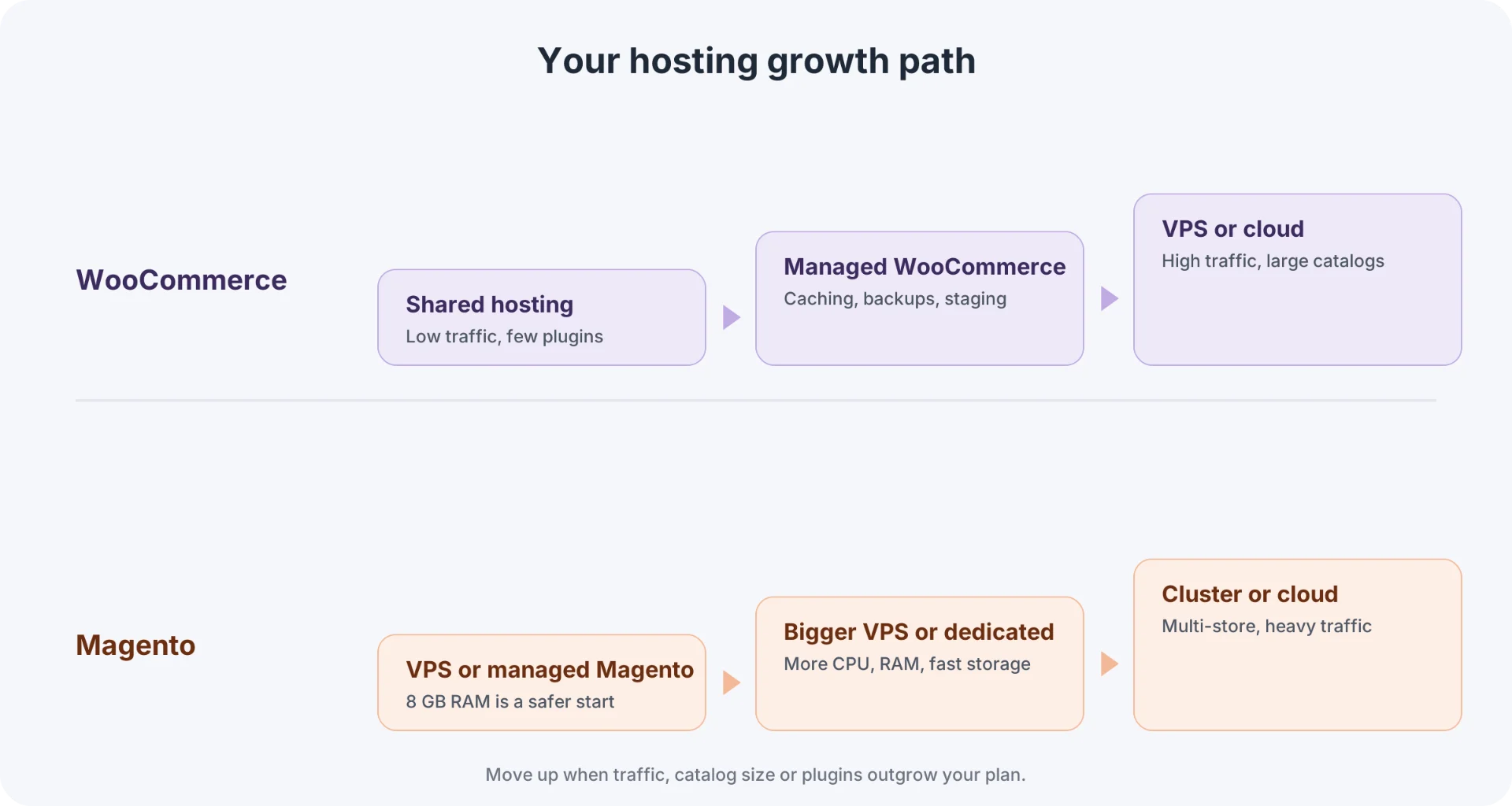
Scaling WooCommerce
A typical growth path looks like this:
- Start with managed WordPress/WooCommerce hosting.
- Move to higher-resource managed hosting, cloud hosting or a VPS as traffic and catalog complexity increase.
- Use caching, a CDN, database optimization and careful plugin selection throughout.
Busywork grows with sales. Our N8n Hosting lets you run automations, such as order alerts or stock updates, on your own server. Our AI Workers and OpenClaw hosting can also take on repetitive tasks.
Scaling Magento
Magento needs infrastructure planning earlier than WooCommerce. Start with vertical scaling:
- More CPU
- More RAM
- Faster storage
- Better database resources
Later, move to a clustered or cloud architecture. Do this when traffic, catalog size or multi-store operations demand it. A dedicated server is a common step before that.
Traffic-spike readiness
Do not choose hosting based only on average daily traffic. Averages hide the peaks, and peaks are where sales happen.
Plan for:
- Product launches
- Seasonal promotions
- Influencer traffic
- Paid campaigns
A single campaign can send in a month of visitors in an hour. With 63% of shoppers bouncing from slow pages, a slow checkout costs real money.
Before a big event, ask your host about burst limits. Upgrade early, not during the rush.
Which Hosting Should You Choose?
You now have the facts. Here is how they map to your store.
Choose WooCommerce hosting if
- You already use WordPress.
- You want a lower-cost, faster launch.
- Your store has a manageable catalog and traffic level.
- You or a small team can manage plugins, updates and content.
- Content marketing and blogging are important.

Ready to launch? Start with our web hosting.
Choose Magento hosting if
- You expect high traffic, large catalogs, multiple storefronts, complex pricing, B2B workflows or advanced customization.
- You have a developer or agency maintaining the site.
- You can budget for stronger infrastructure and ongoing technical support.
Quick decision checklist
Answer these seven questions honestly:
- Current monthly traffic
- Number of SKUs and product variations
- Peak concurrent visitors
- In-house technical capability
- Monthly infrastructure budget
- Need for multi-store, multi-currency or B2B features
- Need for staging, backups and developer workflows
If most answers lean large, plan for Magento-grade hosting. If they lean small, WooCommerce hosting will serve you well.
Magento vs WooCommerce hosting comes down to size, skills and budget. Match the server to your store today, and leave room to grow.
Starting a WooCommerce store? Open a hosting account with us and see our web hosting plans. Planning a Magento build? Talk to us at Truehost about our VPS and dedicated servers.
Magento vs WooCommerce Hosting FAQs
Does Magento need more hosting than WooCommerce?
Yes, generally. Magento usually needs more RAM, CPU, database capacity and technical configuration.
Can WooCommerce run on shared hosting?
Yes, for small low-traffic stores. But managed WooCommerce hosting is safer as traffic and plugin use grow.
What hosting is best for Magento?
A managed Magento host, a properly configured VPS, or cloud infrastructure. It needs sufficient RAM, Redis, Elasticsearch/OpenSearch, a CDN and staging.
Is managed WooCommerce hosting worth it?
Usually yes. It suits store owners who want caching, backups, staging, security and support handled by the host.
Can I migrate WooCommerce to Magento later?
Yes, but it takes work. Expect data migration, theme redevelopment, extension mapping, SEO redirects and testing.
How much RAM does Magento hosting need?
Plan for 4 GB as a bare minimum and 8 GB as a safer start for a small live store. Growing catalogs and busy stores often need 16 GB or more.
Traffic, extensions, catalog size and caching all change the number. As a base, Adobe suggests about 2 GB of PHP memory on a single server, and database memory of at least half your database size.
