“Free” is tempting when you’re starting out. But you always pay another way. You pay in speed, control, branding or risk.
Here is the direct answer. Free hosting is fine for testing an idea or a throwaway page. It is a weak foundation for a business that depends on its website.
If you are weighing free hosting for a business website, this guide gives you the full picture. You’ll see what you get, what you give up, when free is fine, and when to move to paid.
How free hosting works
Servers cost money to run. So free providers earn their income in other ways:
- Ads or scripts injected into your site
- Upselling you to paid plans (custom domain, removing ads, more storage)
- Deliberately limited resources, so serious users upgrade
Wix shows this pattern clearly. Its free plan puts a Wix banner on every page and uses a wixsite.com address. Removing the banner and connecting your own domain needs a paid plan.
The entry plan, Light, costs $17 a month billed yearly (October 2026).
Types of free hosting
- Free website builders (Wix, Weebly and similar): Easy to use, but ad-supported. Wix’s free plan gives you 500 MB of storage and 1 GB of bandwidth.
- Free subdomain hosting (yourbusiness.freehost.com): Your address carries the host’s name, not only yours.
- Free static hosting (GitHub Pages, Cloudflare Pages, Netlify): Good for plain files. GitHub does not allow Pages to run an online business or e-commerce site. Netlify says its free plan allows commercial projects.
- “Free” trials and free-for-a-year offers that are really paid hosting: AWS now gives new accounts up to $200 in credits. The free plan ends after six months, or when the credits run out, whichever comes first.
By the end, you will know what you get, what you give up, when free is fine, and when to move to paid.
Let’s start with a side-by-side look.
Free Hosting vs Paid Hosting: Side-by-Side Comparison
This table shows where the two options differ most.
| Feature | Free Hosting | Paid Hosting |
|---|---|---|
| Cost | No upfront cost | Small monthly or yearly fee |
| Domain | Usually a subdomain; custom domain often locked behind an upgrade | Your own domain (often with a free domain offer) |
| Speed and performance | Lower priority, slower, more downtime | Better resources, more stable uptime |
| Ads on your site | Often forced | None |
| Security and SSL | Limited or basic | SSL, malware protection and firewall options |
| Backups | Rarely included | Regular backups, often automatic |
| Customer support | Forum or knowledge base only | Live support (chat, ticket, phone) |
| Storage and bandwidth | Strict limits | Higher or unlimited (fair use) |
| WordPress and e-commerce | Often breaks or isn’t allowed | Fully supported |
| Data export and control | Often limited or unavailable | Full access to files and database |
| Commercial use | Sometimes forbidden | Allowed |
| Scalability | Little room to grow | Easy upgrade path (shared, cloud, VPS) |
| Best for | Testing, learning, short-term pages | Businesses, stores, anything that earns money |
Free hosting for a business website works only while the stakes are low. Once money or reputation is involved, the gaps in this table start to cost you.
Next, let’s be fair about what free does well.
What You Get With Free Hosting
Free hosting has real benefits. Here they are:
- Zero upfront cost. This is useful when you are testing a business idea.
- Easy setup. Many free platforms are builders, so no code is needed.
- A fast start. You find out whether anyone is interested without investing.
- A place to practise. You can build and manage a simple website and learn as you go.
The tradeoff is that these benefits fade quickly. They suit a test, not a growing business.
Some tools can add polish to a free setup. But they only work once you own a domain.
Free Tools You May Not Need To Pay For Once You Own a Domain
Several good tools cost nothing. Each has a catch.
- SSL certificates: Let’s Encrypt is a nonprofit that provides free SSL/TLS certificates to more than 700 million websites. But you need a domain, and a host that lets you install or enable it.
- CDN and DDoS protection: Cloudflare’s Free plan includes DNS, a CDN, SSL and DDoS protection. It can improve speed and security. But you must own a domain and point its nameservers to Cloudflare. Cloudflare also positions this plan for personal and hobby projects, so check that it fits your needs.
- Uptime monitoring: UptimeRobot’s free plan covers 50 monitors with checks every 5 minutes. It alerts you to downtime. It does not fix the hosting problem. Short outages can also slip between checks.
These tools reduce some costs. They do not replace reliable business hosting.
Now let’s look at what free hosting takes away.
What Free Hosting Usually Limits
This is where the real price of “free” shows up.
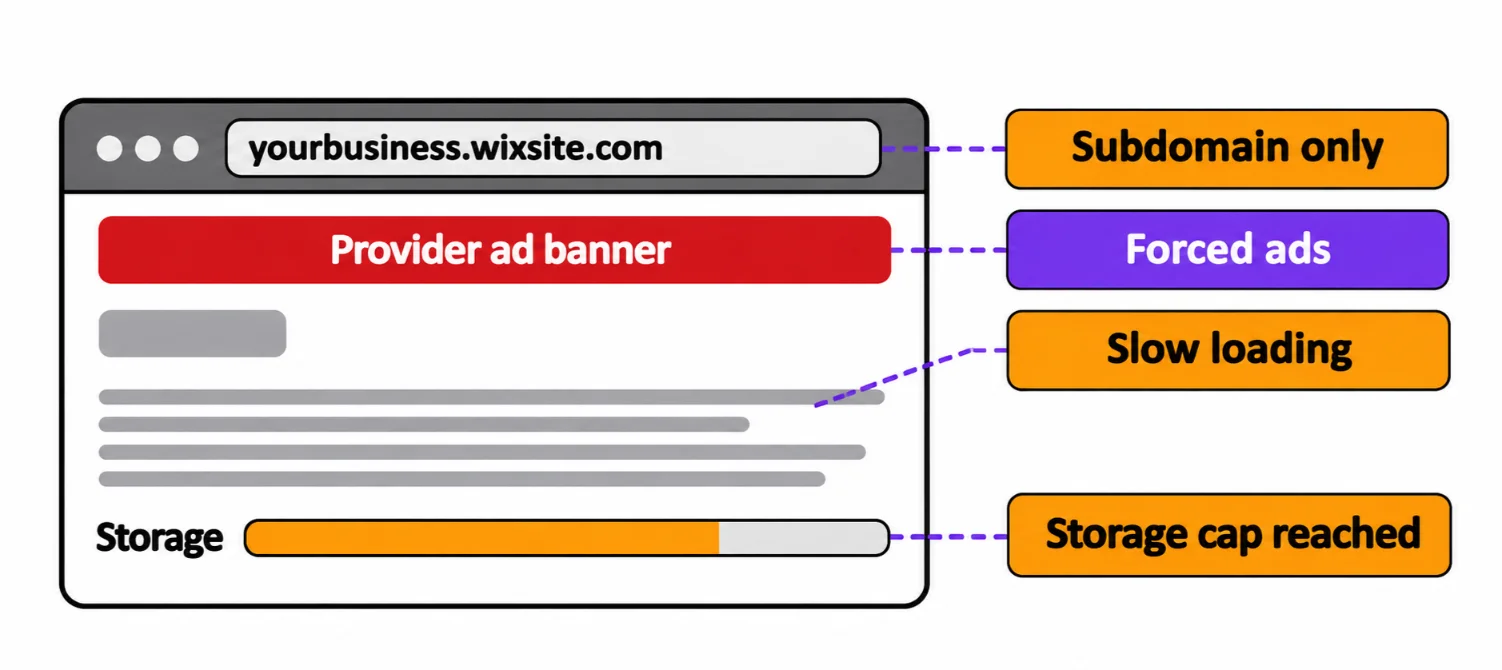
- Slow speed and poor performance: Free sites share resources and get lower priority than paying customers. That means slower loading and more downtime. Google research (published in 2017, still widely cited) found that the chance of a visitor leaving rises 32% when load time goes from one second to three.
- No custom domain or subdomain only: A subdomain looks less professional on business cards, invoices and email signatures. It also builds the provider’s brand rather than yours.
- Forced ads: You may have no control over the ads shown, including competitor ads. That can damage trust.
- Weak or limited security: Expect limited SSL options, few backups, and greater exposure to malware or data-loss risks.
- Little or no support: You may only have documentation or community forums when the site goes down.
- Storage and bandwidth limits: Traffic spikes or growing content can take the site offline or force an upgrade. Wix’s free plan caps you at 500 MB of storage. GitHub Pages sites can be no larger than 1 GB, with a soft bandwidth limit of 100 GB a month.
- SEO limitations: Slow performance and subdomain addresses create a weaker starting point. Rankings earned on a subdomain do not automatically transfer when you move to your own domain. On Wix, for example, 301 redirects are not possible from a free URL.
- Limited ownership and portability: Exporting files, databases and content may be difficult or unavailable.
The last point deserves extra care. Let’s turn it into a checklist.
Check Any Free Hosting Offer Before You Sign Up
Ask these questions before you commit:
- Is SSL free and automatic, or a forced paid extra?
- Does the provider inject ads or scripts?
- Can you export a full database dump and file archive yourself, without a support ticket?
- Do the terms allow commercial use?
- Can you connect your own domain?
- What are the storage, bandwidth, and traffic limits?
Tip: Check the export option before uploading any content, not the week a shutdown is announced.
If an offer passes every check, free can still make sense. Here is when.
When Free Hosting Is Acceptable
Free hosting is a fair choice in these cases:
- Testing a market or business idea
- A short-term event or campaign page
- Learning and practice sites
- Non-commercial hobby projects (if the terms allow it)
- A few static pages with no forms, logins or blog
Rule of thumb: Only keep on free hosting what you can afford to lose.
If you can’t afford to lose it, read on.
Signs It’s Time to Upgrade to Paid Hosting
The reasons are covered above. Here are the short triggers:
- The site is slow or crashing, or frequently unavailable
- You’re running out of space or bandwidth
- Your domain is on business cards, invoices or proposals
- You’re taking orders, enquiries or payments
- You need someone to help when the site goes down
- Traffic is growing and the limits are now a real ceiling
One or two of these is a warning. Three or more means you should move now.
At that point, our shared hosting plans are a simple first step. As you grow, you can move up to a VPS or a dedicated server with us at Truehost.
Do you run automations or AI tools for your business? Free static hosts can’t run them. GitHub Pages, for one, does not support server-side languages. We also offer n8n hosting, OpenClaw hosting and AI Workers.
What Does Paid Hosting Really Cost?
- Opening point: A business-ready plan costs less than most people expect, usually a few dollars a month.
- Watch the renewal price: First-year promotional rates are often much lower than the renewal rate. Compare two years, not the first invoice.
- Truehost Hosting Plans and Pricing starting from USh 106,860.00
Here is what our plans cost in Uganda, excluding VAT:
- Starter: UGX 9,000 a month, or UGX 90,000 a year. Suits new sites, portfolios and blogs.
- Pro: UGX 18,000 a month, or UGX 180,000 a year. Suits small businesses and company websites.
Our Starter plan lists at about $4 a month. It drops to $2.06 a month on a three-year term. That is the kind of difference to check before you buy.
Why Choose Truehost:
- Free SSL: Every plan includes a free, automated SSL certificate.
- Backups: Free daily backups, so your data stays safe.
- Support availability: Our team helps when something breaks. Our Unlimited plan includes 24/7 support.
- Local payment options: Pay with M-PESA or card. Your shop can also take Mobile Money or Airtel Money through a payment plugin.
- Uptime: SSD storage and reliable servers. Our Unlimited plan lists 99.999% uptime.
Is Free Hosting Good Enough FAQs
Does free hosting hurt SEO?
Not directly. Free hosting is not a penalty by itself. The side effects are the problem.
Slow pages, downtime and a subdomain you don’t own all weaken your starting point. Rankings earned on that subdomain do not automatically move with you.
On Wix, a free URL can’t use 301 redirects. That makes a later move harder.
Can I use my own domain with free hosting?
It depends on the type.
Free builders usually lock custom domains behind a paid plan. Wix is one example. Free static hosts like GitHub Pages, Netlify and Cloudflare Pages let you connect your own domain.
Still, a domain alone does not fix speed, support or backup gaps.
Will Google index and rank a website on free hosting?
Google can crawl and index a public site on a free host. Ranking is the harder part.
Slow loading, downtime and a subdomain address all work against you. Some free builders also limit your SEO tools. On Wix, connecting Google Search Console requires a premium plan and a connected domain.
How can I tell if my free hosting is slowing my website down?
Run these three checks:
- Test your pages with Google’s PageSpeed Insights at different times of day.
- Set up a free uptime monitor, such as UptimeRobot, and review the alerts after a week.
- Compare your load time with a paid host by testing a copy of your site there.
If pages crawl at peak hours or alerts keep firing, the host is the likely cause.
Can You Run WordPress or an Online Store on Free Hosting?
Usually not well.
Wix’s free plan cannot take online payments. GitHub Pages does not support server-side languages like PHP, and it is not allowed for running an online business.
On our paid plans, you can install WordPress in one click and add WooCommerce for a shop.
What Happens if Your Free Host Shuts Down?
You may lose your site fast. Glitch is a real example. It announced on May 22, 2025 that hosting would end on July 8, 2025. Users could download their code only until the end of 2025.
Protect yourself with these steps:
- Check the export option now, not when a shutdown notice arrives.
- Keep a full backup of your files and content on your own computer.
- Use your own domain, so you can point it to a new host.
