Reseller hosting lets you buy hosting resources from a provider in bulk and resell them to your own customers under your brand name. You set the prices, own the client relationship, and keep the margin, while the provider runs the servers.
It suits web designers, agencies, and small entrepreneurs who want recurring revenue from hosting without owning hardware. This guide explains how it works, what tools it involves, how it compares with other hosting models, and which providers are worth a look.
How Reseller Hosting Works
A reseller sits in the middle of a three-layer chain: the provider runs the infrastructure, the reseller packages and sells it, and end clients buy hosting from the reseller.
The three-layer structure
- Upstream provider: owns and manages the servers and data centers, and handles uptime, operating system patching, and hardware.
- You, the reseller: buy resources in bulk, create packages, brand the service, and handle billing, client accounts and front-line support.
- End clients: receive individual hosting accounts and deal only with your brand.
Step-by-step process
i) Purchase a reseller plan with an allocation of storage, bandwidth, and number of accounts.
ii) Use a control panel, typically WHM sitting above cPanel (or alternatives such as DirectAdmin or Plesk), to divide those resources into packages.
iii) Define client packages. For example, a Starter package might offer 5–10 GB of storage with limited email accounts and databases, while a Business package raises those limits.
iv) Provision individual client accounts. Each gets its own cPanel login and an isolated environment.
v) Set up white-label branding, private nameservers, billing and support.
vi) Escalate genuine infrastructure issues, such as server outages, to the provider.
The white-label concept
White-labeling means clients see only your branding: your control panel logo, invoices, nameservers and support channels. The parent provider stays invisible, so the client experiences you as the hosting company.
Core Features and Tools
A reseller setup rests on four layers: a control panel, account and package management, branding tools, and billing automation.
i) Control panels
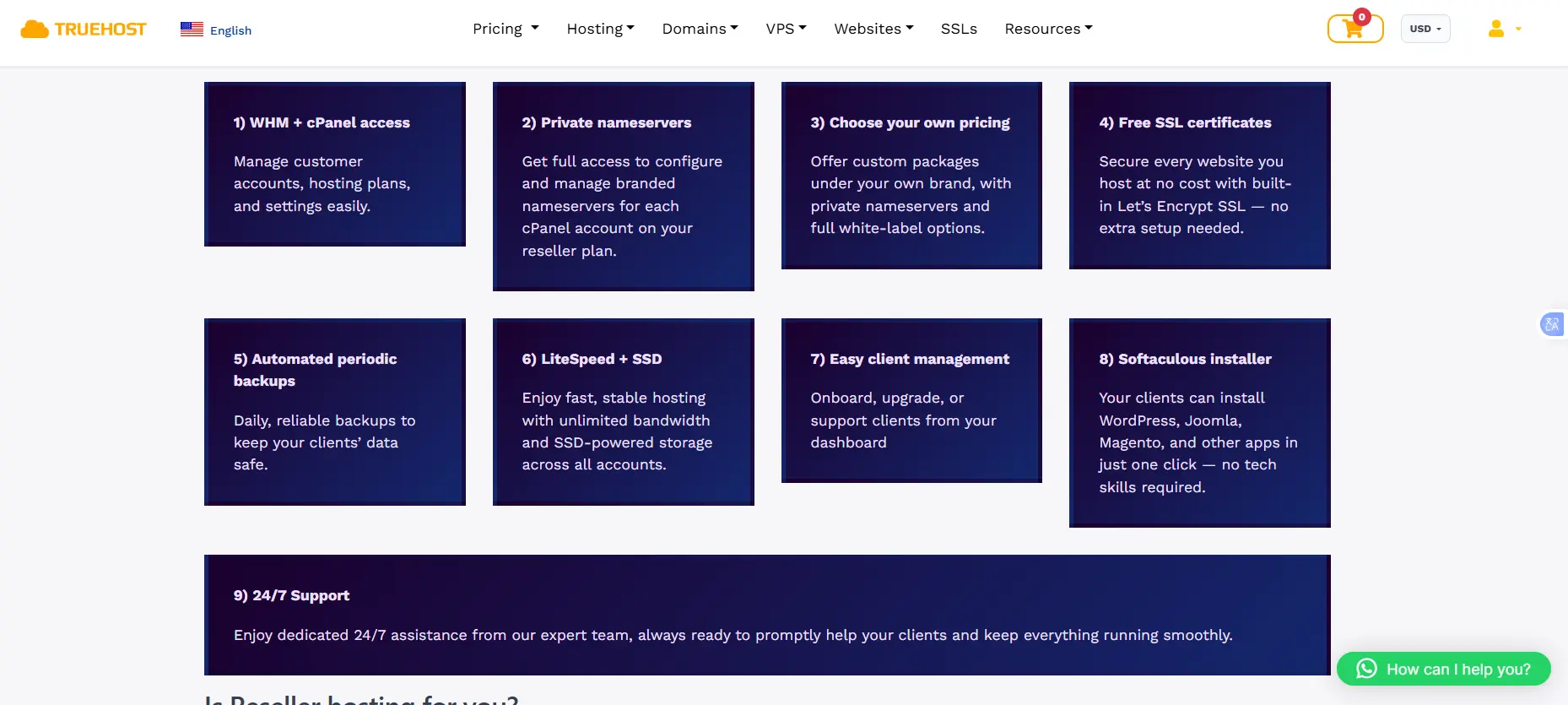
The standard pairing is WHM (WebHost Manager) for you and cPanel for each client. WHM is where you create accounts and set limits; cPanel is the client-facing dashboard for files, email, databases and domains. Alternatives include DirectAdmin and Plesk, and some providers ship their own panel, such as ScalaHosting’s SPanel.
Licensing shapes plan design. cPanel prices licenses by the number of accounts on a server, not by the server itself, which is why most reseller plans carry a fixed ceiling on client accounts. InMotion, for example, caps its reseller tiers at 25, 50, 80 and 100 accounts.
ii) Account and package management
From WHM you can create, suspend and terminate accounts, and customize resource limits per client: disk space, bandwidth, email accounts, databases and domains. Packages let you reuse those limits, so adding a new Starter-tier client takes a few clicks.
iii) Branding tools
- Your logo in the client control panel
- Private (custom) nameservers such as ns1.yourbrand.com
- Branded invoices, welcome emails and support portal
Some providers reserve custom branding and private DNS for higher-priced plans, so confirm this before buying.
iv) Billing and automation
Billing platforms such as WHMCS connect to the control panel to send invoices, take payments, create accounts automatically when an order is paid, and suspend them when payment fails. Several reseller plans bundle a WHMCS or Blesta license, which counts because WHMCS is a real cost: its Plus tier (up to 250 clients) is listed at $34.95 per month in 2026, rising to $39.99 in January 2027.
v) Supporting features
Most plans include or offer SSL certificates, backups, email accounts, databases, security tools such as malware scanning, and one-click installers for WordPress and other applications.
Types of Reseller Hosting
The right type depends on how many clients you serve, how demanding their sites are, and how much control you want.
- Shared reseller: the cheapest option. Your resources are pooled with other resellers on the same server, so a noisy neighbor can slow your clients.
- VPS reseller: a virtual private server with guaranteed, isolated resources, better performance and security, and root access. It costs more and requires more administration.
- Cloud reseller: runs on scalable, typically newer infrastructure, so you can add CPU, RAM, and storage as client demand grows.
- Dedicated reseller: an entire physical server. It has the highest cost and the most control, and suits large client bases or demanding workloads.
By operating system
Linux is the most common choice and pairs with cPanel and open-source stacks such as PHP and MySQL. Windows reseller plans are needed mainly for ASP.NET or MSSQL applications, and are less common and usually pricier.
Reseller Hosting vs. Other Options
Reseller hosting is the only option here built specifically for selling hosting to others.
| Option | What you get | Client separation | Who owns the client | Best for |
| Reseller hosting | A dashboard to create and manage many client accounts, plus white-labeling | Built in, one cPanel per client | You | Selling hosting under your brand |
| Shared hosting | One account for your own sites | None out of the box | Not applicable | Hosting your own website |
| VPS | Root access to an isolated virtual server | You build it yourself | You, if you set it up | Technical users who want raw control |
| Dedicated server | A whole physical server | You build it yourself | You, if you set it up | Large workloads with a full admin team |
| Affiliate hosting | A referral link and commission | Provider’s accounts | The provider | Earning without operating anything |
Versus shared hosting: one shared account is for your own site. A reseller plan gives you a management dashboard, many accounts and white-labeling.
Versus VPS: a VPS gives you raw control but is not designed for client account separation. You would need to install a control panel and licenses yourself. Reseller plans come ready for selling.
Versus a dedicated server: it offers maximum control and performance at the highest cost, with the most administration on you.
Versus affiliate hosting: an affiliate refers customers and earns a commission, but the provider owns the client relationship, billing and pricing. As a reseller, you own all three.
Common Use Cases
- Web designers and developers: add hosting to design and development projects and turn one-off fees into recurring income, with every client site on one dashboard.
- Digital and SEO agencies: host and manage many client websites in one place, with consistent backups, security and support boundaries.
- Entrepreneurs: start a hosting business without buying or managing physical servers, competing on niche focus, support quality or local pricing.
Pros and Cons
| Advantages | Limitations |
| Low startup cost: no physical servers to buy or maintain. | Shared resources: heavy usage by one account can affect others on the same server. |
| Recurring income: you set your own prices and earn from renewals. | Customer support: you handle basic client issues before contacting your provider. |
| Easy management: tools handle accounts, packages and billing. | Provider dependence: your service is only as reliable as your provider. |
Two further costs are easy to miss. Promotional prices often rise sharply at renewal, which squeezes margins on packages you have already priced for clients.
Control panel and billing licenses are also rising: cPanel and WHMCS have both announced increases of roughly 8 to 20 percent for 2027, which providers may pass on.
Is Reseller Hosting Right for Your Business?
Reseller hosting is a good option if you want to earn regular income by selling hosting services and supporting clients. It is not ideal if you only need hosting for your own websites or want to earn money without dealing with clients.
Reseller hosting may be right for you if:
- You have clients who need website hosting and support.
- You are ready to help clients when their websites or emails have problems.
- You can set prices that cover both current and renewal costs.
- You prefer regular monthly income over one-time commissions.
If these do not apply to you, shared hosting or an affiliate program may be a simpler option with fewer responsibilities.
You can also estimate your potential earnings before getting started. For example, if your hosting plan costs $36 per month and you charge eight clients $5 each, you will cover the monthly cost. Any additional income can contribute to your profit after other expenses. Your main challenge will be finding clients and providing reliable support.
Start with a small plan that can support your first five to ten clients. You can upgrade as your business grows.
Compare hosting plans, renewal prices, and account limits on Truehost to find a plan that fits your business.
Reseller Hosting FAQs
Is reseller hosting profitable?
It can be, but profit depends on margin per account, how many accounts you fill, and your support time. As an illustration, an InMotion R-1000N plan renewing at $35.99 a month breaks even at eight clients paying $5 each. At all 25 accounts it leaves about $89 a month before payment fees, billing software and your time. Rising license costs and renewal jumps are the main threats to margin.
Do I need technical skills?
Basic ones. You should be comfortable in WHM and cPanel, with DNS records, email setup and domain pointing. The provider handles servers, patching and hardware, while you handle front-line client support.
Is “unlimited” really unlimited?
No. Unlimited usually means no fixed cap, but providers apply fair-usage policies based on server load and abuse prevention. Plans that advertise unlimited resources still cap cPanel accounts, because cPanel licenses are priced per account.
Can I upgrade later?
Yes. Providers such as GreenGeeks and SiteGround let you change plans as your client base grows. When you outgrow a plan’s account cap, you can usually buy a larger plan, add a second one, or move to a VPS or dedicated server.
What is the difference between reseller hosting and shared hosting?
Shared hosting gives you one account to host your own sites. Reseller hosting gives you many isolated client accounts, a management dashboard, and white-label branding so you can sell hosting yourself.
Top Reseller Hosting Companies
Truehost: A good starting point for reseller hosting in Uganda. Compare its plans, renewal prices, and account limits.
The international providers below offer other options. Prices are in USD per month, checked in October 2026. Introductory rates may increase at renewal.
SiteGround: Offers white-label tools for agencies hosting WordPress websites. Growbig starts at $6.99 and renews at $29.99.
GreenGeeks: From $19.95, renewing at $34.95, with 25 accounts and WHMCS.
Hosting.com: From $18.25 per month on annual billing for 30 accounts. WHMCS costs an extra $5 monthly. Confirm pricing with the provider.
