Starting an online store in Uganda allows you to sell products beyond your local area without renting a physical shop. You can begin with WhatsApp, Instagram or TikTok, then build a website as your customer base grows.
However, running an online store involves more than posting products and receiving orders. You need to research demand, find reliable suppliers, register your business, arrange payments and deliveries, and create a store that customers can trust.
This article explains how to start an online store in Uganda, the legal requirements to consider, the platforms available, and the costs involved.
1) Know how Ugandans shop online
Before starting an online store, find out what customers buy, where they shop and how they prefer to pay.
Many Ugandans discover products on social media and contact sellers through WhatsApp or phone calls. Mobile money is a popular payment option, while some customers prefer cash on delivery.
Consider these factors when researching your market:
- Customer preferences: Find out which products people want, such as fashion, beauty products, electronics and homeware.
- Shopping habits: Check whether customers prefer ordering through WhatsApp, social media, marketplaces or websites.
- Customer concerns: Customers may worry about fake products, poor quality, late deliveries and payment security. Use clear product photos, honest descriptions and reliable delivery services to build trust.
- Popular platforms: Use social media platforms such WhatsApp Business, Instagram and TikTok to promote your products and reach customers. Check Facebook’s accessibility in Uganda before relying on it as a main sales channel.
2) Choose What to Sell and Test Demand
Start with a specific product category instead of selling everything. You could focus on phone accessories, clothing, beauty products, household items or locally made crafts.
Before investing in stock, take these steps:
- Test demand: Share product photos and prices on social media or collect pre-orders to see if people are willing to buy.
- Find reliable suppliers: Compare local wholesalers, manufacturers and importers based on their prices, product quality and reliability.
- Check product requirements: Some products need certification or approval before they can be sold. Check with the Uganda National Bureau of Standards (UNBS).
- Set your prices: Include product costs, packaging, delivery, payment fees and other expenses while leaving room for profit.
- Start small: Buy manageable stock until you have confirmed customer demand.
3) Choose Where to Sell
You can start selling online without a website. Choose a platform based on your budget, business needs, and target customers.
| Sales channel | Best for | Main advantage | Main drawback |
| Social media | Beginners | Low startup costs | Manual order management |
| Online marketplaces | Reaching existing shoppers | Access to potential buyers | Fees and competition |
| Own website | Building a brand | More control over the store | Requires marketing and maintenance |
| Multiple channels | Growing businesses | Reaches more customers | Takes more work to manage |
Social media and WhatsApp Business are good starting points. You can share products, answer questions and receive orders without paying for a website.
Online marketplaces help you reach existing shoppers, but check their fees, seller requirements and delivery arrangements before joining.
An independent website gives you more control over your products, brand and customer experience. It also allows customers to browse products and place orders directly.
Start with social media and WhatsApp Business, then build a website as your sales grow. You can continue using social media to attract customers to your store.
4) Register Your Business and Follow the Rules
Before selling regularly, register your business and check the tax, licence and data protection requirements.
i) Register Your Business
You can register as:
- Business name: Suitable for individuals and small businesses.
- Limited company: Suitable for businesses planning to grow or employ staff.
Register through the Uganda Registration Services Bureau (URSB) portal:
- Create an account.
- Search and reserve your business name.
- Fill in the registration forms.
- Pay the required fees.
- Download your certificate after approval.
The listed fees are UGX 35,000 for a business name. A limited company with share capital of up to UGX 5 million costs UGX 35,000 for name reservation and UGX 105,000 for registration. Check the current fees before applying.
You can also register your business name or logo as a trademark.
ii) Register for Taxes
Get a Tax Identification Number (TIN) from the Uganda Revenue Authority (URA). Also, check which taxes apply to your business:
- Income tax: Paid on taxable business profits.
- VAT: The annual turnover threshold is UGX 300 million. The standard rate is 18%.
- EFRIS: Used to record sales and issue electronic receipts. It is required for VAT-registered businesses and some other businesses.
Keep records of your sales, expenses, stock and payments to make tax filing easier.
iii) Get the Required Licences
Your business may need a trading licence from your local authority or KCCA if it operates in Kampala.
Also, check with the Uganda National Bureau of Standards (UNBS) to see if your products need approval before you sell them.
iv) Register With the PDPO
If you collect customer details such as names, phone numbers and delivery addresses, you may need to register with the Personal Data Protection Office (PDPO).
Check pdpo.go.ug for registration requirements and fees.
v) Set Up Customer Policies
Make these policies available on your website:
- Privacy policy: Explains how you use and protect customer information.
- Delivery policy: Shows delivery areas, fees and timelines.
- Returns and refunds policy: Explains how customers can return products or request refunds.
- Terms and conditions: States the rules for orders, payments and cancellations.
Allow customers to review their orders and correct mistakes before paying.
5) Set Up Payment Methods
Give customers simple and reliable ways to pay for their orders.
a) Accept Mobile Money
Accept both MTN MoMo and Airtel Money to reach more customers. Apply for a business merchant code or till instead of using your personal number.
Ask your provider if one merchant code can receive payments from both networks.
b) Use a Payment Gateway
If you have a website, consider payment providers such as Pesapal and Flutterwave.
Compare their:
- Supported payment methods.
- Transaction fees.
- Payment processing times.
- Business registration requirements.
These providers can support mobile money and card payments. You may need business registration documents and a TIN to open an account.
Include payment fees when setting your product prices.
c) Offer Cash on Delivery
Customers pay when their orders arrive. This can attract first-time buyers, but some may refuse their orders.
To reduce losses, confirm orders before sending them and set clear delivery charges. Start with areas you can serve reliably.
d) Confirm Payments and Keep Records
Send customers an order confirmation with the products, total cost, delivery fee and expected delivery date.
Check payments through your merchant account or payment dashboard. Do not rely on payment screenshots.
Also, explain your refund rules, including when customers can get a refund and how long it takes.
6) Build Your Online Store
Your website gives you more control over your online business. To set it up, you need a domain name, hosting and an e-commerce platform.
i) Choose a Domain Name
A domain is your website address, such as yourstore.ug or yourstore.com. Choose a short name that customers can remember and spell easily.
A .ug domain shows that your business is based in Uganda. A .com is suitable if you also plan to sell to customers outside the country. Compare the registration and renewal prices before deciding.
To register a domain, search for your preferred name on a registrar’s website, enter your details and make payment.
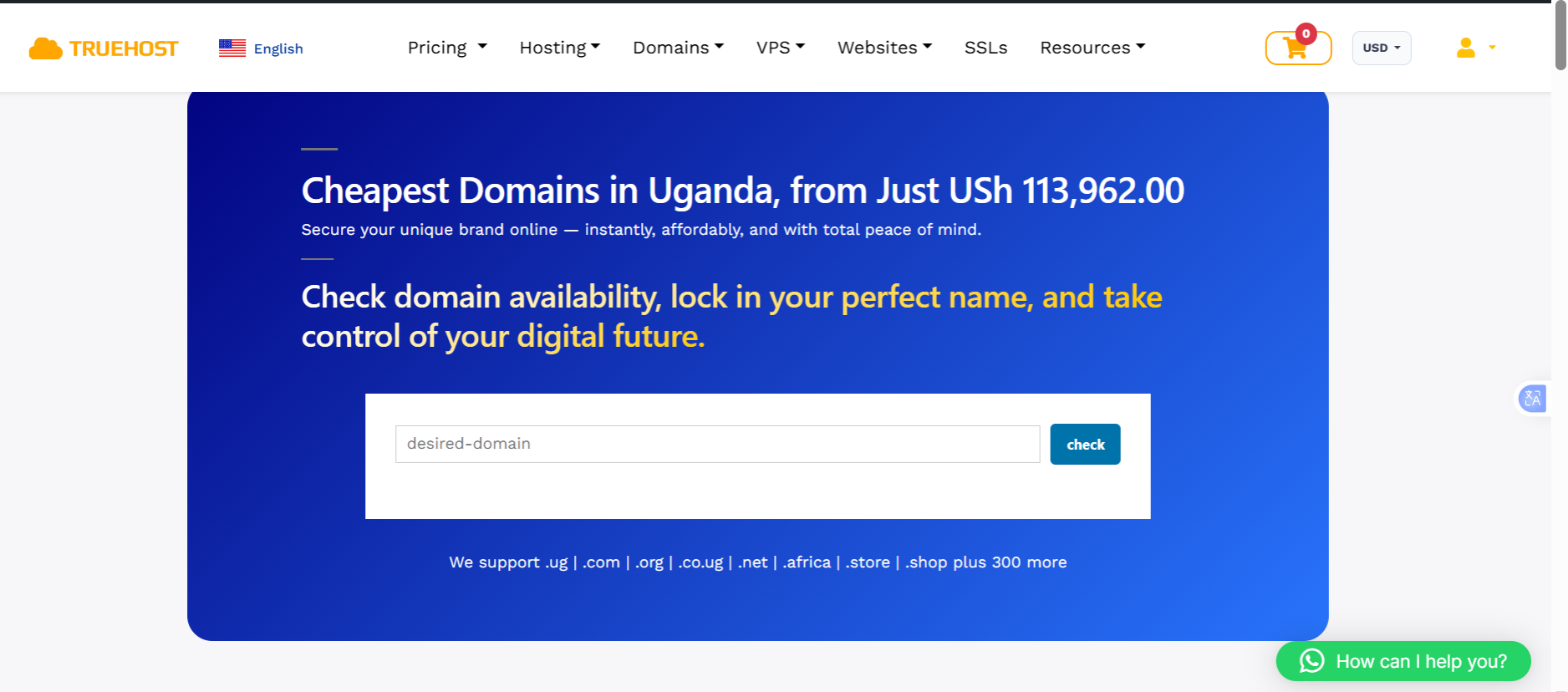
Then connect it to your hosting account.
Compare domain prices:
- .ug: USh 113,962.00
- .ug registrars: Renewal Price: USh 114,000.00/year — Savings shown are compared to this renewal rate.PeriodPriceYou Save1 YearUSh 113,962.00—
- .com: USh 29,450.00
ii) Choose a Hosting Plan
Hosting stores your website files and customer information. A slow website can make customers leave before buying.
Shared hosting is a good starting point for a small store. You can upgrade to VPS or cloud hosting as your business grows.
If you plan to use WooCommerce, check that your host supports its requirements. Some hosts, including Truehost, offer one-click WooCommerce installation through Softaculous.
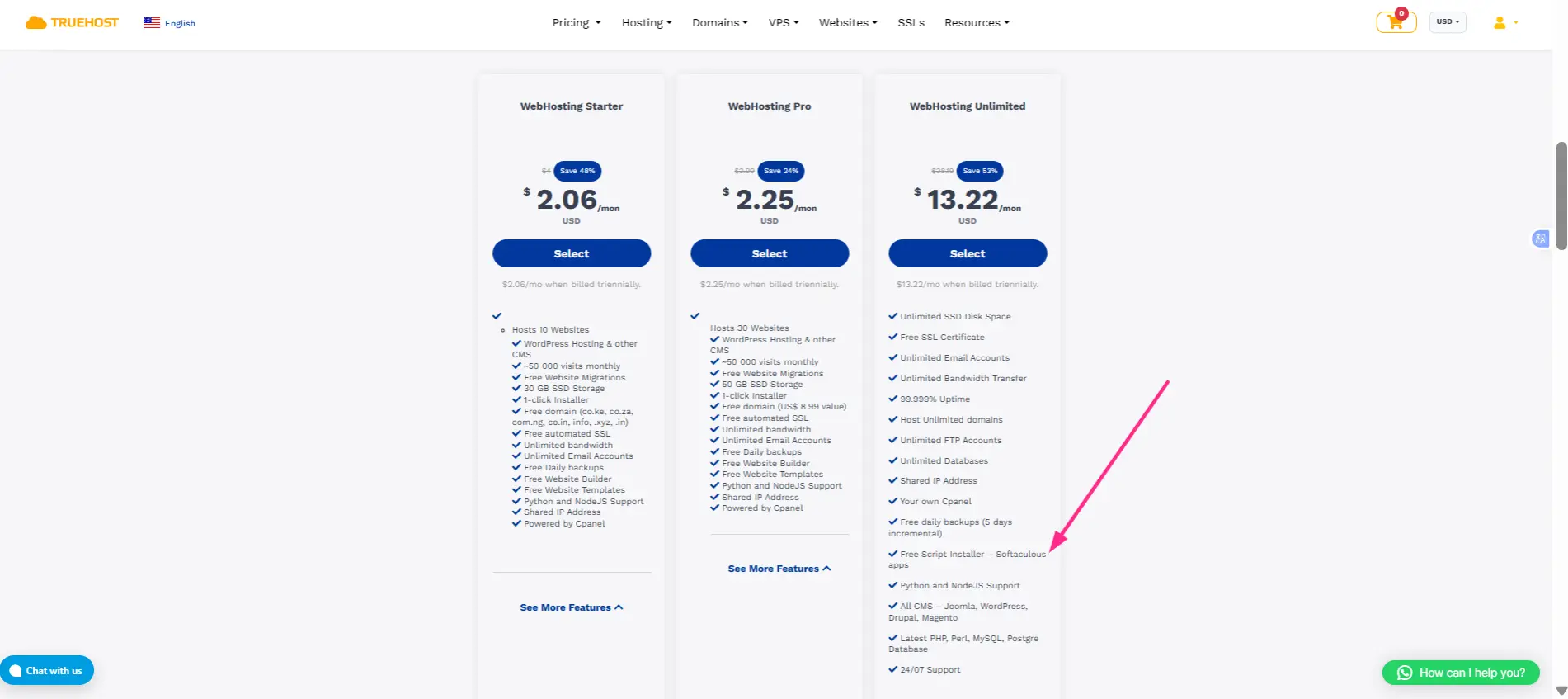
Your hosting plan should also include an SSL certificate. This protects information shared between your website and customers and keeps checkout secure.
Choose hosting with regular backups and reliable support. You should also compress product images, use a simple theme and install only the plugins you need to keep the site fast.
An entry-level shared hosting plan, billed annually: USh 8,905.00
iii) Choose an E-commerce Platform
You can use WooCommerce or Shopify to build your store.
- WooCommerce: A free WordPress plugin. You pay for hosting and any paid themes or extensions. You also manage updates and backups.
- Shopify: Includes hosting, themes and checkout in one platform. It is easier to manage but has a monthly fee, usually billed in dollars.
If you are still testing your business idea, start with a WhatsApp Business catalogue. You can build a website as your orders grow.
iv) Make Your Website Easy to Use
Many customers shop using mobile phones. Make sure your website loads quickly and is easy to navigate.
Each product page should have:
- Clear photos and product descriptions
- Prices in Ugandan shillings (UGX)
- Stock availability
- Delivery charges
- A working business phone number
Also display your delivery, return and privacy policies. Show delivery costs before checkout so customers know the full price before ordering.
7) Arrange Delivery and Returns
For deliveries within Kampala, you can use a boda rider or a delivery service. For Wakiso, Mukono and other towns, check which areas your courier covers, the delivery cost and how long it takes.
Set delivery fees for different areas. For example, charge one rate for Kampala, another for nearby areas and use the courier’s rate for upcountry deliveries. Tell customers the delivery cost before they pay.
Pack products properly to prevent damage during transport. Seal liquids and cosmetics, label each parcel and check that it matches the customer’s order before sending it.
Also, have a clear return policy. State how many days customers have to return unused products, the condition required and how refunds or exchanges work. Explain who pays for return delivery and list any products that cannot be returned. If you send the wrong or damaged item, cover the return cost.
8) How Much Does It Cost to Start an Online Store?
Your startup costs depend on the business structure, domain, hosting, stock and delivery needs.
The following are some common costs:
| Item | Estimated cost |
| URSB business name registration | UGX 90,000 |
| Limited company registration | From UGX 140,000, before stamp duty |
| TIN registration | Free |
| EFRIS registration | Free |
| Trading licence | Depends on your location and business |
| Data protection registration | UGX 100,000 per year |
| .ug domain | USh 113,962.00 |
| .com domain | USh 29,450.00 |
| Shared hosting | USh 8,905.00 |
| SSL certificate | Often included with hosting |
| WooCommerce | Free |
| Payment gateway | Transaction fees apply |
| Stock, packaging and product photos | Depends on your products |
A limited company may cost more if its share capital exceeds UGX 5 million. Trademark registration is also optional and has additional fees.
For a small business, a basic first-year setup could include:
- UGX 90,000 for business name registration
- About UGX 123,000 for a .ug domain at USD 30
- The cost of one shared hosting plan with SSL
This does not include stock, packaging, delivery, trading licences, data protection registration or advertising.
Start with a small amount of stock and increase it as orders grow. This helps you avoid spending too much before confirming customer demand.
9) Market Your Online Store
After setting up your store, promote your products to attract customers and increase sales.
Use these methods:
- Social media: Share product photos, videos, prices and customer reviews on Instagram and TikTok.
- WhatsApp Business: Create a product catalogue, answer customer questions and send order updates.
- Google search: Use clear product names and descriptions so customers can find your store online.
- Paid ads: Advertise on Facebook, Instagram or TikTok. Start with a small budget.
- Build trust: Share genuine reviews, provide correct product details and respond to customers quickly.
- Encourage repeat sales: Inform previous customers about new products and offers. Only send marketing messages to those who agree to receive them.
Common Mistakes to Avoid When Starting an Online Store in Uganda
Avoid these mistakes when starting your business:
- Buying stock before checking customer demand.
- Ordering too much stock at the beginning.
- Setting prices without including delivery and payment fees.
- Using suppliers without checking product quality.
- Offering payment methods customers cannot easily use.
- Hiding delivery fees or giving unclear delivery times.
- Ignoring mobile users when building your website.
- Spending too much on ads before testing your products.
- Failing to track sales, stock and expenses.
- Ignoring tax, licensing and data protection rules.
- Expanding before you can manage orders and deliveries properly.
Start Your Online Store in Uganda With the Right Plan
Starting an online store in Uganda does not have to be expensive. You can begin by selling through WhatsApp Business and social media, test customer demand and grow your business gradually.
Focus on products people want, reliable suppliers, easy payment methods and dependable delivery. As your sales increase, you can build a website using WooCommerce to manage your products and orders.
Ready to take your business online? Visit Truehost to check domain registration and web hosting plans for your online store. Start with a suitable hosting plan and upgrade as your business grows.
Start small, keep track of your sales and expenses, and give customers good service. These steps can help you build a business that grows over time.
Starting an Online Store in Uganda FAQs
Do I need to register before selling online?
You can start with a few pre-orders to test your products. However, if you plan to sell regularly, register your business with URSB and get a TIN. You must also follow the tax rules for online businesses.
Can I sell using WhatsApp only?
Yes. WhatsApp Business lets you display products, answer questions and receive orders. However, you may need a website when managing orders, payments and stock through chats becomes difficult.
Do I need a website to start?
No. You can begin with WhatsApp Business and social media. Build a website as your orders and customer base grow.
Should I buy a .ug or .com domain?
A .ug domain is suitable if most of your customers are in Uganda. A .com is a good option if you plan to sell internationally. Compare registration and renewal prices before buying.
What hosting does WooCommerce need?
A basic shared hosting plan can run a small WooCommerce store if it meets the platform’s requirements. You can upgrade to VPS or cloud hosting as your store grows.
Do I need an SSL certificate?
Yes. SSL protects information shared between your website and customers. It also keeps your checkout secure and helps prevent browser security warnings.
Do I have to use EFRIS?
VAT-registered businesses must use EFRIS. Some businesses that are not VAT-registered may also need it, depending on their activities and turnover. Check with URA to confirm if it applies to your business.
Do I need to register with the PDPO?
If you collect customer details such as names, phone numbers and addresses, you may need to register with the Personal Data Protection Office (PDPO). Check pdpo.go.ug for the current requirements and fees.
What should I do first?
Start by picking a business name and checking if it is available. Register it with URSB, get a domain and choose suitable hosting when you are ready to build your website. Make sure your delivery, return and privacy policies are clear before accepting online payments.
