An SSL certificate is a small digital file installed on your web server. It does two jobs:
- Authentication: It helps verify that a website is associated with the domain it claims to represent, reducing the risk of impersonation.
- Encryption: It enables an encrypted connection between the server and the visitor’s browser. This allows the website to use HTTPS and display a connection-security indicator.
The certificate binds a cryptographic public key to an identity, usually a domain name. Certificates with higher validation levels also involve checks on the organization behind the website.
The certificate does not encrypt data by itself. Instead, it helps the browser and server establish an encrypted connection using the TLS protocol.
Although SSL (Secure Sockets Layer) is the commonly used term, modern certificates use TLS (Transport Layer Security), currently available in version 1.3. While “SSL certificate” survives as the everyday name, “SSL/TLS certificate” is the accurate one.
For websites in Uganda, HTTPS helps protect visitor data, build confidence, and prevent browser security warnings.
This guide covers how SSL certificates work, their types, benefits, costs, and renewal requirements.
Who Issues SSL Certificates?
SSL certificates are issued by Certificate Authorities (CAs), including DigiCert, Sectigo, GlobalSign, and Let’s Encrypt. These organizations verify certificate requests and digitally sign the certificates they issue.
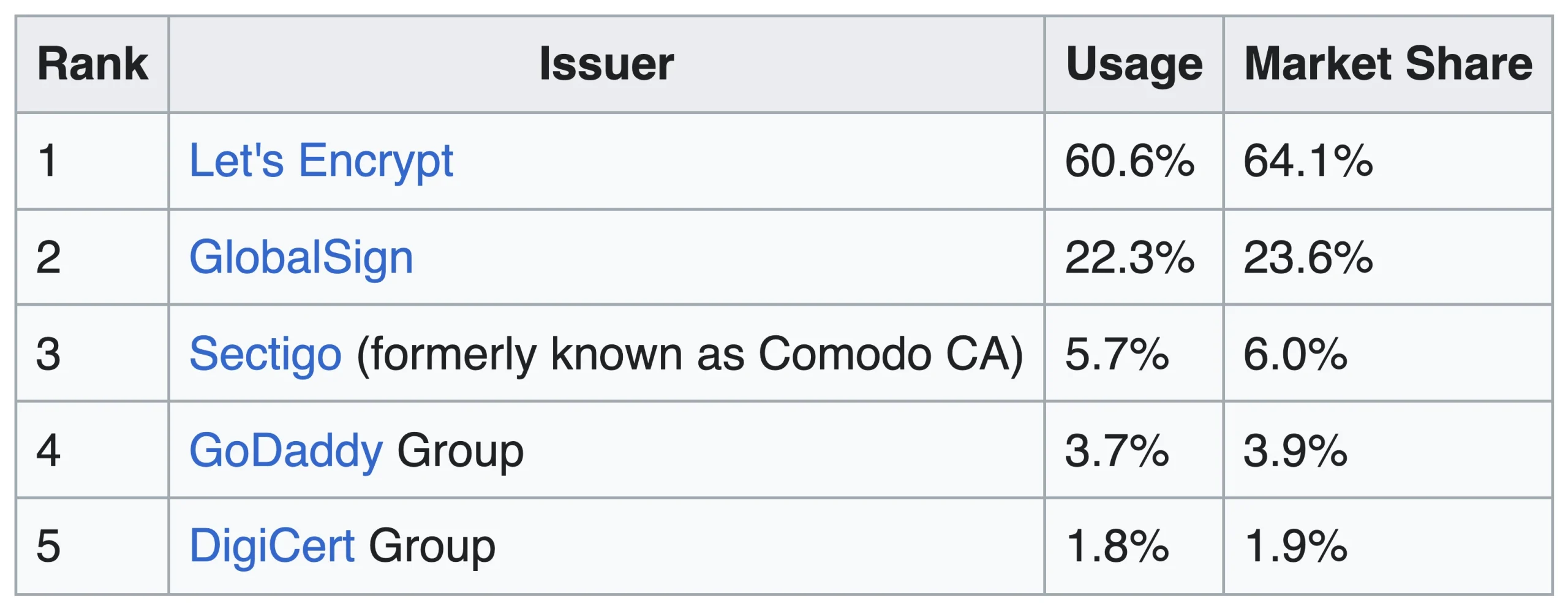
A Certificate Authority is a trusted third party that checks an applicant’s details and signs the certificate using its private key.
Browsers and operating systems use a built-in collection of trusted root CA certificates, known as root stores, to validate digital certificates and secure HTTPS connections.
For CAs to get onto that list, they must meet applicable audit requirements and industry standards, including those established by the CA/Browser Forum.
When you visit a website, your browser checks a chain of trust that generally includes:
- The website’s server certificate: The certificate issued for the website’s domain.
- An intermediate certificate: Links the server certificate to the issuing CA’s trust chain.
- A root certificate: A certificate trusted by the browser or operating system.
If the browser cannot verify this chain, it may display a security warning.
You do not always need to purchase a certificate directly from a Certificate Authority. Web hosting companies and domain registrars often resell certificates and may help with installation and renewal.
What’s Inside an SSL Certificate?
An SSL certificate contains information that helps the browser verify the website’s identity and establish a secure connection.
The main details include:
- Domain name or names: The domains covered by the certificate, including specified subdomains where applicable.
- Certificate holder: Organization details for OV and EV certificates.
- Issuing Certificate Authority: The CA that issued and digitally signed the certificate.
- Issue and expiry dates: The dates marking the certificate’s validity period.
- Public key: The cryptographic key associated with the certificate.
The private key is not included in the certificate. It remains secret and must be protected on the server or within an appropriate key-management system.
How Does an SSL Certificate Work?
There are two parts to this: how you get a certificate and what happens each time someone visits your site.
Getting a certificate
- The server generates a public-private key pair and creates a Certificate Signing Request (CSR). The CA never sees your private key.
- The Certificate Authority verifies the application, including domain control and any required organization details, then issues the certificate.
- The certificate is installed on the server.
- The website is configured to use HTTPS.
Your hosting provider may handle some or all of these steps, depending on the service you use.
During an HTTPS connection
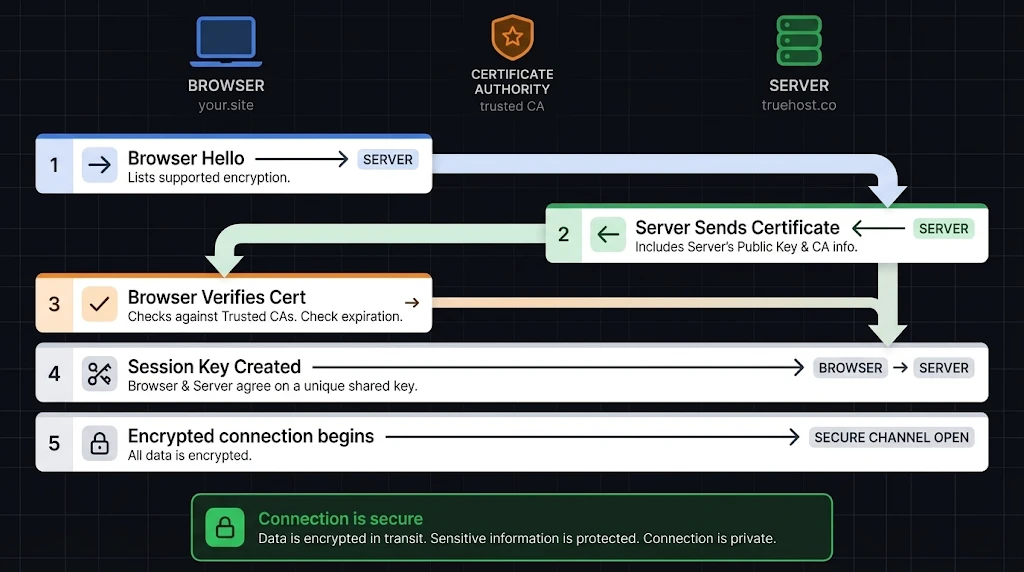
- The visitor’s browser connects to the server and requests the information needed to establish a secure connection.
- The server sends its certificate, which includes its public key.
- The browser checks the certificate’s validity period, domain name, trust chain, and applicable revocation information.
- If everything checks out, the browser sends the encrypted session key. Your server decrypts it with its private key.
- Both sides now encrypt all traffic with that session key.
This process is called the TLS handshake. It normally takes milliseconds, allowing the browser and server to establish a secure connection quickly.
The public and private keys are used only at the start because they take a lot of computing power. The faster session key does the rest.
Once the connection is established, information travelling between the browser and server is encrypted. This helps prevent someone who intercepts the traffic from reading the information in transit.
Types of SSL Certificates
Certificates differ in two ways: how much checking the CA does on you and how many domain names one certificate covers. The right option depends on how much identity verification you need and how many domain names your website uses.
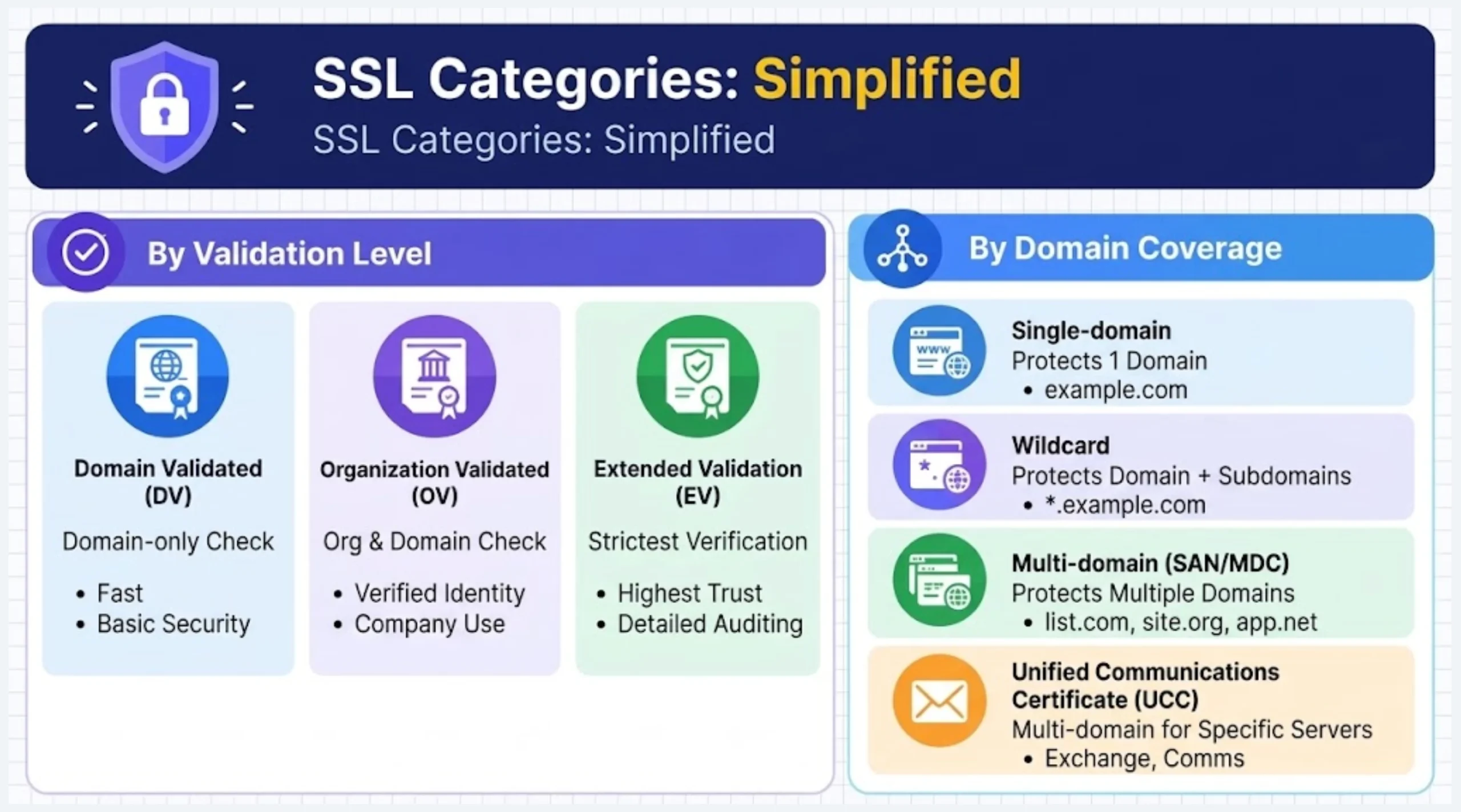
By validation level
| Type | What the CA checks | Typical use |
|---|---|---|
| DV (Domain Validated) | That you control the domain name | Blogs, personal and informational sites |
| OV (Organization Validated) | The domain, plus that the business is legally registered | Business sites, login forms, and checkout pages |
| EV (Extended Validation) | The strictest check of the organization’s identity | High-profile sites that handle payments |
DV is the quickest and cheapest. A DV certificate can be issued within minutes, while EV can take up to a week. OV needs a legally registered business plus proof of domain ownership.
These levels describe how much identity checking happens before the CA signs.
EV no longer gets special treatment in the address bar. Since Chrome 77 in September 2019, Chrome shows the company name only inside the page-info bubble behind the padlock. Any extra value in EV is in the identity check itself, not a visible security badge.
By domain coverage
- Single-domain: Protects one specified domain.
- Wildcard: Protects a domain and its specified subdomains at the covered level. Check if the root domain is included separately.
- Multi-domain (SAN/MDC): Protects several specified domain names under one certificate.
- Unified Communications Certificate (UCC): A multi-domain certificate originally designed for Microsoft Exchange and communications servers.
Self-signed certificates
A self-signed certificate is signed by the website owner rather than a publicly trusted Certificate Authority. Browsers generally warn visitors about these certificates unless they have been explicitly trusted by the relevant system.
They are suitable for testing and internal systems but are generally not recommended for public websites.
At Truehost, we offer DV and OV SSL certificates, including wildcard and multi-domain options.
Why Is an SSL Certificate Important for Your Ugandan Website?
An SSL certificate protects the information your visitors send you, and it changes how browsers treat your site.
1. Security: Logins, payment details, and personal data travel encrypted, so anyone who intercepts them sees only unreadable text.
2. Visitor trust: Without a certificate, browsers label your site “Not secure.”
When Chrome 68 launched in 2018, PC Tech Magazine listed about 50 Ugandan sites it flagged, from media houses to telecoms and government ministries.
Chrome 154, due in October 2026, raises the stakes further by introducing permission prompts before visitors first open any public site without HTTPS. New visitors feel it most.
3. Sales and sign-ups: Visitors feel more comfortable submitting forms, creating accounts, or completing purchases when the connection is secure.
4. Search visibility: Google has used HTTPS as a ranking signal since 2014, although it is a minor ranking factor and does not guarantee better positions.
5. Data protection: Uganda’s Data Protection and Privacy Act, 2019, requires appropriate technical and organizational safeguards for personal data. Encryption in transit can help meet these security needs, although the Act does not specifically mandate SSL certificates.
Important: A padlock confirms that the connection is encrypted; it does not prove that a business is legitimate. Phishing websites can also use HTTPS. Visitors should check the domain name and verify the business before sharing sensitive information.
Free vs Paid SSL Certificates
You can obtain an SSL certificate without paying, but paid options may provide additional identity verification, broader domain coverage, or access to provider support.
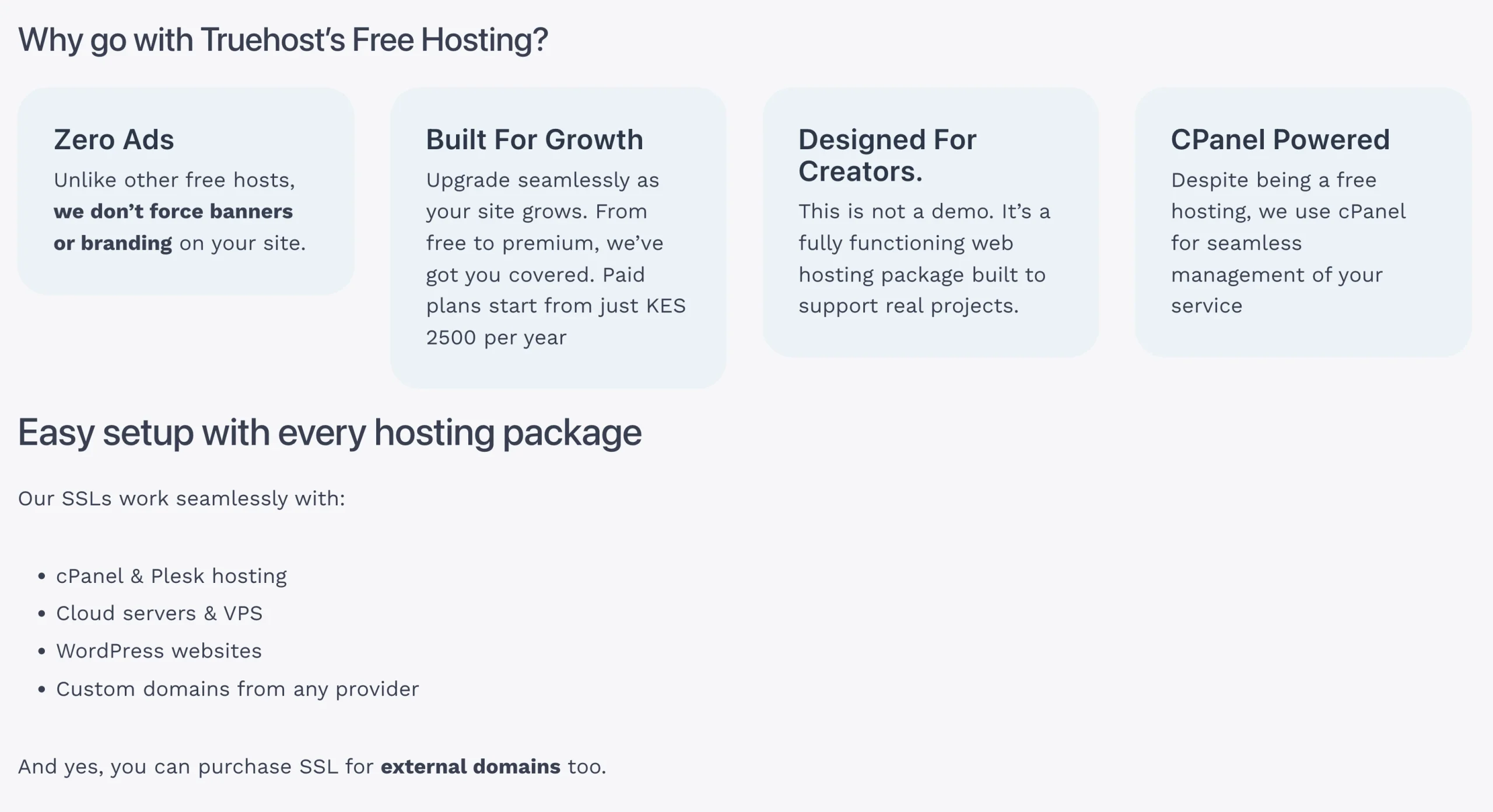
Free certificates: Services such as Let’s Encrypt and Cloudflare offer free SSL/TLS options. Let’s Encrypt supports automated certificate issuance and renewal, making it suitable for many websites that need HTTPS without a certificate purchase.
Paid certificates: These may include organization validation, wildcard or multi-domain coverage, and technical support, depending on the product and provider.
The main difference is not necessarily encryption strength. It is the level of identity verification, domain coverage, and support included with the certificate.
How Long Does an SSL Certificate Last?
SSL certificates have expiry dates and must be renewed. An expired certificate can trigger browser warnings and prevent visitors from accessing your website without security alerts.
Publicly trusted certificates are moving towards shorter maximum validity periods, according to Sectigo:
- From 15 March 2026: Maximum validity of 200 days, roughly twice-yearly renewals.
- From 15 March 2027: Maximum validity of 100 days, renewals about every three months.
- From 15 March 2029: Maximum validity of 47 days, close to eight renewals a year.
These changes follow the CA/Browser Forum ballot SC081v3, which cuts the maximum from 398 days to 47.
Because of this, automated certificate management, including renewal, deployment and monitoring, is increasingly important.
An expired certificate triggers browser warnings and can make your site unreachable. These are the errors visitors see most:
- Expired certificate: The certificate was not renewed before its expiry date.
- Name mismatch: The certificate does not cover the domain requested by the visitor.
- Untrusted CA: The browser cannot establish a trusted connection to the issuing Certificate Authority.
- Mixed content: An HTTPS page loads some resources, such as images or scripts, over HTTP.
Where Are SSL Certificates Used?
SSL/TLS certificates help secure connections wherever information passes between systems. Common uses include:
- Payment pages and checkout systems.
- Website logins and online forms.
- Email systems, intranets and cloud platforms.
- FTPS file transfers and mobile data connections.
- Server-to-server connections.
The certificate must cover the relevant domain or server name, and the service must be configured correctly to use TLS.
What Is an SSL Certificate FAQs
What happens if I don’t have an SSL certificate?
Your website may be accessible over HTTP, but browsers can label the connection as “Not secure.” Visitors may hesitate to submit personal information or make payments. Configuring HTTPS helps protect data in transit and reduces these warnings.
How do I get an SSL certificate?
You can obtain one through a Certificate Authority or your hosting provider. The process involves proving domain control, completing any required organisation checks, installing the certificate and configuring HTTPS. Some hosting providers automate the process.
Is an SSL certificate necessary?
HTTPS is strongly recommended for public websites, particularly those that collect personal information, provide user accounts or accept payments. It protects information in transit and helps prevent browser security warnings.
Do I need an SSL certificate if I don’t have a website?
Not necessarily. If you do not operate a website or online service, you may not need to purchase one. However, a domain used for email or another online service may still require a certificate to secure its connections.
Which is safer, TLS or SSL?
TLS is the safer choice. SSL is an older protocol that has been superseded and should not be used for modern secure connections. Websites should use HTTPS with supported TLS versions.
Where do I find my SSL certificate?
If you manage the website, check your hosting control panel or contact your hosting provider. You can also inspect a website’s certificate through your browser’s connection-security controls. Remember that the private key is stored separately and must remain protected.
Do I need an SSL certificate for my email?
Email services often use TLS to secure connections between email applications and servers. If you operate your own mail server, you may need a certificate for its hostname. Hosted email providers generally manage certificates for their own services.
Get an SSL Certificate for Your Website
To get an SSL certificate, visit our SSL certificates page and choose the option that fits your website.
- DV certificates (AskSSL Starter and RapidSSL): Suitable for blogs and informational websites. They confirm that you control the domain.
- OV certificate (Sectigo InstantSSL): An option for business websites that want their registered organisation identity verified.
- Wildcard and multi-domain options: Suitable for websites that need to protect subdomains or several specified domain names.
We also offer free reissues and a 7-day money-back guarantee, so you can start without much risk.
Choose the right certificate for your website, configure HTTPS correctly and set up renewal monitoring to help keep your visitors’ connections secure and avoid preventable certificate warnings.
