Are you wondering how to transfer a domain in Uganda?
Maybe your current web host keeps increasing their renewal fees? Or their customer support is unreliable? Or maybe you have many domains and want to manage all of them under one web host?
You might even feel that you have outgrown your current registrar or have discovered a better web host elsewhere.
Whatever your reason, transferring your .ug domain or a global domain like .com, .net, isn’t a complicated process.
We’ll tell you all about it so that by the end of this guide, you’ll understand the steps involved, the requirements, and common pitfalls that could delay or derail your transfer.
Why Transfer a Domain?
Before we look at how to transfer a domain, let’s first talk about why you might want to transfer your domain in the first place.
Below are some common reasons:
Lower Costs
There are several domain registrars in Uganda, and each one charges very different rates for domain registration and renewal.
It’s common practice for registrars to charge high renewal rates and even have hidden rates.
For instance, you may find that your current registrar offers an affordable first-year price, only to increase renewal fees later. By moving to a registrar with transparent and predictable pricing, you can save a lot of money.
Better Customer Support
It can be very frustrating to have an issue with your domain and not get immediate customer support.
Transferring to a domain registrar that offers responsive, 24/7 support can save you stress and protect your business’s online presence. This is because a registrar with reliable support can help you resolve DNS issues, domain locking problems, and other technical glitches quickly.
This is especially critical if you run an e-commerce store or a business that cannot afford downtime.
Simplifying Domain Management
If you have registered multiple domains with different registrars, it’s easy to lose track of renewal dates and DNS settings.
Transferring to a single registrar consolidates everything into one dashboard, helping you to simplify billing, manage DNS records, and ensure you never miss a renewal deadline because of scattered account logins.
More Features and Services
Some registrars, like Truehost, offer value-added services like free SSL certificates, hosting bundles, or advanced DNS management. Transferring to such a registrar gives you more for your money.
For example, instead of paying separately for hosting and SSL, you could choose Truehost and enjoy all these benefits in one package at a lower cost.
Additional Insight
Sometimes, a transfer isn’t just about problems with your current registrar but about upgrading your online presence to a registrar that aligns better with your growth plans.
For instance, maybe your registrar offers marketing tools, embraces new cutting-edge technologies like AI website builders, or has special insight into the Ugandan market.
At the end of the day, it makes sense to align with a registrar that you feel will support your growth within Uganda and beyond.
Now that we’ve covered why you might want to transfer a domain in Uganda, here’s how to do it.
.ug Domain Transfers in Uganda
Transferring a domain name simply means moving it from one registrar to another while you remain the owner.
A domain transfer doesn’t alter your brand identity or web address. Everything remains unchanged, but hopefully, depending on the new host you choose, the management experience improves.
You Need an Auth Code (EPP Code) To Transfer A Domain
The Auth Code, also known as an EPP Code, is a unique security key required to initiate a domain transfer. You can only get it from your current registrar (the one you’re migrating from).
An EPP code is important because:
- It protects your domain from unauthorized transfers by ensuring that only you, its rightful owner, can initiate a move. This adds an extra layer of security to the process as only you can approve the transfer.
- Without an EPP code, no other registrar can take over the management of your domain. This prevents accidental or malicious transfers.
An EPP code is a must for all domain transfers (be they TLDs like .com or .net or CCTLDs like .ug). But the speed of transfer might vary from one registrar to another, depending on their internal processes. You’ll find the process quicker if the registrar is fully automated.
Always keep your Auth Code safe and private because if someone else accesses it, they could move your domain and frustrate your business.
How to Transfer a Domain in Uganda
Here’s how to transfer your domain successfully — broken down into clear, manageable steps.
Step 1: Check if your domain is eligible for transfer
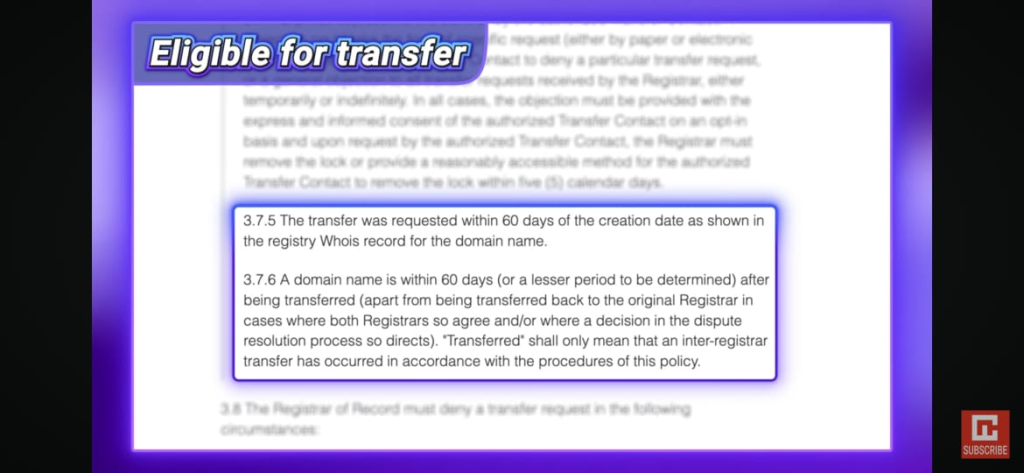
Not every domain is eligible for transfer right away. There are a few rules you need to check before you start:
- The domain must be at least 60 days old from the initial registration date. This prevents immediate flipping or fraudulent registrations.
- If the domain was transferred recently, you must wait another 60 days before transferring again.
- In case you’ve recently updated ownership details (such as a name or email change), your registrar may automatically apply a 60-day transfer lock for security reasons.
- If there’s an ongoing dispute or complaint about the domain (for example, a UDRP case), the transfer will be denied until it’s resolved.
Checking these factors now saves you time and frustration later. If any of these conditions apply, wait until they are cleared before initiating the transfer.
Step 2: Request your Auth Code
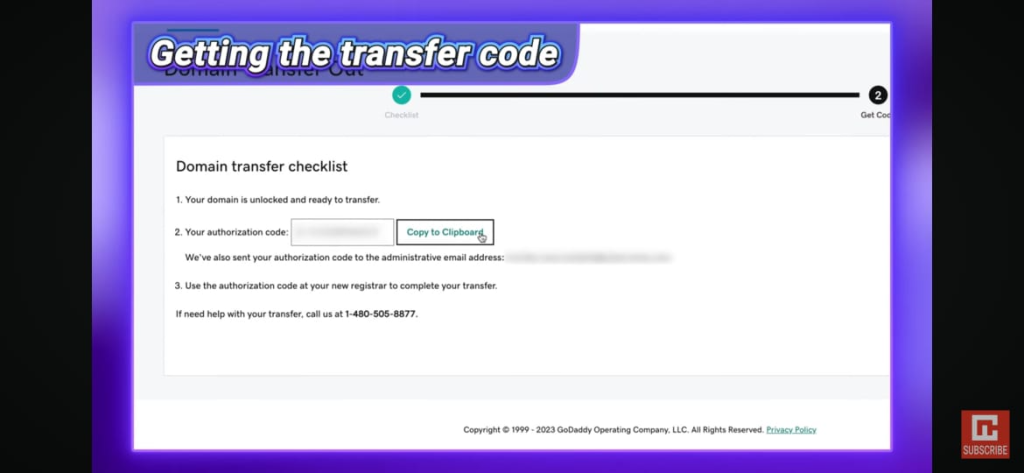
Once you confirm that the domain is eligible for transfer, log into your current registrar’s control panel and request the Auth Code.
- Some registrars display it immediately in the account dashboard for quick access.
- Others require you to submit a request to their support team and verify your identity.
- You might be required to verify further by providing your ID or company documents.
If your registrar delays or refuses to give you the Auth Code, contact their support team. It’s your right as the domain owner to access this information, and a reputable registrar should comply.
Step 3: Unlock Your Domain
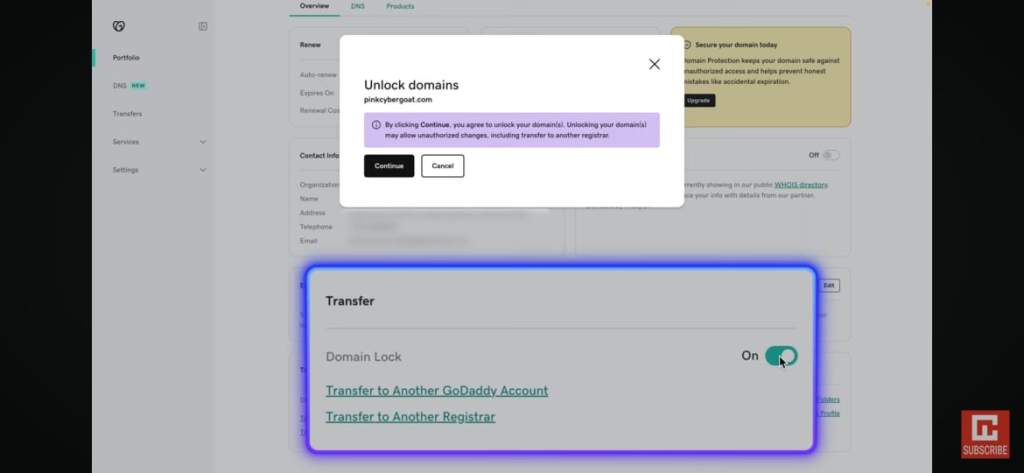
Most domains are “locked” by default to prevent unauthorized transfers. You’ll need to unlock your domain before the transfer can begin.
- Look for an option like “Registrar Lock” or “Domain Lock” in your dashboard.
- Switch it to “off” or “disabled.”
- Confirm that the status update reflects correctly in the dashboard.
- After unlocking, it’s a good idea to wait 24 hours before starting the transfer to ensure the lock has been fully removed across all systems.
Step 4: Start the transfer
Now, log in to the new registrar’s dashboard and:
- Search for domain transfer in their menu or dashboard.
- Enter your domain name. Avoid typos.
- Provide the Auth Code when prompted.
- Pay the transfer fee to finalize your request.
For most domains, the transfer fee includes a one-year renewal, which is added to your current expiration date.
This means you don’t lose any time but you actually gain an extra year of registration. Be sure to confirm this benefit with your new registrar before making a payment.
Step 5: Approve the transfer
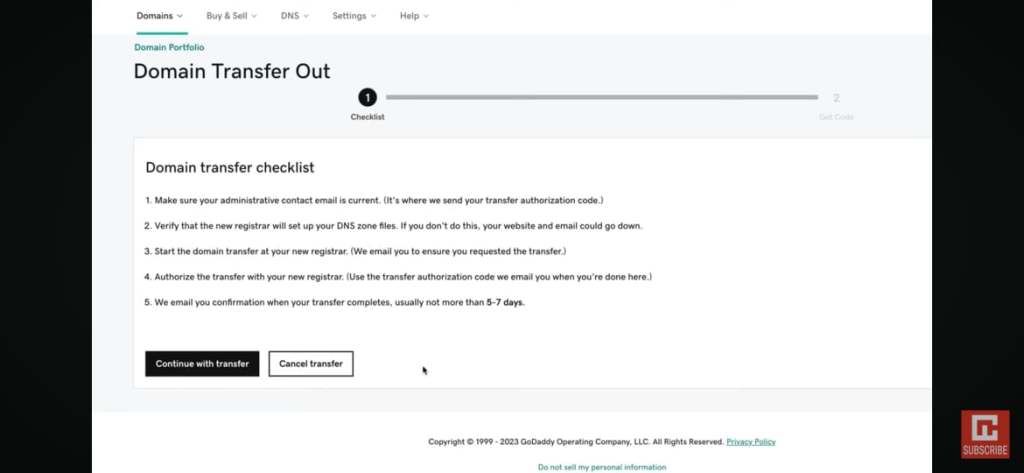
After initiating the transfer, both registrars (current and new) will send you confirmation emails.
You’ll need to approve the transfer by clicking a link or confirming through their dashboard.
Once approved, the transfer may take anywhere from 1 to 7 days to be complete.
Keep checking your email for the transfer confirmation or for any further instructions regarding the transfer.
Step 6: Verify and Update DNS Settings
When the transfer is complete, log in to your new registrar and:
- Verify that your domain is active and visible in your account.
- Check your DNS records to ensure your website and email services are working correctly.
- Update settings if necessary, especially if you’re also changing hosting providers.
Failing to verify DNS records could result in downtime, affecting website traffic, customer communications, and sales.
Why Domain Transfers Fail and How to Avoid Problems
Your domain transfer might fail for any of these reasons:
- If it’s locked. Always unlock your domain before starting because a locked status will instantly prevent the transfer from going through.
- Wrong Auth Code. Double-check you’ve copied the code correctly because even a single incorrect character will cause failure.
- Expired domain. Transfer your domain before it expires because after the expiry date, the domain transfer process becomes more complicated and costly.
- Outdated contact information. Transfer confirmations are sent to the email on record, and if it’s outdated, you will miss critical instructions.
- Recent changes. Wait 60 days after updating registrant details or completing a previous transfer to comply with security policies.
Final Thoughts: Transfer your .ug or global Domain to Truehost
Transferring a domain in Uganda, whether it’s a local .ug domain or a global .com, doesn’t have to be intimidating.
If you’re ready to take advantage of better pricing, reliable 24/7 customer support, and handle all your domain management from a single host, check your domain for transfer eligibility on Truehost’s domain transfer page and start the transfer process.